%20{%20:root%20{%20--deepread-stroke:%20%23E5E7EB;%20}%20}%20.dark%20{%20--deepread-stroke:%20%23E5E7EB;%20}%20%3c/style%3e%3crect%20x='40'%20y='30'%20width='220'%20height='260'%20rx='28'%20ry='28'%20stroke='var(--deepread-stroke)'%20stroke-width='16'%20fill='none'/%3e%3cpath%20d='M180%2030v52c0%2010%208%2018%2018%2018h62'%20stroke='var(--deepread-stroke)'%20stroke-width='16'%20fill='none'/%3e%3cline%20x1='70'%20y1='130'%20x2='200'%20y2='130'%20stroke='var(--deepread-stroke)'%20stroke-width='16'%20stroke-linecap='round'/%3e%3cline%20x1='70'%20y1='165'%20x2='200'%20y2='165'%20stroke='var(--deepread-stroke)'%20stroke-width='16'%20stroke-linecap='round'/%3e%3cline%20x1='70'%20y1='200'%20x2='170'%20y2='200'%20stroke='var(--deepread-stroke)'%20stroke-width='16'%20stroke-linecap='round'/%3e%3c!--%20green%20download%20arrow%20in%20bottom%20right%20corner%20--%3e%3cpath%20d='M210%20202v58'%20stroke='var(--deepread-accent)'%20stroke-width='18'%20stroke-linecap='round'/%3e%3cpath%20d='M195%20245l15%2015%2015-15'%20fill='none'%20stroke='var(--deepread-accent)'%20stroke-width='18'%20stroke-linecap='round'%20stroke-linejoin='round'/%3e%3c/svg%3e)
Amazon Textract Limits and Quotas: File Size, Pages, and API Rate Limits
Amazon Textract limits explained: 10 MB and 1 page for sync, 500 MB and 3,000 pages for async, plus default TPS by region and how to handle throttling.

Most Textract problems that look like bugs are limits. A multi-page PDF sent to a synchronous call fails. A burst of uploads gets throttled. A scan with small print returns almost nothing. Each of these is documented, but the numbers sit on three different AWS pages, and some tutorials still show values from before AWS raised its defaults.
This guide puts the limits in one place and says which ones you can change. It also shows how to check a document before you send it and how to retry when you are throttled. If you are still deciding whether Textract is the right tool, DeepRead's vendor comparison covers the category.
Every Textract number below comes from AWS documentation read on November 18, 2026. AWS changes quotas, so confirm anything you plan to build on in the Service Quotas console for your own account and region.
The Short Answer
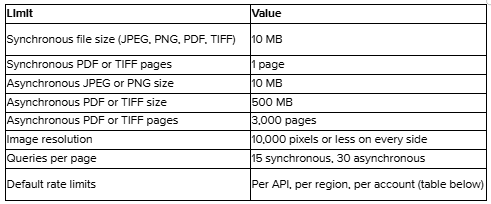
The first five rows are set quotas. AWS says they cannot be changed. The rate limits are default quotas, and you can ask for more.
Synchronous or Asynchronous: The Choice That Sets Your Limits
Textract has two ways to process a document, and they have different limits.
- Synchronous calls, such as AnalyzeDocument and DetectDocumentText, return the result in the same response. They accept a single page. Use them for receipts, forms, and anything where a user is waiting, such as in digital invoice processing.
- Asynchronous calls, such as StartDocumentAnalysis and StartDocumentTextDetection, return a job ID. You fetch the result later with a matching Get call. They handle multi-page PDFs and TIFFs.
A single-page file is the only input that works both ways. Any multi-page PDF has to go through the asynchronous path, which reads from Amazon S3 and returns results you page through.
This split matters for throughput. A synchronous call processes one page, so your page rate cannot exceed your synchronous TPS. An asynchronous job can carry up to 3,000 pages, so the limit that matters there is how many jobs you can start per second and how many can exist at once. Large batches usually need splitting and classifying first, which DeepRead's guide to automated document indexing covers.
File and Page Limits
These are the set quotas from the AWS documentation. None can be raised. For general PDF handling beyond Textract, see DeepRead's guide to extracting data from any PDF.
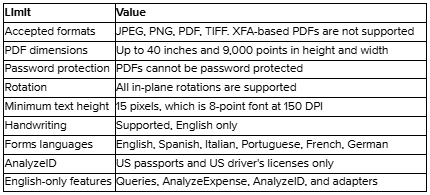
Textract reads more than 40 languages for plain text detection, tables, signatures, and layout, according to the supported languages page. Forms are the narrower case, with the six languages above.
Limits That Fail Quietly
Some of these limits may not return an error. Text below the 15-pixel minimum, or handwriting in a language other than English, is outside what the documentation says Textract supports, so expect missing or wrong words rather than a clear failure. If extraction quality drops on a batch, check resolution and language before you check your code. DeepRead's guide to OCR platforms explains how products in this category differ.
Default Rate Limits by Region
Rate limits are measured in transactions per second (TPS) per account, per API, per region. The table shows the defaults on the AWS endpoints and quotas page. Europe (Zurich) and Asia Pacific (Tokyo) match the "Other regions" column for these rows.
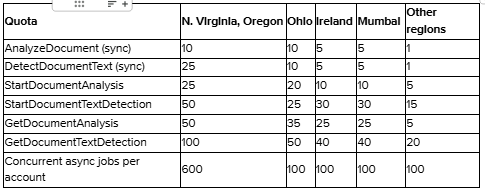
Three details are easy to miss.
- Each API has its own limit. Extracting forms and tables with AnalyzeDocument draws on a different quota than plain text with DetectDocumentText.
- Get calls count too. Polling for results spends your Get quota. Use SNS notifications instead of tight polling loops.
- Older numbers are lower. AWS raised default quotas in 2022, and tutorials written before then show smaller values.
Textract also has quotas for custom adapters: a maximum of 10 adapters, 10 adapter versions created per month, and 3 versions in progress at once. A training set takes 5 to 2,500 documents.
What Happens When You Hit a Limit
Textract signals each kind of limit with a different error.
- ProvisionedThroughputExceededException: you exceeded a TPS limit. The API reference says to contact AWS if you want to increase it.
- ThrottlingException: Textract is temporarily unable to process the request, and the documented fix is to try again.
- LimitExceededException: you started too many asynchronous jobs at once. Start calls fail with it until the number of running jobs falls below the limit.
- UnsupportedDocumentException: the document format is not supported.
The first three are worth retrying. The last is not, because the same file will fail again.
Check a Document Before You Send It
Sending a file that cannot work costs a round trip and an error. This small module encodes the set quotas and the default sync rates from the tables above. route says whether a file can go synchronous, needs the async path, or has to be split first.
"""Check a document against Amazon Textract set quotas and default TPS."""

SYNC_MB = 10

ASYNC_PDF_MB = 500

ASYNC_PDF_PAGES = 3000

# Default sync TPS per account, from the AWS endpoints and quotas page.

SYNC_TPS = {

"us-east-1": {"AnalyzeDocument": 10, "DetectDocumentText": 25},

"us-east-2": {"AnalyzeDocument": 10, "DetectDocumentText": 10},

"eu-west-1": {"AnalyzeDocument": 5, "DetectDocumentText": 5},

"ap-south-1": {"AnalyzeDocument": 5, "DetectDocumentText": 5},

"other": {"AnalyzeDocument": 1, "DetectDocumentText": 1},

}

def route(fmt, pages, mb):

"""Return (mode, reason) for one file. fmt is jpeg, png, pdf or tiff."""

fmt = fmt.lower()

if fmt in ("jpeg", "jpg", "png"):

if mb <= SYNC_MB:

return "sync_or_async", "image within 10 MB"

return "reject", "image over 10 MB"

if fmt in ("pdf", "tiff", "tif"):

if pages == 1 and mb <= SYNC_MB:

return "sync_or_async", "single page within 10 MB"

if pages <= ASYNC_PDF_PAGES and mb <= ASYNC_PDF_MB:

return "async", "multipage needs the Start/Get operations"

if pages > ASYNC_PDF_PAGES:

return "split", "over 3,000 pages, split before upload"

return "split", "over 500 MB, split before upload"

return "reject", "format not accepted"

def sync_floor_seconds(pages, region, api="AnalyzeDocument"):

"""Lower bound: sync takes one page per call, so pages / TPS seconds."""

tps = SYNC_TPS.get(region, SYNC_TPS["other"])[api]

return pages / tps
sync_floor_seconds is a lower bound. It divides pages by TPS and ignores response time, so real runs take longer. It still shows when a synchronous design cannot keep up. At the default AnalyzeDocument rate in N. Virginia, 10,000 single-page files take at least 1,000 seconds.
Retry When You Are Throttled
AWS's error handling page says Textract throttles when you exceed TPS or when a connection drops, and recommends automatic retries with a retry count of 5. The AWS SDK can do this through client configuration. The wrapper below shows the same idea in your own code, with exponential backoff and jitter, so many workers do not retry at the same moment.
import random

import time

from botocore.exceptions import ClientError

RETRYABLE = {

"ProvisionedThroughputExceededException",

"ThrottlingException",

"LimitExceededException",

}

def call_with_backoff(fn, tries=5, base=0.5, cap=20.0, sleep=time.sleep):

"""Call fn(); retry throttling errors with exponential backoff and jitter."""

for attempt in range(tries):

try:

return fn()

except ClientError as err:

code = err.response["Error"]["Code"]

if code not in RETRYABLE or attempt == tries - 1:

raise

sleep(random.uniform(0, min(cap, base * 2 ** attempt)))
The test below runs the router and the wrapper. The retry test uses botocore's Stubber to return two throttling errors and then a success, so it needs no AWS account. An InvalidParameterException is not retried and passes straight through.
--- routing ---
pdf 1 2 -> ('sync_or_async', 'single page within 10 MB')
pdf 40 30 -> ('async', 'multipage needs the Start/Get operations')
pdf 3500 400 -> ('split', 'over 3,000 pages, split before upload')
png 1 12 -> ('reject', 'image over 10 MB')
pdf 800 600 -> ('split', 'over 500 MB, split before upload')
docx 3 1 -> ('reject', 'format not accepted')
--- sync floor for 10,000 single-page files ---
us-east-1 1000 seconds
ap-south-1 2000 seconds
other 10000 seconds
--- backoff ---
blocks: [] retries: 2
not retried: InvalidParameterException
Backoff handles bursts. It does not fix a workload that exceeds your quota all day. For that, smooth the traffic with a queue and request a higher quota.
Raising a Quota
Default quotas can be viewed and changed in the Service Quotas console, and Textract has a quota calculator that estimates what you need from your volume and page counts. AWS says some requests are processed automatically, and large increases may be reviewed by hand. Set quotas, such as the 3,000-page cap, cannot be raised, so a larger file has to be split.
Plan for lead time. If a launch depends on a higher quota, file the request before you need it.
How DeepRead's Limits Compare
DeepRead is a hosted document API with plan-based limits.
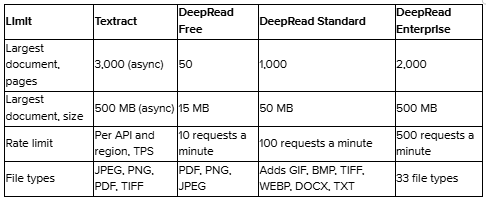
Textract accepts more pages per document than any DeepRead plan, 3,000 against 2,000, and its 500 MB asynchronous size cap matches Enterprise. If you routinely process documents over 2,000 pages, that is a real advantage. Several things differ in kind rather than size:
- Units. Textract rate limits count API calls per second for each operation and region. DeepRead counts requests per minute per plan. Compare each against your own workload instead of converting between them.
- Plan-based limits. DeepRead's limits come from the plan you choose, with no per-API quota to calculate. Standard has no monthly page limit.
- Output. DeepRead returns fields with page, bounding box, and source text, and flags uncertain values with needs_review. Textract returns blocks that your code assembles into fields.
For the invoice case specifically, see DeepRead's OCR API for invoice processing.
DeepRead is hosted only and defaults to US East. It has no self-hosted option and no BAA on any plan. If your documents have those requirements, check them against your vendor before you commit.
Common Mistakes
- Sending a multi-page PDF to a synchronous call. Only the asynchronous operations accept more than one page.
- Using one region's numbers everywhere. N. Virginia allows 10 AnalyzeDocument calls per second. Other regions can allow 1.
- Polling tightly. Get calls have their own quota. Use notifications.
- Retrying without backoff. Immediate retries add load and stay throttled.
- Retrying errors that cannot succeed. An unsupported or oversized file fails every time.
- Trusting a tutorial's quota table. Read the current AWS page, and check your account in Service Quotas.
- Ignoring image quality. Text under 15 pixels tall is a limit too, and it may fail without an error.
Conclusion
Textract's limits come in two groups. The set quotas fix what a single call can accept: one page and 10 MB for synchronous, 3,000 pages and 500 MB for asynchronous. The default quotas cap how fast you can go and can be raised. Route each file before you send it, retry throttling errors with backoff, and request increases early. For a view of how document processing is used at scale, see DeepRead's guide to scaling data capture with document AI.
FAQ
What is the maximum file size for Amazon Textract?
For synchronous operations, 10 MB for JPEG, PNG, PDF, and TIFF. For asynchronous operations, 10 MB for JPEG and PNG, and 500 MB for PDF and TIFF.
How many pages can Textract process?
A synchronous PDF or TIFF is limited to 1 page. An asynchronous PDF or TIFF can have up to 3,000 pages.
Can I increase Textract's limits?
You can raise default quotas, such as TPS and concurrent jobs, through the Service Quotas console. Set quotas, such as file size and page count, cannot be changed.
What is Textract's default rate limit?
It depends on the API and region. In N. Virginia, AnalyzeDocument defaults to 10 transactions per second and DetectDocumentText to 25. Other regions can be as low as 1.
Why do I get ProvisionedThroughputExceededException?
You exceeded a transactions-per-second quota. Retry with exponential backoff and jitter, smooth your traffic with a queue, or request a higher quota.
Does Textract support password-protected PDFs?
No. Textract does not accept password-protected PDFs, and it does not support XFA-based PDFs.
Does Textract read handwriting?
Yes, but handwriting recognition is English only.
More articles

Is Nanonets Safe? Security, Compliance, and Data Privacy Review
Is Nanonets safe? What it says on encryption, SOC 2, ISO 27001, HIPAA, and data retention; what you can verify; and the questions to ask before you upload.

Semantic Document Search: How It Works and How to Build It with Embeddings
How semantic document search works, plus a Python build: extract, chunk, embed, and search, with a tested keyword, semantic, and hybrid comparison.