%20{%20:root%20{%20--deepread-stroke:%20%23E5E7EB;%20}%20}%20.dark%20{%20--deepread-stroke:%20%23E5E7EB;%20}%20%3c/style%3e%3crect%20x='40'%20y='30'%20width='220'%20height='260'%20rx='28'%20ry='28'%20stroke='var(--deepread-stroke)'%20stroke-width='16'%20fill='none'/%3e%3cpath%20d='M180%2030v52c0%2010%208%2018%2018%2018h62'%20stroke='var(--deepread-stroke)'%20stroke-width='16'%20fill='none'/%3e%3cline%20x1='70'%20y1='130'%20x2='200'%20y2='130'%20stroke='var(--deepread-stroke)'%20stroke-width='16'%20stroke-linecap='round'/%3e%3cline%20x1='70'%20y1='165'%20x2='200'%20y2='165'%20stroke='var(--deepread-stroke)'%20stroke-width='16'%20stroke-linecap='round'/%3e%3cline%20x1='70'%20y1='200'%20x2='170'%20y2='200'%20stroke='var(--deepread-stroke)'%20stroke-width='16'%20stroke-linecap='round'/%3e%3c!--%20green%20download%20arrow%20in%20bottom%20right%20corner%20--%3e%3cpath%20d='M210%20202v58'%20stroke='var(--deepread-accent)'%20stroke-width='18'%20stroke-linecap='round'/%3e%3cpath%20d='M195%20245l15%2015%2015-15'%20fill='none'%20stroke='var(--deepread-accent)'%20stroke-width='18'%20stroke-linecap='round'%20stroke-linejoin='round'/%3e%3c/svg%3e)
Document Processing Vendor Comparison: AI Parsing, Validation and Autocomplete
Compare AI document processing vendors on parsing, validation, autocomplete, webhooks, and confidence handling, with pricing, limits, pros and cons for each.
Every vendor in this space can read an invoice. The difference shows up afterwards: whether the output is checked against rules, whether missing fields are filled from your vendor or purchase order records, and how the result reaches your system. Those steps decide how much data entry automation you actually get, and how much of it still lands on a person.
This guide compares seven vendors on those steps, using vendor documentation and pricing pages where they could be read, and labelling third-party figures where they could not. If you are still building the long list, DeepRead's technical comparison of AI platforms for document extraction contrasts established extraction APIs with newer vision-language platforms.
Prices and plan details below are as published or reported in autumn 2026, and vendors change them often, so confirm current figures before buying.
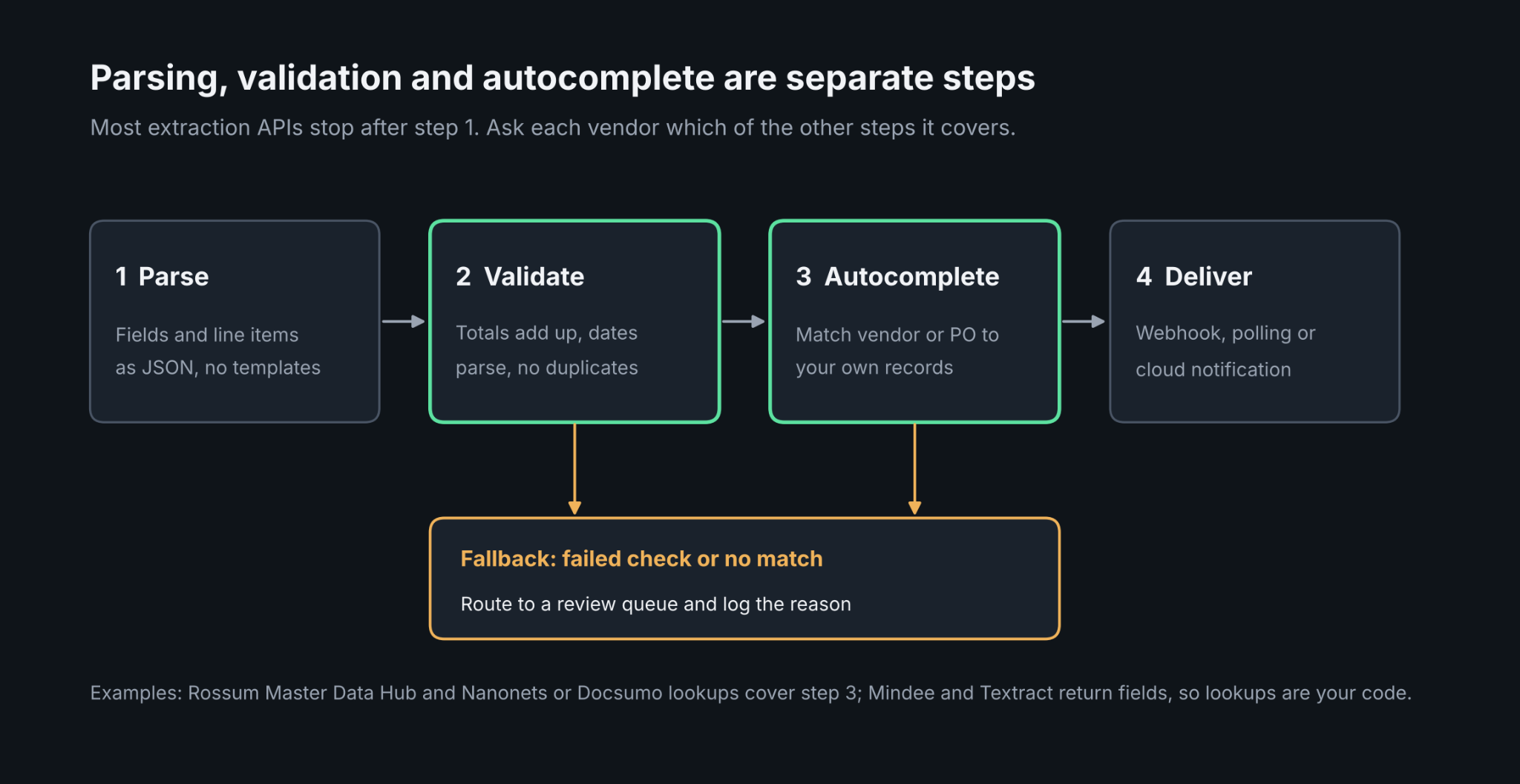
What Parsing, Validation and Autocomplete Mean
Parsing
Parsing turns a PDF, scan, or photo into structured fields and line items. Modern tools do this without templates, so a new supplier layout does not need a new setup. The output worth asking for is JSON with a stable schema that your accounting software or ERP can ingest without manual post-processing.
Validation
Validation checks whether the extracted values make sense: totals that add up, dates in the right format, duplicates, or values that match a known list. Vendors split into two camps. Some return a confidence score per field and leave the rules to you. Others ship a rules layer, so a document stops for review when a check fails. Identity and onboarding documents add another layer, and how banks automate KYC and customer document verification shows that extraction is only the first step in that kind of check.
Autocompleting Fields
Autocomplete here means filling or correcting a field from your own data, for example matching an extracted vendor name to the vendor ID in your ERP, or pulling the purchase order that belongs to an invoice. It removes the last manual keystrokes in auto data entry. Not every extraction API does it. Most put this in a workflow product, a lookup step or your own code.
Where These Tools Are Used
Invoices and Quotes
Invoices and quotes are the most common starting point because the fields are well understood: supplier, dates, taxes, and line items. Construction quotes and bills of quantities (BOQ) are a harder case, and document automation software for construction explains why construction documents such as drawings, specs and RFIs are harder to handle than general business files.
Payslips, Bank Statements and Utility Bills
Lending, payroll and property teams parse payslips, bank statements and utility bills, where multi-page tables and cross-document checks matter. For utility bills specifically, DeepRead's guide to APIs for utility bill and multi-service statement processing covers the multi-service layout problem.
Supplier Onboarding
Supplier onboarding automation tools lean on document extraction to read tax forms such as W-9s, bank letters, and registration certificates, then check them against vendor records before a supplier is created. Of the vendors here, Veryfi lists W-9 and W-2 extraction as separate APIs, and the workflow platforms handle the matching step.
How to Compare Vendors
Use the same six questions for every vendor:
- Schema: Can you define your own fields, or only use prebuilt models?
- Confidence: Is there a score per field, and can you route on it?
- Validation: Are there built-in checks, custom rules, or neither?
- Autocomplete: Is there a lookup against your master data, or is that your code?
- Delivery: Do results arrive by webhook, by polling, or by cloud notification?
- Cost shape: Per page, per credit, per workflow, or by quote?
Teams moving from a pilot to volume should also read what changes when document automation runs at enterprise scale, because exception handling and integrations tend to dominate cost there, not extraction accuracy.
Document Processing Vendors Compared
API-First Vendors
Mindee
- What it automates: Extraction from invoices, receipts and other documents into JSON with a custom data schema, plus classification, splitting and OCR endpoints.
- Pricing: Credit-based, with one credit per single-page invoice, receipt or utility bill. Starter and Pro are listed at 44 and 116 per month (the page shows no currency symbol) from 6,000 credits a month, additional credits start at 0.05, and Enterprise is custom on annual contracts. There is no free plan, only a 14-day free trial. Confidence scores and polygons are listed as included on every plan, although a Mindee landing page calls them add-ons, so confirm for your plan.
- Limits: No native QuickBooks connector, so data is routed through Zapier, Make, n8n or your own code. Validation rules and master data lookups are yours to build.
- Best for: Developers who want a template-free extraction API with per-field scores.
- Pros: Per-field confidence, location of each value on the page, asynchronous processing with polling and webhooks, SDKs in several languages, SOC 2 Type II, and EU and US hosting.
- Cons: No built-in review workflow or autocomplete, and the 0.9 second median invoice time is a vendor figure.
Veryfi
- What it automates: Receipts, invoices with line items, bank statements, checks, W-2s and W-9s, with a business rules engine, duplicate detection and fraud detection.
- Pricing: The pricing page lists a free tier of up to 100 documents a month, and a Starter plan with a $500 per month minimum commitment for fewer than 5,000 documents, at $0.16 per invoice and $0.08 per receipt. Growth is by sales. Veryfi's separate Starter API terms describe pay-as-you-go beyond 100 free calls, so confirm which applies.
- Limits: One reviewer reports that the API response does not include a subtotal-plus-tax-equals-total check or a bank statement reconciliation check, which you would compute yourself.
- Best for: Product teams embedding receipt, invoice, and statement extraction in an expense or fintech app.
- Pros: Line items in 38 languages and 91 currencies, mobile SDKs, automatic categorization, and custom webhook configurations, which its pricing page mentions only in the enterprise FAQ.
- Cons: A 99%-plus accuracy figure appears in third-party summaries as a vendor claim, and Veryfi's own pricing documents describe entry terms differently.
Extend
- What it automates: Parse, Extract, Split, Classify and Edit APIs, with schema-defined extraction, per-field confidence, citations, a Review Agent and multi-step workflows.
- Pricing: Pay-as-you-go at $0.01 per credit after 10,000 free credits, with no contract or monthly minimum. Growth and Enterprise are custom. Extraction costs 3 credits per page in Performance mode (0.7 in Light mode), plus the automatic parse at 2 credits per page in Performance mode (0.5 in Light).
- Limits: Extend's docs state a confidence score is not a guarantee of accuracy. Array and nested object scores are not yet available in conditional steps.
- Best for: Engineering teams building production document pipelines with a defined schema.
- Pros: Two confidence scores per field, citations back to the page, conditional routing on confidence, and a Composer Agent that suggests schema improvements.
- Cons: Cost depends on the mode and on extract plus parse credits, so forecasting takes a worked example, and no autocomplete from your master data is described in its extraction docs.
Amazon Textract
- What it automates: OCR, forms, tables, queries, and purpose-built AnalyzeExpense for invoices and receipts and AnalyzeID for identity documents.
- Pricing: Pay per page. AWS's pricing page lists, for US West (Oregon) on the first million pages a month, plain text at $0.0015, invoices and receipts at $0.01, tables at $0.015, IDs at $0.025, and forms at $0.05, with queries shown at $0.015 in a worked example. New AWS customers get a 3-month free tier, for example, 100 Analyze Expense pages a month. Rates vary by region.
- Limits: Synchronous calls handle single pages, and multi-page PDFs use asynchronous jobs through S3, with completion published to an SNS topic. It is AWS-only, and review, validation, and autocomplete are your own build.
- Best for: Teams already on AWS that want low per-page cost and are happy to build the workflow.
- Pros: Confidence per detected value, tight S3, Lambda, and SNS integration, and low published per-page rates.
- Cons: Raw fields rather than a finished workflow, so the engineering effort sits with you.
Workflow Platforms
Rossum
- What it automates: Invoice and document capture with a validation screen, an automation framework, and a Master Data Hub that matches extracted values against your datasets.
- Pricing: Not listed in Rossum's documentation, so request a quote.
- Limits: Fuzzy matching in the Master Data Hub is not yet available in the user interface and needs assistance from Rossum's team. Duplicate and batch files are blocked from automation by default.
- Best for: AP and operations teams that want automation rules, review and vendor matching in one place.
- Pros: Automation combines built-in checks, confidence scores, history-based checks and custom validation, a default confident-automation threshold of 0.975 that can be set per field, and webhooks or serverless functions for custom rules.
- Cons: Thresholds need tuning on your own data, and Rossum notes that customers wanting high automation typically need a dedicated AI engine.
Docsumo
- What it automates: Classification, splitting, extraction, validation, and review for bank statements, pay stubs, invoices, and similar documents, with cross-document checks.
- Pricing: Docsumo's pricing page lists a 14-day free trial and a paid plan at 299 per month that includes API and webhooks access, with per-page pricing that falls with volume. Business and Enterprise are by quote, and Enterprise is reported to add external database validation and an embeddable review screen. Third-party trackers show older or different figures (for example, $499 and $799), and a July 2026 change cut the free allowance from 5,000 to 1,000 pages, so confirm current terms.
- Limits: Lookup and database mapping features are reported on higher tiers, and some reviewers note a learning curve for advanced validation rules.
- Best for: Lending, insurance, and finance teams that need to validate across several documents in one case.
- Pros: Confidence per value, configurable validation such as total equals subtotal plus tax, a review queue limited to uncertain fields, and webhooks that return structured JSON.
- Cons: The 99% field-level accuracy on 250+ document types is a vendor claim, and pricing sources differ.
Nanonets
- What it automates: A no-code workflow builder covering extraction, validation rules, lookups, approvals, conditional routing, and export, with Python blocks for custom logic.
- Pricing: Usage-based, charged per workflow block run, with reported rates of $0.02 for simple blocks, $0.10 for standard AI, and 0.30forcomplexAI.Reportedfreecreditsdifferbysourceanddate(200 earlier in 2026, $50 after a July 2026 change), Growth is by quote, and Enterprise is custom with an on-premises option. Older listings of $0.30 per page, or Pro at $499 to $999 per month, describe a previous plan structure.
- Limits: ERP and database integrations are reported on Growth, and total cost depends on how many blocks each document passes through.
- Best for: Teams that want to design approval chains and routing without writing code.
- Pros: Per-field confidence feeds routing and review, database lookups, a REST API with webhooks, and a Docker option for running inside your own infrastructure.
- Cons: Per-block pricing is harder to forecast, and one review finds the review UI less polished than purpose-built review tools.
How DeepRead Handles Uncertain Fields
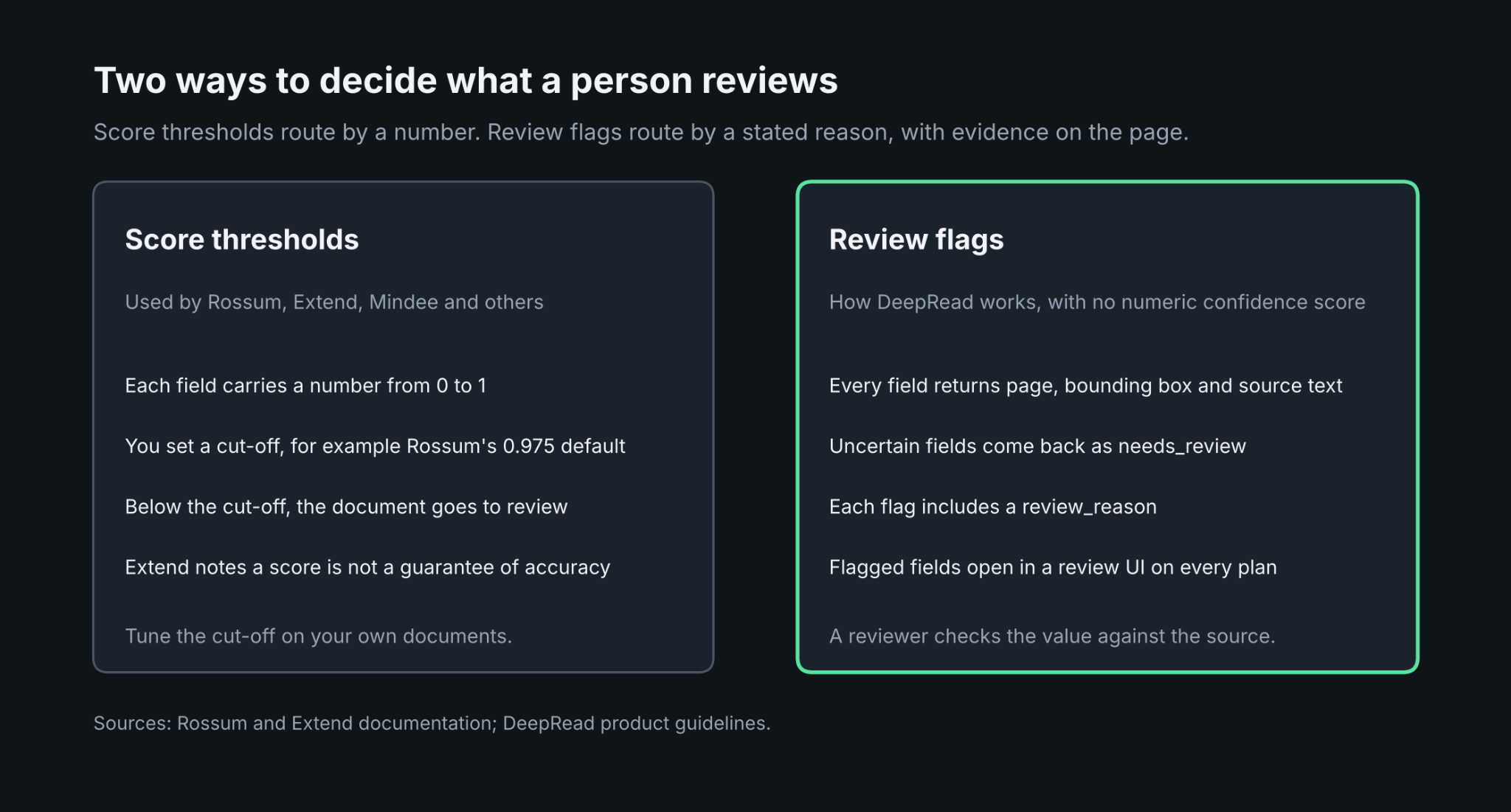
Vendors above lean on a numeric confidence score per field. DeepRead takes a different route: each extracted field comes back with the page it came from, a bounding box, and the source text, so a reviewer can check the value against the document. When a field is uncertain, it is flagged as needs_review along with a review_reason that says why, and flagged fields go to a review UI that is available on every plan. DeepRead does not return a numeric confidence score.
On the delivery side, jobs are job-ID based, so you submit a document and poll for the result, and webhooks are available on Standard and Enterprise (the Free plan refuses a webhook_url with a 402 response). A failed job costs nothing. Free includes 2,000 pages a month with no card, and Standard is listed at $15 and $35 per 1,000 pages. When you are comparing vendors on speed as well as price, DeepRead's fast deep extract pipeline is $90 per 1,000 pages and is about twice as quick as the regular deep extract. Processing defaults to US East; there is no self-hosted option, and no BAA is offered on any plan, which rules it out for workloads that need one.
DeepRead covers parsing and review flags. For autocomplete from your own vendor or PO records, pair it with your own lookup step. Its published benchmark is vendor-run and scoped to the document types it tests, so run your own sample before relying on it
Conclusion
The right vendor depends on which step you are trying to remove. If you only need clean JSON and have engineers, an API such as Mindee, Veryfi, Extend or Textract is enough. If the bottleneck is validation, review and vendor matching, a workflow platform such as Rossum, Docsumo or Nanonets saves build time, at a higher price and with more lock-in. In every case, test two or three vendors on your own messiest documents and measure how many reach your accounting software with no human touch.
FAQ
What is the difference between parsing and validation?
Parsing extracts fields from a document. Validation checks those fields against rules or known data, such as totals that must add up or a vendor that must exist in your records.
Do confidence scores guarantee accurate data?
No. Extend's documentation says a score is not a guarantee of accuracy, and Rossum advises testing thresholds on your own data. Use scores to route documents, and check results against a sample.
Which vendors deliver results by webhook?
Mindee, Rossum and Docsumo document webhooks on their own sites, Veryfi mentions custom webhook configurations on its pricing page, and Nanonets is reported to support them. Textract publishes job completion to an SNS topic rather than calling a webhook. DeepRead supports webhooks on Standard and Enterprise.
Can these tools autocomplete fields from my own records?
Some can. Rossum's Master Data Hub and Docsumo and Nanonets lookups match extracted values to your datasets. The API-first vendors generally leave this to your code.
How do I handle documents the tool cannot read?
Add fallback logic: route low-confidence or failed documents to a review queue instead of rejecting them, and log the reason. Rossum blocks automation on validation errors, and DeepRead returns a review_reason for flagged fields.
More articles
Unstructured.io Review: Features, Pricing, and Alternatives
Unstructured.io review: what the open-source library and hosted platform do, current pricing, tested Python code, limits, and four alternatives compared.

Resume OCR: Extracting Candidate Data from Resumes Automatically
How resume OCR reads PDFs and scans, fixes two-column order, and returns candidate fields. Tested Python code, a tool comparison, and US hiring rules.