%20{%20:root%20{%20--deepread-stroke:%20%23E5E7EB;%20}%20}%20.dark%20{%20--deepread-stroke:%20%23E5E7EB;%20}%20%3c/style%3e%3crect%20x='40'%20y='30'%20width='220'%20height='260'%20rx='28'%20ry='28'%20stroke='var(--deepread-stroke)'%20stroke-width='16'%20fill='none'/%3e%3cpath%20d='M180%2030v52c0%2010%208%2018%2018%2018h62'%20stroke='var(--deepread-stroke)'%20stroke-width='16'%20fill='none'/%3e%3cline%20x1='70'%20y1='130'%20x2='200'%20y2='130'%20stroke='var(--deepread-stroke)'%20stroke-width='16'%20stroke-linecap='round'/%3e%3cline%20x1='70'%20y1='165'%20x2='200'%20y2='165'%20stroke='var(--deepread-stroke)'%20stroke-width='16'%20stroke-linecap='round'/%3e%3cline%20x1='70'%20y1='200'%20x2='170'%20y2='200'%20stroke='var(--deepread-stroke)'%20stroke-width='16'%20stroke-linecap='round'/%3e%3c!--%20green%20download%20arrow%20in%20bottom%20right%20corner%20--%3e%3cpath%20d='M210%20202v58'%20stroke='var(--deepread-accent)'%20stroke-width='18'%20stroke-linecap='round'/%3e%3cpath%20d='M195%20245l15%2015%2015-15'%20fill='none'%20stroke='var(--deepread-accent)'%20stroke-width='18'%20stroke-linecap='round'%20stroke-linejoin='round'/%3e%3c/svg%3e)
Unstructured.io Review: Features, Pricing, and Alternatives
Unstructured.io review: what the open-source library and hosted platform do, current pricing, tested Python code, limits, and four alternatives compared.
Unstructured is a common tool for the first step of a RAG or AI pipeline: turning messy files into clean, labeled text that a language model can use. Teams meet it as an open-source Python library and may later move to its hosted platform.
This review explains what Unstructured does, how its open-source and hosted versions differ, what it costs, what a tested example looks like, and where other tools fit better. If you are still sorting out the difference between parsing and extraction, DeepRead's guide to AI document parsing is a useful primer.
What Unstructured.io Is
Unstructured comes in two parts that share a name:
- The open-source library. A Python package, licensed Apache-2.0, that partitions documents into elements. Its README says the library "is, and will stay, completely free."
- The hosted product. A commercial service that adds model-based partitioning, enrichment, chunking, embedding, and source and destination connectors. Its docs also describe a product called Transform, which is available as an MCP server for connecting AI tools to it.
Naming has shifted over time, with older material referring to a serverless API, a Platform, and Pipelines. When you read a comparison or a forum answer, check which of these it means and when it was written.
How Unstructured Works
Partition: Documents Become Elements
Partitioning turns a file into a list of document elements. Each element has a type, an ID, the extracted text, and metadata that varies by element type and file. Types include Title, NarrativeText, and Table, among others.
The library chooses how to read a file with a partitioning strategy. For PDFs the open-source strategies are auto, fast, hi_res, and ocr_only. Fast is rule-based text extraction and is not recommended for image-based files. Hi_res uses a layout model to identify document structure.
The hosted product offers four strategies: Auto, Fast, High Res, and VLM. Its docs say Fast suits text-only documents, High Res covers other file types and bounding box coordinates, and VLM gives the highest quality for image files and PDFs. In a workflow, Auto routes PDFs page by page, so a plain text page can use Fast while a table-heavy page goes to VLM.
Enrich, Chunk, and Embed
After partitioning, the platform's core functions include:
- Extract: pull values into a JSON schema you define.
- Enrich: add image descriptions, table descriptions, table-to-HTML conversion, named entity recognition, and generative OCR.
- Chunk: split output into pieces sized for retrieval, by character count, section, page, or semantic similarity.
- Embed: convert text into vectors for a vector store.
Connectors
The hosted product connects to storage services such as Amazon S3 and Google Cloud Storage, databases such as PostgreSQL, and vector stores such as Pinecone and MongoDB Atlas. Unstructured's homepage describes support for PDFs, scans, spreadsheets, and more than 50 file types. This pipeline view, from source to chunks to destination, is the main thing separating it from a pure parsing API.
A Tested Example
The open-source library installs with pip install "unstructured[pdf]". For images and PDFs that need OCR, the README lists system dependencies: tesseract-ocr and poppler-utils. The script below was run with version 0.27.37 on a two-column resume PDF that has a real text layer, using the fast strategy.
from unstructured.partition.pdf import partition_pdf

from unstructured.chunking.title import chunk_by_title

elements = partition_pdf(filename="resume_two_col.pdf", strategy="fast")

for el in elements:

print(el.category, "|", el.text)

chunks = chunk_by_title(elements, max_characters=500)

print(len(elements), "elements ->", len(chunks), "chunks")
What came back on that one synthetic file:
- It returned 23 elements, which chunk_by_title grouped into 2 chunks of at most 500 characters.
- Reading order was correct. The sidebar (contact, skills, education) came out first, then the main experience column, with no interleaved lines.
- Element labels were heuristic. Short lines such as "Python, SQL, Spark" and "Cut warehouse costs by 30 percent." were labeled Title, and "2021 to Present" was labeled NarrativeText.
That is a single clean file, not a benchmark. It does show that element types are best guesses, so if your code depends on labels, test them on your own documents. The library also prints a notice pointing to the commercial offering, which can be turned off with the UNSTRUCTURED_DISABLE_NOTICE=1 environment variable.
Unstructured's own README claims its hosted output beats the open-source library, citing 0.878 text accuracy against 0.715 and twice the table content accuracy. These are the project's own benchmarks, so treat them as a reason to test both rather than as a verdict.
Unstructured.io Pricing
- Open-source library: free, Apache-2.0. You supply the compute and the OCR dependencies.
- Free: the pricing page says 10,000 free pages to start, no card required, all features included.
- Pay-As-You-Go: $0.015 per page after the first 10,000 pages. Unstructured's billing docs say the 10,000-page credit applies once per account, that usage after it is billed each calendar month, and that requests begin failing until you upgrade to Pay-As-You-Go.
- Business: dedicated instances, VPC deployment, and custom pricing through sales.
Two cautions. First, older figures are still in circulation. An earlier Unstructured announcement offered 15,000 free pages and $0.03 per page, and some public pages, including structured data on the pricing page and a 2026 insights article, still mention 15,000 free pages a month. The billing docs and the visible pricing page agree on 10,000 pages and $0.015, so use those and confirm before budgeting. Second, one workflows doc describes billing at Fast, High Res, or VLM rates by strategy, while the pricing page shows a single flat rate. Ask which applies to you.
Strengths and Limits
Where It Fits Well
- RAG ingestion as an ETL job. Connectors, partitioning, chunking, and embedding in one product, with an open-source path.
- Many file types. More than 50, including Office files, email, and images.
- Control and cost. The library is free, and the hosted rate is flat per page.
- Enterprise options. Unstructured says it offers VPC and dedicated deployment, RBAC, SOC 2 Type II, and HIPAA controls. Verify the details in a contract.
Where to Be Careful
- Open-source setup. PDF and image work needs Tesseract and poppler, plus the PDF extras, and quality depends on the strategy you pick.
- Labels are heuristic. As the test above shows, element types can be wrong.
- Extraction accuracy tooling. Competitor Extend writes that Unstructured does not provide built-in tools for regression testing extraction accuracy, iterating on schemas, or flagging uncertain outputs for human review. That is a competitor's claim, but the question is a fair one to put to any vendor.
- Moving target. Pricing, product names, and free allowances have changed several times.
Chunks or Fields: Which Job Do You Have?
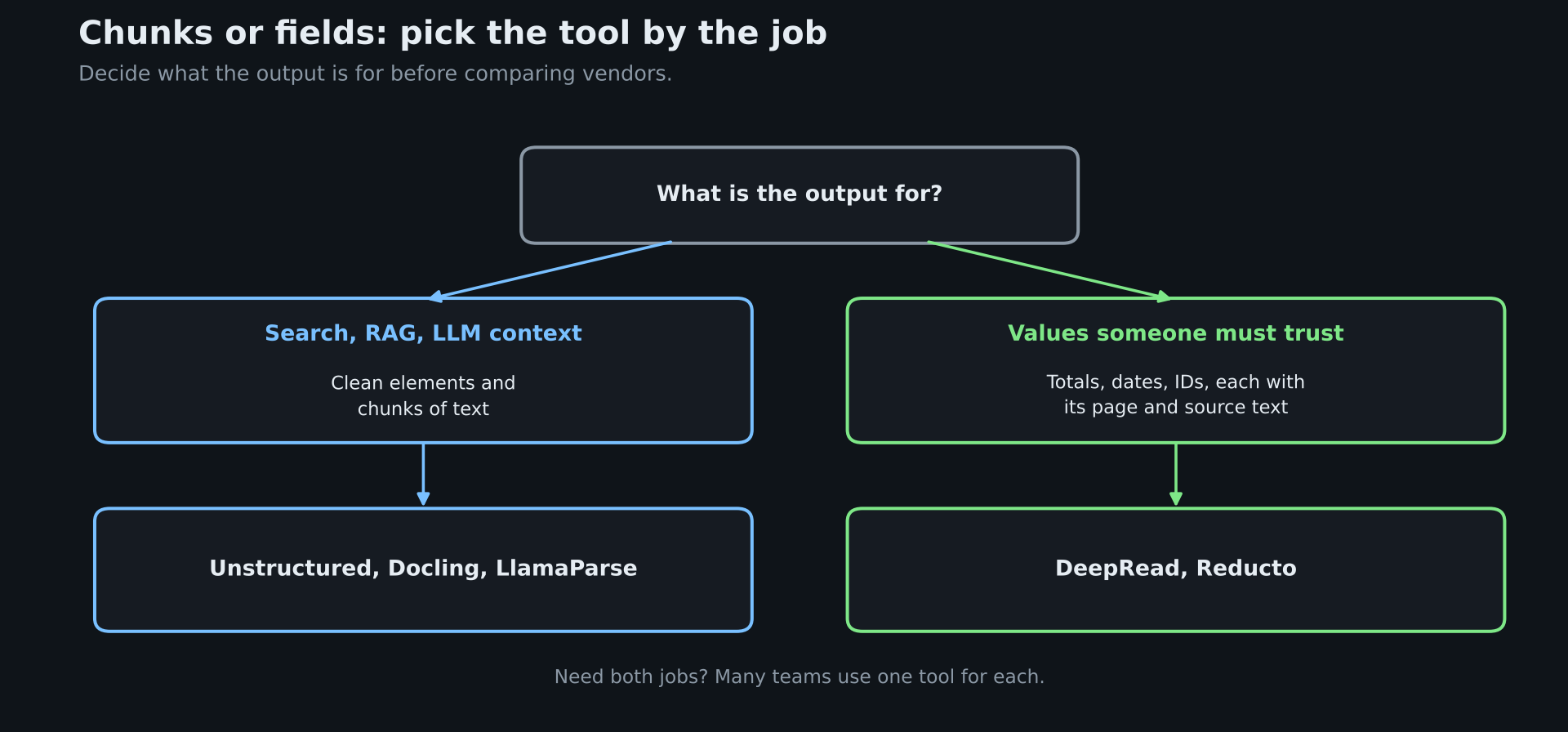
Before comparing tools, decide what the output is for. If it feeds search or a RAG pipeline, you need clean elements and chunks of text, and that is what Unstructured, Docling, and LlamaParse are built to produce. If the output is a value someone must trust, such as an invoice total or a due date, you need named fields with a record of where each one was read, and chunks do not give you that. DeepRead's structured data extraction guide explains why that second job is a different problem, since a missing or misread field matters more than a slightly awkward chunk. Many teams have both jobs, and they use one tool for each.
Unstructured.io Alternatives
Docling
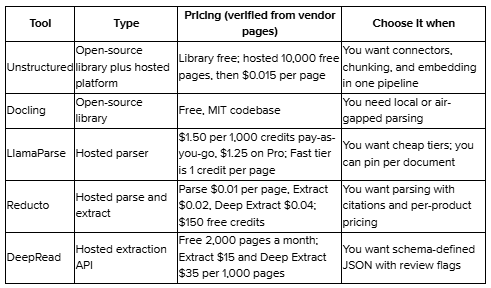
Docling is a library you run yourself. Its README says the codebase is under the MIT license, and model licenses are separate. It lists local execution for sensitive and air-gapped environments, support for many input formats, OCR for scanned PDFs and images, and integrations with LangChain and LlamaIndex. You can also run it as a service with its docling-serve API server. There is no official hosted plan on its repository page, so you carry the infrastructure.
LlamaParse
LlamaParse is LlamaIndex's commercial parser, priced in credits. Parsing tiers are Fast at 1 credit per page, Cost-effective at 3, Agentic at 10, and Agentic Plus, which one docs page lists at 25 credits and others at 45, so check the current figure. The spread between tiers is large, so pin the tier you test. The pay-as-you-go plan includes 10,000 free credits.
Reducto
Reducto sells parse, extract, split, and classify as separate products. Its comparison pages list Parse at $0.01 per page, Extract at $0.02, and Deep Extract at $0.04, with parsing included in the extraction prices, plus $150 in free credits. Its older pages showed different rates, so confirm the current ones. Reducto also publishes comparisons against Unstructured, and as vendor material, they carry the usual bias.
DeepRead
DeepRead is for the fields job, not the chunks job. It is a hosted REST API that takes PDFs and scans and returns named fields in your schema, each with its page, bounding box, and source text, and a needs_review flag with a reason when a value is uncertain. The free plan includes 2,000 pages a month, and its homepage lists Extract at $15 and Deep Extract at $35 per 1,000 pages. It is hosted only, with no self-hosted option or BAA on any plan, and its public materials describe an extraction API rather than connectors, chunking, or built-in embedding, so pair it with your own pipeline if you also need RAG ingestion.
Which Should You Choose
- You need a full ingestion pipeline with connectors, chunking, and embedding: Unstructured.
- Documents must stay on your own machines: the Unstructured library or Docling.
- You need pinned quality tiers and credit pricing: LlamaParse.
- You want cited extraction from a vendor with per-product pricing: Reducto.
- You want schema-driven fields with page and box locations, and flags on uncertain values: DeepRead.
How to Test Before You Commit
Vendors report accuracy on their own samples, and published leaderboards measure different things, as DeepRead's explainer on the LLM OCR accuracy leaderboard shows. Build your own check.
- Collect 50 to 100 real documents covering your hard cases: scans, tables, multi-column layouts, and mixed file types.
- Define what you need from them, such as clean text in reading order, correct tables, or specific fields.
- Run each candidate and score it against hand-checked answers.
- Report results by document group, not as one average.
- Check cost at your real volume, including retries and the pages you reprocess.
If you want a quick way to try a hosted API on a PDF, DeepRead's guide to extracting data from any PDF walks through a first request.
Conclusion
Unstructured is a solid default when the job is ingestion into a RAG pipeline, and you value an open-source path and built-in connectors. It is a weaker fit when you mainly need accurate named fields with traceable sources, or when you cannot rely on pricing and product names staying put. Test it on your own documents next to one or two alternatives, and pick based on measured results and cost at your volume. For a wider view of the field, see DeepRead's comparison of top AI platforms for document extraction.
FAQ
Is Unstructured.io free?
The open-source library is free under the Apache-2.0 license. The hosted product gives 10,000 free pages once per account, then charges $0.015 per page, according to its pricing page and billing docs.
Is Unstructured.io open source?
Partly. The core Python library is open source, and Unstructured says it will stay free. The hosted platform with connectors, enrichment, and model-based partitioning is commercial.
Does Unstructured do OCR?
Yes. The open-source library uses Tesseract for images and PDFs that need OCR, and the hosted product adds model-based High Res and VLM strategies for harder pages and scans.
How much does Unstructured.io cost?
After the first 10,000 pages, Pay-As-You-Go is $0.015 per page. Business plans with dedicated or VPC deployment are quoted individually. Older sources show $0.03 per page, so confirm the current rate.
What are the best Unstructured.io alternatives?
It depends on the job. Docling suits local parsing, LlamaParse suits tiered credit pricing, Reducto suits cited parsing and extraction, and DeepRead suits schema-defined extraction with review flags.
Can Unstructured extract specific fields, such as an invoice total?
Its platform lists an Extract function that pulls values into a JSON schema you define. Test it on your own documents and compare field-level accuracy with alternatives.
More articles
Resume OCR: Extracting Candidate Data from Resumes Automatically
How resume OCR reads PDFs and scans, fixes two-column order, and returns candidate fields. Tested Python code, a tool comparison, and US hiring rules.
OCR of Handwritten Text: How It Works, Where It Fails, and How to Test It
How OCR of handwritten text works, why it is harder than printed OCR, how Textract, Azure, Google, and TrOCR compare, and how to test accuracy.