%20{%20:root%20{%20--deepread-stroke:%20%23E5E7EB;%20}%20}%20.dark%20{%20--deepread-stroke:%20%23E5E7EB;%20}%20%3c/style%3e%3crect%20x='40'%20y='30'%20width='220'%20height='260'%20rx='28'%20ry='28'%20stroke='var(--deepread-stroke)'%20stroke-width='16'%20fill='none'/%3e%3cpath%20d='M180%2030v52c0%2010%208%2018%2018%2018h62'%20stroke='var(--deepread-stroke)'%20stroke-width='16'%20fill='none'/%3e%3cline%20x1='70'%20y1='130'%20x2='200'%20y2='130'%20stroke='var(--deepread-stroke)'%20stroke-width='16'%20stroke-linecap='round'/%3e%3cline%20x1='70'%20y1='165'%20x2='200'%20y2='165'%20stroke='var(--deepread-stroke)'%20stroke-width='16'%20stroke-linecap='round'/%3e%3cline%20x1='70'%20y1='200'%20x2='170'%20y2='200'%20stroke='var(--deepread-stroke)'%20stroke-width='16'%20stroke-linecap='round'/%3e%3c!--%20green%20download%20arrow%20in%20bottom%20right%20corner%20--%3e%3cpath%20d='M210%20202v58'%20stroke='var(--deepread-accent)'%20stroke-width='18'%20stroke-linecap='round'/%3e%3cpath%20d='M195%20245l15%2015%2015-15'%20fill='none'%20stroke='var(--deepread-accent)'%20stroke-width='18'%20stroke-linecap='round'%20stroke-linejoin='round'/%3e%3c/svg%3e)
LLM OCR Accuracy Leaderboard
An LLM OCR leaderboard guide: current top scores on OmniDocBench, olmOCR-Bench, OCRBench v2, and the IDP Leaderboard, what each measures, and how to read them.
Anyone searching for an LLM OCR leaderboard soon finds that there is not one. There are several public benchmarks, each with its own documents, scoring rules, and maintainers, and the top model changes depending on which one you open. This guide is a snapshot of the main ones as of October 2026, with the scores I could confirm, who reported them, and what each benchmark does and does not test. Treat every number as dated, since these boards update often, and treat the ranking as a starting point for your own tests and not a verdict. Where a figure comes from a tracking site and not the benchmark's own page, the text says so.
What Is an LLM OCR Leaderboard?
An LLM OCR leaderboard is a public ranking of models that read text from images and documents, scored on a shared test set so their results can be compared. The models range from specialist vision-language models built for document parsing to general-purpose LLMs and commercial OCR APIs. Each one reads the same pages, its output is scored against known correct answers, and the results are sorted into a table.
What the score means depends on the benchmark behind it. Some leaderboards measure how well a model converts a page into structured text, others run pass or fail checks on specific content, and others ask questions about images. The best-known are OmniDocBench, olmOCR-Bench, OCRBench v2, and composite boards such as the IDP Leaderboard. A leaderboard is a useful way to build a shortlist of candidates, but the ranking only holds for that benchmark’s documents, version, and scoring rules, so it does not guarantee how a model will perform on your own files.
What an LLM OCR Leaderboard Measures
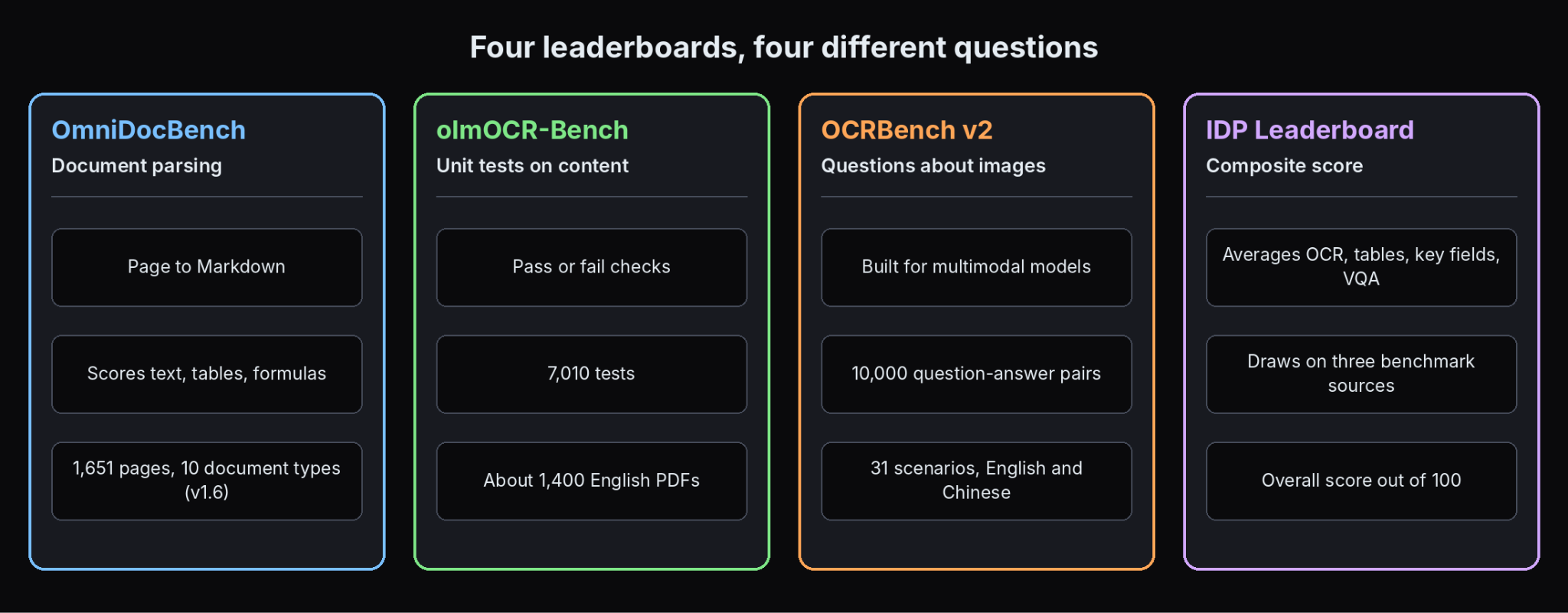
Different leaderboards answer different questions, so the same model can lead one and trail another.
- Document parsing: convert a page into structured text such as Markdown and score text accuracy, tables, formulas, and reading order. OmniDocBench works this way.
- Unit tests on content: check specific facts about the output, such as whether a sentence, table cell, or equation appears correctly. olmOCR-Bench uses pass or fail tests.
- Question answering about images: ask a multimodal model questions about text in an image. OCRBench v2 works this way, so it tests general models more than OCR engines.
- Key information extraction: pull named fields, such as receipt totals, and score them against labels. SROIE and CC-OCR include tracks like this.
- Composite boards: average several benchmarks into one overall score, as the IDP Leaderboard does.
DeepRead's comparison of LLMs vs OCR software explains the difference between classic OCR and these model-based readers, which is why the scoring styles differ.
The Main Leaderboards as of October 2026
OmniDocBench
OmniDocBench is a document parsing benchmark from OpenDataLab and Shanghai AI Laboratory. Its overall score averages text, table, and formula results. The current version, 1.6, covers 1,651 pages across 10 document types, up from the 981 pages in the original paper. On its board, updated September 11, 2026, the leaders are TeleOCR at 96.91, OvisOCR2 at 96.47, and PaddleOCR-VL-1.6 at 96.34. Two more trackers (Invoice Data Extraction, as of October 21, 2026, and Docsumo, checked September 29, 2026) list the same three, and Gemini 3 Pro as the best closed model at 92.91, with GPT-5.2 at 86.59.
Two caveats matter. The top three are within about 0.6 points of each other, so the board does not meaningfully rank them, and scores from different versions, such as 1.5 (released September 2025) and 1.6 (April 2026), are not comparable. Formulas also make up about a third of the overall score, which business documents rarely contain, and Invoice Data Extraction notes the page set has no invoice or receipt type.
olmOCR-Bench
olmOCR-Bench, from the Allen Institute for AI, runs 7,010 pass or fail unit tests over about 1,400 English PDFs and reports the percentage passed. Reported leaders vary by source. Ai2's olmOCR README lists Chandra OCR 0.1.0 at 83.1 but marks it as author-reported and not reproduced in-house, and lists olmOCR v0.4.0 at 82.4. CodeSOTA's tracker, updated in May 2026, lists infinity-parser2-pro at 87.6% (a Hugging Face entry), chandra-2 at 85.9%, and dots.mocr at 83.9%, and some of these come from the model makers' own model cards. Margins between the top few entries are often about a point, and the published error ranges overlap.
The test design has a quirk worth knowing. One class of tests rewards dropping headers and footers, which on invoices often hold invoice numbers, tax IDs, and bank details. A model can score well here and still discard fields you need.
OCRBench v2
OCRBench v2 is a bilingual benchmark of question-answer pairs about images, aimed at multimodal models. Its own page lists 10,000 human-verified question-answer pairs across 31 scenarios, plus a private test set. On its September 2026 leaderboard, SEEU DOC leads English at 76.2, followed by Yaochi-DTS-A2T-1.9 at 73.4 and U2-OCR at 71.7. U2-OCR leads Chinese at 66.7.
A second tracker, BenchLM, listed a different top six on October 29, 2026, led by Qwen3.8 Max at 74.2%, and says all of its rows are provider self-reports. The two lists were assembled differently, which is a reminder that even the same benchmark can look different depending on who compiles it.
IDP Leaderboard
The IDP Leaderboard aggregates OCR accuracy, table extraction, key information extraction, and visual question answering across three benchmark sources and averages them. On its page (version 1.5, no date shown) the overall leaders are Nanonets OCR-3 at 85.9, GPT-5.4 at 83.5, and Gemini-3-Pro at 82.8, and Gemini 3.1 Pro leads its IDP Core benchmark at 89.6.
The page does not name its publisher, but its canonical address is nanonets.com and its methodology links to a Nanonets repository, so the board appears to be maintained by the vendor whose model leads it. Check who maintains any board, and how rows are verified, before you rely on it. DeepRead's roundup of Nanonets alternatives compares document platforms if you want to look beyond a single model score.
Receipt and Invoice Benchmarks
Older and narrower sets test business documents directly. Invoice Data Extraction reports a best Hmean of 90.49% on SROIE, set by the competition's organizers, and a 2025 Fraunhofer IAIS evaluation where Gemini 2.5 Pro scored 87.46% on receipts, 96.50% on clean invoices, and 92.71% on scanned invoices. These come from a secondary source, and the models are older than the ones on the newest boards.
Why Scores Disagree
- Different tasks: parsing, unit tests, question answering, and field extraction reward different behavior.
- Different versions: a score on one version of a benchmark cannot be compared with another. OmniDocBench versions 1.5 and 1.6 are an example, with different page sets and release dates.
- Self-reported scores: many rows are submitted by the model makers or the community and are not independent runs.
- Test set access: public test sets can leak into training data, and private test sets give different results.
- Scoring rules: exact match, edit distance, and lenient matching give different numbers for the same output.
- Hosted vs open weights: a model's own API, a third-party host, and a quantized version of the same weights can score differently.
- Stale rows: some boards keep models from earlier years next to current ones.
How to Read an OCR Leaderboard
- Find the date and version. If there is none, treat the numbers with caution.
- Check who ran each score. Independent runs carry more weight than self-reports.
- Read what the metric rewards. A parsing score is not a field-accuracy score.
- Look at the document mix. Does it contain your kind of pages: invoices, scans, photos, tables, handwriting?
- Compare like with like. Keep to the same benchmark and version.
- Look at the spread, not just the winner. The top three are often within a few points, which is within the noise of different test conditions.
- Note cost and speed. Leaderboards rarely show price, latency, or rate limits.
What the Leaderboards Do Not Tell You About Invoices and Business Documents
None of the headline benchmarks test exact invoice totals, line items that span pages, or whether line amounts add up to the total. OmniDocBench has no invoice or receipt type, olmOCR-Bench can reward dropping the header and footer fields invoices rely on, and OCRBench v2 measures question answering, not extraction. For payables teams, the useful signal is a test on your own invoices, as DeepRead's guide to AI document processing for AP automation describes.
Extraction Is a Different Leaderboard
OCR accuracy is one step. Most applications need fields returned against a schema, which is an extraction task with its own measures. DeepRead published a vendor-run extraction benchmark in October 2026, using 2,614 pages from DocILE (500 documents), Charity (40), and LongExtract (20). Deep Extract averaged 92.0% and Extract 91.1%, against 89.9% for Extend Operator, 87.3% for Reducto Deep Extract, 79.8% for Extend Performance, 79.1% for LandingAI ADE, and 70.5% for Reducto Extract.
Read it with the same caution as any leaderboard. DeepRead ran it; the scoring is lenient (an exact match, a match after normalization, or a reviewer model judging the difference immaterial), and the set has no identity, insurance, or logistics documents. The lead is also not uniform: Extend Operator scored 99.6 on LongExtract against 97.8 for Deep Extract. It is one data point to test against your own pages.
Build Your Own Private Leaderboard
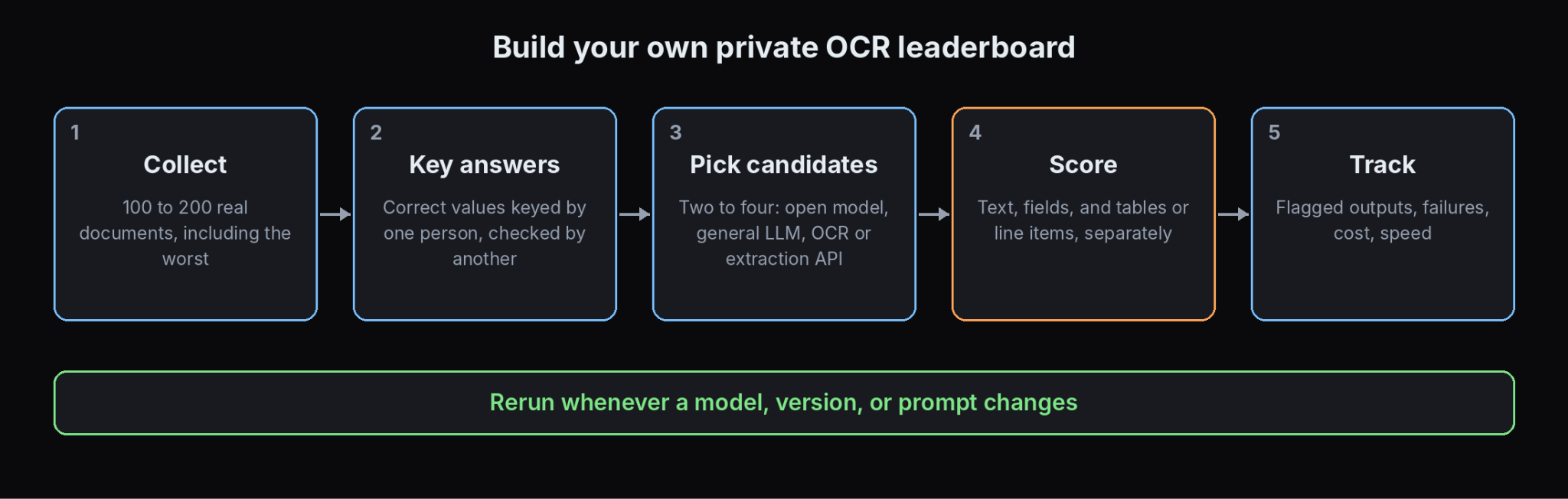
A private leaderboard on your documents answers the question public ones cannot.
- Collect 100 to 200 representative documents, including your worst scans and photos.
- Write down the correct values for the fields you need, keyed by one person and checked by another.
- Pick two to four candidates across the types above: an open-weight OCR model, a general LLM, and one or two OCR or extraction APIs. Many have free tiers, and DeepRead's, for example, covers 2,000 pages a month.
- Score three things separately: text accuracy, field-level accuracy, and table or line-item accuracy.
- Record flagged and failed outputs, not just the best case.
- Track cost and speed: price per page, latency, and rate limits.
- Rerun it when models change, since every board in this guide shifts within months.
DeepRead's review of the most reliable data extraction service walks through a pilot of this kind, and its overview of intelligent document workflow automation shows where OCR sits in a wider pipeline.
Conclusion
An LLM OCR leaderboard is useful for shortlisting and misleading for choosing. The public boards disagree because they measure different tasks on different versions, many scores are self-reported, and none tests invoices or business documents closely. Use them to find candidates, read the date, version, and source of every number, and then run your own test. The leaderboard that matters is the one built from your documents.
Frequently Asked Questions
Is there an official LLM OCR leaderboard?
No single one. The main public benchmarks are OmniDocBench, olmOCR-Bench, OCRBench v2, and composite boards such as the IDP Leaderboard, each with different documents and scoring.
Which model is number one on OCR leaderboards?
It depends on the board and date. In October 2026, TeleOCR led OmniDocBench version 1.6 at 96.91 according to two trackers, SEEU DOC led OCRBench v2 English at 76.2 on its official page, and Nanonets OCR-3 led the IDP Leaderboard overall at 85.9.
Are OCR leaderboard scores independent?
Often not. Many rows are self-reported by the model makers or submitted by the community. Look for independently reproduced runs and check who maintains the board.
Why do OCR models score differently on different leaderboards?
The benchmarks measure different things, use different document sets and versions, and score differently. A parsing score, a unit-test pass rate, and a question-answering score are not interchangeable.
Do OCR leaderboards test invoices?
Mostly not. OmniDocBench has no invoice type, olmOCR-Bench can reward dropping headers and footers that invoices rely on, and OCRBench v2 tests question answering. Older sets such as SROIE cover receipts, but with older models.
How do I choose an OCR model for my documents?
Use the leaderboards to shortlist, then test two to four candidates on 100 to 200 of your own documents, scoring text, fields, and tables separately and recording cost and flagged outputs.
Does DeepRead publish a leaderboard?
DeepRead published a vendor-run extraction benchmark in October 2026, which is an extraction test and not an OCR-only leaderboard. It is lenient in scoring and has no identity, insurance, or logistics documents, so treat it as one data point.
More articles
Business Card OCR API
Compare business card OCR API and software options: fields returned, accuracy checks, pricing units, limits, privacy, and how to test on your own cards.
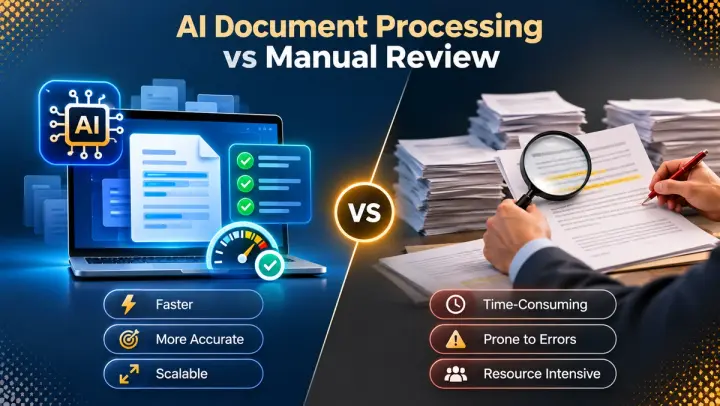
AI Document Processing vs Manual Review
AI document processing vs manual review compared on speed, accuracy, cost, and scale, with a 15,000-page cost example, a hybrid model, and APIs to shortlist.