%20{%20:root%20{%20--deepread-stroke:%20%23E5E7EB;%20}%20}%20.dark%20{%20--deepread-stroke:%20%23E5E7EB;%20}%20%3c/style%3e%3crect%20x='40'%20y='30'%20width='220'%20height='260'%20rx='28'%20ry='28'%20stroke='var(--deepread-stroke)'%20stroke-width='16'%20fill='none'/%3e%3cpath%20d='M180%2030v52c0%2010%208%2018%2018%2018h62'%20stroke='var(--deepread-stroke)'%20stroke-width='16'%20fill='none'/%3e%3cline%20x1='70'%20y1='130'%20x2='200'%20y2='130'%20stroke='var(--deepread-stroke)'%20stroke-width='16'%20stroke-linecap='round'/%3e%3cline%20x1='70'%20y1='165'%20x2='200'%20y2='165'%20stroke='var(--deepread-stroke)'%20stroke-width='16'%20stroke-linecap='round'/%3e%3cline%20x1='70'%20y1='200'%20x2='170'%20y2='200'%20stroke='var(--deepread-stroke)'%20stroke-width='16'%20stroke-linecap='round'/%3e%3c!--%20green%20download%20arrow%20in%20bottom%20right%20corner%20--%3e%3cpath%20d='M210%20202v58'%20stroke='var(--deepread-accent)'%20stroke-width='18'%20stroke-linecap='round'/%3e%3cpath%20d='M195%20245l15%2015%2015-15'%20fill='none'%20stroke='var(--deepread-accent)'%20stroke-width='18'%20stroke-linecap='round'%20stroke-linejoin='round'/%3e%3c/svg%3e)
LLMs vs OCR Software: A 2026 Comparison
LLMs vs OCR software compared - the technical mechanism, real accuracy data, and what to use for legal contracts specifically in 2026.
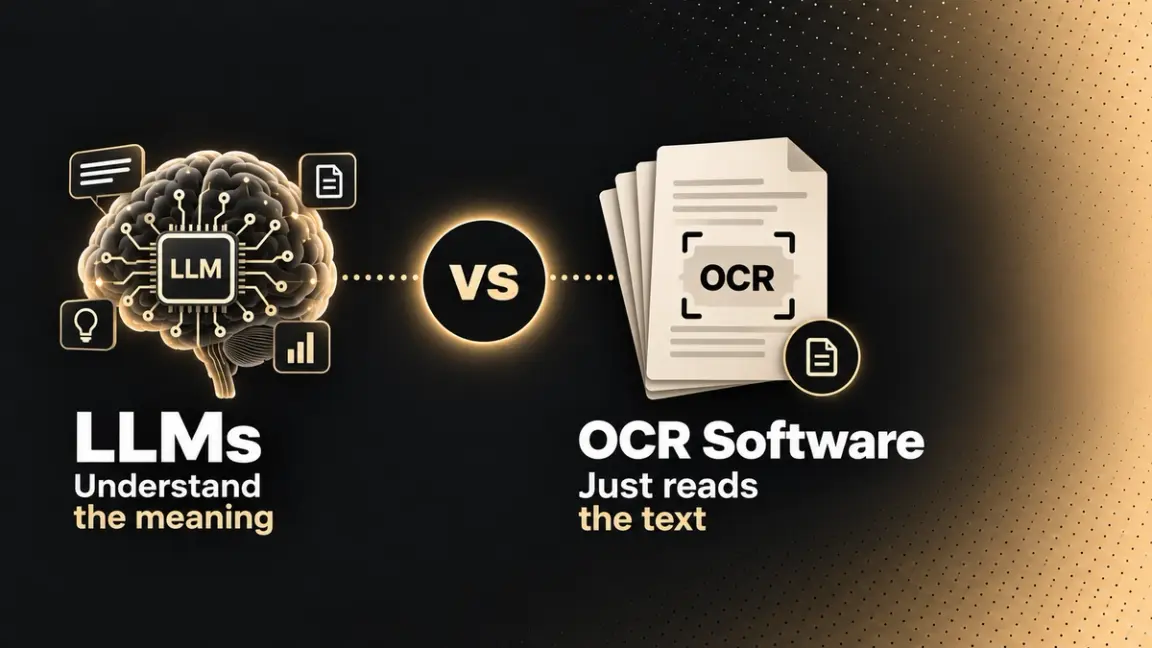
OCR and LLMs solve the same surface-level problem — getting text out of a document — through fundamentally different mechanisms, and which one wins depends heavily on the document type. This guide covers that technical distinction, real accuracy data behind it, and why legal contracts specifically tend to be the case where the answer shifts in favor of LLM-based approaches.
Who This Is For
- Developers building document extraction pipelines deciding between traditional OCR, LLM-based extraction, or a hybrid of both.
- Legal technology teams evaluating OCR software specifically for contracts, discovery documents, and court filings.
- Anyone who's seen a benchmark claiming one approach dominates and wants to understand why the real answer is "it depends on your documents."
The Core Technical Distinction
OCR's underlying mechanism is mostly deterministic — it follows a defined, step-by-step process matching visual patterns against known character shapes. LLMs work differently: multimodal models interpret visual cues in context, understanding layout, style, and semantics together rather than recognizing individual characters in isolation.
In short: OCR extracts what's on the page; an LLM interprets what the page means.
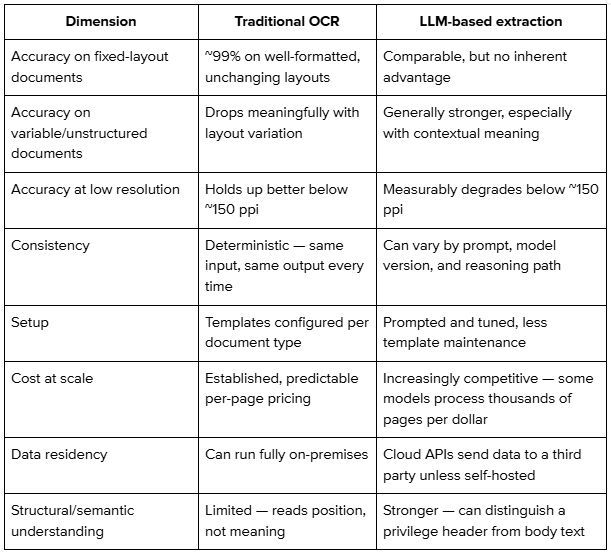
- On fixed-layout documents: OCR systems hit around 99% accuracy on well-formatted documents with an unchanging layout — a 1099 tax form is the commonly cited example, since the format barely varies.
- On variable-layout documents: that advantage flips. One academic study comparing multimodal LLM OCR against a dedicated OCR service found LLMs outperformed dedicated OCR specifically on structured, coherent text (news articles, common phrases) at normal image resolution, while dedicated OCR held its advantage on unstructured or degraded text.
- The "LLMs are just better" narrative doesn't hold uniformly — even within the same study, which side wins depends on the document, not the technology alone.
- Image resolution changes the outcome further: a second academic comparison found multimodal LLM accuracy tracks closely with dedicated OCR at higher resolution (~300 ppi), but falls measurably behind dedicated OCR once resolution drops below ~150 ppi, a real technical limit worth testing for if your sources include lower-quality scans.
Cost and Deployment Are Part of the Real Comparison
This isn't purely an accuracy question. Gemini Flash 2.0, as one current example, can process roughly 6,000 pages for about a dollar — a cost structure that's changed the economics of LLM-based extraction meaningfully versus a few years ago. But cost isn't the only deployment consideration: sending documents to a cloud-based LLM API means sending your document data to a third party, which may not be acceptable for highly sensitive material. Traditional OCR can often run fully on-premises, with no data leaving your environment; enterprise LLM options and self-hosted models exist to close this gap, but they add real setup complexity most cloud-API workflows don't require.
Why Legal Contracts Specifically Favor the LLM Approach
Legal documents are close to a worst-case scenario for fixed-template OCR, and a best-case scenario for context-aware extraction, for a specific reason: contracts vary enormously in structure between parties and firms, and what matters most often isn't raw text but meaning — which clause is an indemnification provision, which paragraph constitutes a termination right, which header indicates privileged material.
Worth internalizing this directly: a 99.7%-accurate OCR tool can still break a legal document in a way that matters, by treating a "CONFIDENTIAL" header as ordinary body text, or a Bates number as page decoration rather than a document-identification field. Character-level accuracy and legally meaningful accuracy are not the same measurement, and a tool optimized purely for the former can still fail at the latter.
OCR vs. LLM: Direct Comparison
Which Should You Use?
- Use OCR if your documents are fixed-format and repetitive — tax forms, standardized applications, anything where the layout barely changes between instances. This is where OCR's deterministic approach is still hard to beat on both accuracy and cost.
- Use LLM-based extraction if your documents vary significantly in structure, or if extracting meaning (which clause, which obligation, which party) matters more than raw text position — this is exactly the profile most legal contracts, correspondence, and non-standardized forms fit.
- Use a hybrid pipeline if you need both: OCR handling the structured, repetitive parts of a document reliably, with an LLM layer applied specifically where contextual interpretation is required. Several platforms in this category are built around exactly this combination rather than picking one mechanism for everything.
- Weight data residency into the decision directly, not as an afterthought, if you're processing confidential or privileged material — this can outweigh a pure accuracy comparison entirely for legal use specifically.
One data point worth including with appropriate caution: Ramp, a finance automation platform, has been reported (via a third-party industry blog, not Ramp's own published case study) to have seen meaningful receipt-processing accuracy improvement after moving from OCR to LLM-based extraction, directionally consistent with the "LLMs win on variable, messy documents" pattern this guide describes, though it's secondhand reporting rather than a primary source worth treating as definitive.
Legal-Specific Evaluation Criteria
Beyond general OCR accuracy, legal document processing has requirements most general-purpose comparisons don't test for:
- Contract clause extraction across multi-page agreements — pulling structured meaning (obligations, dates, parties, termination rights) rather than just text.
- Bates numbering preservation — the sequential identification numbers stamped on documents during discovery, which need to survive processing intact for the document to remain usable in litigation.
- Privilege designation handling — headers and markings indicating privileged or confidential material need to be recognized as structural metadata, not just more body text.
- Multi-column brief and filing format handling — court filings and briefs commonly use layouts that break naive, single-column-assuming extraction.
- Data security obligations specific to legal practice — ABA Model Rule 1.1 (competence) and Model Rule 1.6 (confidentiality) are the specific ethical obligations that make where and how a document processing tool handles data a real compliance question for legal professionals, not just a general best practice.
Named Tools
A note on how to read this list: legal OCR tool comparisons in this space vary in independence; verify current capability and pricing directly.
LlamaParse
Positioned explicitly for legal use cases — contract review and legal discovery specifically named, pulling key entities, obligations, and dates from long-form documents.
- Uses agentic OCR with a vision-language approach — interpreting layout rather than matching against fixed templates — plus semantic reconstruction of headers, footers, sections, clauses, and tables specifically, rather than flat text output
- LlamaExtract provides schema-based structured output with citations and confidence scores, directly relevant to the "was this actually extracted correctly, and can I verify it" question that matters more in legal contexts than most
- A recent product update (LlamaParse v2) introduced tiered processing modes (Fast, Cost Effective, Agentic, Agentic Plus) with reported cost reductions up to 50% and improved accuracy, plus a document-splitting feature (LlamaSplit) that automatically separates bundled documents by analyzing content, directly relevant to legal submissions that routinely arrive as one bundled file containing multiple distinct documents
- Best fit: teams building legal AI applications (RAG, contract analysis agents) needing structured, citation-backed extraction rather than raw text
ABBYY FineReader
The established desktop OCR reference standard for legal professionals specifically, built around traditional, deterministic OCR rather than an LLM-based approach.
- Supports up to 99% accuracy on printed table data, processing a single page in 5–10 seconds, reported at roughly 18x faster than manual data entry
- Strong layout preservation specifically — a multi-page brief with footnotes, embedded tables, and multi-column text is reported to come out closely matching the original format
- Includes document comparison capability, useful specifically for reviewing contract versions and redlines
- Best fit: archive digitization and general legal document conversion where format fidelity matters and documents are reasonably well-structured, rather than highly variable contract layouts specifically
Tungsten Power PDF (formerly Kofax Power PDF)
A PDF management platform with OCR built in, positioned for handling complex layouts common in contracts, court filings, and discovery materials specifically. Worth noting the naming directly: this product was rebranded from Kofax Power PDF following Kofax's broader rebrand to Tungsten Automation; older references to "Kofax Power PDF" point to the same current product.
- Supports batch processing at volume, alongside compliance-relevant features like redaction, Bates stamping, and digital signatures in the same platform
- Best fit: firms wanting OCR bundled with broader PDF management and compliance tooling rather than a standalone extraction API
RelativityOne and Everlaw
Cloud-native eDiscovery platforms with OCR built into a broader litigation workflow, rather than general-purpose document processing tools repurposed for legal use.
- Positioned specifically for high-volume litigation and discovery workflows, with predictive coding and analytics layered on top of OCR output
- One platform in this category reports 99%+ accuracy across 200+ languages as part of its OCR pipeline — a vendor-stated figure worth verifying against your own document set rather than taking as a universal benchmark
- Best fit: mid-to-large firms and corporate legal teams running genuine eDiscovery workflows at volume, distinct from smaller-scale contract review
The Hybrid Approach
Several platforms in this category explicitly combine both technologies rather than choosing one, using OCR for initial structured data extraction, then an AI/LLM layer to refine, classify, or contextually validate that output. The reasoning is direct: pure OCR gets reliable text extraction but limited contextual understanding; pure LLM extraction gets contextual understanding but less predictable consistency. A layered approach aims to get OCR's reliability on the structured parts of a document with LLM-level understanding applied on top for the parts that need interpretation, rather than betting entirely on one mechanism.
A Benchmark Methodology Caution Worth Repeating
Worth being direct about this, since it affects how to read every accuracy claim in this category, including the ones in this article: many published OCR-vs-LLM benchmarks use sample data skewed toward very poor quality or handwritten documents specifically because that's where the gap between the two approaches looks most dramatic. If your actual documents — contracts from known counterparties, standardized filing templates- don't resemble that benchmark composition, the benchmark's conclusion may not transfer to your real use case at all. Test on documents that actually resemble what you process, not a vendor's demo set optimized to showcase a specific advantage.
Where a general-purpose extraction API fits into this picture: DeepRead uses multi-model consensus rather than a single deterministic OCR pass, positioning it architecturally closer to the AI-native side of this comparison, with published accuracy benchmarks across eight general business document types (invoices, bank statements, medical bills, and others), though not specifically on legal contracts. Worth being precise about that scope: this is relevant context for the general LLM-vs-OCR distinction, not a claim about legal-document performance specifically, which isn't something confirmed for this piece.
Conclusion
OCR and LLMs aren't competing replacements for each other so much as tools suited to different document conditions — OCR's deterministic, pattern-based approach wins on fixed-layout, well-formatted documents; LLM-based, contextual extraction wins on variable, unstructured, or meaning-dependent documents, which is exactly the category legal contracts fall into. The real evaluation question isn't which technology is generally "better"; it's which one matches your actual document variability, resolution quality, and confidentiality requirements, tested against documents that resemble what you actually process, not a benchmark built to showcase one side's advantage.
FAQ
Is OCR obsolete now that LLMs can read documents?
No — OCR still holds a real, measurable accuracy advantage on fixed-layout, well-formatted documents like standardized tax forms, and can often run fully on-premises without sending data to a third party, which matters for sensitive documents regardless of accuracy.
Why do legal contracts specifically favor LLM-based extraction over traditional OCR?
Contracts vary enormously in structure between parties, and what matters most is often meaning (which clause is an indemnification provision) rather than raw text. A high character-accuracy OCR tool can still misread structurally important elements like privilege headers or Bates numbers, since character accuracy and legally meaningful accuracy aren't the same measurement.
What are ABA Model Rules 1.1 and 1.6, and why do they matter for choosing OCR software?
Rule 1.1 (competence) and Rule 1.6 (confidentiality) are professional obligations that make where and how a document processing tool handles data a genuine compliance question for legal practice — relevant specifically when comparing cloud-based LLM APIs against on-premises OCR options.
Does image resolution actually affect LLM OCR accuracy?
Yes, measurably; one academic comparison found multimodal LLM accuracy tracks closely with dedicated OCR at around 300 ppi, but falls behind dedicated OCR once resolution drops below roughly 150 ppi, a real technical limit worth testing for with your actual document quality.
Should I trust vendor benchmarks comparing OCR and LLM accuracy?
Treat them cautiously; many benchmarks use document sets skewed toward poor-quality or handwritten samples specifically because that's where the accuracy gap looks most dramatic. If your actual documents don't resemble that composition, the benchmark's conclusion may not apply to your use case.
More articles
Document Workflow Automation at Mid-Sized Companies: Agencies, Platforms, and What Actually Changes by Size
How document workflow automation actually works for companies with 250–1,000 employees, including how implementation agencies operate.
Per-Document vs Per-Page Pricing in AI Extraction Services (2026)
Per-document vs per-page pricing for AI extraction: Google Document AI 2026 invoice and form parser rates, per-document vendors, and cost-by-length math.