%20{%20:root%20{%20--deepread-stroke:%20%23E5E7EB;%20}%20}%20.dark%20{%20--deepread-stroke:%20%23E5E7EB;%20}%20%3c/style%3e%3crect%20x='40'%20y='30'%20width='220'%20height='260'%20rx='28'%20ry='28'%20stroke='var(--deepread-stroke)'%20stroke-width='16'%20fill='none'/%3e%3cpath%20d='M180%2030v52c0%2010%208%2018%2018%2018h62'%20stroke='var(--deepread-stroke)'%20stroke-width='16'%20fill='none'/%3e%3cline%20x1='70'%20y1='130'%20x2='200'%20y2='130'%20stroke='var(--deepread-stroke)'%20stroke-width='16'%20stroke-linecap='round'/%3e%3cline%20x1='70'%20y1='165'%20x2='200'%20y2='165'%20stroke='var(--deepread-stroke)'%20stroke-width='16'%20stroke-linecap='round'/%3e%3cline%20x1='70'%20y1='200'%20x2='170'%20y2='200'%20stroke='var(--deepread-stroke)'%20stroke-width='16'%20stroke-linecap='round'/%3e%3c!--%20green%20download%20arrow%20in%20bottom%20right%20corner%20--%3e%3cpath%20d='M210%20202v58'%20stroke='var(--deepread-accent)'%20stroke-width='18'%20stroke-linecap='round'/%3e%3cpath%20d='M195%20245l15%2015%2015-15'%20fill='none'%20stroke='var(--deepread-accent)'%20stroke-width='18'%20stroke-linecap='round'%20stroke-linejoin='round'/%3e%3c/svg%3e)
Per-Document vs Per-Page Pricing in AI Extraction Services (2026)
Per-document vs per-page pricing for AI extraction: Google Document AI 2026 invoice and form parser rates, per-document vendors, and cost-by-length math.
The unit a vendor bills in matters as much as the price itself. A per-page service punishes long documents, while a flat per-document service can cost more than it should on single-page ones. This guide covers Google Cloud Document AI's 2026 pricing (including the invoice parser and form parser), which services bill per document, what a typical document costs under each model, and the costs a unit price doesn't show. For the broader question of pay-as-you-go versus contract pricing, pay-as-you-go document processing tools are compared separately.
The Short Answer
- Pure per-document pricing is rare. Nearly every per-document model has a page cap, and what happens past the cap varies by vendor: Veryfi requires a custom account configuration above 15 pages, and Docparser charges another credit for every five pages.
- Google bills in several ways. Its invoice and expense parsers bill per 10 pages in a document, its US driver license and passport parsers bill per document, its bank statement, pay slip, and W2 parsers bill per classified document, and its form parser bills per page.
- Veryfi is the clearest per-document example. Its own pricing page says you're charged per document sent to the API, not per page, with a document capped at 15 pages.
- Per-document isn't automatically cheaper. For short documents, a low per-page rate usually wins. For long documents against a high per-page rate, a flat fee can.
- Rates were checked against each vendor's own pricing pages in October 2026. Pricing in this category changes often, so confirm before budgeting.
Who This Is For
- Teams processing multi-page documents (bank statements, contracts, long invoices) where per-page pricing adds up.
- Engineers comparing Google Document AI processors and trying to work out what a single document actually costs.
- Finance and procurement teams forecasting extraction spend at volume.
The Billing Units, Explained
- Per page. Every page counts, so a 10-page PDF is 10 billable units. Google's form parser, AWS, Azure, Reducto, Affinda, and DeepRead work this way, and so does Mindee, where a five-page document uses five credits.
- Per document. One flat charge up to a page limit. Veryfi's limit is 15 pages, and above that it needs a custom account configuration.
- Per block of pages. Google's invoice parser charges for every 10 pages in a document, rounded up. Docparser charges one parsing credit per document of up to five pages, and one more credit for every additional five.
- Per block or per run. Nanonets bills per workflow block run, which multiplies with each step in a workflow.
- Per token. Extraction built on large language models can be billed by tokens processed, so cost tracks how much text and image content a document holds, not how many pages it has. A dense two-page contract can cost more than a sparse ten-page form, so estimate by measuring tokens on a sample of your own documents. How LLM-based and OCR extraction compare on cost and accuracy is covered in LLMs vs OCR software.
- Per credit. Credits can map to pages or documents depending on the vendor, so the credit price alone says little.
- Annual licensing. Enterprise platforms such as Rossum price by volume of pages or documents processed and workflow complexity, with Starter listed as starting at $18,000 a year.
The word "page" is itself vendor-defined. Google counts each PDF page as one page, each Excel tab as one page, and each PowerPoint slide as one page.
Google Cloud Document AI Pricing in 2026
Google's pricing page lists these rates:
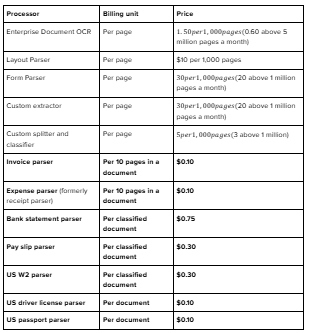
Google's page also lists OCR add-ons at $6 per 1,000 pages and a purchased capacity reservation (provisioned throughput at $300 for every extra page-per-minute per month). It notes that some processors are limited-access, so confirm availability for the specific parser you need and whether a page limit applies to the per-document ones. New customers get $300 in free credit, per Google's Document AI page.
Invoice Parser Pricing: How It Actually Bills
Google's page says $0.10 for every 10 pages in a document, and its own examples show how that works: a document of 1 to 10 pages costs $0.10, 11 to 20 pages costs $0.20, and 91 to 100 pages costs $1.00. That's block billing, rounded up per document.
That gives the invoice parser two effective per-page rates:
- At a full 10-page block, it works out to $0.01 per page. This is the figure some pricing sites quote.
- At one page, it's $0.10 per page. A one-page invoice costs $0.10, not the $0.01 you'd get by dividing by 10.
One third-party comparison notes that against Azure and AWS at $0.01 a page, Google's invoice parser matches them only at 10 pages per document.
Form Parser Pricing
The form parser is straightforward by comparison: $30 per 1,000 pages, or $20 per 1,000 above 1 million pages a month. For context, AWS's pricing page lists Textract Forms at $0.05 per page, and Tables at $0.015 per page, so Forms plus Tables comes to $65 per 1,000 pages, and one third-party comparison puts Azure custom extraction at $30 per 1,000. These products don't include identical features, so verify each on the vendor's own pricing page.
Invoice Parser or Form Parser?
They solve different problems (prebuilt invoice fields versus generic form and table extraction), but price matters when either could work. At $0.03 a page, the form parser costs less than the invoice parser's 0.10fordocumentsuptothreepages(0.09), and more beyond that. This is arithmetic on list prices, not a recommendation: prebuilt invoice fields are the reason to choose the invoice parser.
Why Third-Party Sites Quote Different Numbers
Some convert Google's block price into a $0.01 per page figure, which only holds at full 10-page blocks. Others quote figures that don't match Google's page at all, such as roughly $0.065 per page for the form parser against Google's $0.03. Google's own page is the one to trust, and rates change, so check it before budgeting.
Services That Charge Per Document
- Google (specialized parsers). US driver license and passport parsers at $0.10 per document, bank statement at $0.75 per classified document, and pay slip and W2 at $0.30. The invoice and expense parsers sit in between, billed by 10-page block.
- Veryfi. Its pricing page states you're charged per document sent to the API, not per page, and that a single API transaction covers a document of up to 15 pages; longer documents need a custom account configuration. List prices on that page include $0.16 per invoice, $0.08 per receipt, and $0.16 per form, with a free tier of up to 100 invoices and 100 receipts a month and a $500 monthly minimum on the Starter plan. At $0.16, that minimum covers about 3,125 invoices.
- Docparser. Its pricing page defines one parsing credit as one document of up to five pages, and its help center says it charges one credit for every five pages, so a 12-page document uses three. The monthly Starter plan is 100 credits for $39, or $0.39 a credit.
- Enterprise platforms. Rossum and similar vendors price by annual contract tied to volume, so the unit economics are negotiated.
For contrast, per-page pricing is the model for Google's form parser, AWS Textract, Azure Document Intelligence, Mindee, Reducto, Affinda, Parseur, and DeepRead. Even among these, the spread for field extraction is wide: published rates include $20 per 1,000 pages for Reducto's and DeepRead's Extract, $30 for Google's Form Parser, $50 for AWS Textract Forms (plus $15 for Tables), and $200 for Affinda's pay-as-you-go Starter, which falls to as low as $50 at higher volumes. What each rate includes differs, so compare features and accuracy alongside price.
What One Document Costs at Different Lengths
The table below is my arithmetic from published list prices, not a vendor quote. The $0.01 rate is AWS AnalyzeExpense, and Azure's prebuilt invoice rate is similar per third-party summaries. Features and accuracy differ across these services, so the point is how the billing unit behaves, not which tool to buy.
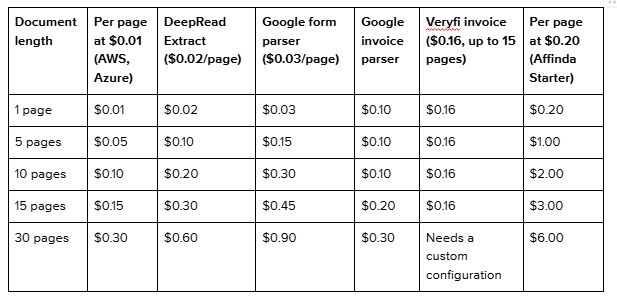
Four patterns stand out:
- A low per-page rate beats flat pricing at almost every length. At 0.01apage,evena15-pagedocument(0.15) costs less than Veryfi's flat $0.16, and DeepRead's Extract at $0.02 a page matches Veryfi's flat rate at exactly eight pages.
- Flat pricing wins against high per-page rates. At $0.20 a page, a 10-page document costs about twelve times a flat $0.16.
- Block pricing has a sweet spot. Google's invoice parser is cheapest per page at exactly 10 pages, steps up after that, and ties the $0.01 per page rate again at full blocks (30 pages, three blocks, $0.30).
- Caps decide long documents. Past a vendor's page limit, the headline per-document rate stops applying, and what happens next determines the cost.
At volume, the gap compounds. For 10,000 five-page invoices a month at these list prices, per-page at $0.01 comes to about $500; DeepRead's Extract and Google's invoice parser to $1,000 each; Veryfi to $1,600; and Affinda's Starter rate to $10,000 (volume tiers lower that). DeepRead's Parse alone would be about $500. The unit that looks cheapest isn't always the cheapest in practice, and the cheapest unit price may buy different accuracy or features.
Run Your Own Numbers
- Measure your documents. Record average length, longest length, and the share of files that are bundles of several documents.
- Per-page vendors: monthly cost = documents × average pages × per-page rate.
- Per-document vendors: monthly cost = documents × per-document rate, or the minimum commitment if that's higher. Price documents over the page cap separately.
- Block pricing: blocks per document = pages ÷ block size, rounded up. Monthly cost = documents × blocks × block price.
- Add separately billed steps (splitting, classification) and an integration estimate.
- Re-run for your longest documents, since averages hide the tail. For mixed volumes, calculate by length band.
A worked example, using the list prices above: 2,000 eight-page documents a month cost about $160 at $0.01 a page, $200 on Google's invoice parser (one block each), and $320 with DeepRead's Extract (16,000 pages at $0.02). At Veryfi's list rate, they'd cost $320, which falls below the $500 monthly minimum, so the bill would be $500. The minimum, not the unit price, decides that last number. Once a pricing model is chosen, document workflow automation ROI metrics show whether it's paying off.
Costs the Unit Price Doesn't Show, and What to Ask
- What exactly is the billable unit? Page, document, block, credit, or token, and how each is defined. Google's own page counting (tab, slide) shows how much definitions vary.
- What's the page cap, and what happens above it? Veryfi caps at 15 pages and requires a custom account configuration beyond that; Docparser steps up every five pages, and Google's invoice parser steps up every 10. Ask whether an oversized document is billed as a second document, rejected, or handled another way.
- Is a bundled PDF one document or several? A 40-page file containing ten invoices could count as one document or ten. Put this to any vendor, because the answer can swing cost by an order of magnitude.
- Can you limit what gets billed? Affinda lets you process only a page range per document type, and excluded pages aren't charged. That can cut cost on long files where only a few pages matter.
- Are splitting, classification, or review billed separately? Google lists a custom splitter and classifier at $5 per 1,000 pages. If you need those steps, add them to the total.
- Is there a minimum commitment? Veryfi's $500 monthly minimum equals its list price only at about 3,125 invoices. At 500 invoices a month, it works out to $1 each.
- Are retries and re-runs billed? Confirm before assuming a failed or repeated request is free.
- What does integration cost? One review site claims production pipelines on Google commonly cost three to five times the headline API price once setup and integration work are counted. Treat that as one source's claim and test your own estimate.
- Do volume discounts apply? Google's form parser drops from $30 to $20 per 1,000 pages above 1 million pages a month, and Affinda's per-page rate falls as volume grows.
Which Pricing Model Fits Which Documents
- Short, single-page documents (receipts, simple invoices). Look for low per-page rates. Flat per-document pricing rarely pays off here, and minimum commitments hurt at low volume. Approaches to this document type are compared in OCR APIs for invoice processing.
- Long statements and contracts. Per-document pricing with a cap that covers your typical length, or a specialized per-document parser such as Google's bank statement parser at $0.75.
- ID documents. Per-document pricing is natural, since each document is a single unit. Google lists US driver license and passport parsers at $0.10 per document.
- Mixed bundles. Check how the vendor splits and counts them before comparing prices.
- Spiky or low volume. Usage-based pricing with no minimum.
- Steady high volume. Commitments and volume tiers can lower the effective unit price, but only if you actually reach the volume.
- LLM-based extraction. Measure tokens on your own sample, since content density, not page count, drives cost.
Where DeepRead Fits
DeepRead bills per page, so the per-page math in this guide applies directly. Free covers 2,000 pages a month with no credit card, up to 50 pages per document and 15 MB per file. Standard is pay-as-you-go with credits you buy and use as you go: $10 per 1,000 pages for Parse, $20 for Extract, and $40 for Deep Extract, with no monthly page limit and documents up to 1,000 pages. Enterprise is custom-priced, with volume discounts per product and documents up to 2,000 pages. Check those page caps against your longest files and ask the same bundled-PDF question listed above of any vendor, DeepRead included. Current details are on its pricing page.
Conclusion
Per-document and per-page pricing aren't better or worse by default. They behave differently as documents get longer, and the page caps, block rules, minimums, and extra processing steps behind a unit price often matter more than the price itself. Start by working out your average document length, how often bundles occur, and your monthly volume, then run that through each vendor's actual billing rules, using the vendor's own pricing page as the source.
FAQ
Which AI extraction services charge per document instead of per page?
Veryfi bills per document (up to 15 pages, with a custom configuration above that) per its pricing page; Docparser bills one credit per document of up to five pages and another for every additional five; and Google Document AI bills some parsers per document (US driver license, passport, bank statement, pay slip, W2). Every per-document model has a page cap or block size, so confirm what happens above it.
How much does Google Document AI's invoice parser cost in 2026?
$0.10 for every 10 pages in a document, per Google's pricing page. Its examples show 1 to 10 pages costing $0.10 and 11 to 20 pages costing $0.20, so a one-page invoice costs $0.10 and a 15-page one costs $0.20.
What is the invoice parser's price per page?
It depends on document length. At a full 10-page block it works out to $0.01 per page, and at one page it's $0.10 per page.
Is Google's form parser priced per page?
Yes. It's 30per1,000pages($ 0.03 per page, or $20 per 1,000 above 1 million pages a month.
Is per-document pricing cheaper for long documents?
Not automatically. Against a high per-page rate it can be much cheaper, but against a low per-page rate like $0.01, even a 15-page document can cost less than a flat per-document fee.
What counts as a page in Google Document AI billing?
Each PDF page counts as one page, each Excel tab counts as one page, and each PowerPoint slide counts as one page.
Why do other sites list different Google Document AI prices?
Some convert block pricing into a per-page figure that only holds at full 10-page blocks, and others are outdated or inaccurate. Google's own pricing page is the reliable source, and rates change.
Does DeepRead charge per document?
No, DeepRead charges per page: from $10 per 1,000 pages for Parse, $20 for Extract, and $40 for Deep Extract on Standard. Free covers 2,000 pages a month, and per-document page limits are 50 (Free), 1,000 (Standard), and 2,000 (Enterprise).
More articles
Document Workflow Automation at Mid-Sized Companies: Agencies, Platforms, and What Actually Changes by Size
How document workflow automation actually works for companies with 250–1,000 employees, including how implementation agencies operate.
Automated Trade Documentation Tools: A 2026 Guide
Automated trade documentation tools compared, customs filing, export licensing, restricted-party screening, and named platforms.