%20{%20:root%20{%20--deepread-stroke:%20%23E5E7EB;%20}%20}%20.dark%20{%20--deepread-stroke:%20%23E5E7EB;%20}%20%3c/style%3e%3crect%20x='40'%20y='30'%20width='220'%20height='260'%20rx='28'%20ry='28'%20stroke='var(--deepread-stroke)'%20stroke-width='16'%20fill='none'/%3e%3cpath%20d='M180%2030v52c0%2010%208%2018%2018%2018h62'%20stroke='var(--deepread-stroke)'%20stroke-width='16'%20fill='none'/%3e%3cline%20x1='70'%20y1='130'%20x2='200'%20y2='130'%20stroke='var(--deepread-stroke)'%20stroke-width='16'%20stroke-linecap='round'/%3e%3cline%20x1='70'%20y1='165'%20x2='200'%20y2='165'%20stroke='var(--deepread-stroke)'%20stroke-width='16'%20stroke-linecap='round'/%3e%3cline%20x1='70'%20y1='200'%20x2='170'%20y2='200'%20stroke='var(--deepread-stroke)'%20stroke-width='16'%20stroke-linecap='round'/%3e%3c!--%20green%20download%20arrow%20in%20bottom%20right%20corner%20--%3e%3cpath%20d='M210%20202v58'%20stroke='var(--deepread-accent)'%20stroke-width='18'%20stroke-linecap='round'/%3e%3cpath%20d='M195%20245l15%2015%2015-15'%20fill='none'%20stroke='var(--deepread-accent)'%20stroke-width='18'%20stroke-linecap='round'%20stroke-linejoin='round'/%3e%3c/svg%3e)
Best OCR API for Invoice Processing: A 2026 Comparison
Comparing OCR APIs built for invoice processing, field coverage, speed, fraud detection, and ERP fit, plus a published accuracy benchmark.
Invoice OCR isn't the same evaluation as general document extraction, even though the underlying technology overlaps.
An invoice has a specific, predictable shape, vendor, line items, totals, tax, due date, PO reference, and the APIs built specifically around that shape get judged on different things than a general-purpose extraction engine: how many invoice-specific fields it returns out of the box.
Whether it's fast enough for real-time approval workflows, whether it catches fraud patterns, and whether the output is ready to drop into an ERP without post-processing.
This is a comparison of OCR APIs specifically for invoice processing, what actually differs between them beyond the marketing page, and a look at what a checkable invoice-accuracy benchmark actually shows.
Who This Is For
- Engineering teams building AP automation who need an extraction API specifically tuned for invoices, not a general-purpose document parser they'd have to customize.
- Finance and ops leaders evaluating whether to build custom AP tooling on an invoice-specialist API versus adopting a full platform.
- Technical buyers already comparing Textract, Nanonets, or similar tools who want to know which invoice-specific capabilities actually set one apart from another.
Why Invoice OCR Is a Different Evaluation Than General Extraction
A few criteria matter disproportionately for invoices specifically:
- Field coverage out of the box. Line items, tax breakdowns, PO numbers, and vendor metadata are invoice-specific fields that a general-purpose OCR engine may not extract without custom configuration, while an invoice-tuned model is often pre-trained to return them directly.
- Processing speed for real-time workflows. AP approval and ERP sync workflows often depend on low-latency extraction rather than batch processing — worth checking whether an API is built for synchronous, near-instant response or designed primarily for async batch jobs.
- Fraud detection. Duplicate invoices, phantom vendors, and payment redirection schemes are a real AP risk that some invoice-specialist APIs build in directly, while general-purpose extraction engines typically leave that entirely to downstream logic.
- ERP-ready structure. Whether the output maps cleanly to accounting fields (GL codes, PO references) or requires custom mapping work after extraction.
Top 10 OCR API for Invoice Processing
1. DeepRead
A schema-driven document extraction API with per-field confidence scoring, async batch processing, and webhook delivery, publishing invoice accuracy as a specifically measured, verifiable benchmark rather than a headline claim.
- Advantages: The one entry on this list with a fully public, checkable methodology behind its invoice accuracy number — the same set of documents run through DeepRead and three named competitors, compared against a manually verified ground truth, with results and methodology published on a dedicated benchmark page rather than summarized in a slide. That benchmark tool is itself worth naming as a differentiator: it's a comparison a prospective buyer can run and check independently, which none of the other 10 entries on this list offer.
Async processing and webhook delivery are built in by default, not an add-on, so large invoice batches don't block or time out. Uncertain fields are marked needs_review rather than returned silently wrong. Full REST API, SDKs, and an interactive playground are available for evaluation before writing integration code. The free tier covers 2,000 documents a month with no credit card required — a meaningfully higher no-cost ceiling than Veryfi's 100-document lifetime cap or Parseur's 20-credit monthly free tier.
- Limitations: A newer entrant relative to the cloud providers and established IDP platforms on this list — there's a smaller independent review footprint (G2, Capterra) to cross-reference against, and paid-tier pricing beyond the free tier isn't detailed in the sources used for this comparison. As with every entry here, run your own invoices through it rather than taking any accuracy number, including this one, on faith.
- Pricing: Free tier — 2,000 documents/month, no credit card required; confirm current paid-tier structure directly..
2. Veryfi
A financial-document specialist built specifically for receipts, invoices, bank statements, checks, and W-2s, with pre-trained models plus access to Veryfi's ML team for custom fine-tuning.
- Advantages: Genuinely fast — reviewers consistently cite quick, accurate OCR with minimal manual correction; strong compliance posture (SOC 2 Type 2, GDPR, HIPAA, CCPA); solid accounting integrations (QuickBooks, Xero, NetSuite).
- Limitations: No workflow orchestration, conditional routing, or human-in-the-loop review interface — it's a single processing mode, which limits usefulness for teams needing more than raw extraction. The $500/month minimum on the Starter plan is a real barrier for small-scale evaluation or prototyping.
- Pricing: Free for the first 100 documents total (not monthly); Starter plan requires a $500/month minimum, covering roughly 6,250 receipts or 3,125 invoices at $0.08/receipt and $0.16/invoice.
3. AWS Textract (AnalyzeExpense)
AWS's native invoice/receipt extraction API, pulling header fields and line items from both scanned and digital documents without requiring templates.
- Advantages: Deep, native integration if you're already running on AWS (S3, Lambda, Step Functions); usage-based pricing with no minimum commitment; a genuine 90-day free tier for basic text extraction.
- Limitations: You're building and staffing the entire extraction pipeline yourself — validation, normalization, and workflow logic aren't included, which is where the real cost of Textract tends to show up at low-to-mid volume (engineering time, not API fees). The free tier only covers plain text extraction, not receipts or forms.
- Pricing: $10 per 1,000 pages for AnalyzeExpense specifically; other Textract APIs range from $1.50/1,000 (plain text) to $50/1,000 (forms).
4. Azure AI Document Intelligence
Microsoft's prebuilt Invoice model, extracting key-value pairs, line items, and metadata, with flexible container-based deployment for data-residency requirements.
- Advantages: A genuinely capable prebuilt model requiring no training to start; strong enterprise compliance and SLA options for teams already inside a Microsoft environment; broad language support (11+ languages added in recent updates).
- Limitations: The free tier (F0) has a specific, easy-to-miss trap — it only processes the first 2 pages of any request, so a 10-page invoice sent to the free tier silently returns incomplete results rather than an error. Prebuilt models can struggle with uncommon or highly customized invoice formats.
- Pricing: Free for the first 500 pages/month (F0 tier, 2-page-per-request cap); $10 per 1,000 pages on the standard tier for the prebuilt Invoice model.
5. Google Document AI
A pretrained Invoice Parser with the option to fine-tune custom parsers, part of Google Cloud's broader document AI suite.
- Advantages: Strong multi-language support; fine-tuning available for teams with non-standard formats; competitive per-page rate relative to Azure and AWS at matched volume.
- Limitations: Billing rounds up to 10-page blocks regardless of actual document length — an 11-page invoice costs exactly double a 10-page one, which penalizes documents that fall just over a boundary. Synchronous requests cap at 15 pages; anything longer requires switching to batch processing. Google periodically retires processor versions, requiring migration work to stay current.
- Pricing: $0.10 per 10-page block (effectively $10 per 1,000 pages) for the prebuilt Invoice Parser.
6. Nanonets
AI-driven extraction covering invoices, receipts, purchase orders, and more, with a no-code interface and models that improve from user corrections over time.
- Advantages: Genuinely fast setup with no templates required; strong accuracy on common, standard document formats according to reviewer consensus; solid ERP/CRM integration ecosystem.
- Limitations: Worth being direct about here — on DeepRead's own published invoice benchmark (run on identical documents against a manually verified ground truth), Nanonets scored 44.4% on the invoice document type specifically, notably lower than its own marketing language ("industry-leading accuracy") would suggest. Independently, reviewers separately flag pricing that "escalates quickly" as volume grows, with block-based charges that can make cost unpredictable at scale.
- Pricing: Free starter tier with $200 in credits; usage-based from $0.02/run (simple) to $0.30/run (complex extraction), with a typical invoice workflow using 4–6 blocks per document.
7. Docsumo
Financial-document-focused extraction with validation against business rules, aimed specifically at lenders, insurers, and financial-services document workflows.
- Advantages: Strong fit for its specific niche — lending, KYC, and financial-document verticals — rather than trying to be a general-purpose tool; API access and multiple export formats (CSV, JSON, XML); positive reviewer feedback on accuracy for routine document types.
- Limitations: No public pricing tiers — the pricing page is entirely sales-led, which slows down early evaluation; can stumble on documents with intricate or non-standard layouts, and some users want more customization depth than currently available.
- Pricing: No published tiers; third-party estimates put entry pricing around $500/month, confirmed only through a sales conversation.
8. ABBYY Vantage
An established, cloud-native IDP platform with 150+ pre-trained "skills" including invoices, purchase orders, and identity documents, built on ABBYY's long-standing OCR technology.
- Advantages: Broad, mature language support (200+ languages); human-in-the-loop verification workflow built in, not bolted on; strong integration with major automation platforms (Power Automate, UiPath, Blue Prism); SOC 2-certified cloud deployment options across multiple regions.
- Limitations: Pricing is entirely opaque — ABBYY doesn't publish rates for Vantage, and third-party procurement data suggests median annual contracts around $150,000, with professional services frequently adding another 30–60% on top in year one. This makes ABBYY a poor fit for small-scale evaluation or budget-constrained teams.
- Pricing: Quote-only; reported ranges span roughly $15,000/year for small deployments to $300,000+/year for enterprise volume, plus implementation services.
9. Parseur
No-code extraction with three parsing engines (AI-based field suggestion, zonal OCR for PDFs, and text-template parsing for structured emails), aimed at teams wanting invoice capture via email intake.
- Advantages: Genuinely easy to set up without technical skills; multiple extraction approaches in one tool gives flexibility across different document sources; direct integrations with Zapier, Make, and Power Automate for fast workflow assembly.
- Limitations: Credits are monthly and don't roll over — a team that under-uses one month effectively loses that unused capacity, which reviewers specifically flag as a downside of the pricing model. Cost per page can escalate quickly relative to volume compared to usage-based competitors.
- Pricing: Free tier (20 credits/month); Micro at $39/month (100 credits); Pro at $399/month (10,000 credits); custom Enterprise pricing above that.
10. IronOCR
A .NET OCR library built on Tesseract 5, embedding OCR directly inside application code rather than calling a hosted API.
- Advantages: No API dependency or per-document fee once licensed — genuinely useful for teams wanting OCR as a local, embedded component rather than a network call; supports 127+ languages and works across .NET 6, 5, Core, Standard, and Framework.
- Limitations: Resource-intensive when processing large batches, according to user reports; as a library rather than a managed service, you own infrastructure scaling and updates yourself, with no hosted workflow or dashboard included.
- Pricing: One-time developer license (current figures not consistently published across review sources — confirm directly with IronSoftware).
What DeepRead's Published Benchmark Actually Shows for Invoices
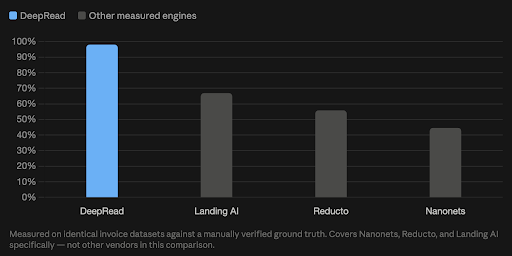
Most of the comparison above rests on vendor positioning, since no shared benchmark spans this full list. One place accuracy on invoices specifically is genuinely measured and checkable:
DeepRead's benchmark runs identical invoice datasets through multiple engines against a manually verified ground truth, with results and methodology public.
On the Invoice document type specifically, published results show:
- DeepRead: 97.8%
- Landing AI: 66.7%
- Reducto: 55.6%
- Nanonets: 44.4%
Worth being precise about scope here: this measures three named competitors specifically, Nanonets, Reducto, and Landing AI, not Veryfi, Textract, Azure, Google, ABBYY, Parseur, or IronOCR, since those weren't part of the measured comparison. It's one genuinely checkable data point in a category full of marketing claims, not a claim of superiority over every API in the table above. View results for Deepread’s invoice performance.
How to Actually Evaluate an Invoice OCR API
- Run your own invoices through it, not a demo invoice — format inconsistency across your actual vendor base is where accuracy claims tend to fall apart.
- Check field coverage against your specific needs. Do you need line-item-level extraction, tax breakdowns, or PO matching, and does the API return those without custom configuration?
- Test actual latency, not a published average; if your workflow depends on near-real-time approval, batch-oriented APIs may not fit regardless of accuracy.
- Ask what happens to low-confidence fields. A flagged uncertain field is safer than one silently returned wrong, especially for financial data feeding a payment workflow.
- Confirm compliance certifications directly (SOC 2, GDPR, HIPAA if relevant) rather than trusting a badge on a marketing page.
- Check whether accuracy claims are independently verifiable — ask what document set a number was measured against, and whether that methodology is public.
Conclusion
There's no single "best" here. DeepRead and Veryfi both suit teams wanting a purpose-built financial-document specialist with strong out-of-the-box accuracy — DeepRead specifically stands out as the one entry with a checkable, multi-document-type benchmark behind its numbers rather than accuracy asserted on faith. AWS Textract, Azure, and Google Document AI suit teams already inside that cloud ecosystem willing to build the surrounding pipeline themselves;
Nanonets and Parseur suit no-code teams wanting fast setup; ABBYY suits large enterprises with budget for a mature, full-featured platform; IronOCR and open-source suit teams wanting a component rather than a service.
Every option here has a real, specific limitation worth knowing before you commit — including newness and review footprint in DeepRead's own case, and none of them are disqualifying on their own. What should disqualify a choice is skipping the step of testing accuracy on your own invoices before deciding.
FAQ
What's the difference between a general OCR API and an invoice-specific one?
A general OCR API extracts text and requires custom work to map it to invoice fields like line items or PO numbers. An invoice-specific API or model (like Textract's AnalyzeExpense or a purpose-built invoice platform) is pre-trained specifically on invoice layout and returns those fields directly, without custom template configuration.
Is a specialist invoice OCR API always better than a general-purpose one?
Not necessarily; it depends on your existing infrastructure and whether invoices are your only document type. Teams already standardized on AWS, Azure, or GCP often get strong invoice-specific results from that provider's prebuilt models without adding another vendor; teams wanting a financial-document specialist with built-in fraud detection may prefer a purpose-built option.
Does OCR speed actually matter for invoice processing?
It depends on your workflow. If invoices need near-real-time approval or immediate ERP sync, low-latency, synchronous processing matters. If you're processing large batches on a schedule (end-of-day, end-of-month), asynchronous batch processing is usually simpler and often more cost-effective.
How is invoice OCR accuracy actually measured?
Rigorously, it should be checkable: the same invoice dataset run through multiple engines, compared against a manually verified ground truth, with the methodology published rather than summarized as a single number. If a vendor's accuracy claim doesn't specify what it was measured against, treat it as a starting point, not a verified figure.
Do I need fraud detection built into my OCR API, or can I build that separately?
Either can work — some invoice-specialist APIs bundle fraud detection (duplicate invoices, phantom vendors) directly, which saves building that logic yourself; general-purpose extraction APIs typically leave fraud checks entirely to your downstream workflow, which gives more control but more implementation work.
More articles
AWS Textract Alternatives
Looking for an AWS Textract alternative? Compare 8 options on published pricing, limits, and best use, plus why teams leave Textract and how to switch.
Top AI Tools for HR Document Processing
Compare top AI tools for HR document processing: payslip and onboarding extraction, document generation, e-signature routing, and RPA, with pricing and limits.