%20{%20:root%20{%20--deepread-stroke:%20%23E5E7EB;%20}%20}%20.dark%20{%20--deepread-stroke:%20%23E5E7EB;%20}%20%3c/style%3e%3crect%20x='40'%20y='30'%20width='220'%20height='260'%20rx='28'%20ry='28'%20stroke='var(--deepread-stroke)'%20stroke-width='16'%20fill='none'/%3e%3cpath%20d='M180%2030v52c0%2010%208%2018%2018%2018h62'%20stroke='var(--deepread-stroke)'%20stroke-width='16'%20fill='none'/%3e%3cline%20x1='70'%20y1='130'%20x2='200'%20y2='130'%20stroke='var(--deepread-stroke)'%20stroke-width='16'%20stroke-linecap='round'/%3e%3cline%20x1='70'%20y1='165'%20x2='200'%20y2='165'%20stroke='var(--deepread-stroke)'%20stroke-width='16'%20stroke-linecap='round'/%3e%3cline%20x1='70'%20y1='200'%20x2='170'%20y2='200'%20stroke='var(--deepread-stroke)'%20stroke-width='16'%20stroke-linecap='round'/%3e%3c!--%20green%20download%20arrow%20in%20bottom%20right%20corner%20--%3e%3cpath%20d='M210%20202v58'%20stroke='var(--deepread-accent)'%20stroke-width='18'%20stroke-linecap='round'/%3e%3cpath%20d='M195%20245l15%2015%2015-15'%20fill='none'%20stroke='var(--deepread-accent)'%20stroke-width='18'%20stroke-linecap='round'%20stroke-linejoin='round'/%3e%3c/svg%3e)
Top AI Tools for HR Document Processing
Compare top AI tools for HR document processing: payslip and onboarding extraction, document generation, e-signature routing, and RPA, with pricing and limits.
HR runs on documents: offer letters, tax forms, IDs, payslips, benefits forms, contracts, and policy acknowledgments. Every new hire creates a stack of them, and every payroll cycle adds more. AI tools for HR document processing take over the repetitive parts, which are reading the documents, checking that they are complete, filling the HR system, generating the next document, and routing it to the right person for approval and signature.
The market is wider than the name suggests. Some tools read documents into data, some collect and verify onboarding paperwork inside an HR platform, some generate and sign documents, and some bots move the data between systems. This guide explains how these fit together, compares ten tools by type with pricing and limits from each vendor's own pages as of November 2026, and covers security, compliance, and how to choose for a mid-size company. For the routing side of the picture, DeepRead's overview of intelligent document workflow automation shows how documents move from intake to approval.
What HR Document Processing Automation Is
HR document processing automation uses OCR and AI to capture HR documents, classify them, extract their fields, check the results, and send approved data and documents to the next step. The documents involved fall into a few groups:
- Onboarding paperwork: offer letters, W-4 and I-9 forms, direct deposit forms, personal information forms, handbooks, and benefit enrollment documents.
- Identity and eligibility documents: driver's licenses, passports, and other IDs.
- Payroll documents: payslips, pay stubs, and W-2s.
- Agreements: employment contracts, NDAs, and IP assignment agreements.
- Ongoing HR records: policy acknowledgments, leave and benefits forms, and training records.
Older OCR tools only turned these into text. AI document understanding goes further and returns named fields, so a payslip becomes gross pay, net pay, deductions, and pay period. DeepRead's comparison of LLMs and OCR software explains how that shift changes what you can automate.
How AI Document Processing Works in HR
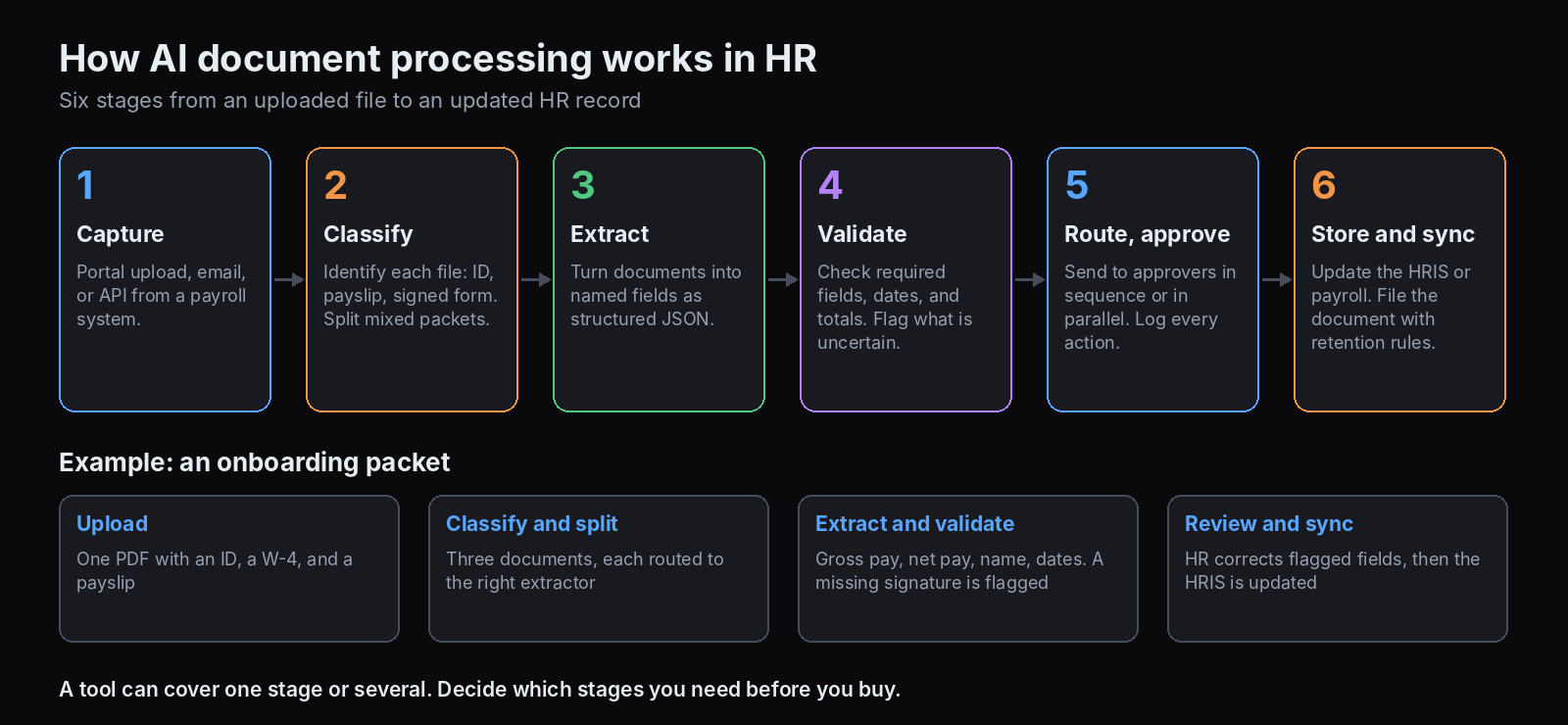
Most HR pipelines follow the same stages:
- Capture. New hires upload documents through a portal, HR forwards an email, or a payroll system sends files through an API.
- Classify. The system decides what each file is, such as an ID, a payslip, or a signed form, and splits mixed packets into separate documents.
- Extract to structured data. AI turns unstructured documents into structured JSON with named fields. This is the step that connects documents to your HR system. DeepRead's guide to structured data extraction covers how fields are defined and returned.
- Validate and verify. Rules check that required fields are present, dates are valid, and totals add up, and anything uncertain goes to a person. DeepRead's review of the most reliable data extraction service shows how to measure accuracy on your own documents.
- Route and approve. Documents go to the right approvers in sequence or in parallel, with every action logged.
- Store and sync. Approved data updates the HRIS or payroll system, and documents go to the employee file with the right retention and access controls.
A tool can cover one stage or several. Knowing which stages you need to automate is the best way to avoid buying the wrong product.
Types of AI Tools for HR Document Processing
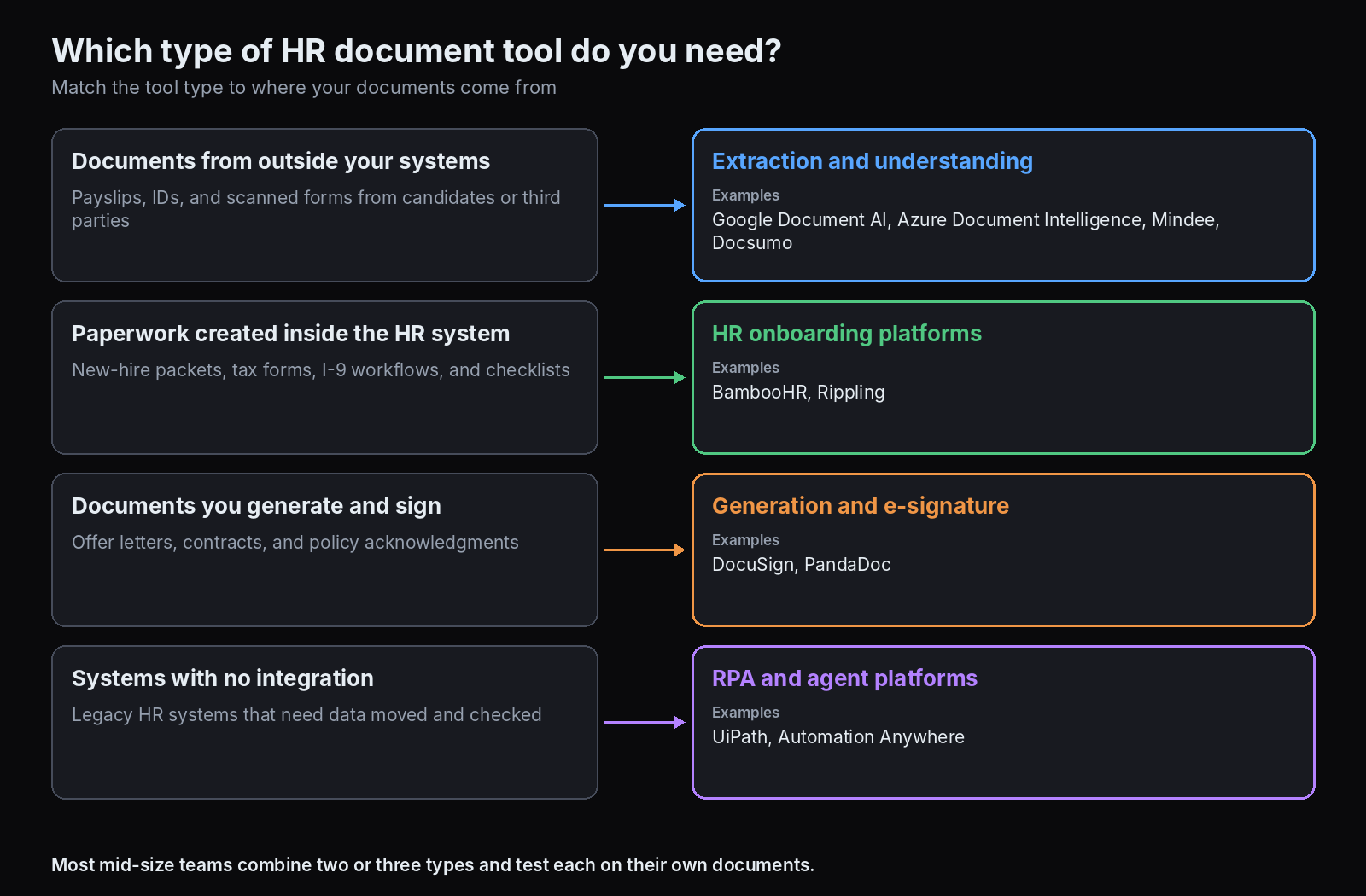
Document Extraction and Understanding Platforms
These read documents and return structured JSON. They include cloud APIs for developers and no-code IDP platforms for operations teams. Most are priced by page or document, a model DeepRead explains in its comparison of per-document and per-page pricing. They are the right choice when documents arrive from outside your systems, such as payslips from candidates or scanned onboarding forms.
HR Onboarding Platforms
HR platforms such as BambooHR and Rippling collect and track onboarding paperwork inside the system of record. They provide new-hire packets, e-signatures, checklists, and compliance workflows for forms such as the I-9. They are strongest when the documents are created and completed inside the platform.
Document Generation and E-Signature Platforms
Tools such as DocuSign and PandaDoc generate documents from templates, route them for approval, and collect signatures. They handle offer letters, contracts, and policy acknowledgments, and they keep an audit trail of who signed what and when.
RPA and Agent Platforms
RPA bots from vendors such as UiPath and Automation Anywhere move data between systems that lack integrations, and they can include document extraction and human review steps. They fit larger organizations with legacy HR systems.
Top AI Tools for HR Document Processing Compared
The tools were chosen to cover each stage of the HR document lifecycle, with published pricing or limits, validation or review features, integrations, and security information as the comparison points. Pricing and limits below come from each vendor's own pages as of November 2026. Where a vendor does not publish a price, the entry says so. Accuracy and speed figures that appear in the entries are the vendor's own and not independently verified.
Document Extraction and Understanding
Google Document AI
- What it automates: Extracting data from documents through specialized processors, including a Pay Slip parser, a W-2 parser, US driver license and passport parsers, a Form Parser, and a Custom Extractor.
- Pricing: The Pay Slip and W-2 parsers are $0.30 per document. The US Driver License and US Passport parsers are $10 per 1,000 pages. Form Parser and Custom Extractor are $30 per 1,000 pages up to 1 million pages, and Enterprise Document OCR is $1.50 per 1,000 pages.
- Limits: Synchronous requests are limited to 10 pages, and batch requests allow up to 200 pages per document. Failed requests are not billed.
- Best for: Developers building payroll or onboarding extraction on Google Cloud, especially for US payslips and W-2s.
- Pros: Purpose-built HR processors, published per-document prices, and a Custom Extractor for company-specific forms.
- Cons: It is an API and not an HR workflow, so routing, approval, and storage are yours to build.
Azure Document Intelligence
- What it automates: Reading documents with prebuilt and custom models in what Microsoft now calls Azure Document Intelligence in Foundry Tools, formerly Azure Document Intelligence, including a pay stub model that returns earnings, deductions, and net pay data as structured JSON.
- Pricing: Pay as you go by pages analyzed, with commitment tiers for high volume. A free tier covers 500 pages a month. Per-page rates by model are on Microsoft's pricing page.
- Limits: The pay stub model supports the en-us locale only. Paid-tier files can be up to 500 MB and 2,000 pages, while free-tier jobs process only the first two pages, with a 4 MB limit. Supported formats include PDF, JPEG, PNG, BMP, TIFF, and HEIF, and Office files are not accepted by prebuilt models.
- Best for: Teams already on Azure that need US pay stub and ID extraction.
- Pros: Generally available models, a free tier, a test studio, and SDKs and REST APIs.
- Cons: US-focused pay stub support, and no built-in HR workflow or review UI.
Mindee
- What it automates: A payslip API that returns employee, employer, pay period, gross and net pay, taxes and deductions, and year-to-date amounts.
- Pricing: A 14-day free trial with no card. After that, tiers depend on page volume and features, and Mindee points to its pricing page.
- Limits: Files up to 100 MB and 200 pages, with no encrypted or password-protected files. File types include PDF, JPEG, PNG, WebP, TIFF, and HEIC.
- Best for: Developers who need a dedicated payslip API across several countries and languages.
- Pros: It works with payslips in many formats without templates, and each value comes with a confidence score and its position on the page.
- Cons: The API returns sensitive fields, including social security numbers, so you must protect them. Mindee's accuracy figures, such as 97.2% on pay fields and 92.0% on taxes and deductions, are its own.
Docsumo
- What it automates: Reading documents such as pay stubs, W-2s, 1099s, driver licenses, and IDs, with a confidence score on each field and a review queue for exceptions.
- Pricing: A 14-day free trial covers 1,000 pages and 10 user licenses. Business and Enterprise plans are quoted by volume, with setup fees on top.
- Limits: Custom integrations are on Business and above, and cross-document validations are listed for Enterprise.
- Best for: Operations teams that want a no-code platform with human review for HR and payroll documents.
- Pros: Pre-trained models, validation and review features, and security measures that its site states, including SOC 2 Type 2, ISO 27001, HIPAA, and GDPR support.
- Cons: Paid pricing is not public, and the 99% field-level accuracy it states has no published method.
HR Onboarding Platforms
BambooHR
- What it automates: New-hire paperwork through e-signatures, new-hire packets, onboarding checklists, signed-document reports, and I-9 and E-Verify workflows powered by Mitratech.
- Pricing: Not published on the pages reviewed. BambooHR's help center says the New Hire Packet is included in the Core, Pro, and Elite packages.
- Limits: New hires can sign onboarding documents only in the web app, not the mobile app, because they cannot log in until their first day.
- Best for: HR teams that want guided onboarding paperwork inside their HR system.
- Pros: Candidate data from the ATS pre-fills the employee record, document status reports show what is signed and outstanding, and automated reminders keep tasks on schedule.
- Cons: Its onboarding page lists no AI features. It automates collection and signing, not extraction from outside documents such as payslips, so pair it with an extraction tool for that.
Rippling
- What it automates: Onboarding workflows that send offer letters and tax forms for e-signature, track completion of I-9s, W-4s, and other required documents, and sync data to payroll and IT, with AI that flags missing information and routes approvals.
- Pricing: Rippling's own pages differ. One comparison lists a custom quote, and another says pricing starts at $8 per employee a month, so confirm with Rippling.
- Limits: There is no free tier, and it requires a paid plan.
- Best for: Companies that want HR, payroll, and IT provisioning in one platform.
- Pros: Document management with signatures and audit trails, and setup steps that Rippling says can finish in about 90 seconds, though training and ramp-up still take longer.
- Cons: Published pricing is inconsistent, and the breadth of the platform makes it a larger commitment than a point tool.
Document Generation and E-Signature
DocuSign
- What it automates: E-signature workflows for HR documents such as offer letters and acknowledgments, with templates, conditional and parallel routing, bulk send, and more than 900 integrations.
- Pricing: Personal is $10 a month, Standard is $25 per user per month, and Business Pro is $40 per user per month, billed annually.
- Limits: Standard and Business Pro annual plans include up to 100 envelopes per user per year, and PowerForms and bulk sends count toward the allowance.
- Best for: Teams that need signature routing and an audit trail, with generation handled by templates or another system.
- Pros: Conditional routing logs approvals and signatures, and Business Pro adds forms, bulk send, and conditional logic.
- Cons: Envelope limits apply, and higher-volume use needs a custom plan.
PandaDoc
- What it automates: Generating documents from templates, then collecting signatures, with approval workflows on the Business plan.
- Pricing: Free for 5 documents a month. Starter is $19 per seat per month, and Business is $49 per seat per month, billed annually. Enterprise is per seat or per document.
- Limits: Starter allows up to 5 templates. Approval workflows are on Business, while web forms and bulk send are listed as optional add-ons. SSO, webhooks, the API, and US or EU data residency are on Enterprise, where workflow automation is also listed as an optional feature.
- Best for: HR teams that generate many offer letters and agreements from templates.
- Pros: Document creation and signing in one tool, and PandaDoc names HR among the teams that use its templates.
- Cons: Advanced workflow features sit in higher tiers.
RPA and Agent Platforms
UiPath
- What it automates: HR processes such as onboarding paperwork and HR letters, with Document Understanding that extracts data from images, PDFs, handwriting, signatures, checkboxes, and tables, and Validation Station for human review.
- Pricing: Community is free. Basic is listed at $25 a month, and UiPath says Basic is evolving. Standard and Enterprise are quote-based.
- Limits: Basic does not include document extraction, while Standard and Enterprise include it at scale.
- Best for: Larger organizations with legacy HR systems that need bots plus document extraction and approvals.
- Pros: Human-in-the-loop validation, an audit trail of Action Center actions, and robots that update HR systems.
- Cons: Extraction sits in quote-based tiers, and the platform is more than a mid-size HR team usually needs.
Automation Anywhere
- What it automates: Its Agentic App Store lists an Employee Onboarding AI agent that downloads HR mailbox emails and attachments, extracts employee details from PDFs, validates them, routes errors to human verification, and sends confirmations.
- Pricing: That agent is listed as free, and platform pricing is not published on the pages reviewed.
- Limits: The agent is published by a community vendor and not by Automation Anywhere, and it lists PDF attachments only. It requires the Automation 360 Control Room.
- Best for: Teams already on Automation Anywhere that want a starting point for onboarding email processing.
- Pros: Validation, human verification, and an automatic return to the workflow after review.
- Cons: Treat it as a starter template. The validation rules are not described, and it has few downloads and reviews.
Automating HR Document Generation, Routing, and Approvals at Scale
For generated documents such as offer letters, contracts, and policies, the pattern is a locked template, merge fields filled from your ATS or HRIS, an approval route, a signature step, and filing of the signed copy. At enterprise scale, the details that matter are:
- Approval logic. Conditional routing sends a document to different approvers based on its content, and parallel routing avoids waiting for each approver in turn. DocuSign describes both, and it logs routing approvals and signature activity as an audit trail.
- Bulk operations. Bulk send lets HR issue the same document, such as a policy acknowledgment, to many employees at once. DocuSign lists it on Business Pro, and PandaDoc lists it as an optional add-on to its Business plan.
- System connections. Data should flow from and back to the ATS, HRIS, and payroll, through native integrations, webhooks, or APIs.
- Version and template control. Use approved templates so legal language does not drift between documents.
- Audit records. Every send, approval, and signature should be logged and exportable.
Security and Compliance for HR Documents
HR documents hold some of the most sensitive data a company has, including social security numbers, bank details, and ID images. A few controls matter regardless of tool:
- Access control. Limit who and what can see employee files, and use role-based permissions.
- Redaction and retention. Remove sensitive fields where they are not needed, and set retention periods that match your legal requirements.
- Audit logs. Record who viewed, changed, or approved each document.
- Data location. Know where documents are processed and stored, and whether you can choose a region.
- Vendor evidence. Ask for certifications and what they cover. Docsumo's site states SOC 2 Type 2 and ISO 27001, for example, and you should confirm the scope.
- Human review. Keep a person in the loop for uncertain values and for decisions that affect employees.
The EU AI Act also matters if you operate in Europe. Under the Digital Omnibus on AI, which the European Parliament adopted on 16 June 2026 and which was reported as approved by the Council on 10 July 2026, obligations for stand-alone high-risk systems apply from 2 December 2027, and employment and HR uses are among the listed areas. Extracting fields from a payslip is not automatically high-risk, but using AI to screen or rank candidates can be, so confirm classification with counsel and check the final published text.
HR Document Automation for Mid-Size Companies (250 to 1,000 Employees)
At this size, HR usually has a small team, an HRIS or payroll system, and a mix of documents that arrive from inside and outside the system. A practical approach is to build in layers:
- Start with the HR platform. If onboarding paperwork and e-signatures are not already automated, a platform such as BambooHR or Rippling handles collection, signing, and reminders in one place.
- Add extraction for documents from outside. Payslips, IDs, and scanned forms that arrive from candidates or third parties are better handled by an extraction tool, either a no-code platform or an API.
- Use a signature tool for generated documents if your HR platform does not generate and route the documents you need.
- Add RPA only where integrations are missing. Bots earn their cost when a legacy system has no API.
Start with one document type and one outcome, such as onboarding paperwork for new hires or payslip data for income checks, and measure results before expanding.
Using an Extraction API for HR Documents
Teams that build their own HR workflows can use an extraction API for the reading step and keep their own rules and approvals around it. DeepRead is one option. It returns a document as Markdown and returns the fields you define in a schema as JSON, each linked to its page and source text, and it flags uncertain values with a needs_review flag and a reason instead of a numeric confidence score. A review interface for flagged fields is on every plan.
For HR data, the Enterprise plan adds the controls that matter most: retention controls from 1 to 365 days, incognito processing, PII redaction, EU and AU data residency, and SSO and SAML. The Free plan covers 2,000 pages a month with no card and accepts PDF, PNG, and JPEG files up to 15 MB. Paid usage is $15 per 1,000 pages for Extract and $35 for Deep Extract, and webhooks are available from the Standard plan. It extracts data and does not run onboarding or approvals, so pair it with your HR platform or workflow tool.
How to Choose
- Map your HR documents. List what you handle, where each arrives from, and which stage you want to automate.
- Pick the tool type that matches. Outside documents need extraction, internal paperwork needs an HR platform, generated documents need a generation and signature tool, and missing integrations need RPA.
- Test on your own documents. Run real payslips, IDs, and forms, and measure field accuracy and how many need review.
- Check validation and review. Make sure uncertain values are flagged with a reason and sent to a person.
- Confirm integrations. Check that data reaches your HRIS, payroll, and ATS without manual steps.
- Review security and cost. Check access controls, retention, redaction, and how pricing scales.
- Plan the rollout. Start with one workflow, assign an owner, and add document types one at a time.
Conclusion
The best AI tool for HR document processing depends on which part of the document lifecycle you want to automate. Extraction platforms and APIs turn payslips, IDs, and forms into structured data. HR platforms collect and track onboarding paperwork. Generation and signature tools produce and route offer letters and agreements. RPA connects systems that lack integrations. Most mid-size companies combine two or three of these, test them on their own documents, and keep a person in the loop for anything uncertain or sensitive.
Frequently Asked Questions
What are the top AI tools for HR document processing?
It depends on the job. For extraction, Google Document AI, Azure Document Intelligence, Mindee, and Docsumo read payslips, IDs, and forms. For onboarding paperwork, BambooHR and Rippling. For generation and signatures, DocuSign and PandaDoc. For RPA, UiPath and Automation Anywhere.
How do AI tools turn HR documents into structured JSON?
They classify the document, read it with OCR and AI, and return named fields such as employee name, gross pay, and net pay in JSON. Good tools add validation and a review step for uncertain values.
What is the best software for automating HR employee documentation for mid-size companies?
Many mid-size companies combine an HR platform for onboarding paperwork, an extraction tool for outside documents, and a signature tool for generated documents. Choose by document type, and test on your own files first.
How much does HR document automation cost?
It ranges from free tiers to custom contracts. As of November 2026, examples include Google Document AI's Pay Slip parser at $0.30 per document, DocuSign Standard at $25 per user a month billed annually, and PandaDoc Business at $49 per seat a month billed annually. Several HR platforms and RPA vendors use custom quotes.
How secure is AI document processing for sensitive HR data?
It depends on the tool and how you configure it. HR files contain social security numbers, bank details, and ID images, so look for role-based access, redaction, retention controls, audit logs, a choice of data region, and certifications whose scope you have confirmed. Keep a person in the loop for uncertain values.
Can these tools connect to our HRIS or payroll system?
Most offer integrations, webhooks, or APIs. HR platforms such as BambooHR and Rippling sync data inside their own systems, extraction tools typically push JSON through webhooks or APIs, and RPA bots can update systems that have no API. Confirm that the specific system you use is supported before you buy.
Does the EU AI Act apply to HR document automation?
It can. Employment and HR uses are among the high-risk areas, with obligations for stand-alone systems applying from 2 December 2027. Extracting fields from a payslip is not automatically high-risk, while screening or ranking candidates can be, so check with counsel.
More articles
AWS Textract Alternatives
Looking for an AWS Textract alternative? Compare 8 options on published pricing, limits, and best use, plus why teams leave Textract and how to switch.
Automated Data Entry Software
Compare automated data entry software by type: AI extraction, RPA, and integrations. See how it works, real-time error correction, and tools with pricing.