%20{%20:root%20{%20--deepread-stroke:%20%23E5E7EB;%20}%20}%20.dark%20{%20--deepread-stroke:%20%23E5E7EB;%20}%20%3c/style%3e%3crect%20x='40'%20y='30'%20width='220'%20height='260'%20rx='28'%20ry='28'%20stroke='var(--deepread-stroke)'%20stroke-width='16'%20fill='none'/%3e%3cpath%20d='M180%2030v52c0%2010%208%2018%2018%2018h62'%20stroke='var(--deepread-stroke)'%20stroke-width='16'%20fill='none'/%3e%3cline%20x1='70'%20y1='130'%20x2='200'%20y2='130'%20stroke='var(--deepread-stroke)'%20stroke-width='16'%20stroke-linecap='round'/%3e%3cline%20x1='70'%20y1='165'%20x2='200'%20y2='165'%20stroke='var(--deepread-stroke)'%20stroke-width='16'%20stroke-linecap='round'/%3e%3cline%20x1='70'%20y1='200'%20x2='170'%20y2='200'%20stroke='var(--deepread-stroke)'%20stroke-width='16'%20stroke-linecap='round'/%3e%3c!--%20green%20download%20arrow%20in%20bottom%20right%20corner%20--%3e%3cpath%20d='M210%20202v58'%20stroke='var(--deepread-accent)'%20stroke-width='18'%20stroke-linecap='round'/%3e%3cpath%20d='M195%20245l15%2015%2015-15'%20fill='none'%20stroke='var(--deepread-accent)'%20stroke-width='18'%20stroke-linecap='round'%20stroke-linejoin='round'/%3e%3c/svg%3e)
Intelligent Document Workflow Automation: How to Actually Build It
How to actually build intelligent document workflow automation - architecture, integration patterns, compliance design, and common implementation pitfalls.
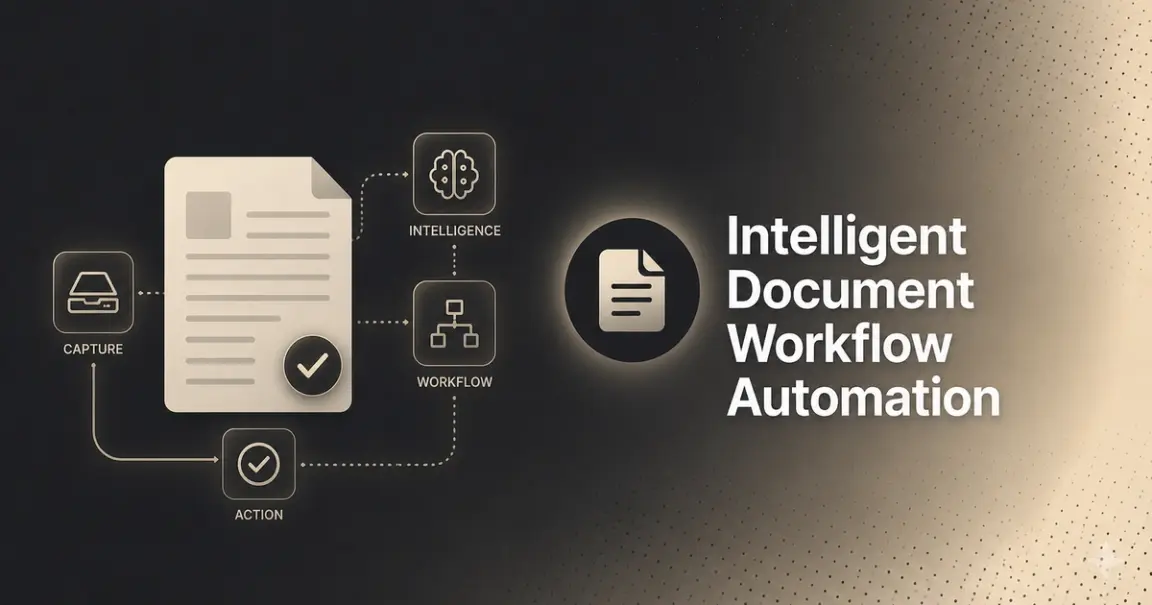
Most content on intelligent document workflow automation explains what it is. This is about what happens after you've decided to build one — the architecture decisions, integration patterns, and implementation choices that determine whether a project ships and holds up in production, or stalls somewhere between the pilot and the rollout.
If you already know the difference between RPA, IDP, and IPA, skip to "Reference Architecture." If you want the short version first: RPA automates repetitive, rule-based tasks and can become brittle when inputs, layouts, or interfaces change. IDP adds AI and machine learning to handle documents in variable formats — it's designed to extract from new or varied layouts it wasn't explicitly trained on, though how well it does so depends on the specific tool, document type, and configuration. IPA is the broader layer that combines both with orchestration and decision logic across an entire workflow, not just one task.
Reference Architecture
Strip away the vendor branding, and almost every implementation in this category is built from the same six components:
- Capture — documents arrive from email, upload, scan, or API, in whatever format they arrive in.
- Classification — the system identifies what kind of document it's looking at before deciding how to process it.
- Extraction — OCR and ML models pull structured fields out of the document.
- Validation and confidence scoring — extracted data is checked against business rules, and each field gets a confidence score.
- Exception routing — anything below a confidence threshold, or that fails validation, goes to a human reviewer instead of being processed blind.
- Orchestration — validated data is written into downstream systems, triggering whatever comes next.
The diagram below shows how these pieces typically connect, including the branch back to human review — this is the part of the architecture most implementations get wrong, either by skipping it or bolting it on as an afterthought rather than designing it in from the start.
Steps 1–3 are largely commoditized at this point — most modern extraction engines handle common document types reasonably well. Steps 4–6 are where implementations actually differentiate, and where most of the engineering effort in a real build goes.
The Decisions That Actually Determine Whether This Works
Synchronous vs. asynchronous processing. If you're processing documents one at a time as they arrive, synchronous calls are simpler to build. If you're processing batches — end-of-day invoice runs, bulk claims intake — synchronous calls will block your application and time out on large batches. Async processing with a callback or webhook is the only pattern that scales past small volumes, and it's worth designing for this from day one rather than retrofitting it after a pilot succeeds and volume grows.
Confidence thresholds. Every extraction engine returns some form of per-field confidence score. The threshold you set for "auto-approve" vs. "route to human review" is a business decision, not a technical one, set it too high and your exception queue balloons with fields that were actually correct; set it too low and errors slip through untouched. This threshold should be tuned against your actual documents during the pilot, not set once and left alone, since document mix and vendor behavior shift over time.
Where human review actually sits. Exception routing only works if there's a real person, with real bandwidth, reviewing flagged items in a reasonable time window. Teams frequently design the technical routing correctly and then discover the review queue has no owner, or the person assigned to it has no time budgeted for it. This is an organizational decision as much as a technical one, and it needs an owner before launch, not after the queue starts backing up.
Schema stability. Downstream systems (ERP, CRM, case management) expect a consistent data shape. If your extraction layer's output schema changes — new fields, renamed fields, restructured nesting — every downstream integration that consumes it needs to change too. Decide early whether your extraction layer supports versioned or backward-compatible schemas, because this is expensive to fix retroactively once multiple systems depend on a specific output shape.
Feedback loop from human corrections. When a reviewer corrects a flagged field, does that correction feed back into improving future extraction, or does it just fix that one document? Systems that treat every correction as a one-off don't actually improve over time; systems designed to learn from corrections do; this is worth confirming with any extraction provider before you build around it.
Integration Patterns
Three patterns cover most real implementations:
Webhook-driven. The extraction layer processes a document asynchronously and calls a webhook endpoint you control when it's done, delivering the structured result directly. This is the lowest-latency, lowest-overhead pattern for most production pipelines, since it avoids polling and lets your system react the moment data is ready.
Polling. Your system periodically checks a status endpoint for completed jobs. Simpler to implement than webhooks in some environments, but adds latency and unnecessary load, especially at higher volumes, generally worth avoiding once you're past a pilot.
Event queue-based. For teams already running message queues (SQS, Kafka, etc.), extraction results can be published as events that downstream consumers subscribe to. This decouples the extraction layer from any single downstream system and scales well for organizations with many consumers of the same document data, but adds infrastructure complexity that's rarely worth it for a first implementation.
For most teams building their first intelligent document workflow, webhook-driven is the right default, it's simple enough to implement quickly and scales further than most first projects will need before it's worth revisiting.
If You're Adding Agentic Decisioning on Top
A newer layer showing up in more implementations: instead of extracted, validated document data going straight to a human or a fixed workflow rule, it's handed to an AI agent that reasons over it and takes further action, flagging, prioritizing, or in some cases acting autonomously on well-defined tasks.
If you're considering this layer, the implementation implication is direct: an agent's decisions are only as reliable as the document data it's reasoning over. This makes the extraction and confidence-scoring layers more important to get right, not less; a sophisticated agent making decisions on inaccurate or poorly-flagged data will simply make confident, wrong decisions faster than a human would have. Don't add an agentic decision layer before the extraction and exception-handling foundation underneath it is solid.
Compliance Requirements to Design In From Day One
It's worth being precise here rather than assuming the worst or the least. Regulatory frameworks like the EU AI Act apply obligations based on risk classification and specific use case, not a blanket rule that every document workflow is automatically high-risk — a general invoice-extraction pipeline is treated differently than a system making automated decisions about credit, employment, or identity verification, which typically face stricter requirements. Obligations under the Act are also phasing in over several years rather than applying all at once.
The practical implication for implementation: check whether your specific use case and document types fall into a higher-risk category before assuming you need extensive explainability tooling. But regardless of current classification, it's worth building a few things into the architecture from the start, since regulatory scope tends to expand over time and retrofitting these after launch is far more expensive than designing them in:
- Audit logging by default — what was extracted, what was flagged, who reviewed it, and when, reconstructable on demand.
- Confidence scores retained, not just used transiently at decision time and discarded.
- Decision traceability — for any document, you should be able to answer exactly why it was auto-processed or routed to review.
Common Implementation Pitfalls
- Scoping the pilot too broadly. "Automate all AP documents" fails more often than "automate one invoice format from three known vendors." Narrow scope first, prove the numbers, then expand.
- Treating exception handling as an afterthought. If the review queue has no owner and no time budget, the automation just shifts the bottleneck instead of removing it.
- Assuming pilot accuracy holds at scale. A pilot on curated documents doesn't guarantee the same accuracy on the full, messier document mix production will actually see.
- No plan for schema evolution. The first version of your extraction schema is rarely the last. Build for change, not just for launch.
- Ignoring the feedback loop. If human corrections don't feed back into the system, you're paying for review labor indefinitely instead of the system improving over time.
- Adding orchestration complexity before the foundation is solid. Agentic decisioning, complex multi-system orchestration, and advanced routing logic are all easier to add once extraction and exception handling are proven — not before.
Where the Document Intelligence Layer Fits
Everything in this architecture — steps 4 through 6, the decisions above, the integration patterns- depends on step 3 being reliable. A workflow orchestration layer built on top of inaccurate extraction just automates the production of errors faster.
This is the layer DeepRead is built for specifically: schema-driven structured extraction with per-field confidence scores, asynchronous processing for batch volume, webhook delivery so results land directly in your system without polling, and a needs_review flag on any field the model isn't confident about, designed to plug into exactly the architecture described above rather than requiring you to build your workflow around a closed platform. Extraction accuracy across document types is measured and published on the benchmarks page, rather than asserted as a marketing number, since that's the one claim in this whole architecture worth being able to check yourself before you build on top of it.
Implementation Checklist
- Extraction accuracy validated on your actual documents, not a demo set, before committing to an architecture
- Async and webhook support confirmed, if you're processing anything beyond low, one-at-a-time volume
- Confidence threshold tuned during the pilot, not set once and forgotten
- Human review queue has a named owner with allocated time before launch
- Schema versioning or backward-compatibility plan in place before multiple systems depend on the output
- Audit logging and decision traceability built in, regardless of current regulatory classification
- Feedback loop from corrections confirmed — does the system actually improve, or does every correction stay a one-off?
Conclusion
Intelligent document workflow automation isn't difficult to explain — it's difficult to implement well. The architecture is fairly consistent across the category: capture, classify, extract, validate, route exceptions, orchestrate. What separates a project that works in production from one that stalls after the pilot is rarely the high-level architecture; it's the decisions underneath it: how confidence thresholds are tuned, who owns the exception queue, whether the schema can evolve, and whether corrections actually make the system smarter over time.
Get the extraction layer right first. Everything built on top of it — workflow orchestration, agentic decisioning, compliance logging- inherits its accuracy, for better or worse.
If you're at the architecture stage and want to validate the extraction layer before building around it, DeepRead's free tier processes documents with no credit card required, enough to test accuracy and confidence scoring on your actual document mix before committing engineering time to the integration.
FAQ
What's the difference between building this myself versus buying a platform?
Buying a platform gets you a faster start with a fixed workflow shape. Building gives you control over schema, integration patterns, and how exception handling fits your specific process, worth it when your documents or workflow don't fit a standard platform's template, not worth it if they do.
Should I use webhooks or polling for document processing results?
Webhooks, for almost every production use case. Polling adds latency and unnecessary load as volume grows, and webhook delivery is a standard, well-supported pattern across most modern extraction APIs.
How do I set the right confidence threshold for auto-approval vs. human review?
There's no universal number — it depends on your risk tolerance and document mix. Start conservative during the pilot (more items routed to review than you expect to need long-term), measure how many flagged items turn out to actually be correct, and adjust the threshold based on that data rather than guessing upfront.
Does the EU AI Act require explainability for all document automation?
No - obligations are risk- and use-case-based, not blanket. A standard document-extraction workflow is treated differently than a system making automated decisions about credit, employment, or identity. It's still worth building audit logging and traceability in regardless, since regulatory scope in this area continues to evolve.
What's the most common reason these implementations fail after a successful pilot?
Scope creep at rollout (expanding to document types the pilot never tested), an exception queue with no real owner, or a schema that wasn't designed to change — all organizational and architectural issues, not accuracy problems.
More articles
Structured Data Extraction: A Technical Guide
How to extract structured data from documents using an AI API, the architecture, grounding, and named tools compared.
Key Features of AI Document Workflow Automation
AI document workflow automation features, governance, prioritization framework, and real examples with measurable benefits for 2026.