%20{%20:root%20{%20--deepread-stroke:%20%23E5E7EB;%20}%20}%20.dark%20{%20--deepread-stroke:%20%23E5E7EB;%20}%20%3c/style%3e%3crect%20x='40'%20y='30'%20width='220'%20height='260'%20rx='28'%20ry='28'%20stroke='var(--deepread-stroke)'%20stroke-width='16'%20fill='none'/%3e%3cpath%20d='M180%2030v52c0%2010%208%2018%2018%2018h62'%20stroke='var(--deepread-stroke)'%20stroke-width='16'%20fill='none'/%3e%3cline%20x1='70'%20y1='130'%20x2='200'%20y2='130'%20stroke='var(--deepread-stroke)'%20stroke-width='16'%20stroke-linecap='round'/%3e%3cline%20x1='70'%20y1='165'%20x2='200'%20y2='165'%20stroke='var(--deepread-stroke)'%20stroke-width='16'%20stroke-linecap='round'/%3e%3cline%20x1='70'%20y1='200'%20x2='170'%20y2='200'%20stroke='var(--deepread-stroke)'%20stroke-width='16'%20stroke-linecap='round'/%3e%3c!--%20green%20download%20arrow%20in%20bottom%20right%20corner%20--%3e%3cpath%20d='M210%20202v58'%20stroke='var(--deepread-accent)'%20stroke-width='18'%20stroke-linecap='round'/%3e%3cpath%20d='M195%20245l15%2015%2015-15'%20fill='none'%20stroke='var(--deepread-accent)'%20stroke-width='18'%20stroke-linecap='round'%20stroke-linejoin='round'/%3e%3c/svg%3e)
Key Features of AI Document Workflow Automation
AI document workflow automation features, governance, prioritization framework, and real examples with measurable benefits for 2026.
"AI workflow automation" is used for two different things: general task and project automation (Jira tickets, Slack notifications, project prioritization) and document-specific automation, which routes, classifies, and processes the documents a business generates. This guide is about the second. It covers the features that separate document workflow automation from generic task automation, the AI technologies behind those features, how to govern AI-driven decisions, how to choose which processes to automate first, and how to measure results. The category itself is defined more broadly in DeepRead's overview of intelligent document workflow automation.
Key Features, Organized by the AI Technology Behind Them
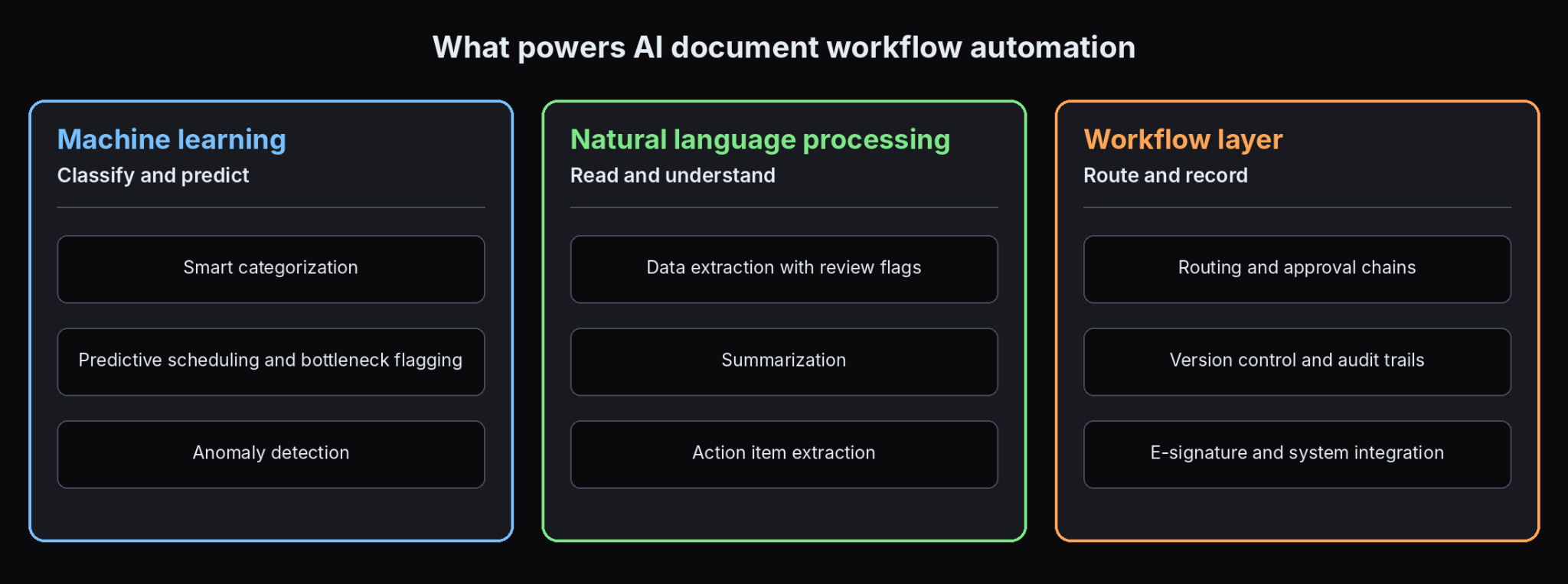
Document workflow automation features are powered by two different technologies that solve different problems, so it helps to see them separately.
Machine learning powers
- Smart categorization. Sorting incoming documents by type or priority from learned patterns instead of fixed rules.
- Predictive scheduling and bottleneck flagging. Identifying which documents or approvals are likely to miss a deadline, based on historical patterns.
- Anomaly detection. Spotting unusual patterns in extracted data, such as an invoice amount far outside a vendor's typical range or a field that does not match expected values.
Natural language processing (NLP) powers
- Data extraction with review flags or confidence scores. Reading and pulling key information from contracts, invoices, and forms, with a flag or score attached to each value so uncertain fields go to review instead of being silently accepted or blocking the whole document.
- Summarization. Condensing a long contract or report into its key points so a reviewer can act without a full manual read.
- Action item extraction. Reading email threads or correspondence and pulling out specific tasks or obligations.
DeepRead's extraction API is one example of the flagging approach. Instead of a numeric confidence score, uncertain fields come back marked needs_review with a review_reason, and each field returns its page, bounding box, and source text so a reviewer can check it quickly. It covers the extraction step of a broader workflow. It is a component you build a workflow around, not a full workflow automation platform. How that kind of extraction works under the hood is covered in our guide to structured data extraction.
The workflow layer adds
- Intelligent routing and approval chains. Documents move to the right reviewer or approver based on content, value, or business rules.
- Version control and audit trails. Every change and approval step is logged, supporting dispute resolution and regulatory review.
- E-signature integration. Documents that need a signature move straight into that step.
- API and system integration. Connections into an ERP, CRM, or accounting platform so processed data flows downstream.
A Concrete Example: Document Triage in Practice
Consider a team managing hundreds of incoming documents a week, with invoices, contracts, and support correspondence mixed together. Manual triage can take hours and produces inconsistent prioritization depending on who does it. AI-driven triage analyzes each document, categorizes it by type and urgency, routes it to the person or team with the relevant expertise, and can predict how long processing will take from similar past documents, all as one automated step instead of a person sorting the queue first.
Governance Principles for Responsible AI-Driven Prioritization
AI that decides document priority and routing needs guardrails, not just capability. For agents that act on documents instead of only routing them, DeepRead's guide to guardrails for autonomous AI agents goes deeper on the controls.
- Agree upfront which inputs drive priority, and which should not, before the system starts deciding from patterns nobody approved.
- Set clear limits on what automation can do without human approval. Routing a routine document or flagging an uncertain extraction is reasonable to automate. Final approval of a high-value contract is not.
- Require explainability for recommendations that affect real outcomes. If a system flags a document as high priority or routes it a certain way, a person should be able to see why.
- Audit outputs regularly for drift, bias, and unhelpful patterns. Model behavior can shift as it meets new document types, and periodic review catches this early.
- Assign clear ownership for changes to rules, workflows, and decision logic. One specific person should be responsible for updating automation rules as processes evolve.
How to Prioritize Which Document Processes to Automate First
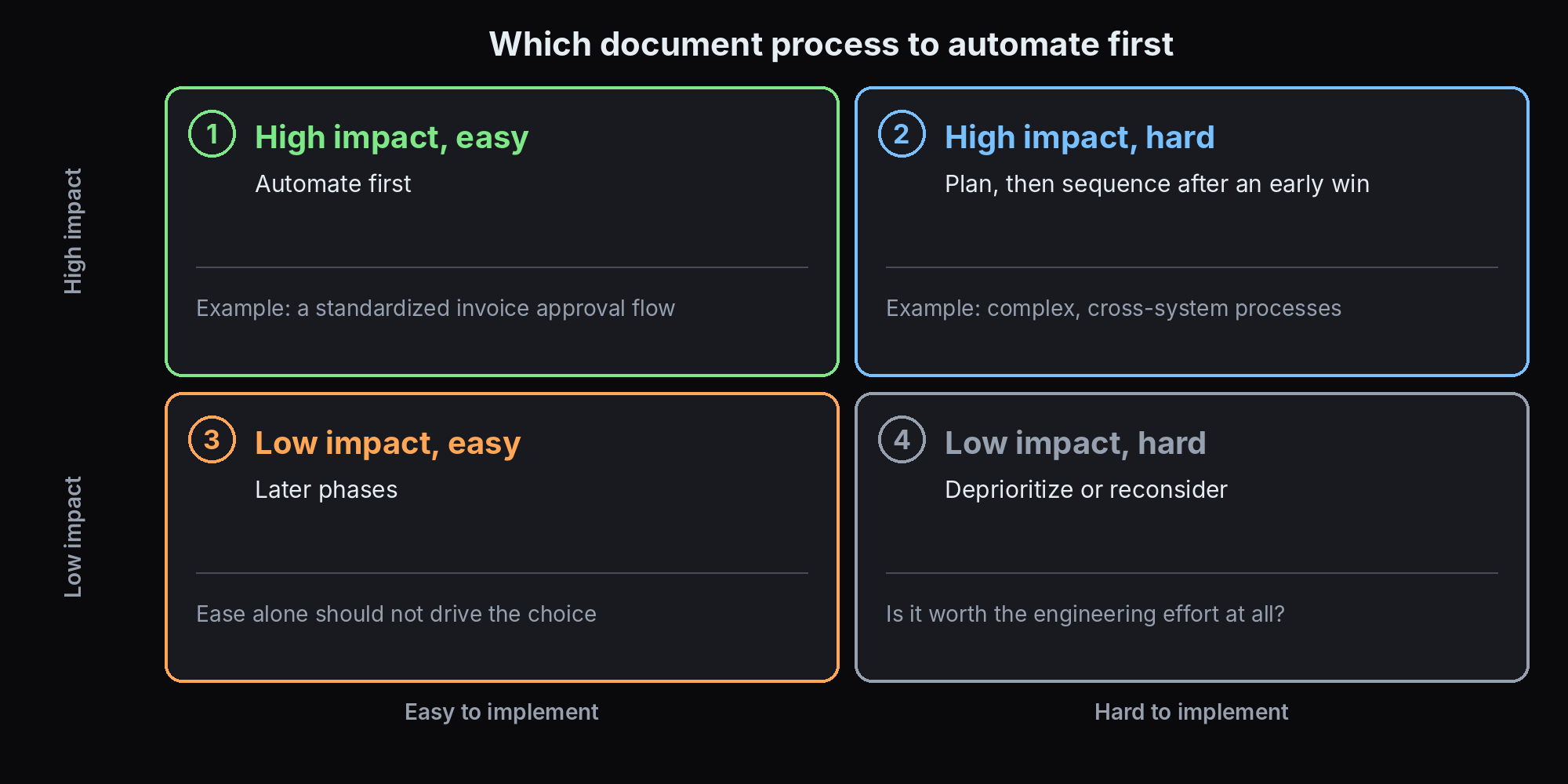
Most organizations have more candidate processes than budget or engineering capacity. The framework is simple: weigh business impact against ease of implementation, instead of automating whatever is most visible or most requested.
- High impact, easy to implement. Automate these first. A high-volume, error-prone, technically straightforward process, such as a standardized invoice approval flow, delivers fast, visible wins that build confidence for the next phase.
- High impact, hard to implement. Plan for these, but sequence them after an early win. Complex, cross-system processes take longer and carry more risk, so tackle them once the organization has some automation experience.
- Low impact, easy to implement. Reasonable for later phases, but ease alone should not drive prioritization, since a quick win that does not matter teaches little.
- Low impact, hard to implement. Deprioritize these, or reconsider whether they are worth automating at all.
A few practical steps matter beyond the weighing itself. Consult the team that works the process before automating it, and involve managers, end users, and legal or compliance stakeholders early so requirements are not discovered after the build. Keep the consultation going after launch on a recurring cadence, since the issues worth fixing often show up only once a workflow runs in real conditions.
Run small trial projects to validate an approach before committing broader resources, and expand deliberately. One new document type or process per quarter is a reasonable pace for most organizations. The next step, from a working pilot to production volume, is covered in DeepRead's guide to scaling unstructured document processing.
How to Measure Success
Track specific, named metrics from day one instead of relying on a sense that automation "seemed to help."
- Time saved, measured against your own pre-automation baseline for the specific process, not an industry average.
- Error reduction, tracked by error type where possible, since a drop in total errors matters less than knowing which error types declined.
- Workflow efficiency, meaning cycle time from document receipt to final resolution, which most directly shows whether bottlenecks cleared.
Adjust rules and models as processes evolve. Metrics are an ongoing signal for when a rule needs updating or a model needs retraining, tied back to the assigned-ownership principle above. The full set of formulas and baselines is laid out in the guide to metrics that measure document workflow automation ROI.
Electronic Document Workflow Automation Examples
- Invoice approval routing. An incoming invoice is classified, key fields (vendor, amount, due date) are extracted and matched against a purchase order, and it is routed to the right approver by amount threshold, instead of a person keying data and forwarding it. Benefit: faster approval cycles and fewer missed early-payment discounts.
- Contract review and approval. A submitted contract is classified by type, key clauses and obligations are extracted, and it goes to legal review with the relevant terms already surfaced. Benefit: faster turnaround on routine contracts, freeing legal time for complex agreements.
- HR onboarding document routing. New-hire paperwork, offer letters, tax forms, and benefit enrollments go to the right system and reviewer instead of waiting in a shared inbox. Benefit: a smoother onboarding experience and fewer administrative errors.
- Expense report approval. Receipts are classified, data extracted, and checked against policy, and a report is routed for approval only when something falls outside policy. Benefit: routine reports clear automatically, concentrating manual review on the exceptions.
Conclusion
AI document workflow automation is a distinct category from general task and project automation. It combines ML-powered classification and prediction, NLP-powered extraction and summarization, and a workflow layer for routing, approval, and audit trails. Adoption also needs real governance: agreed priority inputs, human-approval boundaries, explainability, and clear ownership, not just capability.
When more processes are candidates than you can tackle at once, weigh business impact against ease of implementation, start with high-impact, low-effort wins, and track specific, named metrics from day one. That is more reliable than automating whatever is loudest or most recently requested.
Frequently Asked Questions
What is the difference between AI document workflow automation and general AI workflow automation tools?
General AI workflow automation (Jira, Slack, project management platforms) handles task prioritization, scheduling, and team coordination. AI document workflow automation handles the documents themselves: classification, extraction, routing, and approval chains. They are different technical problems despite similar marketing language.
What AI technologies power document workflow automation?
Machine learning powers classification, predictive scheduling, and anomaly detection. Natural language processing powers data extraction, summarization, and action-item extraction from correspondence. Routing, version control, and system integration are workflow-layer capabilities built on top of both.
How should I decide which document process to automate first?
Weigh business impact against ease of implementation. Start with processes that are both high impact and straightforward to automate, since they deliver fast, visible wins before you tackle complex, cross-system processes.
What governance should be in place before letting AI make routing or priority decisions?
Agree upfront which inputs drive priority, set limits on what can happen without human approval, require explainability for recommendations, audit outputs regularly for drift or bias, and assign clear ownership for updating the rules and logic as processes change.
What metrics should I track to know whether document workflow automation worked?
Time saved against your own pre-automation baseline, error reduction by specific error type, and cycle time from document receipt to resolution, re-measured over time instead of checked once at launch.
Does DeepRead offer full document workflow automation?
No. DeepRead provides schema-driven data extraction with review flags (needs_review with a reason) and field-level source locations. Every plan includes a review UI for flagged fields, and Standard and Enterprise add webhooks. That covers one NLP-powered component of a broader workflow, not classification, routing, approval chains, or e-signature integration, so it fits the extraction step a workflow system would use and is not a substitute for the full platform.
More articles

Automated In-Bond Processing Documentation: A Compliance Guide
Automated in-bond processing explained, CBP requirements, ACE and eBond, deadlines, penalties, and where document extraction fits.
Structured Data Extraction: A Technical Guide
How to extract structured data from documents using an AI API, the architecture, grounding, and named tools compared.