%20{%20:root%20{%20--deepread-stroke:%20%23E5E7EB;%20}%20}%20.dark%20{%20--deepread-stroke:%20%23E5E7EB;%20}%20%3c/style%3e%3crect%20x='40'%20y='30'%20width='220'%20height='260'%20rx='28'%20ry='28'%20stroke='var(--deepread-stroke)'%20stroke-width='16'%20fill='none'/%3e%3cpath%20d='M180%2030v52c0%2010%208%2018%2018%2018h62'%20stroke='var(--deepread-stroke)'%20stroke-width='16'%20fill='none'/%3e%3cline%20x1='70'%20y1='130'%20x2='200'%20y2='130'%20stroke='var(--deepread-stroke)'%20stroke-width='16'%20stroke-linecap='round'/%3e%3cline%20x1='70'%20y1='165'%20x2='200'%20y2='165'%20stroke='var(--deepread-stroke)'%20stroke-width='16'%20stroke-linecap='round'/%3e%3cline%20x1='70'%20y1='200'%20x2='170'%20y2='200'%20stroke='var(--deepread-stroke)'%20stroke-width='16'%20stroke-linecap='round'/%3e%3c!--%20green%20download%20arrow%20in%20bottom%20right%20corner%20--%3e%3cpath%20d='M210%20202v58'%20stroke='var(--deepread-accent)'%20stroke-width='18'%20stroke-linecap='round'/%3e%3cpath%20d='M195%20245l15%2015%2015-15'%20fill='none'%20stroke='var(--deepread-accent)'%20stroke-width='18'%20stroke-linecap='round'%20stroke-linejoin='round'/%3e%3c/svg%3e)
Business Card OCR API
Compare business card OCR API and software options: fields returned, accuracy checks, pricing units, limits, privacy, and how to test on your own cards.
Introduction
A business card holds a small, useful record: who someone is, where they work, and how to reach them. Getting that record into a CRM by hand takes time and invites typos, which is why a business card OCR API exists. You send it a photo or scan, and it returns the name, title, company, phone numbers, email, website, and address as structured fields. This guide explains how business card OCR works, how an API differs from business card OCR software, which fields to expect, how to measure accuracy, and what to check on privacy and cost. It compares five dedicated APIs and five scanner apps using their own published pages, and ends with a pilot you can run on your own cards. Pricing changes often, so confirm figures with each vendor.
What Business Card OCR Is
Business card OCR reads the printed text on a card and then works out which text is which. The first step, optical character recognition, turns pixels into characters. The second, often called parsing or key-value extraction, decides that one line is a person's name, another is a job title, and a string of digits is a mobile number. A plain OCR engine does only the first step, so a useful business card service needs both.
Cards are harder than they look. Layouts are free-form, fonts are decorative, logos sit beside text, and one card can carry several phone numbers, two languages, or text printed on both sides. Photos taken on a phone add skew, glare, and shadows.
Common Use Cases
- Events and trade shows: capture cards at the booth and move leads into follow-up the same day, instead of carrying a stack back to the office.
- CRM hygiene for sales teams: keep contact records consistent by capturing each card the same way, in the same fields.
- Digitizing a backlog: work through boxes of old cards in batches.
- Recruiting and HR: record contacts from career fairs and referrals.
- Networking apps and internal tools: let users add contacts by photographing a card, with the API running behind the scenes.
Veryfi and Mindee both list sales, marketing, event, HR, real estate, and financial services teams among the people who use card capture.
How a Business Card OCR API Works
- Capture. Your app uploads an image or PDF, or passes a URL.
- Read. The service detects text and its position on the card.
- Parse. A model assigns each piece of text to a field, such as name, title, or email.
- Normalize. Values are cleaned, for example splitting a name into first and last, or standardizing a phone number.
- Return. The API sends back JSON, which your app maps to CRM fields.
- Review. Uncertain or conflicting values are checked by a person before they are saved.
Older systems relied on templates and rules, and newer ones use deep learning or language models that cope with unfamiliar layouts. DeepRead's comparison of LLMs vs OCR software explains how these two generations differ.
Fields a Business Card OCR API Returns
The set varies by vendor. Mindee's documentation lists first name, last name, job title, company, email, phone number, mobile number, fax number, address, website, and social media. Veryfi lists name, organization, title, address with parsed parts (street, city, state, postal code), phone, mobile, fax, email, website, and image and logo URLs. Azure's business card model returned contact names, company names, departments, job titles, emails, websites, addresses, and mobile, work, fax, and other phone numbers.
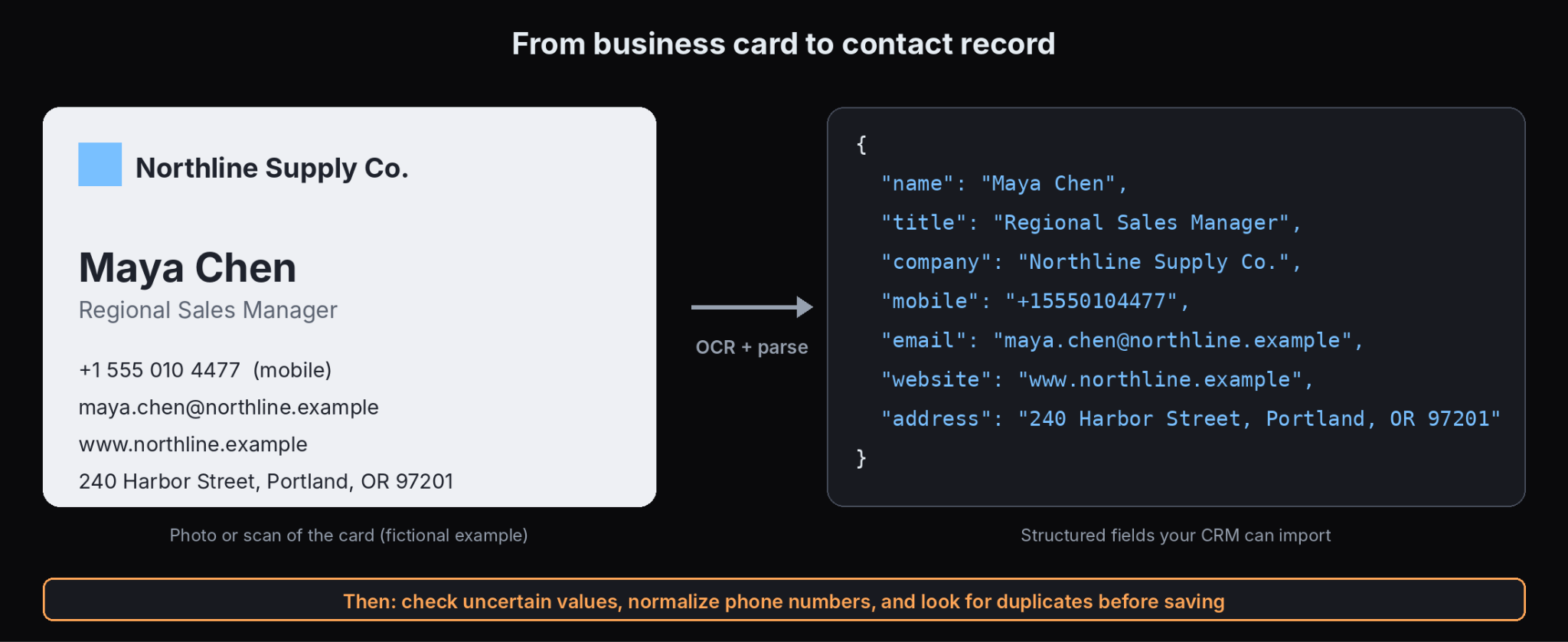
Compare the field lists against what your CRM needs. Check how each API handles:
- Multiple phone numbers, and whether it labels them as work, mobile, or fax.
- Names split into first and last, especially for non-Western names.
- Addresses, and whether they come back as one string or as parts.
- Cards in several languages, or with two languages on one side.
- A department or social handle, if your CRM stores them.
Getting Cards Into Your CRM
Extraction is only half the job. A card becomes useful when the contact lands in the right place in the right shape.
- Map fields deliberately. Decide where each returned field goes, such as mobile versus work phone, and what happens to fields your CRM lacks.
- Normalize. Standardize phone formats, capitalization, and country codes before saving.
- Check for duplicates. Match on email first, since a person you already know may hand you a new card.
- Pick the integration route. Apps often sync natively to CRMs, and HubSpot's scanner is built into its mobile app and creates contacts directly in the CRM, according to Guideflow. With an API you build the sync yourself or send results through a webhook or an automation tool. Export-only tools produce CSV or vCard files that someone imports by hand.
- Consider enrichment. Some apps go beyond reading the card and verify or complete details such as email, phone, and LinkedIn from other data sources. Blinq's guide treats this as the main differentiator between apps, so decide whether you want a reader or a reader plus enrichment.
Business Card OCR API vs Business Card OCR Software
Both read cards, but they are built for different people.
- An API returns data to your own application. It suits developers building scanning into a CRM, an event app, or an internal tool, and it leaves the interface, storage, and review process to you.
- Scanner software or an app gives people a ready interface: they photograph a card, and the contact is saved to a phone or synced to a CRM. It suits individuals and sales teams that want a finished tool.
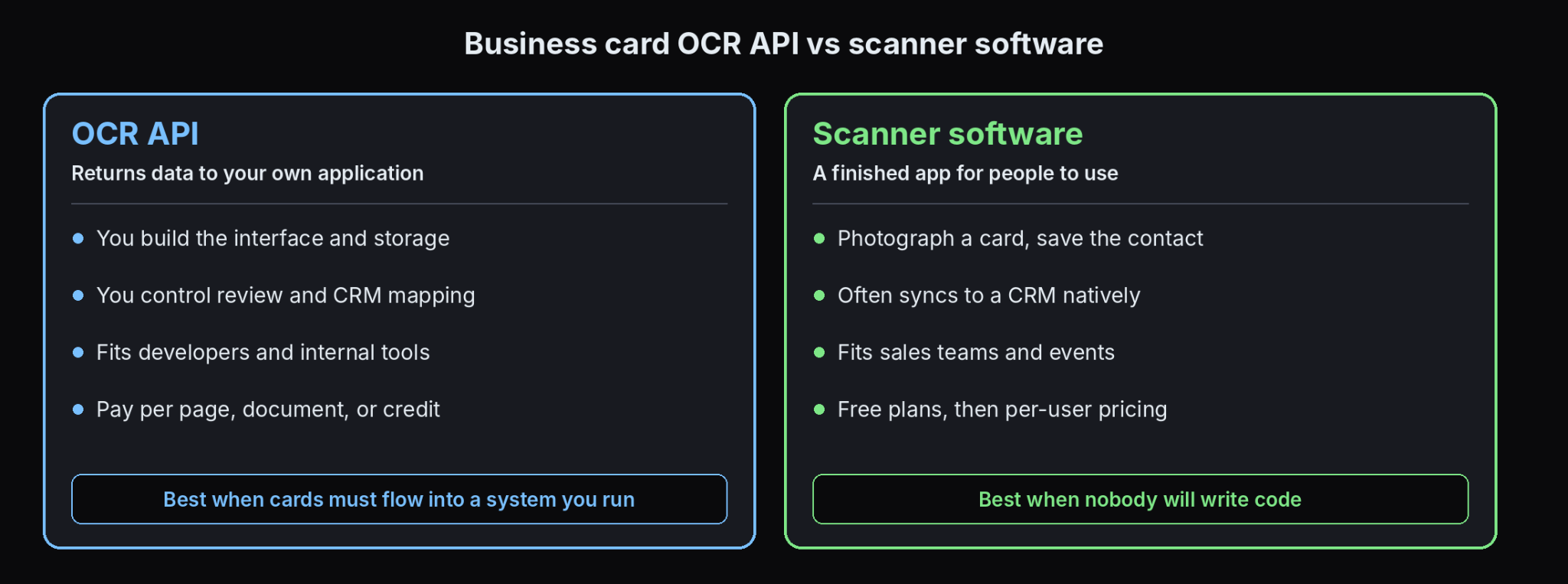
If nobody on your team will write code, an app is simpler. If you need cards to flow into a system you already run, or you need control over storage and review, an API fits better. DeepRead's guide to document workflow automation shows how a capture step connects to the rest of a process.
How to Judge Accuracy
Vendor accuracy claims are rarely tied to a stated test. Veryfi's page, for instance, claims 99% or better accuracy across document types, with no business card benchmark shown. Run your own test.
- Use real cards, including stylized fonts, dark backgrounds, glossy stock, and cards in other languages.
- Photograph them the way your users will, with phone cameras in uneven light.
- Score field by field. A card can be mostly right and still have a wrong email, which is the field that matters most.
- Count the failures that look right, such as a swapped mobile and work number.
- Check what the API does when unsure. Some return confidence or flags, and some return nothing. The sample responses on Veryfi's and Mindee's business card pages show no confidence fields, so check whether the live API returns any.
DeepRead's review of the most reliable data extraction service walks through a small pilot that you can adapt to cards.
Privacy and Compliance
A business card is personal data. Before sending cards to any service, check where images are processed and stored, how long they are kept, whether they are used to train models, and who can access them. Ask for retention controls and a data processing agreement if you collect cards in the EU or from people who have not agreed to be contacted. Consent rules vary by country and by how you use the contact, so confirm them with your legal team. Keep your own copy of the original image so you can correct or delete a record when someone asks.
Pricing Units: Per Card, Per Page, Per Document
APIs bill in different units, which makes headline prices hard to compare. One card is usually one page or one document, but a scan with several cards on one sheet counts as one page and holds many contacts, or as several documents depending on the vendor. Work out your cost per finished contact, including review time. DeepRead's breakdown of per-document vs per-page pricing shows how the unit changes the total.
Volume: Events and Backlogs
Trade shows and old card boxes create bursts, and many tools offer batch scanning for them. Check rate limits, whether the API accepts batches, and how failed requests are handled and billed. DeepRead's guide to scaling unstructured document processing covers the move from a pilot to production volume.
Business Card OCR APIs to Compare
Pricing and limits come from each vendor's own pages where noted. Business card rates are often not published separately, so those entries say so.
Veryfi
- What it automates: A business card endpoint that returns name, organization, title, address parts, phone, mobile, fax, email, website, and image and logo URLs, with SDKs in Python, Node.js, PHP, C#, Java, Go, and others.
- Pricing: The business card page does not state a per-card price. Veryfi's general pricing page lists a Free plan for up to 100 documents a month and a Starter plan with a $500 monthly minimum for fewer than 5,000 documents, though that page describes Starter terms inconsistently. The business card page mentions a 14-day free trial. Confirm the business card rate with Veryfi.
- Limits: Billing is per document, and one transaction covers up to 15 pages. The page claims any language but links to a separate coverage page for details.
- Best for: Developers who want a ready business card endpoint with a standardized response.
- Pros: A dedicated business card model, broad SDK support, and parsed address parts.
- Cons: No confidence or position data appears in the sample response on its page, and the $500 minimum on the pricing page is steep for low volume.
Mindee
- What it automates: A Business Cards OCR API that parses PDFs or photos of cards into first name, last name, job title, company, email, phone, mobile, fax, address, website, and social media.
- Pricing: I could not open Mindee's pricing page. Its announcement says you can try the product free without a card, and it offers custom plans.
- Limits: The documentation I reviewed describes the V1 API and does not state file size, page, or rate limits, or whether a newer version replaces it.
- Best for: Developers who want a documented, narrow business card API with code samples in several languages.
- Pros: A clear field list that includes social media, and support for any geography and language, according to its documentation.
- Cons: No confidence fields appear in the sample response in its documentation, and pricing and limits were not available to confirm.
Azure AI Document Intelligence
- What it automates: A prebuilt business card model (prebuilt-businessCard) that returns contact names, company names, departments, job titles, emails, websites, addresses, and mobile, work, fax, and other phone numbers.
- Pricing: Billed per page by model. The free tier covers 500 pages a month, according to Microsoft's pricing page, and I could not confirm the paid business card rate.
- Limits: Microsoft deprecated the business card model starting with Document Intelligence v4.0. It remains available in v3.1, v3.0, and v2.1, and v3.0 reaches end of support on March 30, 2029, according to Microsoft's migration guide. The paid tier accepts files up to 500 MB and the free tier 4 MB, and it accepts JPEG, PNG, BMP, TIFF, HEIF, and PDF.
- Best for: Teams already on Azure who can use an older API version, or who plan to pair a layout model with a language model.
- Pros: Detailed documentation, a free tier, and a broad file format list.
- Cons: The model is deprecated in the newest version, so plan for replacing it.
snapAddy
- What it automates: A business card scanning API that takes a card image over an HTTP request and returns the contact data as JSON, with first and last names in separate fields.
- Pricing: Not published on the page reviewed.
- Limits: snapAddy claims more than 45 languages from over 100 countries, which is a vendor claim. No file size or rate limits are stated.
- Best for: Software providers and trade show app builders who want a card-specific API.
- Pros: A card-focused product aimed at integrators, with separate name fields.
- Cons: Pricing and limits are not public, and the language claim comes from its own marketing, including a comparison with a competitor's language count.
Parseur
- What it automates: Converts business cards to JSON, Excel, or CSV from uploads, email, or API, with batch processing and delivery to a CRM, spreadsheet, database, or webhook, and no model training required.
- Pricing: Not stated on the page reviewed, which mentions a free start.
- Limits: Accepts PDF, Word, and image files. No numeric limits are stated.
- Best for: Teams that want email-in, data-out automation across many document types, with cards as one of them.
- Pros: Email and API intake, batch handling, and several output formats. Parseur says images are processed securely and not stored after extraction, which is a vendor statement to verify.
- Cons: It is a general document parser, so check field accuracy on your own cards.
When a General Extraction API Makes Sense for Business Cards
A dedicated card API is the simplest choice when cards are all you process. If cards are one of several document types, a general extraction API can be worth considering, because you reuse one integration instead of adding a separate vendor for each document.
DeepRead is an example. It has no business card preset, so you define the fields you want, such as name, title, company, phone numbers, and email, and it returns them as JSON with each value's page, bounding box, and source text. Uncertain values come back marked needs_review with a reason, and it does not return a numeric confidence score. Extract is $15 per 1,000 pages, which is about $15 per 1,000 cards if each card is a single page, and the Free plan covers 2,000 pages a month. Processing defaults to US East; there is no self-hosted option or BAA, and Free and Standard retain documents for up to three years.
The trade-off is that you write and test the schema yourself, and it does not include CRM sync, deduplication, or contact enrichment. For cards alone, a dedicated API or app is usually less work.
Business Card OCR Software and Scanner Apps
These apps are for people who want a finished scanner. Pricing for CamCard, Covve, Haystack, and Blinq comes from Zapier's May 2026 roundup, and HubSpot's from Guideflow's July 2026 roundup. Both are secondary sources, so confirm each plan with the vendor.
CamCard
- What it automates: Scanning cards into saved contacts, including multilingual cards, which Zapier named the best overall business card scanner app.
- Pricing: A free plan with 100 scans and paid plans from $9.99 a month, per Zapier.
- Limits: Not stated in the roundup.
- Best for: People who want a dependable standalone scanner.
- Pros: Long-established, with strong standalone scanning and multilingual reading.
- Cons: Scan limits apply on the free plan.
Covve
- What it automates: Scanning cards with contact enrichment, AI research, and tagging.
- Pricing: A free plan with unlimited scans, and paid plans from $12 a month, per Zapier, which lists the paid price inconsistently as $12 per month and $12 per user per month.
- Limits: Not stated in the roundup.
- Best for: Users who want enrichment and organization after the scan.
- Pros: Unlimited scans on the free plan.
- Cons: The paid pricing basis is unclear in the source.
Haystack
- What it automates: Scanning and sharing cards, with plans for teams.
- Pricing: Free for individuals and paid plans from $2.50 per user per month for teams of 10 or more, per Zapier, which named it the best free business card scanner app.
- Limits: Not stated in the roundup.
- Best for: Individuals and small teams on a tight budget.
- Pros: A free individual plan and low team pricing.
- Cons: Team pricing requires a minimum of 10 users.
HubSpot business card scanner
- What it automates: Scanning cards from HubSpot's mobile app and creating contacts directly in the HubSpot CRM, according to Guideflow.
- Pricing: Free with any HubSpot account, per Guideflow.
- Limits: It requires a HubSpot account, and Guideflow does not state scan limits.
- Best for: Teams that already run HubSpot.
- Pros: No extra cost and no import step.
- Cons: It only helps if HubSpot is your CRM.
Blinq
- What it automates: Scanning cards and syncing contacts to a CRM, alongside digital business cards. Zapier named it the best for conferences and networking events.
- Pricing: Free with two digital cards and unlimited contacts, and Premium at $9.99 a month, per Zapier.
- Limits: Not stated in the roundup.
- Best for: Teams collecting contacts at events who also want digital cards.
- Pros: CRM sync and event-oriented features.
- Cons: Much of its appeal is the digital card and event features, so confirm the scanning accuracy on your own cards.
Many phones can also scan a card for free. Zapier notes that Google Lens, built into most newer Android phones, can read a card and save it to contacts, though it needs a few manual steps.
How to Run a Business Card OCR Pilot
- Collect 100 cards, including odd fonts, dark backgrounds, other languages, and double-sided cards.
- Photograph them like your users, with phone cameras and ordinary lighting.
- Key the correct values with one person and a second to check.
- Run two or three services on the same set, using free tiers or trials.
- Score each field separately, with extra weight on email and phone.
- Record flags and failures, and how often a person must step in.
- Test the CRM mapping, including duplicates and phone formats.
- Compare total cost per finished contact, including review time.
Common Mistakes to Avoid
- Trusting an accuracy claim that does not name its test.
- Judging only on clean, flat scans and not phone photos.
- Treating a plain OCR engine as a business card parser.
- Skipping review for emails and phone numbers.
- Overlooking retention and consent rules for personal data.
- Building on a deprecated model without a replacement plan.
Conclusion
A business card OCR API is worth it when cards need to land in a system you control, and scanner software is the better fit when you want a finished app. In both cases the test that matters is yours: real cards, phone photos, field-level scoring, and a check on what happens when the model is unsure. Confirm pricing units, retention terms, and whether the model you choose is still supported, then run the pilot before you commit.
Frequently Asked Questions
What is a business card OCR API?
It is a service that takes an image or PDF of a business card and returns structured contact fields such as name, title, company, phone, email, website, and address as JSON.
What is the best business card OCR API?
It depends on your fields, volume, and stack. Veryfi and Mindee offer dedicated business card endpoints, Azure's business card model is deprecated in its newest version, and a general extraction API such as DeepRead lets you define your own fields. Test each on your own cards.
How accurate is business card OCR?
Accuracy varies with the card design and photo quality. Vendor claims rarely name a business card test, so score each field on your own samples and give extra weight to email and phone numbers.
Is there free business card OCR software?
Yes. Several scanner apps have free plans, such as Haystack for individuals and Covve with unlimited scans, and many Android phones can scan cards through Google Lens. Free plans usually limit features or scans.
What is the difference between a business card scanner app and an API?
An app gives people a ready interface for scanning and saving contacts. An API returns data to your own application, so you build the interface, storage, and review process.
Can business card OCR handle other languages?
Mindee and Veryfi state that they support any language, but neither page lists the languages. Test the languages you actually receive.
Does Azure still offer a business card model?
Yes, in API versions 3.1, 3.0, and 2.1, but Microsoft deprecated it starting with version 4.0, and version 3.0 reaches end of support on March 30, 2029.
Does DeepRead have a business card API?
DeepRead is a general extraction API and does not have a business card preset. You define the fields you want, and it returns them with each value's page, bounding box, and source text, and flags uncertain values needs_review and a reason. It does not return a numeric confidence score.
More articles
LLM OCR Accuracy Leaderboard
An LLM OCR leaderboard guide: current top scores on OmniDocBench, olmOCR-Bench, OCRBench v2, and the IDP Leaderboard, what each measures, and how to read them.
AI Document Processing vs Manual Review
AI document processing vs manual review compared on speed, accuracy, cost, and scale, with a 15,000-page cost example, a hybrid model, and APIs to shortlist.