%20{%20:root%20{%20--deepread-stroke:%20%23E5E7EB;%20}%20}%20.dark%20{%20--deepread-stroke:%20%23E5E7EB;%20}%20%3c/style%3e%3crect%20x='40'%20y='30'%20width='220'%20height='260'%20rx='28'%20ry='28'%20stroke='var(--deepread-stroke)'%20stroke-width='16'%20fill='none'/%3e%3cpath%20d='M180%2030v52c0%2010%208%2018%2018%2018h62'%20stroke='var(--deepread-stroke)'%20stroke-width='16'%20fill='none'/%3e%3cline%20x1='70'%20y1='130'%20x2='200'%20y2='130'%20stroke='var(--deepread-stroke)'%20stroke-width='16'%20stroke-linecap='round'/%3e%3cline%20x1='70'%20y1='165'%20x2='200'%20y2='165'%20stroke='var(--deepread-stroke)'%20stroke-width='16'%20stroke-linecap='round'/%3e%3cline%20x1='70'%20y1='200'%20x2='170'%20y2='200'%20stroke='var(--deepread-stroke)'%20stroke-width='16'%20stroke-linecap='round'/%3e%3c!--%20green%20download%20arrow%20in%20bottom%20right%20corner%20--%3e%3cpath%20d='M210%20202v58'%20stroke='var(--deepread-accent)'%20stroke-width='18'%20stroke-linecap='round'/%3e%3cpath%20d='M195%20245l15%2015%2015-15'%20fill='none'%20stroke='var(--deepread-accent)'%20stroke-width='18'%20stroke-linecap='round'%20stroke-linejoin='round'/%3e%3c/svg%3e)
AI Parse Document: How AI Document Parsing Works and Which Tools to Use (2026)
How AI parse document works: Databricks ai_parse_document vs Snowflake AI_PARSE_DOCUMENT, costs, limits, other tools, and BOQ and supplier quote extraction.
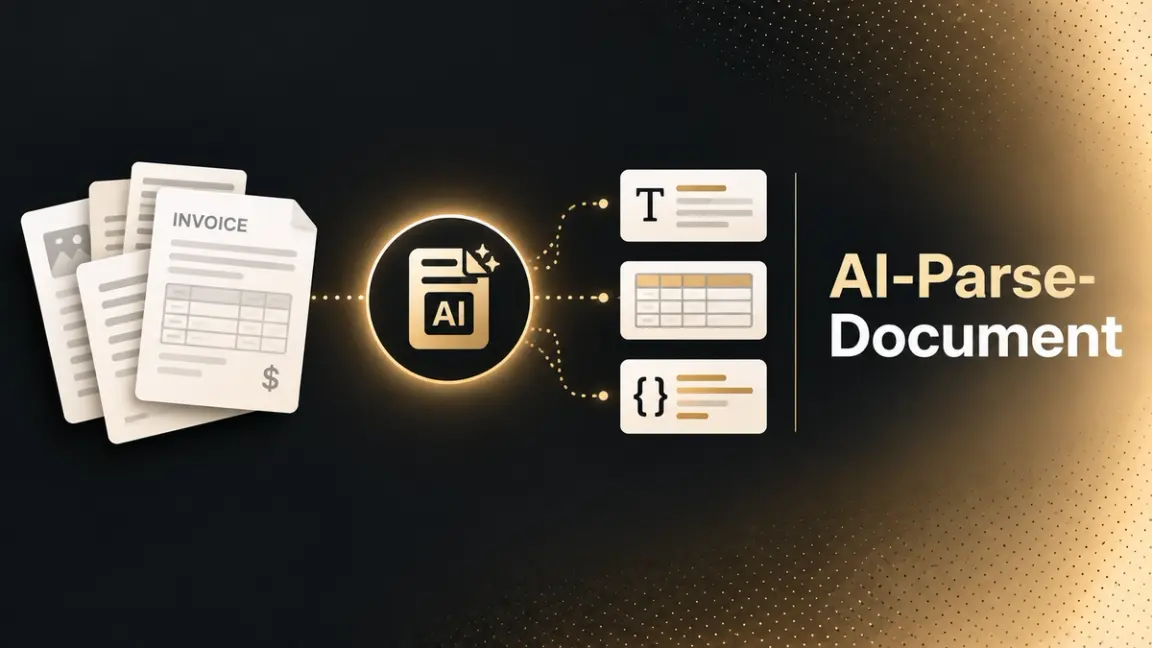
"AI parse document" now means two things. For data engineers, it's a SQL function: Databricks ships ai_parse_document and Snowflake ships AI_PARSE_DOCUMENT, each built to parse PDFs and other files without leaving the platform. For everyone else, it's the broader category of tools that turn unstructured documents into structured, layout-aware data. This guide covers both: how AI document parsing works, how the two SQL functions compare, when a dedicated API fits better, and how parsing applies to invoices, supplier quotes, and construction bills of quantities (BOQs). For the wider market, see AI document processing solutions.
Who This Is For
- Data and platform engineers deciding whether to parse documents with Databricks or Snowflake SQL functions or a separate service.
- Teams building RAG, search, or analytics pipelines that need clean structure from PDFs, scans, and slide decks.
- Estimating, procurement, and finance teams in construction who need line items out of BOQs, supplier quotes, and invoices.
What Does "AI Parse Document" Mean?
AI document parsing converts a file (a PDF, scan, image, or Office document) into structured output that keeps the document's layout: text in reading order, tables with their rows and columns, figures, headers, and footers. The output is usually Markdown or JSON, so downstream systems can use it directly.
Three terms get mixed up:
- OCR recognizes characters in an image and returns text. It doesn't know what a table or a heading is.
- Parsing recovers structure: which block is a table, which is a title, what order a reader would follow.
- Extraction pulls specific fields (an invoice total, a quantity) into a schema you define.
Most modern tools do parsing first and extraction second, which is why both Databricks and Snowflake position their parse functions as the first step before functions like ai_extract and AI_EXTRACT.
How AI Document Parsing Works
- Render and detect layout. Each page is rendered and divided into blocks: text, tables, figures, headers, footers, page numbers.
- Recognize content. Text is read with OCR or a vision-language model. How models read characters is covered in machine learning algorithms for OCR.
- Rebuild structure. Reading order is restored, and tables are reconstructed as HTML or Markdown so rows and cells survive.
- Return output with locations. Better parsers return a bounding box per element, so any value can be traced back to its place on the page.
- Hand off. The output feeds chunking for retrieval, or a schema-based extraction step, as described in structured data extraction.
Databricks ai_parse_document
Databricks ai_parse_document is a SQL AI function in Databricks (also available in PySpark) that parses structured content from unstructured documents. It launched in public preview in November 2025, per InfoWorld, as part of the Agent Bricks AI Functions. Check Databricks' documentation for current release status
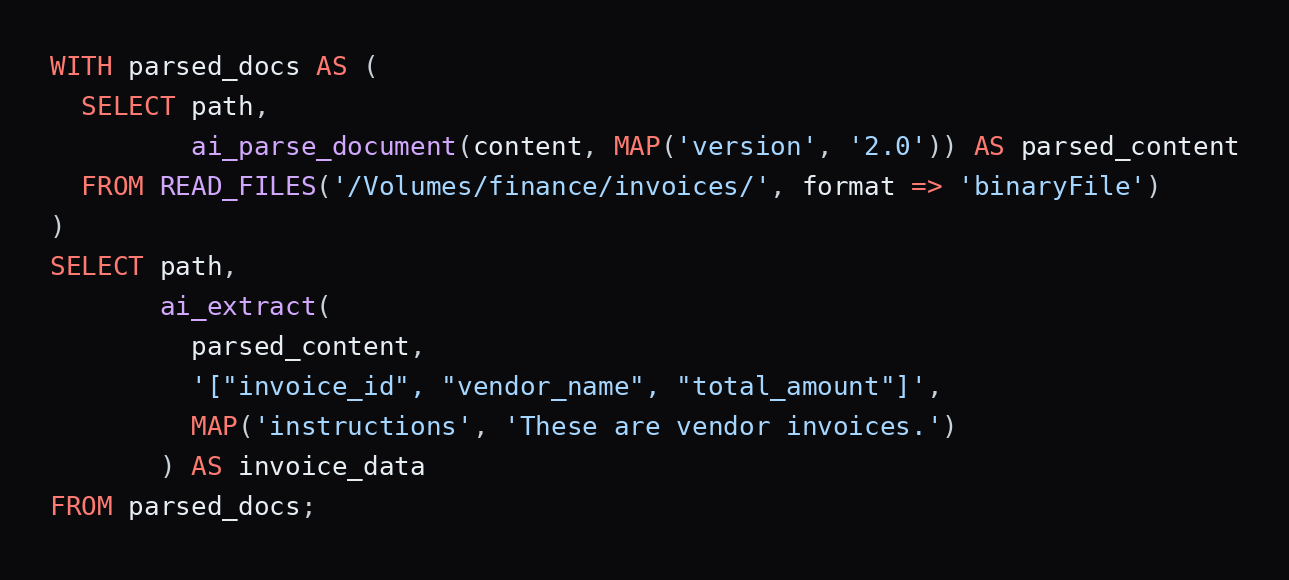
- Syntax: ai_parse_document(content [, map(...)]), where content is binary data, typically read with read_files(..., format => 'binaryFile').
- Options: version ("2.0"), imageOutputPath (saves rendered page images to a Unity Catalog volume), descriptionElementTypes (AI-generated descriptions for figures), and pageRange (parse selected pages).
- Output: a VARIANT with a list of elements. Each element has a type (text, table, figure, signature, title, caption, section header, page header and footer, page number, footnote), its content, a confidence score from 0 to 1, and a bounding box. Tables come back as HTML, and charts as JSON when data can be read. An error_status field reports per-page failures.
- Formats: PDF, JPG/JPEG, PNG, TIFF/TIF, DOC/DOCX, and PPT/PPTX.
- Limits: up to 500 pages and 100 MB per document. The docs note weaker results on non-Latin alphabets such as Japanese and Korean, possible inaccuracy on documents with digital signatures, and no option to swap in your own model.
- Requirements: Databricks Runtime 17.3 or above, serverless environment version 3 or above, and a supported region. Data is processed within the Databricks security perimeter.
- Composes with ai_extract (version 2.1 adds citations and confidence scores, per its docs), ai_prep_search for retrieval chunks, and a Document Parsing UI for checking results.
- Cost: based on the number and complexity of pages. Databricks' pricing page estimates, for US East, about 10 to 15 DBUs ($0.70 to 1.05)per1,000simplepagessuchasreceiptsandW-2s,60to65DBUs(4.20 to 4.55)fortext-plus-tabledocumentslike10-Ks,and85to90DBUs(5.95 to $6.30) for engineering diagrams. The page notes a 50% promotion that ran through June 30, 2026.
Snowflake AI_PARSE_DOCUMENT
Snowflake AI_PARSE_DOCUMENT is a Cortex AI function that extracts text, layout, and images from documents on internal or external stages. It is the updated version of SNOWFLAKE.CORTEX.PARSE_DOCUMENT, which Snowflake says will be deprecated by the end of 2026
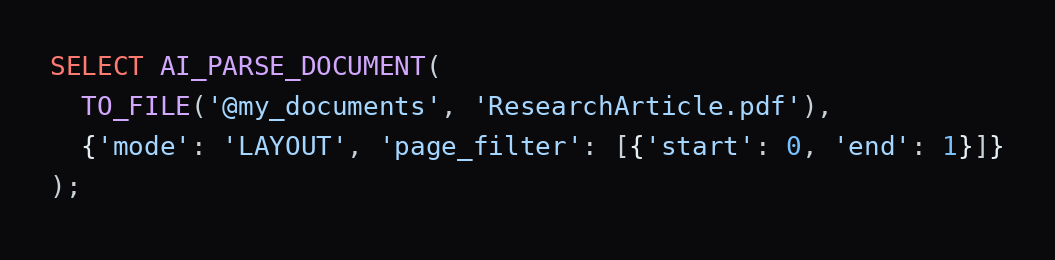
- Syntax: AI_PARSE_DOCUMENT(TO_FILE('@stage', 'file.pdf'), {options}).
- Modes: LAYOUT (preferred for complex documents; returns Markdown with tables and is required for image extraction) and OCR (the default; plain text with no layout).
- Other options: page_split (one result per page), page_filter (process selected pages; indexes start at 0 and the end is exclusive), and extract_images (LAYOUT mode only; up to 50 images per document, at no extra cost).
- Output: JSON with metadata (including pageCount) and the extracted content, split into pages when page_split is on. Extracted images come back base64-encoded with bounding boxes.
- Formats: PDF, PPTX, DOCX, JPEG/JPG, PNG, TIFF/TIF, HTML, and TXT per its input table (its error text lists fewer, so test your file types).
- Limits: up to 2,000 pages and 100 MB per document, with best results at 8-point fonts or larger. It recognizes handwriting but can struggle with decorative or script fonts.
- Languages: trained on 15, including Chinese, English, French, German, Hindi, Italian, Portuguese, Russian, Spanish, and Turkish.
- Access and regions: the SNOWFLAKE.CORTEX_USER role is required. It's available natively in select regions and elsewhere through cross-region inference.
- Cost: billed per page processed: each PDF or DOCX page, each image file as one page, and every 3,000 characters of HTML or TXT as a page. Snowflake bills it in AI Credits per 1,000 pages by mode and recommends a warehouse no larger than MEDIUM. Snowflake's own February 2026 engineering blog cites about $6.66 per 1,000 pages for layout mode on Standard Edition, before promotions, so check the Consumption Table for current rates.
Databricks vs Snowflake: Side by Side
Databricks ai_parse_document
Snowflake AI_PARSE_DOCUMENT
Input
Binary content (for example from read_files)
A file on a stage (TO_FILE)
Output
VARIANT of typed elements with bounding boxes and confidence
JSON with Markdown per page; images with bounding boxes if enabled
Tables
HTML
Markdown (LAYOUT mode)
Max pages / size
500 pages, 100 MB
2,000 pages, 100 MB
Formats
PDF, JPG/JPEG, PNG, TIFF, DOC/DOCX, PPT/PPTX
PDF, PPTX, DOCX, images, HTML, TXT
Excel files
Not listed
Not listed
Modes / options
version, imageOutputPath, descriptionElementTypes, pageRange
mode, page_split, page_filter, extract_images
Pricing basis
DBUs by page complexity
AI Credits per 1,000 pages by mode
Follow-on functions
ai_extract, ai_prep_search
AI_EXTRACT, AI_CLASSIFY
The InfoWorld story, "Databricks fires back at Snowflake with SQL-based AI document parsing," frames this as the latest round of competition between the two. Each vendor has published its own benchmarks, and each shows itself ahead: Databricks pitches price-performance, while Snowflake's blog reports higher OCR scores in its own tests. One analyst quoted in the story, Bradley Shimmin of The Futurum Group, advised enterprises to run their own benchmarks instead of relying on vendor claims. That's the right instinct. The platform you already run your data on will usually decide this, and your own documents will settle anything close.
Example Queries
Databricks, parsing a folder of invoices and extracting fields (adapted from its docs):
Snowflake, parsing only the first page of a document in layout mode:
When Platform-Native Parsing Fits, and When It Doesn't
It fits when your documents already live in the lakehouse or warehouse, you want parsing governed by the same access controls as your tables, and you process in batches through SQL. Not moving data is a real advantage.
A dedicated API fits better when:
- You need review routing. Neither function documents a review-queue workflow. If a wrong value is expensive, you want uncertain fields flagged with a reason.
- Your inputs fall outside the documented formats or limits. Neither function lists Excel, which matters for BOQs, and 500 or 2,000 pages can be limiting for large tender sets.
- You need a model or behavior you control. Databricks says customizing the parsing model isn't supported.
- Documents live elsewhere. Email attachments and portal uploads outside the platform still need an ingestion path.
- You want parsing and schema extraction in one call. Both platforms treat extraction as a separate function.
The trade-offs between language-model and OCR-based approaches are covered in LLMs vs OCR software.
Other AI Document Parsing Tools
Prices below come from each vendor's own pages as of October 9, 2026, so confirm them before budgeting. Pros and cons are drawn from vendor documentation and pricing structure; where a point is this guide's own assessment, it says so.
DeepRead
DeepRead is a REST API for parsing and extraction, called over HTTP from any language or job. Parse returns Markdown with layout blocks and bounding boxes, Extract adds your schema as JSON, and Deep Extract adds two OCR engines and a verification pass.
- Pricing: Free is 2,000 pages a month (up to 50 pages and 15 MB per document, PDF/PNG/JPEG). Standard is pay per page: $10 per 1,000 pages for Parse, $20 for Extract, and $40 for Deep Extract, with documents up to 1,000 pages and 50 MB. Enterprise is custom, with documents up to 2,000 pages and 500 MB. Migration credits of up to $1,000 are available. See pricing.
- Pros: per-page rates published up front; page, bounding box, and source text on every field, with table cells located individually; needs_review flags with reasons for uncertain values; a published invoice benchmark (97.8%, exact-match, its own, on its benchmarks page); Enterprise adds retention controls, bring-your-own model keys, EU and AU data residency, SSO/SAML, and a custom SLA.
- Cons: a REST API only, with no native SQL function and no verified Databricks or Snowflake integration; no numeric confidence score; spreadsheets, PII redaction, and form fill are Enterprise-only; no BOQ-specific benchmark.
- Best fit: teams that want field-level review flags, or whose documents sit outside a data platform. Details are in the docs, and routing is explained in review flags and fallback logic.
Reducto
Reducto splits its API into products priced per 1,000 pages, with citations on every extracted value.
- Pricing: Standard includes $150 of free usage. Parse is $10 per 1,000 pages, Extract $20 (parsing included), Deep Extract $40, Split $20, Classify $7.50, and Edit 60(15 for prefilled pages). Growth and Enterprise are custom, and Enterprise supports VPC, on-prem, and air-gapped deployment. Reducto's own comparison page notes a 20% batch discount with a 12-hour completion guarantee.
- Pros: citations return page, bounding box, source text, and confidence for each value; Deep Extract verifies output against the source and re-extracts until it meets your criteria; Extract includes parsing at no extra charge; flexible deployment on Enterprise.
- Cons: pricing is per product, so a pipeline using Parse, Classify, and Extract adds up; Deep Extract is $40 per 1,000 pages; Reducto itself says it's not the lowest per-page list price.
- Best fit: accuracy-critical, multi-page documents and AI engineering teams.
LlamaParse
LlamaParse prices in credits per page, with a quality tier you choose per job.
- Pricing: $1.25 per 1,000 credits. Parse tiers are Fast (1 credit, about $0.00125 a page), Cost-effective (3), Agentic (10), and Agentic Plus (45, about $0.056 a page). Layout extraction adds 3 credits a page, spreadsheets cost 1 credit per sheet, and re-parsing a file within 48 hours is free. Extract adds 5, 15, or 50 credits a page on top of parsing. Third-party comparisons cite 10,000 free credits a month, so confirm the free allowance on its billing page.
- Pros: a tier for every budget; spreadsheet parsing and a spreadsheet extract mode that reads Excel and CSV directly; 130+ file formats; a Cost Optimizer that routes simple pages to cheaper tiers.
- Cons: the price spread is 45 times across tiers, so you must pin the tier; Fast returns spatial text only, with no Markdown; credit math takes work to forecast.
- Best fit: teams in the LlamaIndex ecosystem, and mixed-complexity document sets where tier routing saves money.
Landing AI
Landing AI's Agentic Document Extraction parses documents into hierarchical output with page and coordinate references and supports schema-based extraction.
- Pricing (official): a credit costs $0.01. Explore is pay-as-you-go with 1,000 free credits (expiring after 90 days). Team credit packs start at $250 a month, and Enterprise is custom. Parse on DPT-3 Pro costs 1 credit per page plus 0.5 credits per 1,000 output characters (half that on the standard tier), spreadsheets cost 1 credit per sheet, and Ground requests are free.
- Pros: visual grounding on every plan; zero data retention and HIPAA (BAA) from Team; spreadsheets supported; the same pricing in the US and EU regions.
- Cons: complexity-aware credits make a document's cost harder to predict (its docs cite a median of 1.5 credits per typical document on the standard tier); Team starts at $250 a month; VPC and on-prem deployment, SSO, and SLAs are Enterprise-only.
- Best fit: regulated or audit-heavy work where every value must trace to a location.
Mistral OCR
Mistral OCR returns structured pages with typed blocks and locations.
- Pricing: OCR 4 is 4per1,000pagesthroughtheAPI(2 with the Batch API), and Document AI in Mistral Studio is $5 per 1,000. OCR 3 was listed at 2(1 batch), and an OCR 4.1 release followed, so confirm the current rate.
- Pros: bounding boxes, block classification, and per-word and per-page confidence scores; 170 languages; a self-hosted option for strict data requirements; available through Amazon SageMaker and Microsoft Foundry, with Snowflake support announced as coming.
- Cons: the rate doubled between OCR 3 and OCR 4; self-hosting is sales-led; it's an OCR and parsing service, so review workflow, validation, and schema logic are yours to build (this guide's assessment).
- Best fit: multilingual, high-volume work where you own the validation layer.
Amazon Textract
- Pricing: Detect Document Text is 0.0015apageforthefirstmillion(0.0006 after); Tables $0.015; Forms $0.05; Queries $0.015; Tables, Forms, and Queries together $0.070; Signatures $0.0035; Analyze Expense $0.01; Analyze ID $0.025; Analyze Lending $0.07. Layout is free when used with Tables. New AWS customers get a three-month free tier.
- Pros: pretrained APIs for expenses, IDs, and lending documents; custom Queries with adapters; easy fit for AWS-native pipelines.
- Cons: features stack in cost; it returns fields, not a review workflow or audit trail; the free tier lasts only three months.
- Best fit: engineering teams already on AWS.
Google Document AI
- Pricing (official): Enterprise Document OCR is 1.50per1,000pages(0.60 above 5 million); Layout Parser is $10; Form Parser and the custom extractor are 30per1,000(20 above 1 million); the invoice parser is $0.10 per 10 pages in a document. New customers get $300 in free credit.
- Pros: a wide range of prebuilt and custom processors; volume discounts.
- Cons: billing units differ by processor (per page, per 10-page block, or per classified document), so costs are harder to compare; some processors are limited access.
- Best fit: teams committed to Google Cloud.
Azure AI Document Intelligence
- Pricing: a free tier covers 500 pages a month, and the dollar rates on Microsoft's page load dynamically by region. Microsoft's retail price feed, as reported by trackers, lists Read at 1.50per1,000pages(0.60 above 1 million), Layout and prebuilt models at $10, and custom extraction at $30, with commitment tiers and container deployment at the same prices. Custom neural training is free for 10 hours, then $3 an hour.
- Pros: prebuilt models for invoices, receipts, IDs, W-2s, and contracts; commitment tiers for volume; containers for private deployment.
- Cons: costs climb quickly at $10 to $30 per 1,000 pages; custom models need labeled training data; the Azure resource and key setup adds overhead for small teams.
- Best fit: Microsoft-centric enterprises.
AI Document Parsing for Invoices, Quotes, and Construction BOQs
A bill of quantities lists the items of work in a project with quantities, units, and rates. Parsing one is harder than parsing an invoice, and supplier quotes bring their own problems.
What makes BOQs and quotes hard:
- Hierarchy. Items sit inside sections and sub-sections, with subtotals and carried-forward lines mixed in with the items.
- Excel as the main format. BOQs often arrive as spreadsheets with merged cells, and neither Databricks nor Snowflake lists Excel as a supported input.
- Long, multi-page tables. Airparser notes that quotes can span several pages with the table continuing across them, and that line items must be defined as a repeating group or they merge into one field.
- Inconsistent layouts. Every supplier labels columns differently.
- Numbers that must reconcile. Quantity times rate should equal the amount, and subtotals should sum to the total.
Checks to run after parsing: recompute quantity times rate for every line, confirm subtotals and the grand total, check that units are consistent within an item, and flag items with no quantity or no rate. Pelles' guide to construction document parsing adds the simplest rule: always spot-check extracted data against the original document.
Tools aimed at this work (pricing from each vendor's site, October 9, 2026):
BoqCalc
An estimator that reads BOQs and prices them, rather than a pure parser.
- Pricing: credit packs of €75 for 5 credits, €270 for 20, €600 for 50, and €1,000 for 100, with 4 free credits (no card) that never expire. Credits depend on project value; for a €500k to €2M project, an Express estimate is 11 credits and a full cost analysis 15.
- Pros: accepts Excel, PDF, and GAEB or ÖNORM bills; adds pricing, risk analysis, scheduling, and cash flow; exports to Excel, PDF, and MS Project; local pricing data for 40+ countries.
- Cons: you pay by project value, not by page; it's a web workflow, so check for API access if you need to embed it; AI-suggested prices still need an estimator's review (this guide's assessment).
Blueprint Crusher
An estimating platform that parses bills, matches line items to your rate library with confidence scores, and includes takeoff.
- Pricing: Free covers takeoff, assemblies, and manual rates, plus 2 BOQ imports and 10 AI chats a month. Basic is €75 a month (€750 a year) with unlimited AI bill parsing, rate matching, and spec conflict detection; Pro is €150 with automatic takeoff; GC Starter is €199 and GC Pro €399 for tendering and procurement; Enterprise is custom.
- Pros: parsing, rate matching, and takeoff in one tool; a usable free plan; Excel export.
- Cons: built for estimators, not as an embeddable API; AI features run under a fair-use policy; the free plan caps BOQ imports at two a month.
Airparser
A general document parser that handles quotes through schemas with repeating line-item groups.
- Pricing: Starter is $33 a month billed annually (100 credits, 30-day retention, OCR, API and webhooks); Growth is $49 (500 credits, 90-day retention); larger plans run to $299 a month. Free is 20 credits a month with no card, and annual billing saves about 17%.
- Pros: no per-supplier templates; parses emails as well as PDFs; API, webhooks, and integrations.
- Cons: credit-based and not construction-specific; you define and maintain the line-item schema yourself.
Pelles
Preconstruction document intelligence for MEP and trade contractors.
- Pricing: quote-based only ("book a free call"); no public rates.
- Pros: extractions come with citations to the source; revision-aware comparison and scope validation across drawings, specs, and addenda; trade-specific.
- Cons: no published pricing; MEP and trade focus; its own guides say takeoff isn't a main capability.
Where a general parser like DeepRead fits: it's an extraction layer, not an estimating platform. Define a nested schema (sections containing items, each with reference, description, quantity, unit, rate, and amount), and each value returns with its page, bounding box, and source text, table cells located individually, and uncertain values flagged needs_review. DeepRead has no BOQ-specific benchmark, its 97.8% invoice benchmark covers invoice line items rather than BOQs, and Excel input requires its Enterprise plan, so test on your own tender files first. Related guides: invoice line-item extraction, document automation for construction, and DeepRead's construction solution.
How to Evaluate an AI Document Parser
- Test on your worst documents. Include scans, phone photos, merged-cell spreadsheets, and the supplier whose quote layout breaks everything.
- Check tables specifically. Look for merged cells, rows split across pages, and totals that still reconcile.
- Score at field level. Compare each extracted value to a hand-built ground truth, per document type.
- Look for locations and uncertainty signals. Bounding boxes and review flags make errors findable.
- Compare limits to your files. Page counts, file sizes, formats, and languages.
- Price by page complexity. Cost per 1,000 pages varies widely with document type, so model your real mix.
- Confirm data handling. Region, retention, and whether documents train models.
Conclusion
"AI parse document" is both a product feature and a category. Databricks' ai_parse_document and Snowflake's AI_PARSE_DOCUMENT make parsing a SQL call with similar capabilities, different limits, and different pricing models, and each is strongest when your data already lives on that platform. When you need review routing, formats outside their lists such as Excel BOQs, or documents that arrive outside the platform, a dedicated API belongs in the pipeline. Either way, the deciding evidence is your own documents, scored field by field.
FAQ
What is ai_parse_document in Databricks?
A SQL AI function that parses structured content (text, tables, figures, headers, and footers) from unstructured documents and returns it as a VARIANT with typed elements, bounding boxes, and confidence scores. It supports PDF, images, DOC/DOCX, and PPT/PPTX, up to 500 pages and 100 MB.
What is AI_PARSE_DOCUMENT in Snowflake?
A Cortex AI function that extracts text, layout, and images from documents on stages, with LAYOUT mode (Markdown with tables) and OCR mode (plain text). It handles up to 2,000 pages and 100 MB per document.
Databricks or Snowflake: which parses documents better?
Both vendors publish benchmarks showing themselves ahead, so neither claim settles it. Choose based on where your data lives, then test both on your own documents if the choice is open.
How much does AI document parsing cost?
It varies by tool and by how rates are expressed. Databricks prices by page complexity (roughly $0.70 to $6.30 per 1,000 pages in its published estimates), and Snowflake bills AI Credits per 1,000 pages by mode. Dedicated APIs publish per-page rates: $10 per 1,000 pages for DeepRead's and Reducto's Parse, 4forMistralOCR4(2 batch), $0.01 per credit at Landing AI, and $1.25 per 1,000 credits at LlamaParse (a 3-credit page is about $0.00375). Cloud OCR starts at $1.50 per 1,000 pages for plain text and rises to $10 to $30 for layout, forms, and custom extraction.
Can these tools parse Excel BOQs?
Neither Databricks nor Snowflake lists Excel as a supported format. BOQ-focused tools such as BoqCalc and Blueprint Crusher accept Excel and PDF, LlamaParse and Landing AI price spreadsheets per sheet, and DeepRead supports spreadsheets on its Enterprise plan.
What's the difference between parsing and extraction?
Parsing recovers a document's structure (text, tables, reading order). Extraction pulls specific fields into a schema. Most pipelines do parsing first and extraction second.
Is DeepRead an AI parse document tool?
Yes, as a REST API rather than a SQL function. Its Parse product returns Markdown with layout blocks and bounding boxes, and its Extract product returns schema-defined JSON with field locations and needs_review flags for uncertain values.
More articles
Healthcare Document OCR: Medical Records, Prescriptions, and Top Tools (2026)
Healthcare document OCR for medical records and handwritten prescriptions: document types, how it works, real accuracy limits, and leading tools compared.

OCR Software for Handwritten Text: What Works, What Doesn't, and How to Choose (2026)
Compare OCR software for handwritten text: handwriting OCR APIs, free tools, cursive and Chinese support, real pricing and limits, and how to test accuracy.