%20{%20:root%20{%20--deepread-stroke:%20%23E5E7EB;%20}%20}%20.dark%20{%20--deepread-stroke:%20%23E5E7EB;%20}%20%3c/style%3e%3crect%20x='40'%20y='30'%20width='220'%20height='260'%20rx='28'%20ry='28'%20stroke='var(--deepread-stroke)'%20stroke-width='16'%20fill='none'/%3e%3cpath%20d='M180%2030v52c0%2010%208%2018%2018%2018h62'%20stroke='var(--deepread-stroke)'%20stroke-width='16'%20fill='none'/%3e%3cline%20x1='70'%20y1='130'%20x2='200'%20y2='130'%20stroke='var(--deepread-stroke)'%20stroke-width='16'%20stroke-linecap='round'/%3e%3cline%20x1='70'%20y1='165'%20x2='200'%20y2='165'%20stroke='var(--deepread-stroke)'%20stroke-width='16'%20stroke-linecap='round'/%3e%3cline%20x1='70'%20y1='200'%20x2='170'%20y2='200'%20stroke='var(--deepread-stroke)'%20stroke-width='16'%20stroke-linecap='round'/%3e%3c!--%20green%20download%20arrow%20in%20bottom%20right%20corner%20--%3e%3cpath%20d='M210%20202v58'%20stroke='var(--deepread-accent)'%20stroke-width='18'%20stroke-linecap='round'/%3e%3cpath%20d='M195%20245l15%2015%2015-15'%20fill='none'%20stroke='var(--deepread-accent)'%20stroke-width='18'%20stroke-linecap='round'%20stroke-linejoin='round'/%3e%3c/svg%3e)
OCR of Handwritten Text: How It Works, Where It Fails, and How to Test It
How OCR of handwritten text works, why it is harder than printed OCR, how Textract, Azure, Google, and TrOCR compare, and how to test accuracy.
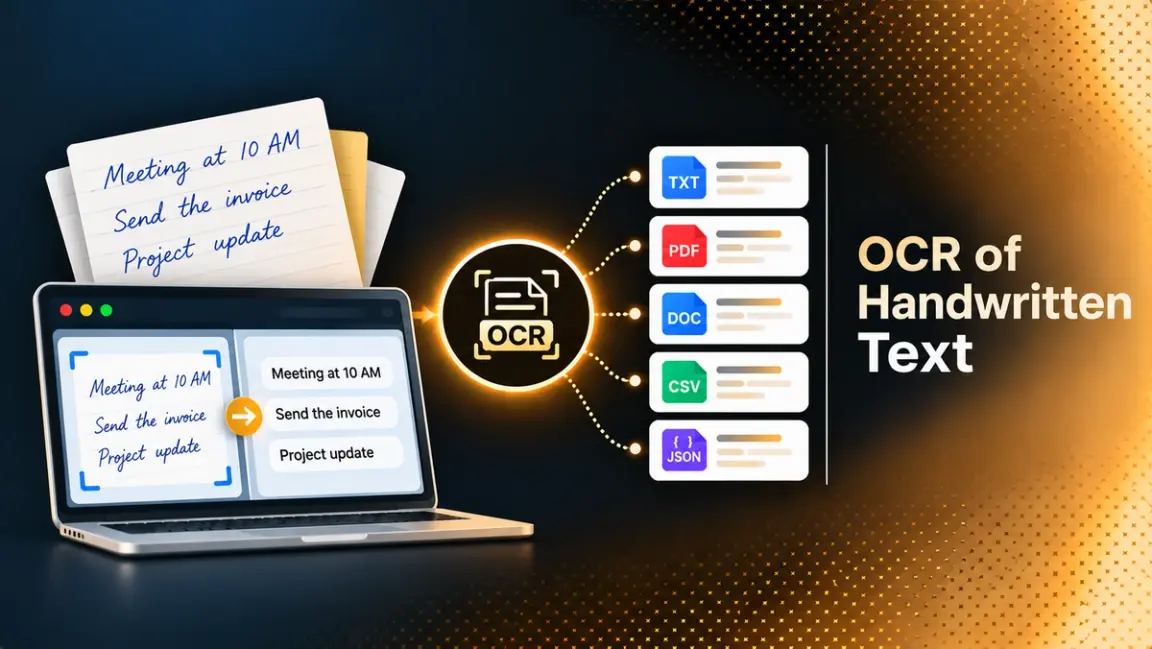
Printed text is largely tractable for modern OCR. Handwriting is a harder problem. A clinic intake form, a delivery note signed on a clipboard, or a claim form filled in with a pen can look simple to a person and still return garbage from software that handles typed invoices well.
Part of the confusion is vocabulary. Handwriting recognition is technically its own category, often called Intelligent Character Recognition (ICR), and tools that are strong at printed OCR can be weak at it. DeepRead's explainer on how OCR platforms work covers that split in more depth.
This guide explains how OCR of handwritten text works, what the main services support, how to measure accuracy with tested code, and where a person should stay in the loop.
What OCR of Handwritten Text Means
Three terms are used for related work:
- OCR reads printed characters from an image.
- ICR extends that to handwriting. Many products bundle it with their OCR.
- HTR (handwritten text recognition) is the term common in research for the same problem.
Most business documents are mixed. A form has printed labels and handwritten answers on the same page, so a useful tool has to read both and say which is which. Azure's Read model, for example, classifies each text line as handwritten style or not, with a confidence score, for supported languages.
Why Handwriting Is Harder Than Print
A printed font has a small, consistent set of shapes. Handwriting varies from person to person and even from word to word for the same writer. A system often cannot identify a single character on its own, so it infers it from the shape of the whole word and the words around it.
DeepRead's technical guide to machine learning algorithms for OCR states a rule of thumb: printed text typically reaches 98 to 99.5 percent character accuracy with modern approaches, while handwriting commonly lands between 85 and 95 percent depending on handwriting quality. Treat that as a broad guide rather than a measurement for any one tool. It also names IAM and RIMES as the common benchmark datasets in this field.
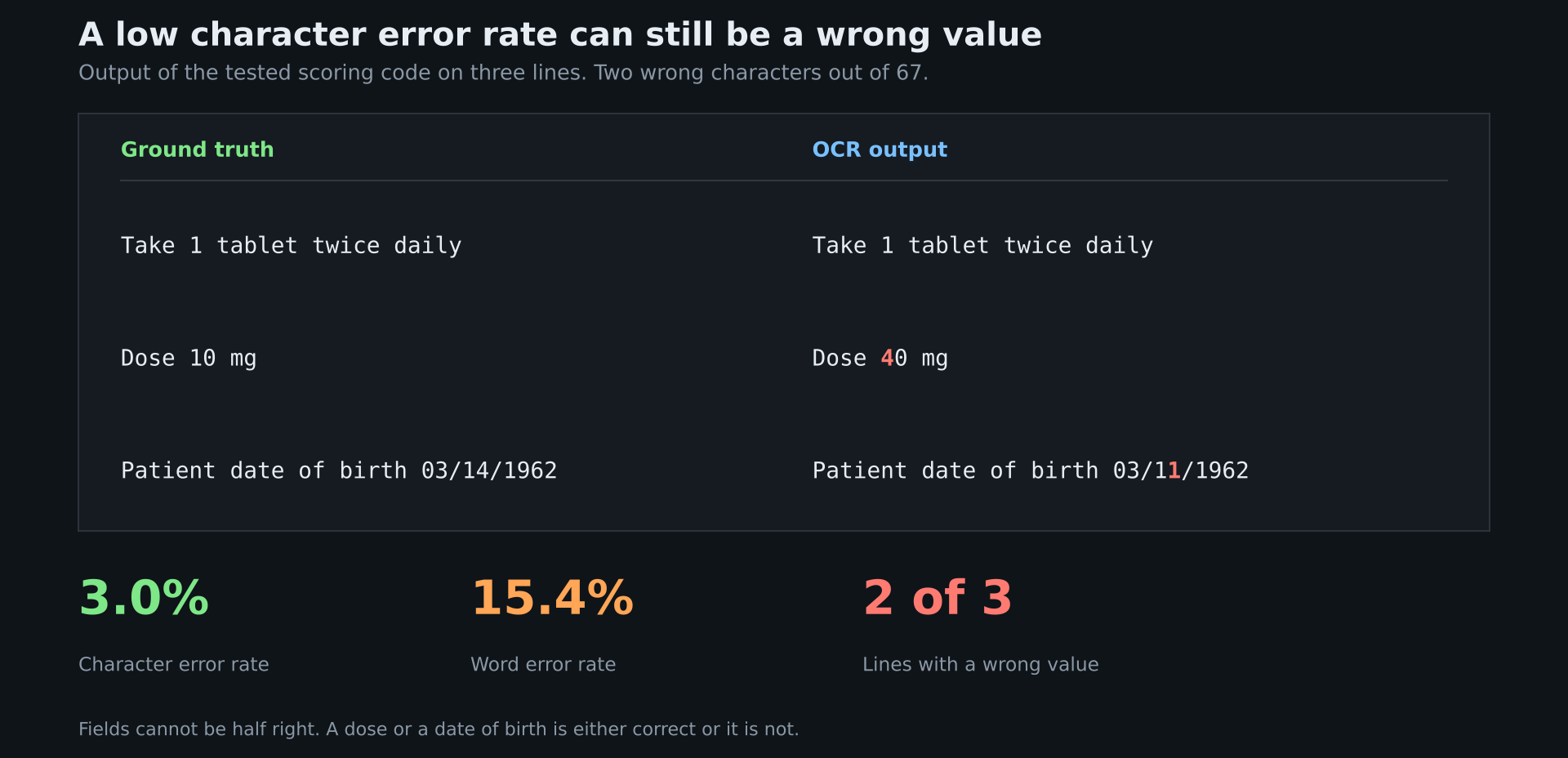
Character accuracy also hides the cost of single mistakes. In a dose of "10 mg" read as "40 mg", one character is wrong out of five, and the field is completely wrong. The testing section below shows this with numbers.
How Handwriting Recognition Works
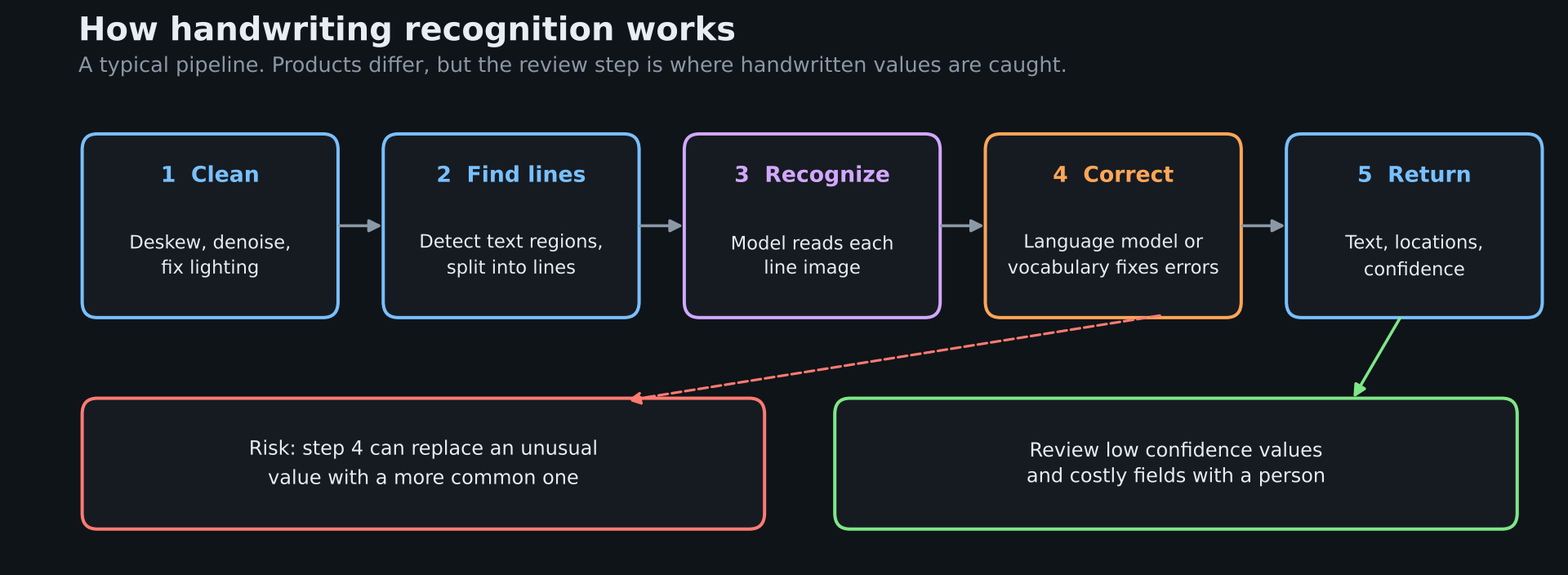
A typical pipeline has these stages, though products differ:
- Clean the image. Straighten (deskew), remove noise, and fix uneven lighting.
- Find the text. Detect regions and split them into lines, because many recognizers work on one line at a time.
- Recognize each line. A model converts the line image into characters or word pieces.
- Correct with context. A language model or vocabulary fixes likely errors.
- Return structure. Output text with locations and confidence, ready for field extraction.
Two Model Families
Older recognizers combine a convolutional network, a recurrent network, and a decoder called CTC that aligns image slices to characters. Newer ones use transformers. TrOCR, published by Microsoft researchers, pairs a pretrained image transformer as the encoder with a pretrained text transformer as the decoder, with no convolutional backbone. The paper reports state-of-the-art results on printed, handwritten, and scene text benchmarks at the time of publication. It resizes each input image to 384 by 384 pixels, and practitioners typically crop single lines before running it. One community model card states plainly that the image should contain single-line text.
The Risk of Context Correction
Context helps, and context also invents. A model that leans on language priors can "correct" an unusual name or number into a more common one. For handwritten values you cannot check against a dictionary, such as a dose, an amount, or a policy number, that is a real hazard, and it is why the review step matters more here than for printed text.
Where Handwritten OCR Is Used
Handwriting shows up wherever people fill in paper. DeepRead's guides on healthcare document OCR and insurance document processing describe the typical cases:
- Medical intake forms, notes, and prescriptions.
- Hand-filled claims forms and field adjuster notes.
- Logistics paperwork such as delivery notes, where handwritten signatures and details make it a real ICR problem.
- Applications and archives that were never typed.
For prescriptions, the evidence is sobering. A late-2024 preprint called MIRAGE, as summarized in DeepRead's healthcare guide, fine-tuned multimodal models on simulated handwritten prescriptions from Indian doctors and counted a medication wrong if either the name or the dosage was wrong. General models scored very low without training, GPT-4o at 7.57 percent, and the best fine-tuned model reached 82 percent, which the authors described as not deployable. It is one preprint on simulated data with older models, so newer models may score higher, but it shows how strict field-level scoring changes the picture.
OCR of Handwritten Text: Tools Compared
Support for handwriting differs by service and by language. The details below come from each vendor's own documentation, and they change, so confirm them before you commit.
Cloud Services
Amazon Textract
Textract detects printed text and handwriting through its Detect Document Text and Analyze Document APIs. Its quotas page says handwritten character recognition is only supported in English, and the FAQ repeats that handwriting is English only. Its documented minimum text height is 15 pixels, which at 150 DPI is about an 8 point font. AWS has also published an updated text detection model that it says improves handwriting detection, so retest if you evaluated an older version. Note that a separate AWS marketing page lists handwriting in six languages, which conflicts with the FAQ, so test your language in the console.
Azure Document Intelligence
The Read model extracts printed and handwritten text from PDFs and scans, returns bounding polygons and confidence for words, and flags handwritten lines in the styles collection. Handwriting is supported for English, Chinese Simplified, French, German, Italian, Japanese, Korean, Portuguese, and Spanish. The Layout model's page describes handwritten text as English only, so check which model you call.
Google Document AI
Google lists Enterprise Document OCR as covering more than 200 printed languages and 50 handwritten languages. The OCR processor accepts language hints, and Google's documentation describes language and handwriting hints that you can supply when you know your dataset's characteristics. Its Cloud Vision API also has a separate handwriting detection feature for images.
Open Source
TrOCR
TrOCR models and code are publicly available, so you can run it yourself, fine-tune it on your own handwriting, and keep data in your environment. You must also do the rest: detect and crop lines, run the model on each, and reassemble the page. One practitioner write-up on handwritten census records found that TrOCR returned plain text with no separators, and that Tesseract does not support handwriting by default. Plan for engineering time.
DeepRead
DeepRead's homepage mentions handwriting in its description ("PDFs, scans and handwriting in"), but the body of the page names no handwriting benchmark, and the benchmark sets it lists, DocILE, Charity, and LongExtract, are not described there as handwriting tests. DeepRead's own healthcare guide says there is no published benchmark for handwritten prescriptions, and its fintech guide advises testing handwritten input specifically instead of trusting general accuracy claims. See the sections below for how to run that test.
Test It on Your Own Documents
Vendor accuracy figures come from the vendor's samples. Build a test set from your own paper.
- Collect 100 or more real documents, covering your range of writers, pens, paper, and scan quality.
- Type the correct text and field values by hand. That is your ground truth.
- Run each tool on the same images.
- Score at the line level (character and word error rate) and at the field level (exact match).
- Report results by group, for example, block capitals versus cursive, because one average hides the weak group.
The module below computes both kinds of score. It uses the jiwer library for character error rate (CER) and word error rate (WER), and plain Python for field-level exact match.
import re

import jiwer

def norm(text):

"""Lowercase and collapse whitespace so layout noise is not scored."""

return re.sub(r"\s+", " ", text.lower()).strip()

def line_scores(pairs):

"""pairs: list of (truth, ocr) strings. Returns character and word error rates."""

truth = [norm(t) for t, _ in pairs]

ocr = [norm(o) for _, o in pairs]

return {"cer": jiwer.cer(truth, ocr), "wer": jiwer.wer(truth, ocr)}

def field_accuracy(truth_rows, ocr_rows, fields):

"""Exact match per field after trimming. Rows are dicts keyed by field name."""

hits = {f: 0 for f in fields}

for t, o in zip(truth_rows, ocr_rows):

for f in fields:

if str(t.get(f, "")).strip() == str(o.get(f, "")).strip():

hits[f] += 1

n = len(truth_rows)

return {f: hits[f] / n for f in fields}
Run on three short lines where the OCR got "10 mg" wrong as "40 mg" and a date of birth wrong by one digit, it returns a CER of about 3.0 percent and a WER of about 15.4 percent. That looks tolerable until you read it as fields. A 3 percent character error rate on those lines still means a wrong dose and a wrong birth date. Scored as fields on a separate two-record example, the dose is right only half the time.
Character and word error rate are good for comparing engines. Field accuracy tells you whether the output is safe to use, so weight it more heavily for decisions that matter.
Improving Results and Handling Doubt
Input quality and a review rule are the two things you control.
- Capture clearly. Flat, evenly lit, in focus, and large enough. Remember Textract's 15-pixel minimum text height.
- Constrain values. Check extracted values against a known list where one exists, such as a drug vocabulary for medications. DeepRead's healthcare guide recommends this check and labels it as its own recommendation, not a vendor claim.
- Use confidence, then verify. Services such as Azure return confidence per word. Route low-confidence values to a person. Sampling some high-confidence values to catch silent errors is a general practice, not a vendor claim.
- Treat output as a suggestion when an error is costly, such as prescriptions and amounts.
DeepRead's guide to AI document parsing explains how parsing returns locations with each element, which lets a reviewer jump straight to the handwritten value in question.
Handling Handwriting Alongside Other Document Types
If handwriting is one part of a pipeline that also handles invoices, forms, and records, a single extraction API can cover the whole set behind one integration. DeepRead returns named fields with the page, bounding box, and source text, and marks values it is unsure about as needs_review with a review_reason instead of returning a numeric score. A reviewer can see exactly where a handwritten value was read.
Its Free plan includes 2,000 pages a month with no card, up to 50 pages and 15 MB per document, which is enough for the 100-document test described above. Its homepage lists $15 per 1,000 pages for Extract and $35 for Deep Extract, which adds two OCR engines, adjudication of disagreements between them, and a verification pass on every value. It is hosted only and offers no BAA on any plan, so it is not an option for patient forms that require one. Run your handwritten samples through it, score the results with the code above, and decide on your own data. DeepRead does not publish a handwriting accuracy figure, so do not assume one.
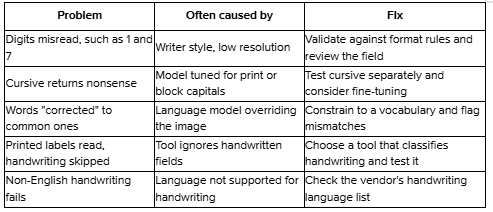
Common Problems and Fixes
Conclusion
Handwriting recognition has improved, but it is still a separate and harder problem than printed OCR, and vendor figures rarely transfer to your documents. Pick candidates that support your language, test them on 100 or more of your own samples, score at the field level, and send doubtful values to a person. That process will tell you more than any published number.
FAQ
Can OCR read handwriting?
Yes, in supported languages and with varying accuracy. Services such as Amazon Textract, Azure Document Intelligence, and Google Document AI document handwriting support, and quality depends on the writer, the language, and the image.
Is OCR accurate on handwritten text?
It is usually less accurate than on printed text. One technical guide puts printed text at 98 to 99.5 percent character accuracy and handwriting at 85 to 95 percent, depending on quality. Field-level accuracy, which counts a whole value as right or wrong, can be much lower, so test your own samples.
What is the difference between OCR and ICR?
OCR reads printed characters. ICR, intelligent character recognition, extends it to handwriting. In practice most services bundle both, and the useful question is whether the tool supports handwriting in your language.
Can Tesseract read handwriting?
Not well. One practitioner write-up found that Tesseract does not support handwriting by default. For handwriting, use a handwriting-capable service or a model such as TrOCR.
Which language support do I need to check?
Check the vendor's handwriting list, not the printed list. Textract limits handwriting to English, while Azure's Read model lists nine languages and Google lists 50 handwritten languages.
Do I need human review for handwritten documents?
For anything where an error is costly, yes. Review low-confidence values and sample the rest, and treat handwritten medical or financial values as suggestions until checked.
More articles

Unstructured.io Review: Features, Pricing, and Alternatives
Unstructured.io review: what the open-source library and hosted platform do, current pricing, tested Python code, limits, and four alternatives compared.
Resume OCR: Extracting Candidate Data from Resumes Automatically
How resume OCR reads PDFs and scans, fixes two-column order, and returns candidate fields. Tested Python code, a tool comparison, and US hiring rules.