%20{%20:root%20{%20--deepread-stroke:%20%23E5E7EB;%20}%20}%20.dark%20{%20--deepread-stroke:%20%23E5E7EB;%20}%20%3c/style%3e%3crect%20x='40'%20y='30'%20width='220'%20height='260'%20rx='28'%20ry='28'%20stroke='var(--deepread-stroke)'%20stroke-width='16'%20fill='none'/%3e%3cpath%20d='M180%2030v52c0%2010%208%2018%2018%2018h62'%20stroke='var(--deepread-stroke)'%20stroke-width='16'%20fill='none'/%3e%3cline%20x1='70'%20y1='130'%20x2='200'%20y2='130'%20stroke='var(--deepread-stroke)'%20stroke-width='16'%20stroke-linecap='round'/%3e%3cline%20x1='70'%20y1='165'%20x2='200'%20y2='165'%20stroke='var(--deepread-stroke)'%20stroke-width='16'%20stroke-linecap='round'/%3e%3cline%20x1='70'%20y1='200'%20x2='170'%20y2='200'%20stroke='var(--deepread-stroke)'%20stroke-width='16'%20stroke-linecap='round'/%3e%3c!--%20green%20download%20arrow%20in%20bottom%20right%20corner%20--%3e%3cpath%20d='M210%20202v58'%20stroke='var(--deepread-accent)'%20stroke-width='18'%20stroke-linecap='round'/%3e%3cpath%20d='M195%20245l15%2015%2015-15'%20fill='none'%20stroke='var(--deepread-accent)'%20stroke-width='18'%20stroke-linecap='round'%20stroke-linejoin='round'/%3e%3c/svg%3e)
OCR Platforms Explained: How OCR Technology Actually Works
How OCR platforms actually work, from rules-based pattern matching to machine learning and LLM-based extraction, plus handwriting, PDFs, and free APIs.
Most explanations of OCR stop at "it reads text from images." That's true, but it skips the part that actually matters if you're trying to understand why one OCR platform handles a handwritten form fine and another one doesn't, or why "OCR" and "machine learning" get used almost interchangeably in some places and treated as separate things in others.
This is a technical look at how OCR platforms actually work, the mechanics behind text recognition, how machine learning and now LLMs changed the pipeline, how handwriting recognition specifically works, the real difference between OCR on an image and OCR on a PDF, and an honest rundown of free versus production-grade options.
OCR Platform vs. OCR Tool
Worth separating before going further, since "OCR platform" gets used loosely. A desktop OCR tool converts a document you feed it, one at a time, through a UI, useful for digitizing an archive, not built for automation. An OCR platform is API-based: it accepts documents programmatically, returns structured text or JSON, and is built to scale horizontally inside another application or workflow rather than being operated by hand. If you're evaluating something for a one-off digitization project, a tool is fine. If you're building OCR into a product or automated pipeline, you're evaluating platforms, and the mechanics below are what actually differ between them.
Does OCR Use Machine Learning?
Short answer: it depends on the generation of OCR you're looking at, and this is worth being precise about rather than answering with a flat yes or no.
Early OCR (pre-2010s, and still present in some tools today) was rules-based: the engine compared shapes in the image against a fixed glossary of character templates. No learning involved, just pattern matching against predefined rules. This is fast and cheap, but brittle against handwriting, unusual fonts, or noisy scans.
Modern OCR genuinely does use machine learning, typically at two stages: a model trained to recognize character and word shapes from image data (rather than matching against fixed templates), and increasingly a second model that understands context — using surrounding words and document structure to correct likely misreads. Even some tools historically associated with rules-based matching, like Tesseract, moved to neural network-based recognition in more recent versions.
So "OCR vs. machine learning" is a bit of a false dichotomy at this point — most production OCR platforms today are machine learning systems, but the term "OCR" itself just describes the task (extracting text from images), not the method used to do it.
How OCR Actually Works, Mechanically
Strip it down to the actual processing steps:
- Preprocessing — the image is cleaned: deskewed if scanned at an angle, contrast-adjusted, noise removed.
- Text detection / layout analysis — the system identifies where text exists on the page, distinguishing text regions from tables, images, and whitespace.
- Feature extraction and recognition — for each detected text region, a model analyzes the visual features of each character or word shape and maps them to likely text. In classical OCR, this used engineered features (edges, contours). In modern neural OCR, this is typically a convolutional neural network (CNN) extracting visual features, sometimes paired with a recurrent or transformer-based sequence model that reads characters in context rather than in isolation.
- Sequence modeling — for connected or cursive text (and especially handwriting), reading characters one at a time in isolation performs poorly. Modern systems use sequence models, historically LSTMs, increasingly transformer-based architectures, that consider the whole word or line as a sequence, similar to how language models process text, which lets the system use context to disambiguate an ambiguous character.
- Post-processing — a language model layer corrects likely errors using dictionary and context checks (e.g., recognizing "rnodern" is very likely "modern").
- Structuring— in a modern OCR platform, output doesn't stop at plain text. It's mapped to fields, tables, and schema, often with a confidence score attached to each extracted value.
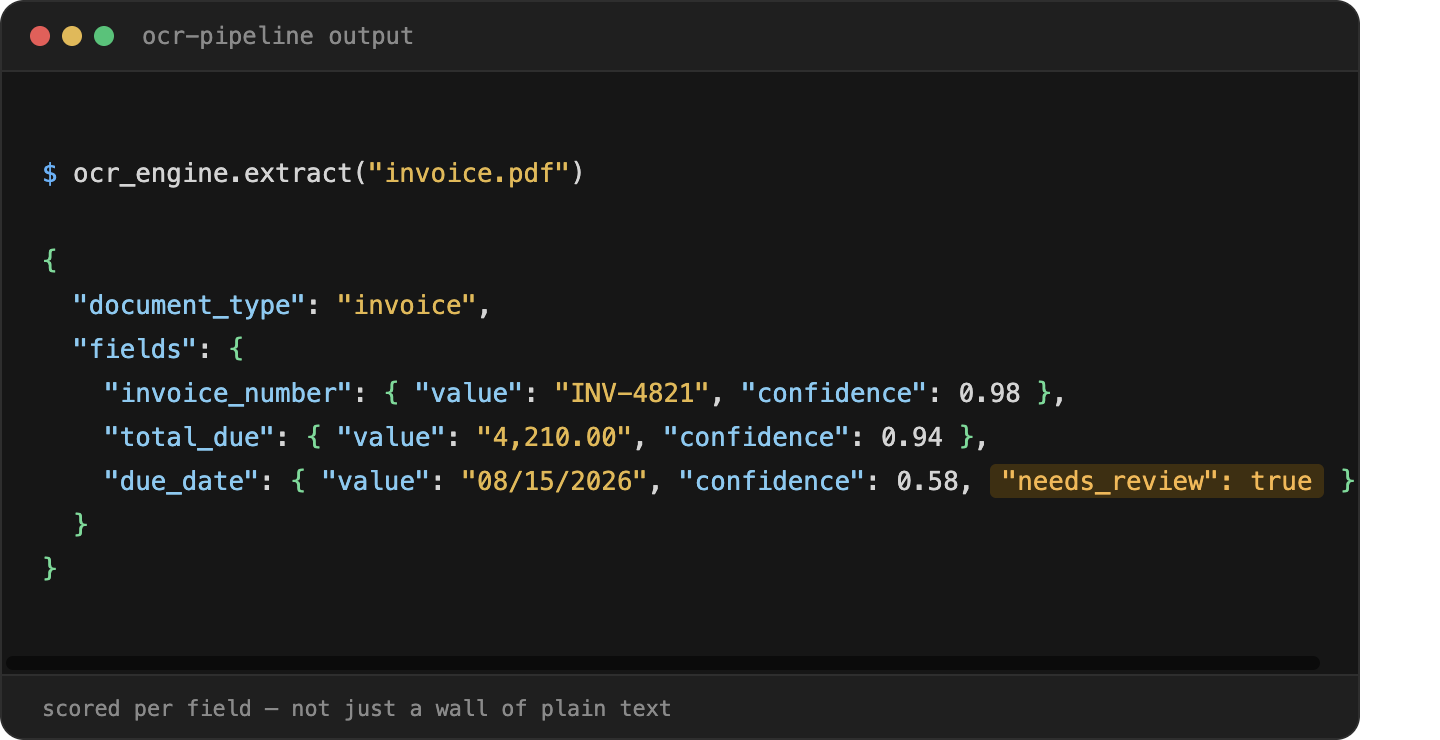
The generational shift in this category is really about which of these steps got a model upgrade, and when engines differ significantly in how good steps 3 and 4 are, which is where accuracy differences between platforms actually show up.
Handwriting Recognition (ICR): Why It's a Harder Problem
Handwritten text recognition is technically its own category, Intelligent Character Recognition (ICR), and it's a meaningfully harder problem than printed-text OCR for a specific reason: printed characters have a small, consistent set of shapes per font; handwritten characters vary enormously between individuals, and even within one person's handwriting from word to word.
This is why handwriting recognition depends much more heavily on sequence modeling and context than printed-text OCR does — a system reading handwriting often can't reliably identify one character in isolation and instead infers it from the shape of the whole word and surrounding context, similar to how a person reads messy handwriting by recognizing the word shape rather than each letter individually.
Practical implication: handwriting accuracy varies far more between platforms than printed-text accuracy does, and it's worth testing specifically rather than assuming a platform's general accuracy number transfers to handwritten documents. A tool can perform well on typed invoices and meaningfully worse on a handwritten delivery note or claims form — these are different technical problems even though both get called "OCR."
Image OCR vs. PDF OCR: A Real Technical Difference
This gets conflated constantly, and it's worth separating clearly, especially if you're specifically looking for a "PDF OCR API": not all PDFs need OCR.
- A text-layer PDF (created digitally, exported from Word, generated by a system) already contains machine-readable text embedded in the file. No OCR is needed; you can extract the text directly.
- An image-only PDF (a scanned document saved as PDF, or a photo embedded in a PDF wrapper) contains no embedded text layer; it's effectively a picture. This does require OCR, exactly like a JPG or PNG would.
A platform advertised as a "PDF OCR API" is really doing one of two things depending on the input: detecting whether a text layer already exists and extracting it directly (fast, and not really "OCR" in the technical sense), or running the image-recognition pipeline described above when no text layer exists. Worth checking which one a given API actually does, since some free tools handle text-layer PDFs well and fall over on scanned ones, which is exactly the case that matters for most real-world documents.
LLM-Based OCR: What Actually Changes
The newest shift in this category is vision-language models (VLMs), the same general model family behind modern LLMs, but trained to process images and text together, being applied directly to document understanding rather than a separate OCR step feeding a separate language model.
What this changes in practice:
- Layout and meaning are understood together, rather than OCR reading characters first and a downstream system inferring structure afterward. This is part of why the OCR market has split into AI-native document platforms using vision-language models for agentic processing, positioned against legacy OCR suites focused on high-accuracy text recognition and digitization; the two approaches solve overlapping but distinct problems.
- Better handling of complex layouts — nested tables, multi-column pages, mixed text and diagrams, since the model reasons over the whole page rather than processing text regions independently.
- Tradeoffs worth knowing: LLM-based extraction can be slower and more expensive per document than a purpose-built OCR pipeline, and like any LLM-based system, carries some risk of confidently generating a plausible-but-wrong value rather than failing visibly — which makes confidence scoring and human-review routing more important with this approach, not less.
In practice, many of the strongest current platforms combine both: a fast, accurate extraction layer for the core text-and-field recognition, with LLM-style reasoning applied specifically to structure, classification, and ambiguous cases, rather than using an LLM as the entire pipeline.
Free and No-Auth OCR APIs: An Honest Rundown
A meaningful number of people looking for "OCR API" specifically want something free, with no registration or authentication, to test quickly or handle a small personal project. Worth addressing directly rather than skipping past it:
- Open-source, self-hosted: Tesseract, PaddleOCR, EasyOCR — genuinely free, no API key, but you're running and maintaining the infrastructure yourself, and accuracy tuning is on you.
- Free-tier hosted APIs: Services like OCR.space offer a free web API with no registration required, supporting JPG, PNG, GIF, and PDF uploads, with a file size limit on the free tier. Good for quick testing or low-volume, non-sensitive use.
- Cloud provider free tiers: Google Cloud Vision API includes a free allotment (1,000 units per month) before usage-based billing applies. Solid accuracy, but requires account setup and API key authentication, not truly "no-auth."
Where these genuinely fall short for anything beyond testing: no meaningful SLA or uptime guarantee, rate limits that don't scale to production volume, and, this is the one worth taking seriously- most free/no-auth services are not appropriate for sensitive documents. Even services that state uploaded files are deleted immediately after processing are still a third-party service handling your data with no contractual guarantee behind it — fine for a test invoice, not appropriate for a real customer's bank statement, medical bill, or ID document. If you're processing anything with PII or anything a compliance team would ask about, a free/no-auth tool is the wrong layer for that data regardless of how convenient it is to test with.
Where OCR Platforms Get Used: Logistics and Insurance
Two verticals worth naming specifically, since document-heavy, non-standard-format workflows are exactly the conditions that make OCR ROI clearest:
- Logistics — bills of lading, proof of delivery, and carrier invoices, which vary in format by carrier and frequently arrive as scanned or photographed documents rather than clean digital files. Handwritten signatures and hand-filled delivery details make this a real ICR problem, not just a printed-text one.
- Insurance claims — claim forms, adjuster notes, and supporting documentation, often submitted as photos or scans with a mix of typed and handwritten content, under real-time pressure since claims processing speed directly affects customer experience.
Both are cases where the technical distinctions above — handwriting-specific accuracy, confidence scoring, and reliable handling of inconsistent formats- matter more than a general accuracy headline number.
FAQ
Is OCR the same as machine learning?
Not inherently; OCR describes the task (extracting text from images), not the method. Early OCR was rules-based pattern matching with no learning involved. Most modern OCR platforms do use machine learning, typically for both character recognition and contextual error correction, but the term "OCR" itself is method-agnostic.
What's the best LLM for OCR?
There isn't a single universal answer — vision-language models vary in accuracy by document type, layout complexity, and language, and the field is moving quickly enough that specific rankings age fast. What's more useful than a "best model" answer is checking a platform's accuracy on documents that resemble yours specifically, since LLM-based OCR performance varies more by document type than traditional OCR does.
Is there a genuinely free OCR API with no registration?
Yes, for low-volume and non-sensitive documents — OCR.space's free tier and similar services don't require account creation. For anything involving sensitive data (PII, financial documents, IDs) or production volume, a free/no-auth tool is generally the wrong fit regardless of cost, since there's no meaningful data-handling guarantee or uptime commitment behind it.
How does OCR handle handwriting differently from printed text?
Handwriting recognition (technically ICR) relies much more heavily on sequence and context modeling, since handwritten character shapes vary too much between individuals to reliably recognize in isolation. This is why handwriting accuracy varies more between platforms than printed-text accuracy, and why it's worth testing specifically rather than assuming a general accuracy number applies.
Does a scanned PDF need OCR, or does every PDF need it?
Only image-only PDFs need OCR — a scanned document or a photo saved as PDF has no embedded, machine-readable text and is technically just an image. A digitally-created PDF (exported from Word, generated by software) already contains a text layer and doesn't need OCR at all; the text can be extracted directly.
What does OCR cost?
It ranges from free (open-source, self-hosted, or limited free-tier APIs) to usage-based commercial pricing, typically per document or per page, to enterprise platforms with implementation and professional services costs on top of licensing. Cost should be evaluated alongside accuracy on your actual document mix, not in isolation; a cheaper platform that pushes more documents into manual review isn't necessarily cheaper in practice.
More articles
Structured Data Extraction: A Technical Guide
How to extract structured data from documents using an AI API, the architecture, grounding, and named tools compared.
Key Features of AI Document Workflow Automation
AI document workflow automation features, governance, prioritization framework, and real examples with measurable benefits for 2026.