%20{%20:root%20{%20--deepread-stroke:%20%23E5E7EB;%20}%20}%20.dark%20{%20--deepread-stroke:%20%23E5E7EB;%20}%20%3c/style%3e%3crect%20x='40'%20y='30'%20width='220'%20height='260'%20rx='28'%20ry='28'%20stroke='var(--deepread-stroke)'%20stroke-width='16'%20fill='none'/%3e%3cpath%20d='M180%2030v52c0%2010%208%2018%2018%2018h62'%20stroke='var(--deepread-stroke)'%20stroke-width='16'%20fill='none'/%3e%3cline%20x1='70'%20y1='130'%20x2='200'%20y2='130'%20stroke='var(--deepread-stroke)'%20stroke-width='16'%20stroke-linecap='round'/%3e%3cline%20x1='70'%20y1='165'%20x2='200'%20y2='165'%20stroke='var(--deepread-stroke)'%20stroke-width='16'%20stroke-linecap='round'/%3e%3cline%20x1='70'%20y1='200'%20x2='170'%20y2='200'%20stroke='var(--deepread-stroke)'%20stroke-width='16'%20stroke-linecap='round'/%3e%3c!--%20green%20download%20arrow%20in%20bottom%20right%20corner%20--%3e%3cpath%20d='M210%20202v58'%20stroke='var(--deepread-accent)'%20stroke-width='18'%20stroke-linecap='round'/%3e%3cpath%20d='M195%20245l15%2015%2015-15'%20fill='none'%20stroke='var(--deepread-accent)'%20stroke-width='18'%20stroke-linecap='round'%20stroke-linejoin='round'/%3e%3c/svg%3e)
Resume OCR: Extracting Candidate Data from Resumes Automatically
How resume OCR reads PDFs and scans, fixes two-column order, and returns candidate fields. Tested Python code, a tool comparison, and US hiring rules.
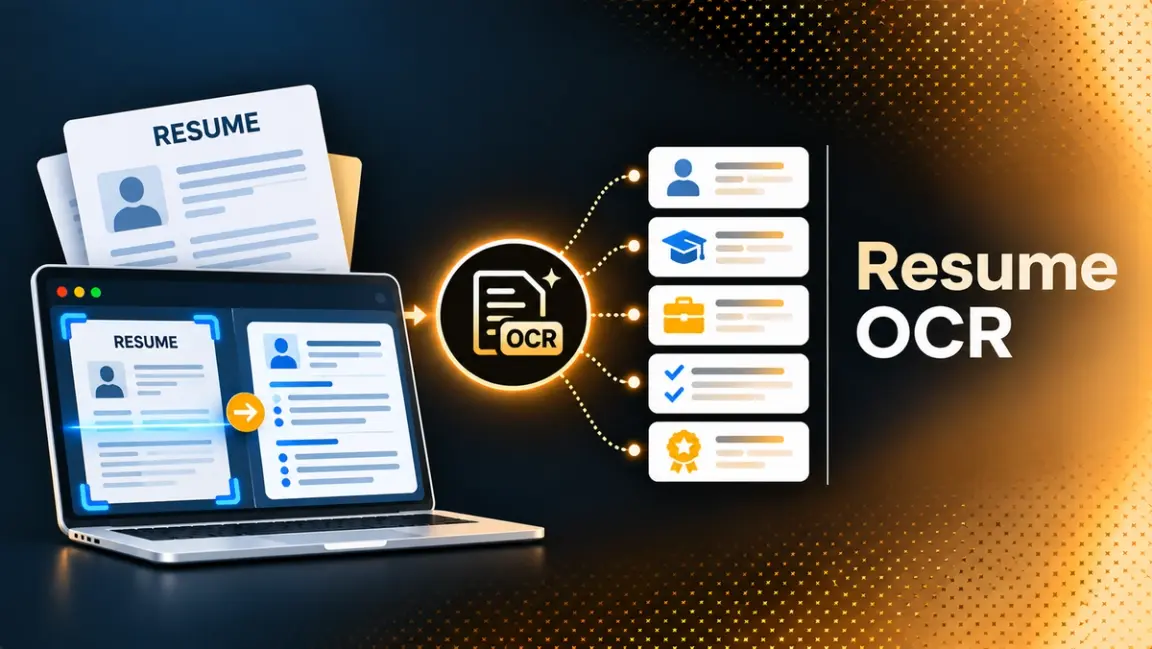
A recruiter's inbox holds resumes as PDFs, Word files, phone photos, and scans of paper. Typing each one into an applicant tracking system (ATS) is slow and error-prone, so teams automate it with resume OCR: software that reads the file and returns the fields a candidate record needs.
Resumes also sit next to offer letters, ID checks, and benefits forms in the wider paperwork of hiring, a theme covered in this piece on document workflow automation.
This guide covers how the technology works, where it fails, how to build a basic reader in Python, how four hosted parsers compare, and which US rules to check before you automate.
What Resume OCR Is and How It Differs from Resume Parsing
Three terms get mixed up in this space:
- OCR converts the pixels of an image into text. It does not know what a job title is.
- Parsing recovers structure: which block is the header, which lines belong to which job, in what order a reader would follow them.
- Extraction maps that content into fields you define, such as employer, start_date, and degree.
"Resume OCR" is the search phrase, but the working product is all three steps in sequence. Many resumes arrive as text PDFs or Word files that carry their own text, so OCR is only needed when the file is a scan or a photo. Textkernel's documentation says that on average about 5 percent of the documents its parser sees need OCR, which is a vendor figure for its own traffic and will differ for your applicant pool.
For the wider debate over whether language models replace classic OCR, see this comparison of LLMs vs OCR software.
Why Resumes Are Harder Than Most Documents
An invoice has a predictable shape. A resume does not, and each of the following problems shows up in real applicant pools.
No Standard Layout
Every candidate designs their own page. The variation between documents of one type is what breaks extraction accuracy in ways averages hide, a point explored in this article on scaling data capture with document AI.
Two Columns and Broken Reading Order
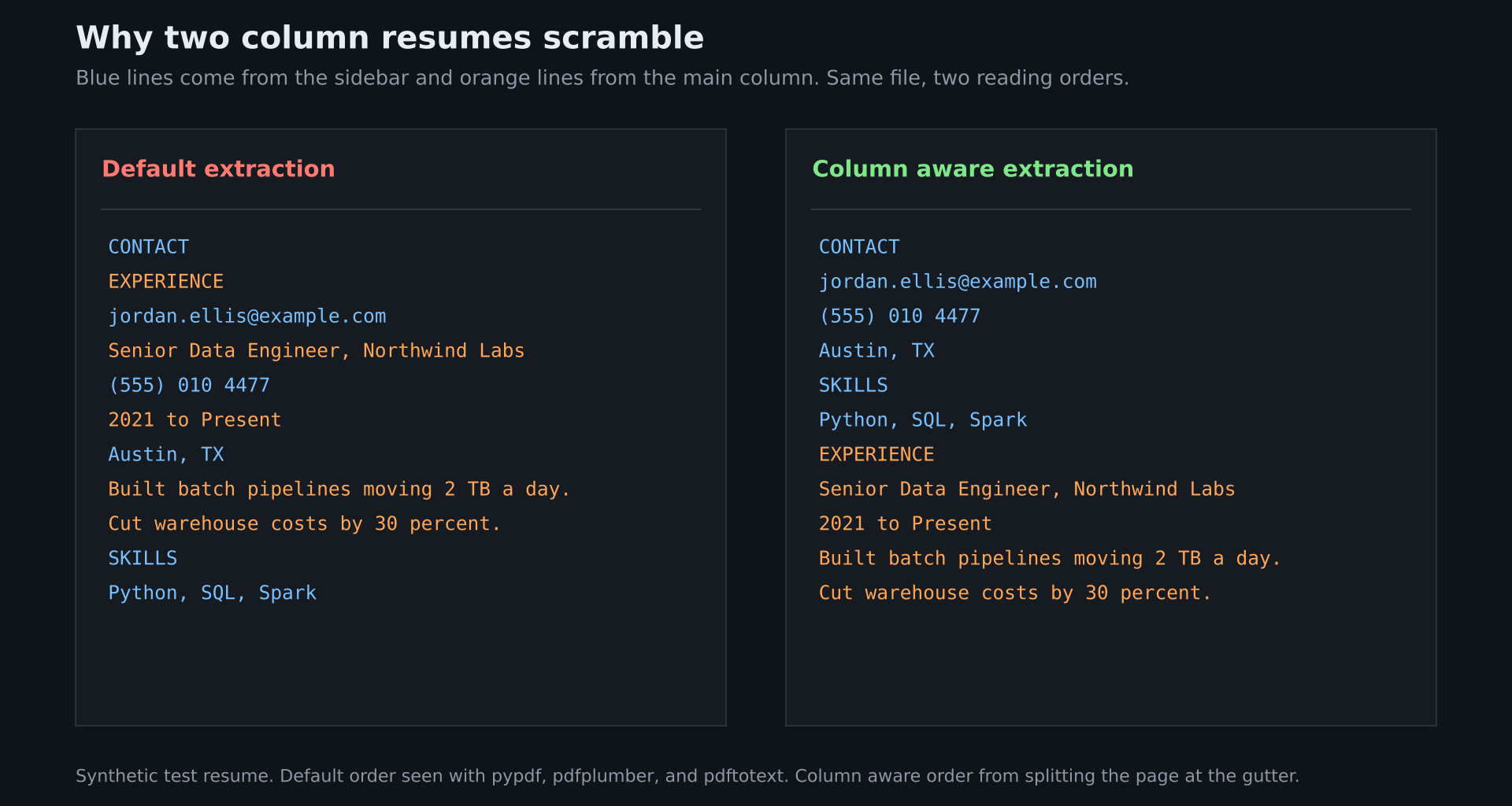
Sidebars and two-column designs are common. A 2025 arXiv paper on resume extraction reported that about 20 percent of the resumes in its own data used non-linear, multi-column layouts that break top-to-bottom reading flow. That is the paper's own dataset, not a universal rate.
The failure is easy to reproduce. Some text PDFs, such as those exported from table based layouts, store a sidebar line and a main column line next to each other, and default extractors read straight across. In a test on a synthetic sidebar resume, pypdf, pdfplumber, and pdftotext all returned contact lines mixed with experience lines.
Scans, Photos, and Faxes
A scanned resume has no text layer, so the file needs OCR first, and OCR errors then flow into every later step. A title misread as "Snr Engineor" will not normalize to a known job title.
Free-Form Content
Dates appear as "2021 to Present", "03/2021", or "Spring 2021". Jobs overlap. Skills sit in a sidebar, a paragraph, or a bar chart. A parser has to normalize all of it.
How Resume OCR Works Step by Step
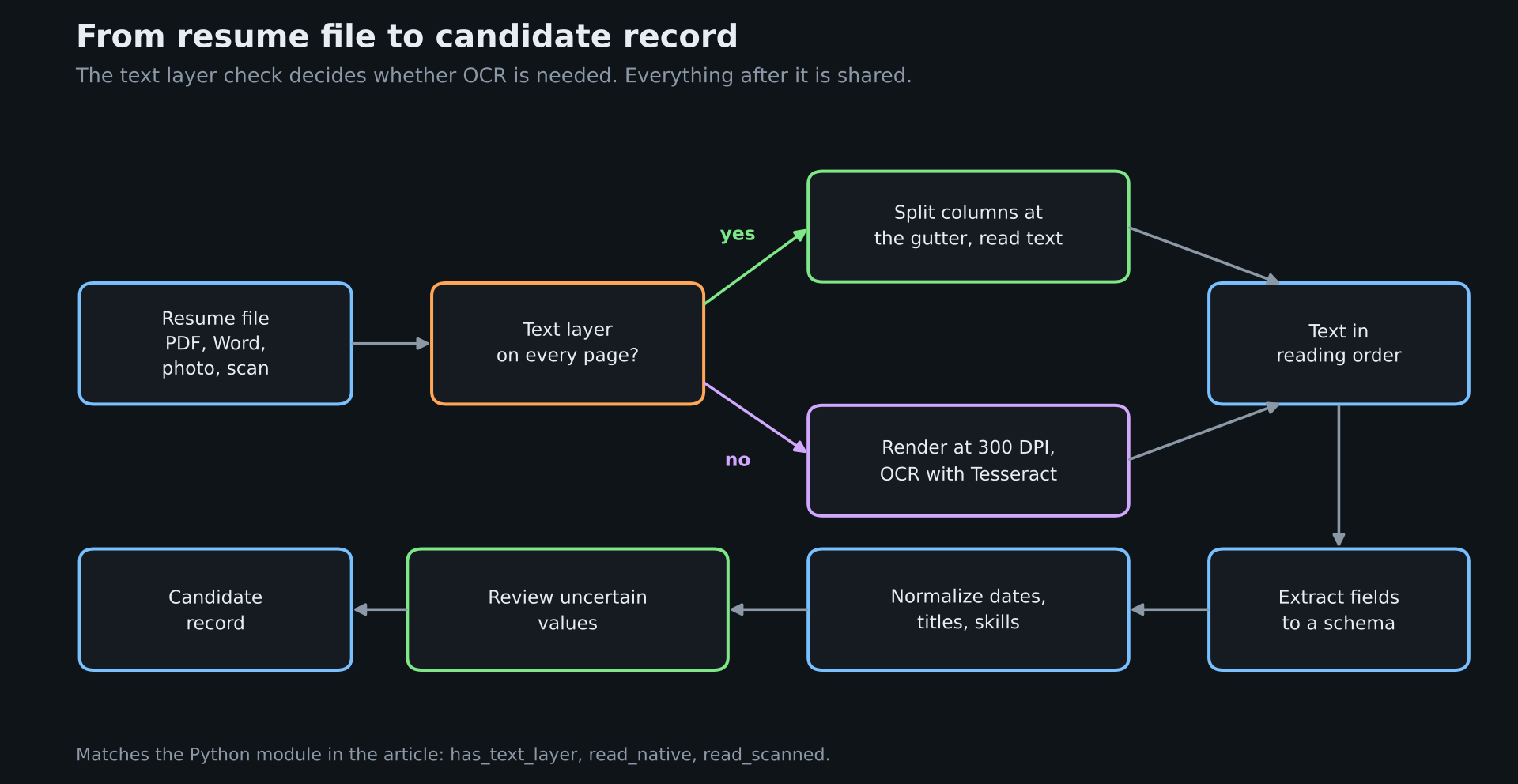
1. Check for a Text Layer
Try to read text directly. If every page returns real text, skip OCR. If not, render the pages to images and run OCR. Some scanners add a hidden text layer of their own, so spot check a sample.
2. Recover the Reading Order
For text PDFs, split columns before extracting. For scans, check the OCR output order on your own layouts, since layout analysis varies by engine and page design.
3. Segment Sections
Find where the experience, education, and skills sections start and stop. Headings such as "Work History", "Career", and "Professional Background" all mean the same thing.
4. Extract Fields into a Schema
Three approaches exist: rules and templates, trained models, and language models prompted with a schema. Rules break on unseen layouts. Language models handle variety but can return plausible values that are not on the page, so keep the source text for each value.
5. Normalize
Convert dates to a standard format, map job titles and skills to a taxonomy, and split city and state.
6. Review and Route
Send uncertain values to a person. Measuring how many records a human still touches is the real running cost, a habit described in this guide to extraction tools for fintech onboarding and compliance.
Build a Basic Resume Reader in Python
The module below handles both file types. It checks for a text layer, splits text PDFs at the gutter between columns, and sends scans to Tesseract. Install the packages with pip install pdfplumber pytesseract pdf2image numpy, plus the Tesseract and Poppler system packages.
import numpy as np

import pdfplumber

import pytesseract

from pdf2image import convert_from_path

def has_text_layer(path, min_chars=40):

"""True when every page carries real text, False when the PDF is a scan."""

with pdfplumber.open(path) as pdf:

return all(len(page.extract_text() or "") >= min_chars for page in pdf.pages)

def find_gutter(page, min_gap=18):

"""Return the x position of an empty vertical band, or None for one column."""

width = int(page.width)

covered = np.zeros(width + 1, dtype=bool)

for w in page.extract_words():

covered[int(w["x0"]):int(w["x1"]) + 1] = True

best_len, best_start, run = 0, 0, None

for x in range(int(width * 0.25), int(width * 0.75)):

if covered[x]:

run = None

continue

run = x if run is None else run

if x - run + 1 > best_len:

best_len, best_start = x - run + 1, run

return best_start + best_len / 2 if best_len >= min_gap else None

def read_native(path):

"""Read a text PDF one column at a time so lines do not interleave."""

pages = []

with pdfplumber.open(path) as pdf:

for page in pdf.pages:

gutter = find_gutter(page)

if gutter is None:

pages.append(page.extract_text() or "")

continue

left = page.crop((0, 0, gutter, page.height)).extract_text() or ""

right = page.crop((gutter, 0, page.width, page.height)).extract_text() or ""

pages.append(left + "\n" + right)

return "\n".join(pages)

def read_scanned(path, dpi=300):

"""OCR a scanned PDF page by page with Tesseract's automatic layout mode."""

images = convert_from_path(path, dpi=dpi)

return "\n".join(

pytesseract.image_to_string(img, config="--oem 3 --psm 3") for img in images

)

def resume_text(path):

return read_native(path) if has_text_layer(path) else read_scanned(path)
Call resume_text("candidate.pdf") to get plain text in reading order, then pass it to your field extraction step.
In a test on one synthetic two-column resume, the function returned every expected field from the text PDF, with the sidebar read before the main column. Tesseract's automatic layout mode also read the same page in order from a clean 300 DPI scan and from a copy rotated 1.2 degrees with blur and noise, so column splitting mattered for the text PDF and not for the scan. This is a single simple layout. Colored sidebars, icons, and tight gutters can behave differently, so test your own samples.
Which Fields to Extract and Which to Leave Out
Start from the decision the data supports. A typical candidate schema is:
{

"name": "",

"email": "",

"phone": "",

"location": {"city": "", "state": ""},

"work_history": [{"employer": "", "title": "", "start": "", "end": ""}],

"education": [{"school": "", "degree": "", "end": ""}],

"skills": []

}
Many resumes, especially from outside the US, also carry a photo, date of birth, marital status, or nationality. Those details can reveal characteristics that US hiring law protects, such as age or national origin, so unless you need them, leave them out of the schema and out of reviewer screens. Removing identifying details before review is the other route, described in this guide to AI powered fast redaction software.
Resume OCR Tools Compared
Resume parsing is a mature category. The details below come from each vendor's own pages. Prices change, so confirm them before you buy.
Hosted Resume Parsing APIs
Affinda
- What it automates: Resume parsing, job description parsing, search and match, and resume summaries.
- Pricing: Self-serve at US$0.10 per document by card with no annual commitment, and the first 14 days include 1,000 free documents. Annual hosted plans are available, and deploying in your own environment has annual pricing based on document volume.
- Limits: Recruitment products are credited per document, while other document types are credited per page, which complicates cost forecasts for mixed workloads.
- Best for: HR technology teams that want a hosted API now and the option to run it in their own environment later.
- Pros: Per document billing for resume parsing, a published self-serve rate, and an own-environment option.
- Cons: Credit models differ across product lines, and own-environment pricing is volume based.
Textkernel
- What it automates: Resume parsing in 29 languages and job parsing in 9, with column layout detection, an OCR add-on for image files, an LLM parser add-on, and user-defined fields through FlexRequests.
- Pricing: Credit based, with an enterprise plan quoted on request. Turning on OCR adds a small extra credit cost to each parse.
- Limits: Delivered as a cloud service through a REST API, and documents that need OCR take longer to return than text files.
- Best for: Multilingual, high volume hiring teams that want a long-established parser.
- Pros: Broad language coverage, availability in US, EU, and APAC regions, and a stated 99.9 percent uptime.
- Cons: OCR is an add-on with its own cost, and there is no self-hosted option.
Mindee
- What it automates: A Resume API that returns contact details, work experience, education, skills, and certifications as JSON from PDF, DOC, and scanned resumes.
- Pricing: A 14-day free trial with no card required. Paid rates are on Mindee's separate pricing page and are not stated on the resume page.
- Limits: The resume page does not state file size limits, rate limits, retention periods, or whether uploaded data is used for training, so read the data agreement before sending candidate files.
- Best for: Developer teams that want a per-field score to drive review rules.
- Pros: A confidence score on every extracted field, EU hosting, and a claim of multi-column handling without templates.
- Cons: No published accuracy benchmark on the resume page, and how its scores are calibrated is not described.
Klippa
- What it automates: Extraction from printed and handwritten resumes into customizable fields, plus workflow automation and fraud detection modules.
- Pricing: Pay per use and monthly licenses, both quoted by Klippa's solution architects, since the cost depends on field count, volume, and page count.
- Limits: No public price list, so budgeting needs a sales conversation.
- Best for: Teams that need fields tailored to their own process and can work through a quote.
- Pros: Stated support for handwritten resumes and fully customizable fields.
- Cons: The page claims nearly 100 percent accuracy without naming a test set, so treat it as a marketing figure.
Build It Yourself
An open-source stack of pdfplumber and Tesseract, as shown above, gives you text for free. You then add field extraction through rules or a language model, plus normalization and review tooling. That makes sense for a small, steady volume or for strict data control, and costs engineering time as layouts and edge cases accumulate.
How to Measure Accuracy on Your Own Resumes
Vendor accuracy figures use the vendor's own samples, and demos use resumes the vendor picked. Measure your own.
- Collect 100 resumes from your real applicant pool and split them: single column text PDFs, multi-column text PDFs, scans or photos, and any non-English files.
- Label the correct fields by hand for each.
- Run each candidate tool and score every field for precision (how many returned values were right) and recall (how many true values were found).
- Report results per group, not as one average, because averages hide the failures in the hard groups.
- Decide a review rule, such as sending any record with a missing employer or date to a person, and count how many records that sends.
Test failure behavior as well. Feed a rotated page, a cover letter, and a corrupted file, and check whether the tool fails loudly or invents values.
US Hiring and Privacy Rules to Check
This section is a starting point, not legal advice. Ask counsel how the rules apply to your setup.
Screening Rules
New York City Local Law 144. The law covers automated employment decision tools: computational processes that issue a score, classification, or recommendation and substantially assist or replace discretionary decision making. The city's Department of Consumer and Worker Protection gives resume screening software that decides who is selected for an interview as an example. Employers using a covered tool in the city need a bias audit no more than a year old, a published summary of results, and notice to candidates at least 10 business days before use, with a way to request an alternative selection process or accommodation. The city's rule took effect July 5, 2023.
Extraction that only copies fields into a profile is a different step from scoring. Once its output drives ranking or filtering, the screening tool is what these rules examine.
Illinois HB 3773. Since January 1, 2026, it is a civil rights violation in Illinois to use AI in a way that has the effect of discriminating on a protected basis, and the law requires employers to give employees and applicants notice when AI is used in employment decisions, with the details left to rules from the Illinois Department of Human Rights.
Colorado. Its AI Act has been delayed and rewritten, so check its current status before relying on any summary.
Privacy and Records
CCPA. Since January 1, 2023, California's privacy law covers job applicants as well as consumers, and covered businesses must give notice at or before the point where personal information is collected.
EEOC recordkeeping. Under 29 CFR 1602.14, employers must keep personnel and employment records, including application forms submitted by applicants and other hiring records, for one year from when the record was made or the personnel action taken, whichever is later. If a discrimination charge is filed, relevant records must be kept until final disposition.
In practice, keep the original resume file alongside the extracted values, along with the version of the parser that produced them, so a person can always check a value against the page.
Where a General Document API Fits
If resumes are one of several document types in your pipeline, one extraction API can cover them all behind a single integration. DeepRead returns named fields, each with the page, bounding box, and source text it came from, and marks values it is unsure about as needs_review with a review_reason instead of returning a numeric score. A reviewer can therefore see exactly where an employer name or date was read.
Jobs run asynchronously, so your upload flow submits a file and polls for the result by job ID, or receives a webhook on Standard and Enterprise. The Free plan includes 2,000 pages a month with no card, up to 50 pages and 15 MB per document. Standard has no monthly page limit and charges $15 per 1,000 pages for Extract and $35 for Deep Extract, and Enterprise is custom. Processing is hosted only, defaults to US East, and has no self-hosted option or BAA on any plan, so confirm how long documents are kept and match that to your own retention policy. Enterprise adds retention controls from 1 to 365 days and EU and AU data residency. A failed job is not billed. Test it on your own resumes before relying on it.
Common Problems and Fixes
- Sidebar text appears in the wrong place. Split text PDFs at the gutter, as in the code above, or use a parser that detects columns.
- Empty output from a PDF. The file is probably a scan. Run the text layer check and fall back to OCR.
- Garbled characters. The PDF may use fonts that do not map to Unicode. Render the page to an image and OCR it instead.
- Job titles that will not match your list. Add a normalization step instead of relying on exact text.
- Overlapping or missing dates. Treat "Present" as an explicit value, and send unparseable dates to review.
- Phone photos of paper resumes. Deskew and raise contrast before OCR, and ask candidates to upload a PDF where you can.
Conclusion
Resume OCR is three steps in sequence: read the text, recover its order and structure, and map it into the fields you need. Most files are text PDFs where the hard problem is column order, not character recognition, and the scans that do arrive need OCR with checks on the result.
Choose a tool by testing it on your own resumes, scoring per field and per layout group. Build review into the flow, keep the original file next to the extracted data, and check US screening and privacy rules before extraction output feeds any ranking or filtering.
FAQ
What is resume OCR?
Resume OCR is software that reads a resume file, including scans and photos, and returns structured candidate data such as name, contact details, employers, dates, education, and skills.
What is the difference between resume OCR and resume parsing?
OCR converts an image into text. Parsing recovers the structure of that text and maps it to fields. Most resume tools do both, and files that already contain text skip the OCR step.
Can resume OCR read scanned or photographed resumes?
Yes, but quality depends on the image. Low resolution, skew, and decorative fonts reduce accuracy, and OCR errors carry into later steps such as title matching. Scan at 300 DPI where possible and check the output on a sample.
Why does my parser scramble two-column resumes?
Text PDFs store lines in the order the designer's software wrote them, and default extractors read across the page. Splitting the page at the gutter and reading each column separately fixes this for typical sidebar layouts.
How accurate is resume OCR?
It depends on the layout, the file type, and the tool, and vendor figures come from the vendor's own samples. Measure precision and recall per field on 100 of your own resumes, grouped by single column, multi-column, and scanned files.
Do US hiring laws apply to resume parsing?
Possibly, depending on what the output is used for. Rules such as New York City Local Law 144 and Illinois HB 3773 concern AI that screens or influences hiring decisions, and the CCPA covers job applicant data in California. Ask counsel how they apply to your process.
More articles

Unstructured.io Review: Features, Pricing, and Alternatives
Unstructured.io review: what the open-source library and hosted platform do, current pricing, tested Python code, limits, and four alternatives compared.
OCR of Handwritten Text: How It Works, Where It Fails, and How to Test It
How OCR of handwritten text works, why it is harder than printed OCR, how Textract, Azure, Google, and TrOCR compare, and how to test accuracy.