%20{%20:root%20{%20--deepread-stroke:%20%23E5E7EB;%20}%20}%20.dark%20{%20--deepread-stroke:%20%23E5E7EB;%20}%20%3c/style%3e%3crect%20x='40'%20y='30'%20width='220'%20height='260'%20rx='28'%20ry='28'%20stroke='var(--deepread-stroke)'%20stroke-width='16'%20fill='none'/%3e%3cpath%20d='M180%2030v52c0%2010%208%2018%2018%2018h62'%20stroke='var(--deepread-stroke)'%20stroke-width='16'%20fill='none'/%3e%3cline%20x1='70'%20y1='130'%20x2='200'%20y2='130'%20stroke='var(--deepread-stroke)'%20stroke-width='16'%20stroke-linecap='round'/%3e%3cline%20x1='70'%20y1='165'%20x2='200'%20y2='165'%20stroke='var(--deepread-stroke)'%20stroke-width='16'%20stroke-linecap='round'/%3e%3cline%20x1='70'%20y1='200'%20x2='170'%20y2='200'%20stroke='var(--deepread-stroke)'%20stroke-width='16'%20stroke-linecap='round'/%3e%3c!--%20green%20download%20arrow%20in%20bottom%20right%20corner%20--%3e%3cpath%20d='M210%20202v58'%20stroke='var(--deepread-accent)'%20stroke-width='18'%20stroke-linecap='round'/%3e%3cpath%20d='M195%20245l15%2015%2015-15'%20fill='none'%20stroke='var(--deepread-accent)'%20stroke-width='18'%20stroke-linecap='round'%20stroke-linejoin='round'/%3e%3c/svg%3e)
Automated Document Indexing Solutions for High-Volume Batches: A Buyer's Guide
Compare automated document indexing solutions for high-volume batches: schemas, no-template extraction, search, quality tracking, and per-document pricing.
Indexing is the step that turns a pile of scanned pages into something a person can find. A file becomes useful when it carries a document type, a date, an account number, a counterparty, or whatever else your team searches by. Doing that by hand works for a few hundred pages. It breaks down when a back-file project, a mailroom, or a month-end close drops tens of thousands of pages into the queue at once.
Automated document indexing solutions for high-volume batches take over the repetitive part. They separate a scanned stack into individual documents, identify what each one is, read the index fields, and hand clean metadata to a repository or search engine. Indexing is also the backbone of deal-room work, which is why due diligence platforms with automated document indexing lean on it so heavily.
The products in this category are not interchangeable. Some are cloud APIs that return fields and leave storage and search to you. Some are capture suites built around scanners. Some are document management systems with AI capture added on. This guide explains what each layer does, what to test before buying, how the pricing models differ, and where eight real products fit.
What Document Indexing Automation Actually Does
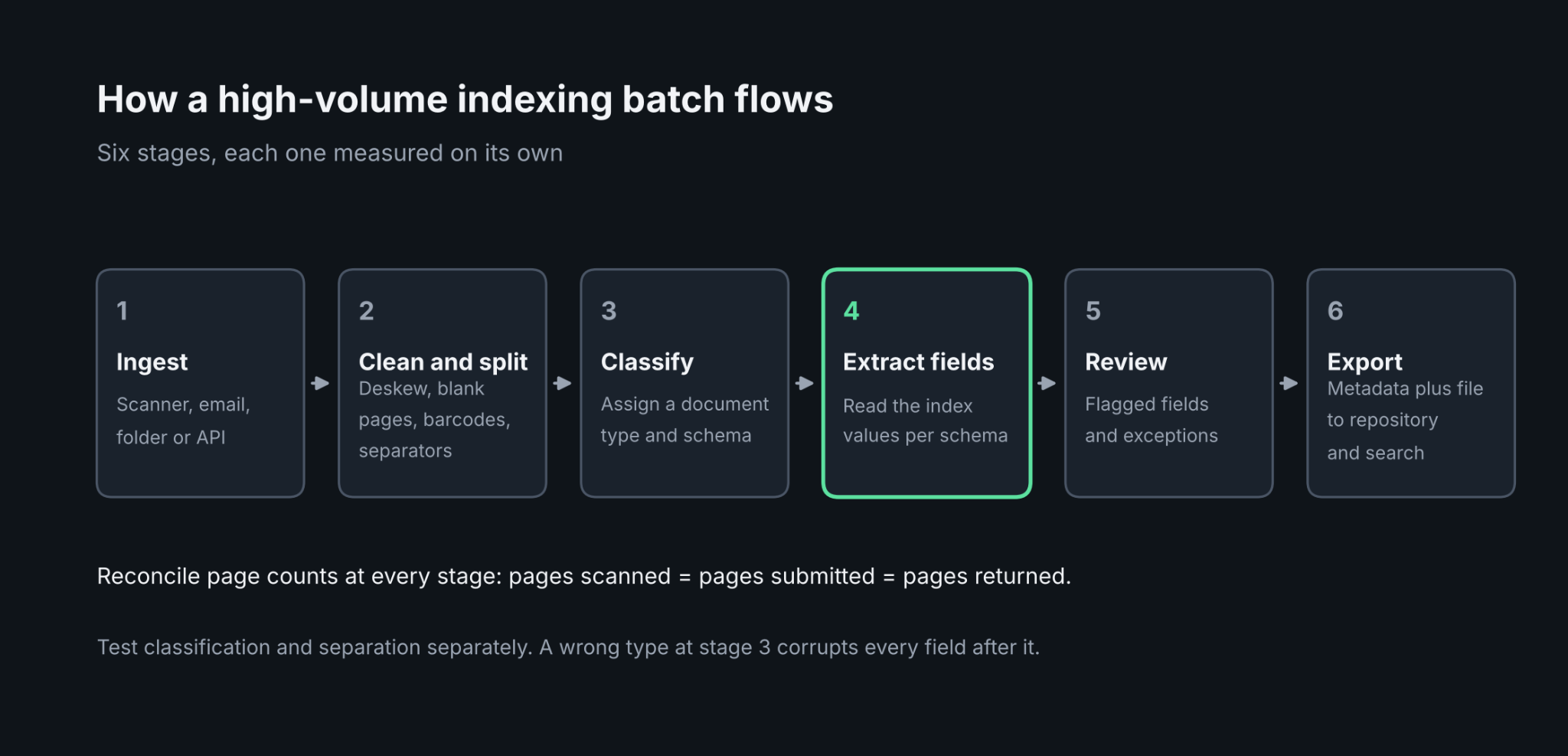
A batch pipeline has the same stages regardless of the vendor. Pages arrive from a scanner, an email inbox, a watched folder, or an API call. The system cleans the images, splits the stack into documents, classifies each document, extracts index values, checks them against rules or reference data and exports the file with its metadata. Each stage can fail separately, so it helps to evaluate them separately.
Index Fields Versus Full-Text Search
Full-text search finds words anywhere on a page. Index fields find the right document when the same words appear on thousands of pages. Searching for an invoice number in full text returns every page that mentions it, including remittance advices and emails. Searching an indexed invoice number field returns the invoice. Most mature setups use both: structured fields for precise filtering and full-text for everything else.
Classification and Separation
Separation decides where one document ends and the next begins. Classic capture tools do it with blank pages, page counts, patch codes, and barcodes. AI-based tools add content-based separation, which matters when a batch arrives as one long PDF with no separator sheets. Classification then assigns a document type, which decides which index schema applies. A mistake at this stage corrupts every field after it, so measure it on its own.
Public-sector records teams face this at scale, and the logic is the same as in AI document categorization for state and local government, where the type assigned on intake drives retention and routing.
Where Scanning and Digitization Fit
Document management automation for high-volume scanning and digitization starts before OCR. Production scanning software handles image cleanup such as deskew, despeckle and blank page removal, and good indexing depends on those images being clean. A digitization project therefore has two halves: capture hardware and image preparation, then recognition and indexing. Some products cover both halves. Cloud extraction APIs cover only the second.
Choosing Between Templates and Schema-Driven Extraction
The most common mistake in a high-volume project is buying a tool that needs a template for every layout. Template and zone-based setups work well for a fixed set of forms. They become a maintenance job when a project includes hundreds of supplier layouts or document types that change year to year. Teams comparing options can start with a practical framework such as how to choose a document automation tool and then apply the tests below.
Customizable Data Schemas
Automated document indexing platforms with customizable data schemas let you define the fields once, by document type, and apply them to any layout. A schema might hold a policy number, an effective date, and an insured name for one type, and a parcel ID and a recording date for another. Test whether a new field can be added without retraining, whether nested values such as line items are supported, and whether the schema can be sent with each API call or must be configured in a console first.
No Templates and No Post-Processing
Automated document indexing solutions with no templates and no post-processing are the goal for variable batches. The claim has two parts, and both need testing. No templates means a layout the system has never seen still yields the right fields. No post-processing means the output is usable as returned, with dates normalized and values typed, without a script that cleans up each vendor's quirks. Run a pilot on a sample of your messiest documents and count how many fields need a cleanup step before they can load into your repository.
Developers who want this behavior behind a single endpoint can compare options in document processing API guides, which cover what to expect from request and response design.
How Pricing Works at Batch Scale
Automated document processing software with pay-per-document pricing is easy to ask for and harder to find. Most cloud tools bill per page. A few bill per document or per block of pages. Others bill per workflow step, per scanner, or per user. The unit matters more than the headline rate, because it decides how cost grows with your batch.
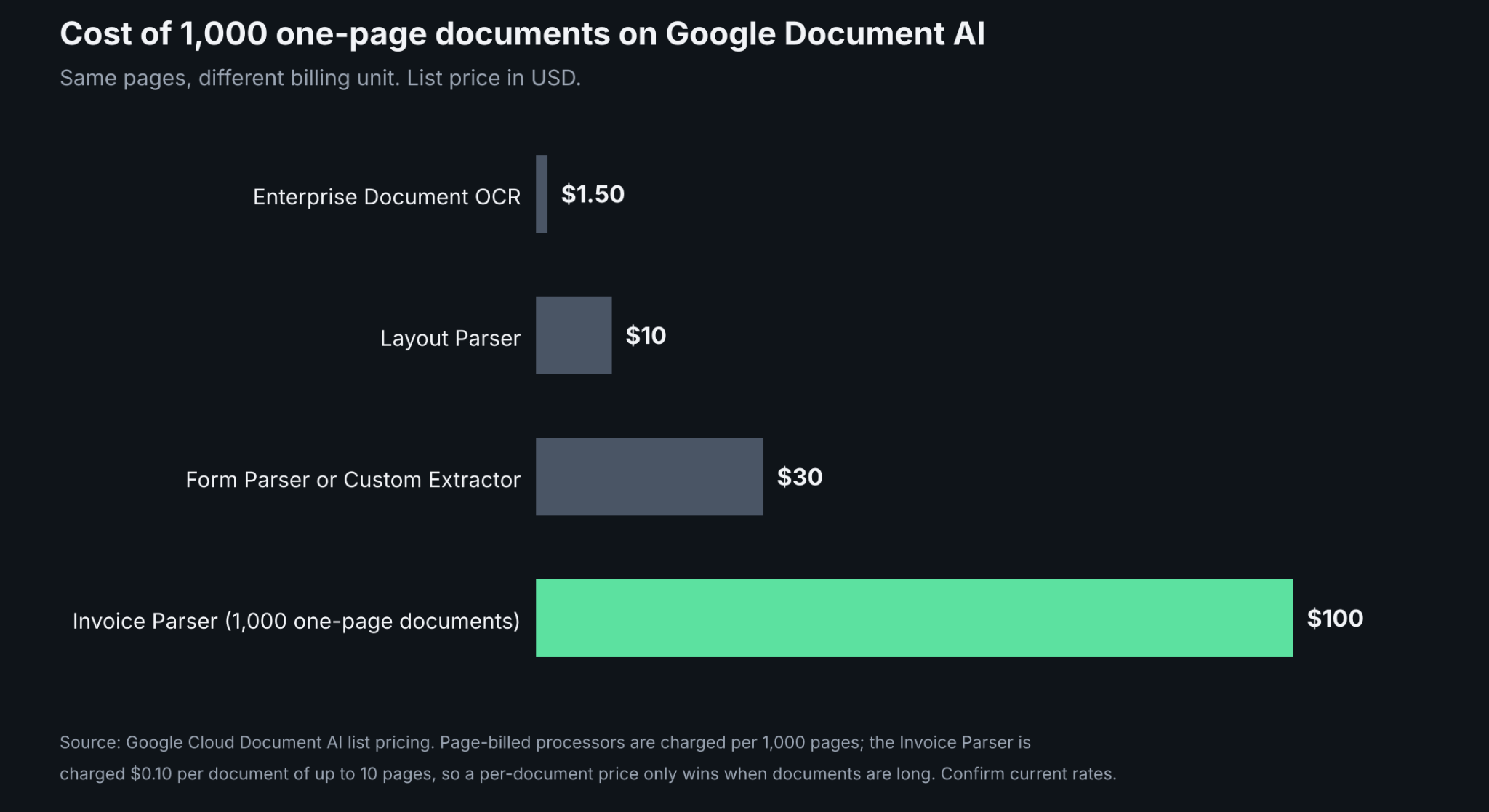
Per-page pricing is the most common. List rates for raw text recognition sit near $1.50 per 1,000 pages at the large cloud providers, while structured extraction costs more. Google Document AI lists $30 per 1,000 pages for its Custom Extractor up to 1 million pages a month. At that rate, 500,000 pages a month cost $15,000 before any discount.
Per-document pricing can help or hurt depending on page count. Google lists its Invoice Parser at $0.10 per document of up to 10 pages. A stack of 1,000 one-page invoices costs $100 on that parser against $30 on the page-billed Custom Extractor, so a per-document price only wins when documents are long. Per-block and per-step pricing, as used by Nanonets, depends on how many steps a workflow runs for each file. Per-user pricing, as used by document management suites, ignores volume entirely and scales with headcount.
Before comparing quotes, count pages and documents in a real batch and ask each vendor to price that exact sample. A longer treatment of this model is in pay-as-you-go document processing, which explains when usage billing beats a flat license and when it does not.
Built-In Analytics and Quality Tracking
Automated document indexing tools with built-in analytics and quality tracking save the most time after launch. A batch of 100,000 pages will contain errors, whatever the vendor promises, and the question is how quickly you can find them. Look for these capabilities.
- Field-level results that show where each value came from on the page, so a reviewer can verify it without reopening the file.
- An exception queue that holds only flagged fields or documents, with the reason for each flag.
- Throughput and turnaround reporting by batch, so a stalled queue is visible the same day.
- Accuracy tracking against reviewer corrections, so you can see whether a document type is drifting.
- An audit trail of who changed which value and when.
Confidence scores are useful but not required. Amazon Textract and Google Document AI return them, and many teams set a threshold below which a field goes to a person. Tools that do not publish scores need another way to flag risk, such as rule checks or a review reason attached to each flagged value. Either approach works if the flagged share stays small enough for your reviewers to clear.
Search and Retrieval After Indexing
Automated document tools with robust search and indexing capabilities fall into two groups. Extraction APIs return structured fields and stop there. Search, permissions, and retention live in whatever repository or search engine you connect. Document management suites include the repository, so search, and metadata templates come built in, but extraction depth varies by product.
Neither design is better in general. An API plus your own search layer gives control over schema, storage, and cost. A suite gives faster rollout and one vendor. What matters is the handoff. Check that exported metadata maps cleanly onto your repository's fields, that the original file and the extracted values stay linked through a stable identifier, and that a reindex is possible when your schema changes. Reindexing a million documents is routine once a schema evolves, so test it early.
Eight Platforms Compared
The platforms below are grouped by what they are, not ranked. Prices are published list rates or figures reported by third-party trackers. Confirm current rates and limits with each vendor before budgeting.
Cloud Extraction APIs
Amazon Textract
- What it automates: Text, forms, tables, queries, signatures and layout extraction from images and PDFs. Queries pull named fields with natural-language questions, up to 15 per page on synchronous calls and 30 per page on asynchronous ones.
- Pricing: Per page. List rates in the US West (Oregon) region are $1.50 per 1,000 pages for plain text detection, $50 per 1,000 for forms and $15 per 1,000 each for tables and queries, with lower rates above 1 million pages a month for text, forms and tables. New AWS customers get a three-month free tier.
- Limits: It returns JSON, not a repository, so storage, search and exception handling are yours to build. Multi-page PDFs and TIFFs go through asynchronous calls from Amazon S3. It does not classify or split mixed stacks on its own outside the lending workflow.
- Best for: AWS-based engineering teams that want a pay-per-page building block inside their own pipeline.
- Pros: Per-field confidence scores, human review through Amazon A2I, volume tiers and tight links to S3 and Lambda.
- Cons: Cost rises quickly when forms, tables and queries are combined on every page, and layout-specific tuning needs custom adapters.
Azure AI Document Intelligence
- What it automates: Text recognition, layout, prebuilt models for invoices, receipts, IDs and tax forms, custom classification and custom extraction models.
- Pricing: Per page. Reported rates are $1.50 per 1,000 pages for Read, $10 per 1,000 for Layout and prebuilt models, and about $30 per 1,000 for custom extraction. Batch meters are priced the same, and monthly commitment tiers discount high volume. A free tier covers 500 pages a month.
- Limits: Model training is billed separately from page processing, and the free tier is meant for evaluation, not production batches.
- Best for: Microsoft-centered teams that want a batch API with commitment pricing and a mix of prebuilt and custom models.
- Pros: A dedicated batch analysis API, commitment tiers at high volume, and a visual studio for labeling.
- Cons: Per-page costs vary by model type and add-on, so a bill is hard to predict without a sample run.
Google Document AI
- What it automates: OCR, layout parsing, form parsing, a generative Custom Extractor, custom classifiers and splitters, and pretrained parsers for invoices, bank statements and identity documents.
- Pricing: Per page for most processors. Enterprise Document OCR is $1.50 per 1,000 pages, Layout Parser is $10, Form Parser and Custom Extractor are $30 (dropping to $20 above 1 million pages a month) and the custom classifier and splitter are $5 (dropping to $3). Invoice and expense parsers are $0.10 per document of up to 10 pages. Each deployed custom processor version adds $0.05 an hour for hosting.
- Limits: Hosting charges apply to custom processors even when idle, and the pretrained parsers cover specific document types only.
- Best for: Teams that need splitting, classification and extraction from the same provider, and want a schema learned from a few examples.
- Pros: A separate splitter and classifier for mixed stacks, entity confidence scores and a Custom Extractor that learns a schema with little or no labeled data.
- Cons: Several processors must be chained for a full pipeline, and cost depends on which processor handles each page.
AI Document Processing Platforms
Nanonets
- What it automates: Workflow-based extraction, classification, validation and routing with no-code setup, plus batch processing and API access.
- Pricing: Usage-based, billed per workflow block run with no platform fee or monthly minimum. Examples from the vendor's billing documentation include $0.01 per imported file, $0.02 for a date-formatting step, $0.03 per exported page and $0.30 per page for AI extraction. Prepaid credits with bonus value and volume discounts are available through sales.
- Limits: Cost depends on how many blocks a workflow runs per document, so a long workflow multiplies the per-document price. Enterprise features such as single sign-on and region-specific hosting sit on the Enterprise tier.
- Best for: Operations teams that want to build indexing workflows without code and pay by workflow activity.
- Pros: No-code workflow builder, no platform fees and block-level billing that makes cost easy to trace.
- Cons: At $0.30 per page, AI extraction costs far more than the $1.50 to $30 per 1,000 pages the hyperscalers list, and block charges add up in multi-step workflows.
ABBYY Vantage
- What it automates: Classification and extraction through reusable Skills, with pre-trained Document Skills for common types and Process Skills that chain classification, extraction and routing. It reads print, handwriting, barcodes and checkboxes.
- Pricing: No public list price. Subscriptions are sold by volume of page transactions, and a UK government marketplace listing shows sample annual tiers where the price per transaction falls as volume rises.
- Limits: Pricing needs a sales conversation, and Skills must be designed and trained by an administrator or skill designer.
- Best for: Enterprises processing large volumes of mixed document types that want pre-trained skills and low-code process design.
- Pros: Large library of pre-trained skills, low-code skill designer and strong coverage of handwriting and multiple languages.
- Cons: Opaque pricing and a setup effort that reviewers describe as needing patience.
Capture and Document Management Suites
Tungsten Capture
- What it automates: Scanning, image cleanup, automatic document separation, classification, indexing and validation, with extraction added through Tungsten Transformation. It ingests from scanners, multifunction devices, email and mobile channels.
- Pricing: Quote-based. Licensing has historically been sold by annual page volume, with separate extraction bundles.
- Limits: Workflows are defined through batch classes and queues, which takes configuration and administration. Extraction through Transformation is configured per document type.
- Best for: Scanning bureaus, mailrooms and regulated enterprises with production scanners and distributed capture stations.
- Pros: Mature batch handling, operator verification and indexing stations, and broad scanner support.
- Cons: Heavier to deploy than a cloud API, and smaller teams may find simpler options more economical.
Laserfiche
- What it automates: A repository with bulk import, full-text search, custom metadata templates and workflow, plus Smart Fields for AI field extraction from natural-language descriptions. Automatic classification and auto-tagging were added in January 2026, matching document types to the right template.
- Pricing: Per user. Cloud Starter is reported at $50 per user per month and Professional at $69, with AI capture pricing handled through sales.
- Limits: Pricing follows seats, not pages, so a small team with a very large archive and a large team with a small archive cost very different amounts. The platform is repository-centric, not a standalone extraction API.
- Best for: Organizations that want indexing, search, retention, and workflow in one system, including public-sector records teams.
- Pros: Metadata templates and search come built in, and it offers cloud, on-premises, and hybrid deployment.
- Cons: Less suited to teams that only want an API feeding an existing system, and AI capture pricing is not public.
Ademero CapturePoint
- What it automates: Splits scanned stacks by automatic detection, barcode or separator sheet, classifies documents, extracts fields and line-item tables, checks line-item totals, and names and files each document. It learns from sample folders and needs no templates, zones, or consultants.
- Pricing: Per PC. Lite is $190 a month for 5,000 pages a month or $1,900 a year for 60,000 pages. Enterprise has unlimited pages on a quote.
- Limits: Windows only, with processing on the local machine. A PC without a GPU needs 8 cores, 24 GB of RAM, and 50 GB of free SSD space. The Lite cap suits moderate volume, not large back-file projects.
- Best for: Small and mid-size scanning operations that want template-free capture on their own hardware.
- Pros: No templates, a confidence threshold that sends low-scoring documents to a person and exports to SharePoint, OneDrive, Google Drive, and Dropbox.
- Cons: Per-PC licensing and local hardware requirements make scaling out a hardware decision, and the vendor publishes no accuracy figures.
DeepRead as the Extraction Step in a Batch Pipeline
Many indexing pipelines are missing one piece: a service that reads each document and returns the index values. DeepRead, a developer-first OCR and document AI API, fills that slot. It does not scan, store, or search, so it pairs with the repository and search layer you already run.
When a policy number or filing date is written to your index, the response also carries the page, bounding box, and source text it was read from. That lets you trace a stored record back to the page and correct a wrong value without rereading the whole file. Values that need a second look arrive as needs_review with a review_reason, which maps cleanly onto an exception queue, and the review interface for flagged fields comes with every plan.
Batches run as jobs. You submit pages, keep each job ID, and poll until the result is ready. Standard and Enterprise can use webhooks instead, while the Free plan returns a 402 error if you pass a webhook_url. A failed job is not billed, so resubmitting a failed chunk adds no cost.
The Free plan covers 2,000 pages a month with no card, which is enough to test a sample of your own batch before committing. Standard is priced at $15 and $35 per 1,000 pages, and Enterprise is custom. The billing unit is the page, so size long files by page count. Processing defaults to US East, and Free and Standard retain documents for up to three years, which archive projects should compare with their own retention policy. Enterprise lists EU and AU data residency. There is no self-hosted option and no BAA on any plan.
It suits teams whose extracted fields feed an index they control. If you also need scanner stations, operator verification, or a built-in repository, a capture suite or a document management system covers that ground.
Rolling Out a High-Volume Batch Project
A few practices prevent most failures once volume rises.
- Reconcile counts at every stage. Pages scanned, pages submitted, pages returned, and documents indexed should agree, and a mismatch should stop the batch before export.
- Send batches in controlled chunks. Fixed-size chunks keep retries small and make it clear which part of a stack failed.
- Make submissions repeatable. Assign each file a stable identifier so a retry never creates a duplicate record.
- Sample the output. Pull a random set of documents from each batch and compare indexed values with the page. Track the error rate by document type, not only overall.
- Keep the original file. Store the source image next to the metadata, so a corrected schema can be reapplied without rescanning.
- Plan the reindex. Schemas change, and the project plan should include time to reprocess documents already indexed.
Conclusion
The right choice depends on where your gaps are. If you have storage and search but no extraction, a cloud API such as Textract, Document Intelligence, Document AI or DeepRead fits, and a pilot on your own documents will show which handles your layouts without templates or post-processing. If you also need scanner control and operator stations, Tungsten Capture or Ademero CapturePoint cover the production side. If you want indexing, search, and retention in a single system, Laserfiche is the repository-first option, and Nanonets and ABBYY Vantage sit between those poles with workflow design on top.
Whatever you shortlist, test with a real batch. Price it by the vendor's own unit, measure the share of fields that need cleanup, check how flagged items are reviewed, and confirm the export maps to your repository. Those four checks separate a pilot that scales from one that stalls at the first large delivery.
FAQ
What are automated document indexing solutions?
They are tools that read scanned or digital documents, split batches into individual documents, classify each one, and extract the index values used to search and file them. The output is metadata linked to the original file, which is loaded into a repository or search engine.
How do automated document indexing solutions handle high-volume batches?
They process pages in parallel, usually through asynchronous jobs or queued batches, and report status by batch. Cloud APIs scale through service quotas, while capture suites scale through additional recognition and verification stations. Chunking batches and reconciling page counts at each stage keeps failures contained.
Can indexing work without templates or post-processing?
Yes, to a degree. AI-based extraction can read layouts it has not seen, and tools such as Google Document AI Custom Extractor and Ademero CapturePoint advertise template-free setup. Test it on your messiest documents and count how many fields still need cleanup before they can load into your repository.
Is pay-per-document pricing better than pay-per-page?
It depends on document length. A per-document price beats per-page billing only when documents are long enough to fill the billing block. Google's Invoice Parser at $0.10 per document of up to 10 pages costs more than page-based extraction for one-page invoices. Price a real sample on each vendor's own unit.
What analytics should an indexing tool provide?
Look for batch throughput and turnaround reporting, a queue of flagged fields with reasons, accuracy tracked against reviewer corrections, and an audit trail of edits. Field-level source references make verification faster, and confidence scores or review reasons help route risky values to a person.
Do I need a document management system as well?
Only if you lack a repository with search and permissions. Extraction APIs return fields and leave storage to you. Suites such as Laserfiche include the repository, metadata templates, and full-text search, so they cover both the indexing and retrieval sides.
More articles
Unstructured.io Review: Features, Pricing, and Alternatives
Unstructured.io review: what the open-source library and hosted platform do, current pricing, tested Python code, limits, and four alternatives compared.

Resume OCR: Extracting Candidate Data from Resumes Automatically
How resume OCR reads PDFs and scans, fixes two-column order, and returns candidate fields. Tested Python code, a tool comparison, and US hiring rules.