%20{%20:root%20{%20--deepread-stroke:%20%23E5E7EB;%20}%20}%20.dark%20{%20--deepread-stroke:%20%23E5E7EB;%20}%20%3c/style%3e%3crect%20x='40'%20y='30'%20width='220'%20height='260'%20rx='28'%20ry='28'%20stroke='var(--deepread-stroke)'%20stroke-width='16'%20fill='none'/%3e%3cpath%20d='M180%2030v52c0%2010%208%2018%2018%2018h62'%20stroke='var(--deepread-stroke)'%20stroke-width='16'%20fill='none'/%3e%3cline%20x1='70'%20y1='130'%20x2='200'%20y2='130'%20stroke='var(--deepread-stroke)'%20stroke-width='16'%20stroke-linecap='round'/%3e%3cline%20x1='70'%20y1='165'%20x2='200'%20y2='165'%20stroke='var(--deepread-stroke)'%20stroke-width='16'%20stroke-linecap='round'/%3e%3cline%20x1='70'%20y1='200'%20x2='170'%20y2='200'%20stroke='var(--deepread-stroke)'%20stroke-width='16'%20stroke-linecap='round'/%3e%3c!--%20green%20download%20arrow%20in%20bottom%20right%20corner%20--%3e%3cpath%20d='M210%20202v58'%20stroke='var(--deepread-accent)'%20stroke-width='18'%20stroke-linecap='round'/%3e%3cpath%20d='M195%20245l15%2015%2015-15'%20fill='none'%20stroke='var(--deepread-accent)'%20stroke-width='18'%20stroke-linecap='round'%20stroke-linejoin='round'/%3e%3c/svg%3e)
AI Document Categorization for State and Local Government: Platforms, JSON Output, and Compliance (2026)
Explore AI document categorization for government, including platform comparisons, JSON output, GovRAMP, CJIS, FERPA, records retention, and pilot planning.
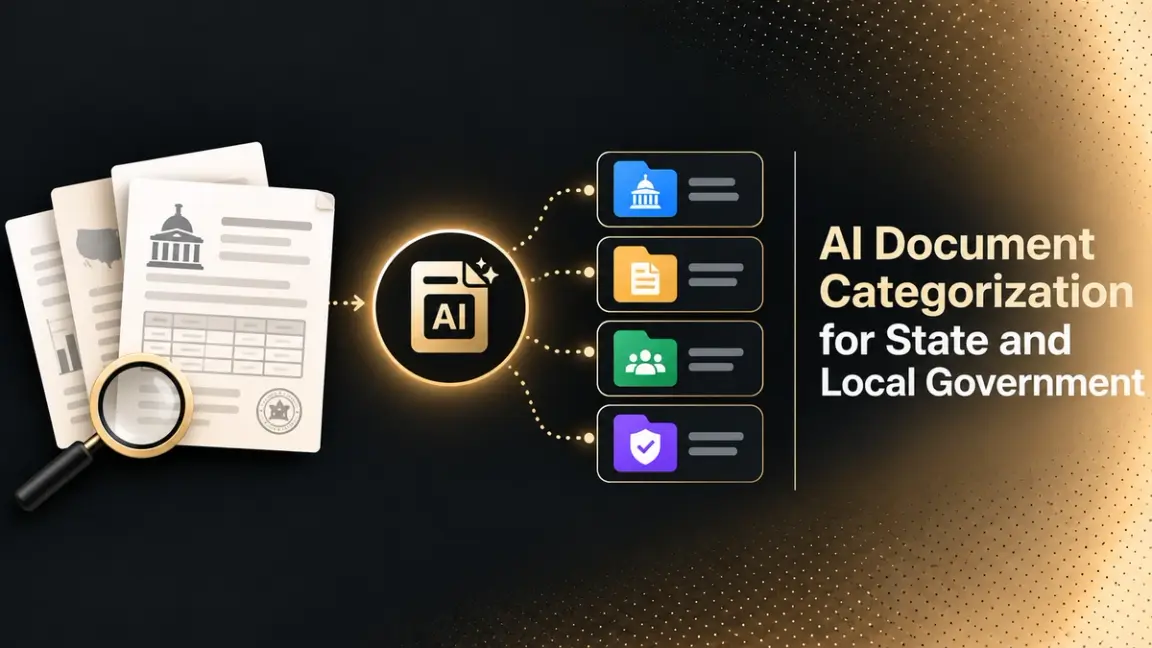
A county clerk, a school district, and a state agency all face the same problem: documents arrive in every format, and someone has to decide what each one is before it can be filed, retained, searched, or released. AI automated document categorization reads each document, assigns a category, and sends it to the right place, leaving staff to review only the uncertain items. This guide covers how the technology works, which platforms and APIs to compare, how to get JSON output from messy unstructured documents, and what to check for compliance before you buy.
What AI Document Categorization Means
Three terms are often used as if they were the same, and the difference matters when you compare products:
- Classification: deciding what kind of document a file is, such as an invoice, a permit application, or a transcript.
- Categorization: placing the document in your own scheme, such as a records series, retention class, department, or sensitivity level.
- Extraction: pulling fields out of the document, such as a parcel number, a date, or an amount.
Most tools classify and extract. Fewer map the result to a government records scheme, which is why you should ask each vendor how categories are defined and who can change them.
Documents That Agencies Need to Categorize
Public bodies handle a mixed stream. Grouped by how hard they are to sort:
Structured and Semi-Structured Documents
- Permit, license, and benefit applications.
- Invoices, purchase orders, and payment forms.
- Student forms, transcripts, and enrollment documents.
Unstructured Documents
- Letters, emails, and attachments from residents and vendors.
- Contracts, meeting minutes, and policy documents.
- Reports, case files, and correspondence.
Scanned and Mixed Packets
- Paper records scanned in bulk.
- Combined PDFs that hold several document types.
- Handwritten forms and signed pages.
Scanned packets and mixed PDFs are where simple rules fail first, because one file may contain several document types.
How Automated Document Categorization Works
Most systems follow the same sequence:
- Ingestion: Documents arrive from scanners, email, portals, and file shares.
- Recognition: OCR and layout analysis convert pages to text and structure.
- Splitting: Combined files are separated into individual documents.
- Classification: A model, rules, or a language model assigns a document type.
- Categorization: The type is mapped to a records series, retention class, or department.
- Confidence check: Low-confidence results go to a person for review.
- Routing and filing: The document and its metadata move into the records system.
For the operating problems that appear at volume, such as batching, retries, and monitoring, see DeepRead's guide to scaling unstructured document processing.
Rules, Machine Learning, and Language Models
Feith describes a hybrid approach in its Auto Categorizer: rules based on metadata, full text, and business rules come first, and when rules cannot categorize a record, natural language processing suggests a category with a confidence percentage. High-confidence matches above a set level can be applied automatically. Language-model tools, such as Unstract, take another route: you write a prompt that lists the categories and the model returns a label.
In practice, rules suit stable categories with clear markers, trained classifiers suit high-volume document types, and language models suit varied or new categories. Many agencies end up combining them.
Turning Messy Documents into JSON Output
Developers searching for classification tools usually want one thing: a clean JSON response they can feed into a records system. An illustrative response looks like this:
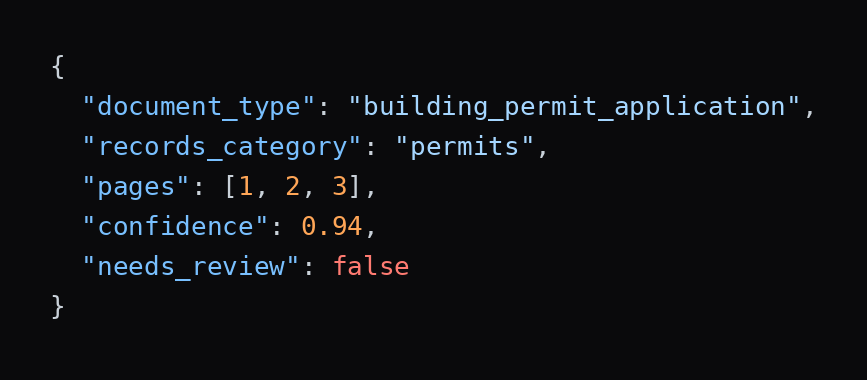
The field names above are an example, not any vendor's schema. Real products differ. Azure AI Document Intelligence, for example, returns a documents array with docType, boundingRegions, and confidence. LandingAI's Classify returns a per-page class with a reason and a suggested_class for pages it cannot place. When you compare tools, check four things: whether the output is per document or per page, whether it includes a confidence value, whether it supports an "unknown" or "other" result, and whether it returns page references so staff can verify. Also check granularity (page, document, or packet), and for language-model classifiers, run the same sample several times and compare label stability, because outputs can vary between runs.
For how field-level output works after classification, see DeepRead's technical guide to structured data extraction.
Use Cases by Sector
State and Local Government
- Sorting incoming mail, forms, and attachments by department and request type.
- Mapping documents to records series and retention schedules.
- Preparing records for public records requests.
Education and Higher Education
- Sorting admissions, registrar, financial aid, and business office documents.
- Routing email attachments to the right workflow.
- Keeping student records separate from administrative records.
Defense, Security, and Justice
- Sorting case files, reports, and correspondence by type and sensitivity.
- Keeping criminal justice information inside approved environments.
- Checking handling and marking rules with your security office before any pilot.
Platforms for Automated Document Classification
Most records vendors do not publish prices, so each pricing bullet reports exactly what the vendor says. Confirm current terms before you decide.
Government and Education Records Platforms
Softdocs
Softdocs is a software company serving education and government, and its announcement says its solutions are used by more than 1,000 organizations.
- What it automates: AI-powered document classification and data extraction for email attachments, with routing for action. The engine learns an organization's indexing rules and document types. Softdocs announced it on March 28, 2024, for higher education, K-12 districts, and state and local governments.
- Pricing: The announcement does not mention pricing.
- Limits: The release says the feature is integrated with Microsoft Outlook, with other applications planned. It gives no accuracy figures. A quote that the AI is "akin to being given 20 to 40 percent more budget" is a vendor claim with no supporting data.
- Best for: Education and local government teams that receive many documents as email attachments.
- Pros: Built for education and public-sector customers. The site footer lists NIST SP 800-53, TX-RAMP, CJIS, and SOC 2 Type II badges, which are vendor statements not tied to this feature.
- Cons: Email-focused at launch, no published pricing, and no accuracy data.
Feith
Feith provides records management software, including an Auto Categorizer.
- What it automates: Automatic categorization of electronic and scanned records using rules, AI-suggested categories with confidence percentages, or a hybrid folder-based mode that applies a retention rule to everything in a folder.
- Pricing: Not mentioned on the page.
- Limits: The page gives no accuracy figures. Its FedRAMP banner refers to RMA iQ, not Auto Categorizer specifically, so check the FedRAMP Marketplace for current status.
- Best for: Records managers who need categorization tied to retention rules and category-based permissions.
- Pros: Rules, AI, and manual options in one tool, with a web-based rule designer.
- Cons: No published pricing or metrics, and the page focuses on federal regulations, so confirm fit for state and local requirements.
Hyland
Hyland is a content services vendor with a large government customer base.
- What it automates: Its site describes AI-powered document capture, separation, classification, extraction, and enrichment, delivered through a centralized, configurable content services platform for state and local government.
- Pricing: No figures. The site offers a demo request and a contact option.
- Limits: The government page I reviewed names no certifications and gives no classification accuracy figures.
- Best for: Agencies that want classification inside a broader content and records platform.
- Pros: The page cites more than 2,300 government customers.
- Cons: No published pricing, and security and compliance details sit on separate pages that you will need to review.
Cloud Classification Services
Google Document AI
Google Document AI is Google Cloud's document processing service with OCR, parsers, and custom classifiers.
- What it automates: Custom classification and splitting of documents, along with OCR, form parsing, layout parsing, and custom extraction.
- Pricing (per 1,000 pages): Custom classifier and custom splitter are each $5 up to 1 million pages a month, then $3. Enterprise Document OCR is $1.50 up to 5 million pages, and Layout Parser is $10.
- Limits: It is a developer toolkit, not a records system, so you build category mapping, review screens, and filing.
- Best for: Teams on Google Cloud that want to build their own classification pipeline.
- Pros: Published per-page pricing and no billing for failed requests.
- Cons: No records retention logic, and you handle compliance review of the deployment yourself.
Azure AI Document Intelligence
Azure AI Document Intelligence is Microsoft's document analysis service with a custom classification model.
- What it automates: Training a classifier on your own samples and returning the document type, confidence, and page regions as JSON. A splitMode setting treats a file as one document, classifies each page, or splits automatically.
- Pricing: I did not retrieve rates from Microsoft's page, so use the Azure pricing calculator.
- Limits: Training needs at least two classes and five samples per class, with up to 1,000 classes and 100 samples per class. PDFs and TIFFs can run to 2,000 pages, and the paid tier accepts files up to 500 MB. The documentation is inconsistent on language support, so check the supported languages page.
- Best for: Microsoft-centered agencies that want to train a classifier on their own document types.
- Pros: Clear output schema, an "other" class for unexpected documents, and incremental training.
- Cons: The documentation does not describe records categories, so mapping and review are your work.
Developer APIs for JSON Output
LlamaIndex
LlamaIndex offers LlamaParse, a document parsing service with a classification feature.
- What it automates: Classifying documents by layout and semantics before parsing, with confidence metadata, and exporting AI-ready JSON with page numbers and spatial coordinates.
- Pricing: No prices on the page. It offers 10,000 free credits to start and links to a separate pricing page.
- Limits: The page lists no size, page, or rate limits and makes no government claims. The cited processing time of under 3 seconds per page is a vendor figure.
- Best for: Developers who want classification and parsing in one API.
- Pros: JSON, Excel, and XML export options, and a stated SOC 2 Type II compliance.
- Cons: The compliance statement is the vendor's own, and no government deployment details are given.
LandingAI
LandingAI's Agentic Document Extraction includes a Classify feature.
- What it automates: Assigning each page of a document to a class you define before parsing, so pages can be routed to different pipelines or skipped.
- Pricing: No specific prices. The page describes the feature as inexpensive and links to a separate pricing page.
- Limits: The page says Classify is in Preview. It lists support for English and 20+ languages and states no size or rate limits.
- Best for: Teams that need page-level routing of mixed packets.
- Pros: JSON output with the class, a reason, and a suggested class for pages it cannot place.
- Cons: Preview status, and no government or compliance claims on the page.
Unstract
Unstract is a platform for extracting structured data from documents with large language models.
- What it automates: Classification through prompts that list your categories, returning a JSON label per document. Its own article says it is not dedicated classification software but handles most of the work.
- Pricing: No figures on the page I reviewed. New accounts get a 14-day trial with $10 of LLM tokens.
- Limits: Results depend on your prompts, so test category definitions on real samples. The page does not describe what each deployment option involves.
- Best for: Technical teams that want flexible, prompt-defined categories.
- Pros: Deployment options listed as managed cloud, on-premises, or open source.
- Cons: Prompt design and testing are your responsibility, and no government compliance claims were found.
Extraction API
DeepRead
DeepRead is a developer-first OCR and document AI API that turns documents into structured data. It is not a records management system.
- What it automates: Structured JSON extraction from documents, with uncertain results flagged for review. DeepRead's public pages I reviewed do not describe a dedicated classification feature, so test whether a document-type field in your extraction schema works on your own samples.
- Pricing: A free tier of 2,000 pages per month, with up to 50 pages and 15 MB per document. The Standard plan is $10, $20, and $40 per 1,000 pages for Parse, Extract, and Deep Extract, with documents up to 1,000 pages and 50 MB. Webhooks are on Standard and Enterprise. Enterprise pricing is custom.
- Limits: PII redaction, retention controls, and regional data residency are Enterprise-only. No government-specific certifications or records categories are described, so confirm hosting and compliance needs directly.
- Best for: Developers who need field-level JSON from messy documents after, or alongside, a classification step.
- Pros: Published pricing with a free tier, and review flags for uncertain results.
- Cons: No record categories, retention schedules, or built-in classification workflow.
Quick Comparison
- Softdocs: Email attachment classification for education and local government, no published pricing.
- Feith: Rules, AI, and hybrid categorization tied to retention, no published pricing.
- Hyland: Classification inside a content services platform, more than 2,300 government customers.
- Google Document AI: Custom classifier at $5 per 1,000 pages.
- Azure AI Document Intelligence: Trainable classifier with per-document JSON, rates not retrieved.
- LlamaIndex: Classification plus parsing, JSON export, 10,000 free credits.
- LandingAI: Per-page Classify in Preview, JSON with reasons.
- Unstract: Prompt-based classification, deployment options include on-premises and open source.
- DeepRead: Structured extraction API with a free tier of 2,000 pages per month.
Compliance, Security, and Governance
Public bodies have to answer for how records are classified and where they are stored. Check these before you shortlist any tool:
- GovRAMP: GovRAMP, which rebranded from StateRAMP in March 2025, describes itself as standardizing cloud security for state, local, tribal, and education governments. Its pathways are Core, Ready, Provisional, and Authorized. Ask whether a vendor holds a status your state or district accepts.
- CJIS: The FBI's CJIS Security Policy governs criminal justice information, and its resource center lists Version 6.1. Justice agencies should confirm a vendor's CJIS terms before sending any such records.
- FERPA: The Department of Education says schools can outsource services involving education records to a vendor that is under the school's direct control over the use and maintenance of those records and meets the school official criteria. Check this before any student records leave the institution.
- Records retention and public records: Your state or local retention schedule decides how long each category is kept, and public records laws decide what must be released. Misclassification can affect both, so test category accuracy before you automate retention actions.
- Human oversight: Keep staff in charge of retention and release decisions, and log what the system assigned and what a person changed. For guardrails when AI acts on documents, see DeepRead's guide to guardrails for autonomous AI agents.
- CUI: Defense and security teams handling Controlled Unclassified Information should review 32 CFR Part 2002, which NARA says sets policy for designating, safeguarding, disseminating, marking, decontrolling, and disposing of CUI, and applies to federal agencies and organizations that handle CUI for them.
- Redaction: Public records requests often require redacting personal data before release. For tools that handle that step, see DeepRead's guide to automated document redaction tools.
Recent Developments
Three dated changes are worth knowing. Softdocs announced AI document classification for education and government on March 28, 2024. StateRAMP changed its public brand to GovRAMP in March 2025 to reflect that local governments and other agencies take part. The FBI's CJIS Security Policy resource center now lists Version 6.1. Check each source for current status before you rely on it.
Build vs Buy for Government Document Classification
- Buy a records platform if you want categories tied to retention schedules, permissions, and filing, and a vendor to support it. Expect a quote-based process.
- Build on cloud services or APIs if you have engineering capacity and need control over categories and JSON output. Google Document AI, Azure AI Document Intelligence, and developer APIs provide classification, and you provide review screens, category mapping, and filing.
- Mix both by using an API for classification and extraction while your records system keeps retention and release decisions.
Whichever route you choose, start with one department and one document flow rather than the whole agency.
Measuring Success
Pick a baseline before you start, then track:
- Per-class precision and recall: accuracy for each category, so large classes do not hide failures in rare ones. Also track how often unknown documents are correctly rejected rather than forced into a category.
- Review rate and time: how many items go to staff and how long each takes.
- Misrouting rate: documents that reach the wrong department or records series.
- Turnaround time: from receipt to filing or response.
- Retrieval time: how quickly staff finds a document afterward.
- Cost per document: including software, review labor, and infrastructure.
Treat vendor accuracy and time-saving figures as claims to test, not results. For a framework on which metrics to track, see DeepRead's guide to metrics to measure the ROI of document workflow automation.
How to Pilot Document Categorization
- Choose one flow. For example, incoming permit applications, registrar documents, or inbound correspondence.
- Collect a sample. 200 to 500 real, anonymized documents including scans, mixed packets, and poor copies.
- Define your categories. Write the list, including an "other" or "unknown" class.
- Label an answer key. Have staff tag the sample by hand.
- Test two or three options. Run vendors or APIs on the same sample.
- Measure accuracy and review load. Count per-class errors, unknowns, and items sent to review, and repeat any language-model runs to check that labels stay stable.
- Check security and governance. Confirm hosting, data handling, audit logs, and certifications your agency requires.
- Price the volume. Include page costs, setup, review labor, and integration work.
Conclusion
AI document categorization works best as a pipeline: recognize and split documents, classify them against your own categories, send uncertain items to people, and return structured JSON your records system can use. Records platforms such as Softdocs, Feith, and Hyland tie categories to retention and workflow but mostly quote pricing privately, while Google Document AI, Azure AI Document Intelligence, and developer APIs give technical teams the building blocks. Start with one flow, measure against your own baseline, keep staff in charge of retention and release decisions, and confirm GovRAMP, CJIS, and FERPA requirements before you scale.
FAQ
What is AI automated document categorization for state and local government?
It is the use of OCR, machine learning, and language models to read each document, assign it a type and category, and route it to the right place, with staff reviewing uncertain results.
What is the difference between document classification and categorization?
Classification identifies what a document is, such as a permit application. Categorization places it in your own scheme, such as a records series or retention class.
Can AI categorize scanned and handwritten documents?
Yes, if the tool includes OCR that handles your scans. Handwritten and poor-quality pages are harder and usually need human review of low-confidence results.
How do I get JSON output from unstructured documents?
Use a classification or extraction API that returns structured JSON, and check whether it works per document or per page, includes confidence, and supports an unknown result. Azure AI Document Intelligence and LandingAI Classify are two examples that document their JSON output.
Which companies offer automated document classification software?
Examples covered here include Softdocs, Feith, Hyland, Google Document AI, Azure AI Document Intelligence, LlamaIndex, LandingAI, Unstract, and DeepRead. They differ in whether they are records platforms or developer tools.
What does it cost?
It varies. Google Document AI publishes $5 per 1,000 pages for its custom classifier, and DeepRead publishes a free tier of 2,000 pages per month. Most records platforms quote privately.
What is GovRAMP and do I need it?
GovRAMP, formerly StateRAMP, is a program that standardizes cloud security verification for state, local, tribal, and education governments. Whether you require it depends on your state or agency policy.
Is AI document classification allowed for student records under FERPA?
FERPA allows schools to outsource services involving education records to vendors that meet the school official conditions, including direct control by the school. Confirm applicability with your counsel.
How should justice agencies approach AI classification?
Confirm that the vendor meets the CJIS Security Policy terms that apply to your agency before sending any criminal justice information, and keep staff responsible for handling decisions.
More articles
Due Diligence Platforms with Automated Document Indexing: How They Work and How to Choose (2026)
Compare due diligence platforms with automated document indexing: what each automates, pricing, pros and cons, VC compliance tools, and how to run a pilot.
Automating Insurance Claims Document Processing: Pipeline, RAG, and Platforms (2026)
How to automate claims document processing: pipeline, RAG for claim document analysis, platform comparison with pricing, compliance, KPIs, and a pilot plan.