%20{%20:root%20{%20--deepread-stroke:%20%23E5E7EB;%20}%20}%20.dark%20{%20--deepread-stroke:%20%23E5E7EB;%20}%20%3c/style%3e%3crect%20x='40'%20y='30'%20width='220'%20height='260'%20rx='28'%20ry='28'%20stroke='var(--deepread-stroke)'%20stroke-width='16'%20fill='none'/%3e%3cpath%20d='M180%2030v52c0%2010%208%2018%2018%2018h62'%20stroke='var(--deepread-stroke)'%20stroke-width='16'%20fill='none'/%3e%3cline%20x1='70'%20y1='130'%20x2='200'%20y2='130'%20stroke='var(--deepread-stroke)'%20stroke-width='16'%20stroke-linecap='round'/%3e%3cline%20x1='70'%20y1='165'%20x2='200'%20y2='165'%20stroke='var(--deepread-stroke)'%20stroke-width='16'%20stroke-linecap='round'/%3e%3cline%20x1='70'%20y1='200'%20x2='170'%20y2='200'%20stroke='var(--deepread-stroke)'%20stroke-width='16'%20stroke-linecap='round'/%3e%3c!--%20green%20download%20arrow%20in%20bottom%20right%20corner%20--%3e%3cpath%20d='M210%20202v58'%20stroke='var(--deepread-accent)'%20stroke-width='18'%20stroke-linecap='round'/%3e%3cpath%20d='M195%20245l15%2015%2015-15'%20fill='none'%20stroke='var(--deepread-accent)'%20stroke-width='18'%20stroke-linecap='round'%20stroke-linejoin='round'/%3e%3c/svg%3e)
Digital Invoice Processing: How It Works and How to Automate It
Learn how digital invoice processing works, how invoice coding software and systems differ from a service, and the best practices for automating AP in the US.
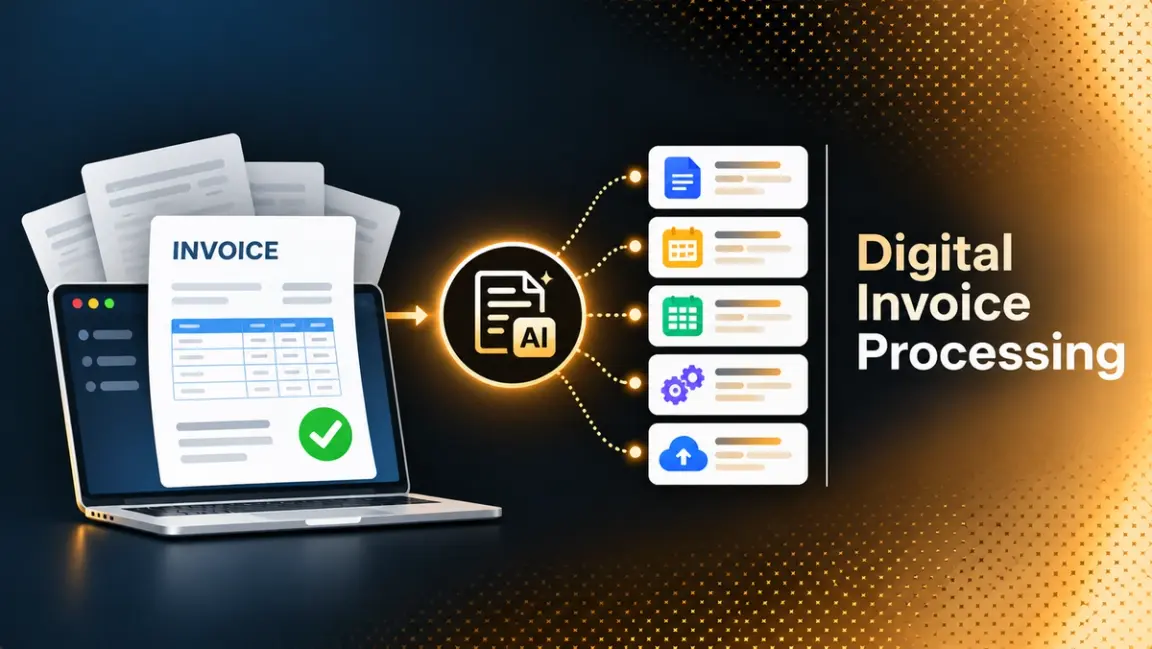
Most accounts payable teams do not receive clean data. They receive PDFs, photos, emailed attachments, and the occasional paper invoice, and someone has to turn each one into a bill that the ERP can post. Digital invoice processing is the set of steps that does this without retyping every field. If you want a broader view of the category first, this overview of AI document processing solutions explains how modern tools differ from rules-based OCR and RPA.
The phrase is used loosely, so this guide starts with definitions. It then covers each stage of the workflow, how invoice coding software fits, whether to buy a system or hire a service, and which practices move cost and cycle time. The audience is AP and finance operations teams in the US and North America, plus the developers who build their pipelines.
A note on scope: "digital invoice" also returns results about sending invoices to customers (accounts receivable). This guide covers the payables side, meaning invoices you receive from suppliers.
What Digital Invoice Processing Means
Three terms get mixed, and they describe different things.
Digital Invoice vs E-Invoice vs Automated Processing
- Digital invoice: an invoice in electronic form that is not structured for machines, such as a PDF, a scan or an image in an email. It needs OCR and AI to be read.
- E-invoice: an invoice issued as structured data (XML, EDI, UBL or a Peppol format) so the receiving system can read it without extraction.
- Automated invoice processing: the downstream workflow of validation, coding, matching, approval, payment and posting, whatever format the invoice arrived in.
Because the US has no e-invoicing mandate for private business, many invoices still arrive as PDFs, so digital invoice processing in practice means extraction plus automation. The Business Payments Coalition has estimated that only about 25% of US invoice volume contains structured data, a figure reported by an EDI vendor guide rather than a primary BPC publication, so treat it as indicative.
The Stages of the Workflow
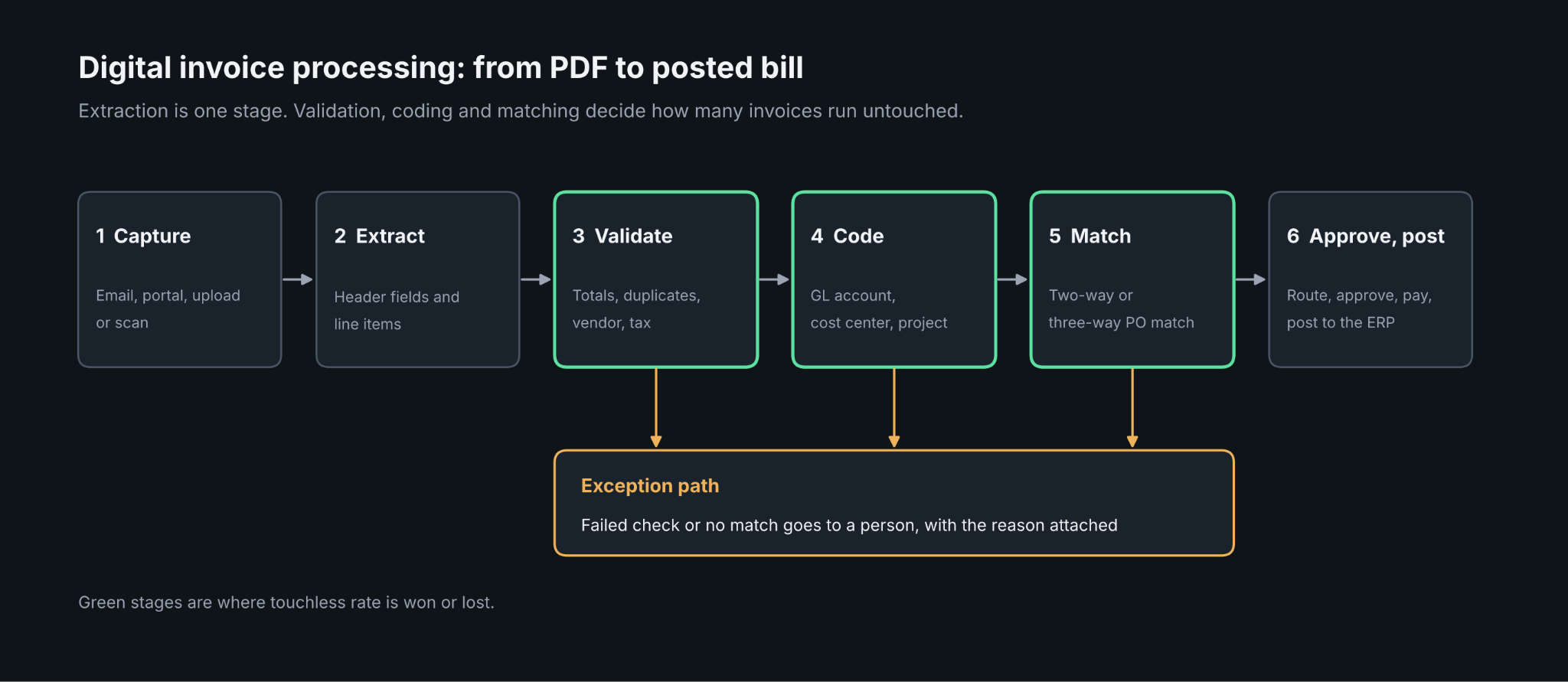
Once an invoice is captured, the same stages apply whether the front end is OCR or an e-invoicing network:
- Capture and extraction of header fields and line items
- Validation against vendor master data, duplicate checks and tax checks
- Coding to general ledger accounts, cost centers and projects
- Two-way or three-way matching to purchase orders and receipts
- Approval routing and exception handling
- Payment and posting to the ERP
For choosing which of these stages to automate first, this practical guide to AI-powered document processing workflows is a useful companion.
How Digital Invoice Processing Works Step by Step
Capture and Extraction
Invoices arrive by email, supplier portal, upload, or scan. The system classifies the file, reads the text, and pulls out the vendor, invoice number, dates, totals, tax, and line items. Line items are the hard part, because tables vary by supplier. Pipelines that handle them well treat extraction as one stage among several, and scaling data capture with document AI argues that document splitting, asynchronous processing, validation, and versioned schemas matter more than raw model accuracy.
Validation
Extraction is not the finish line. Good pipelines check that line items sum to the invoice total, that the vendor exists in master data, that the invoice number has not been seen before, and that tax amounts are consistent. Failures should go to a person with the reason attached, not pass silently.
Coding, Matching and Approval
After validation, the invoice is coded and matched. PO invoices are matched to purchase orders (two-way) and goods receipts (three-way). Non-PO invoices are routed to the right approver based on vendor, amount, or department. Exceptions are where the time goes, which is why exception rate is one of the metrics to watch.
Invoice Coding Software: What It Does
Invoice coding software predicts the accounting treatment of an invoice: the GL account, cost center, project, tax code, and any other dimensions your chart of accounts requires. It usually works from the vendor, the description text, the line items, and your coding history, and it improves as approvers correct its suggestions.
What to look for:
- Suggestions with a human step. Coding is a judgment call for new vendors and unusual items, so the tool should propose and let AP confirm.
- Line-level coding. Splitting one invoice across several accounts or projects is common.
- Master data integration. Suggestions should come from your live chart of accounts and vendor list, not a stale copy.
- A learning loop. Corrections should feed back so repeat vendors become touchless.
Accuracy claims in this category are almost entirely vendor-reported and depend on how repetitive your vendors are. Test on a sample of your own invoices before you trust a percentage from a sales page.
Invoice Processing Systems vs an Invoice Processing Service
Teams usually choose between software they run and a service that runs it for them.
Invoice Processing Systems
A system is software your team operates. It ranges from AP modules inside accounting platforms to dedicated AP automation suites and developer APIs for extraction. You keep control of rules and approvals, and your team handles exceptions. Pricing varies by vendor, so model cost at your real invoice count. For a look at how vendors price this, see what pay-as-you-go document tools really cost, which warns that many vendors marketed as usage-based still require negotiated contracts.
Invoice Processing Service
A service (often called business process outsourcing) has an outside team capture, code, and sometimes approve invoices, using their own tools plus human operators. It suits teams with no capacity to run a system or with spiky volume. The trade-offs are less control over turnaround, handoffs on exceptions, and a per-invoice fee, so confirm what is included and how pricing changes with volume.
Which Fits
- Choose a system if you have steady volume, an AP team that can own rules, and an ERP to integrate with.
- Choose a service if you need results quickly without staffing and can accept less control.
- A hybrid is possible: software for capture and matching, a service for the long tail of odd invoices.
Best Practices for Automating Invoice Processing
These practices apply whichever route you choose. The guide on how organizations use AI for document processes makes the same underlying point: success depends more on rebuilding the surrounding process than on picking the best tool.
- Start with one well-defined flow. Begin with your highest-volume PO invoices or your top fifty vendors, then expand.
- Clean vendor master data first. Duplicates and stale records cause duplicate payments and failed matches.
- Measure a baseline. Record cost per invoice, cycle time, exception rate, and touchless rate before you change anything.
- Standardize intake. One mailbox or portal beats invoices scattered across inboxes.
- Validate every extraction. Totals, tax, dates, and duplicates should be checked automatically.
- Design the exception path. Route low-certainty fields to a reviewer with a reason, and let corrections improve the system.
- Keep approvals proportional. Tight limits on high-value or new-vendor invoices, light touch elsewhere.
- Encourage structured invoices where you can. Ask large suppliers for e-invoices or portal submission to cut extraction work.
- Control access and keep an audit trail. Record who changed what, and keep original files with extracted values.
- Review monthly. Track the metrics below and adjust rules as vendors change formats.
Benchmarks Worth Tracking
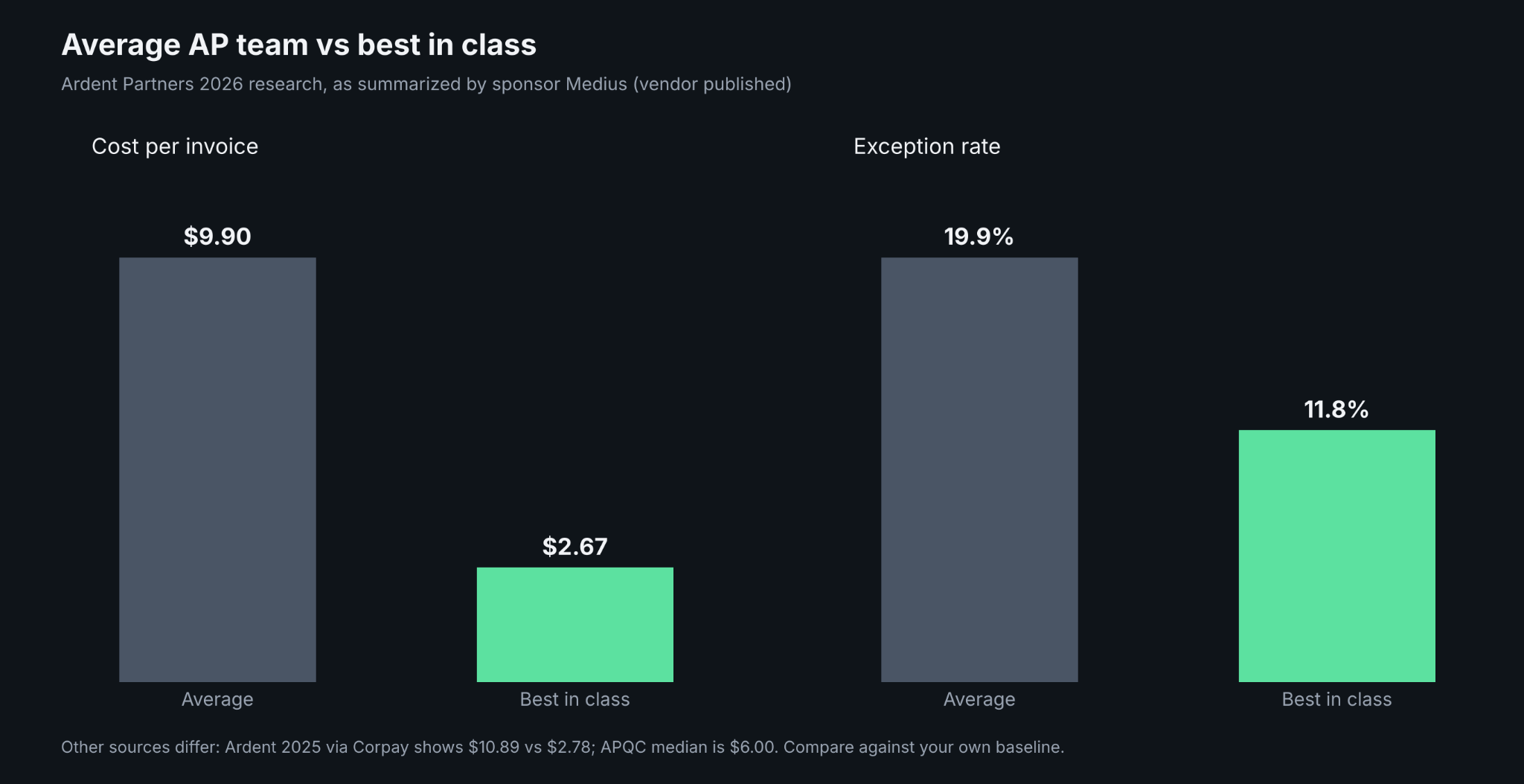
Benchmarks differ by source, year, and sample, so use them as ranges and compare against your own baseline.
- Cost per invoice: Ardent Partners' 2026 research, as summarized by sponsor Medius, reports an average of $9.90 and $2.67 for best-in-class organizations. Ardent's 2025 edition, as quoted by payments provider Corpay, reports $10.89 and $2.78. APQC's cross-industry median, as relayed by a third-party statistics page, is $6.00.
- Cycle time: the 2025 Ardent figures quoted by Corpay are 10.9 days on average and 3.1 days for best-in-class.
- Exception rate: the 2026 Ardent summary reports 19.9% on average and 11.8% for best-in-class.
- AI adoption: the same summary reports that 58% of AP organizations are using or piloting AI, which includes pilots.
Both Medius and Corpay sell AP products, so their summaries are vendor-published. Other aggregators quote different Ardent figures for the same metrics, which is another reason to confirm numbers against the original report before using them in a business case.
E-Invoicing in the US: What Changes for Digital Invoice Processing
The US has no federal B2B e-invoicing mandate. Federal procurement is the exception: the Treasury's Invoice Processing Platform is provided at no cost to federal agencies and their vendors.
For private business, the Business Payments Coalition ran a pilot that led to the Digital Business Networks Alliance (DBNAlliance), a nonprofit formally established in January 2024 that governs an open exchange network modeled on the same four-corner idea as Peppol. Its first production exchange took place in April 2024. Participation is voluntary.
Elsewhere, mandates are arriving. Belgium and Croatia began requiring e-invoicing in January 2026, which matters if you supply customers there. For US AP teams, a pipeline that accepts both PDFs and structured invoices is the safer design while adoption stays voluntary.
Where a Capture API Sits in the Invoice Flow
Teams that build their own AP workflow, or add capture to an existing product, need an extraction layer that returns data a program can trust. DeepRead is a developer-first OCR and document AI API. It is one component of the flow described above, not an AP suite: it covers capture and extraction, while approvals, matching, and payment stay in your ERP or AP platform.
What matters for invoice work:
- Each extracted field comes back with the page, a bounding box, and the source text, so a reviewer or an audit can trace a value to the document.
- Fields that need a human look are marked needs_review with a review_reason, instead of a numeric confidence score. A review interface for flagged fields is available on every plan.
- A failed job costs nothing, and processing defaults to US East.
- Jobs are ID-based, so you submit a document and poll, or use webhooks on Standard and Enterprise plans. The Free plan does not accept a webhook URL.
- Free includes 2,000 pages a month with no card. Standard is priced at $15 and $35 per 1,000 pages, and Enterprise is custom and lists EU and AU data residency.
- A deep extract fast pipeline is also available at $90 per 1,000 pages and runs about 2x faster than the standard deep extract pipeline.
- There is no self-hosted option and no BAA on any plan.
If you want to see how it fits, start with the free tier on your own invoices rather than a demo set, and look at the page, box, and source text returned for the fields you care about. The same plan details are on the DeepRead.
Conclusion
Digital invoice processing is a pipeline, not a single tool: capture, validation, coding, matching, approval and posting, with people handling the exceptions. Choose a system if you want control and have volume, a service if you need results without staffing, and a mix if your invoices are uneven. Start with one flow, set a baseline, validate every extraction and review the numbers monthly. Treat published benchmarks as ranges, and expect PDFs to stay common in the US while structured e-invoicing grows slowly and voluntarily.
FAQ
What is digital invoice processing?
It is the process of converting invoices received as PDFs, scans or emails into structured, validated data that is coded, matched, approved and posted to an accounting or ERP system with little manual entry.
What is the difference between a digital invoice and an e-invoice?
A digital invoice is an electronic file such as a PDF that a machine must read with OCR or AI. An e-invoice is issued as structured data (for example XML, UBL or a Peppol format) so it can be processed directly.
What is invoice coding software?
It is software that suggests the GL account, cost center, project and tax code for each invoice or line item, based on the vendor, description and your coding history, usually with a person confirming new or unusual cases.
Should I use an invoice processing system or an invoice processing service?
Use a system if you have steady volume and a team that can own rules and exceptions. Use a service if you lack staff or capacity. A hybrid of the two is also possible.
Is e-invoicing mandatory in the US?
There is no federal B2B e-invoicing mandate. Federal agencies use the Treasury's Invoice Processing Platform, and private businesses can join the voluntary DBNAlliance network.
How much does it cost to process an invoice?
It depends on the source and year. Ardent Partners' figures, as summarized by vendors, put the average between about $9.90 and $10.89 and best-in-class near $2.67 to $2.78, while APQC's median is reported at $6.00. Compare against your own baseline.
What best practices improve invoice automation results?
Start with one flow, clean vendor data, measure a baseline, standardize intake, validate every extraction, route uncertain fields to a reviewer and track cost, cycle time, exceptions and touchless rate each month.
More articles
Unstructured.io Review: Features, Pricing, and Alternatives
Unstructured.io review: what the open-source library and hosted platform do, current pricing, tested Python code, limits, and four alternatives compared.
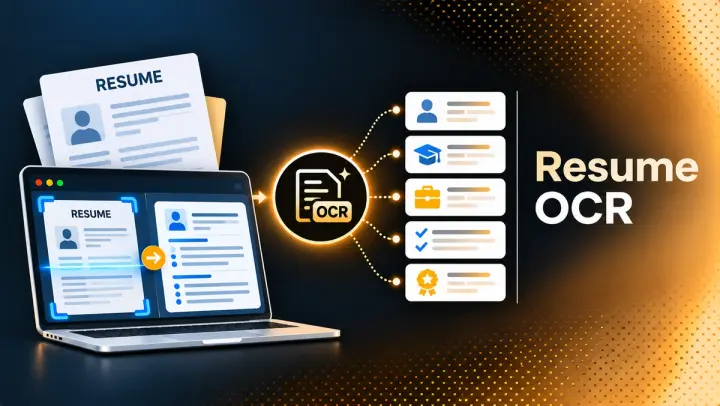
Resume OCR: Extracting Candidate Data from Resumes Automatically
How resume OCR reads PDFs and scans, fixes two-column order, and returns candidate fields. Tested Python code, a tool comparison, and US hiring rules.