%20{%20:root%20{%20--deepread-stroke:%20%23E5E7EB;%20}%20}%20.dark%20{%20--deepread-stroke:%20%23E5E7EB;%20}%20%3c/style%3e%3crect%20x='40'%20y='30'%20width='220'%20height='260'%20rx='28'%20ry='28'%20stroke='var(--deepread-stroke)'%20stroke-width='16'%20fill='none'/%3e%3cpath%20d='M180%2030v52c0%2010%208%2018%2018%2018h62'%20stroke='var(--deepread-stroke)'%20stroke-width='16'%20fill='none'/%3e%3cline%20x1='70'%20y1='130'%20x2='200'%20y2='130'%20stroke='var(--deepread-stroke)'%20stroke-width='16'%20stroke-linecap='round'/%3e%3cline%20x1='70'%20y1='165'%20x2='200'%20y2='165'%20stroke='var(--deepread-stroke)'%20stroke-width='16'%20stroke-linecap='round'/%3e%3cline%20x1='70'%20y1='200'%20x2='170'%20y2='200'%20stroke='var(--deepread-stroke)'%20stroke-width='16'%20stroke-linecap='round'/%3e%3c!--%20green%20download%20arrow%20in%20bottom%20right%20corner%20--%3e%3cpath%20d='M210%20202v58'%20stroke='var(--deepread-accent)'%20stroke-width='18'%20stroke-linecap='round'/%3e%3cpath%20d='M195%20245l15%2015%2015-15'%20fill='none'%20stroke='var(--deepread-accent)'%20stroke-width='18'%20stroke-linecap='round'%20stroke-linejoin='round'/%3e%3c/svg%3e)
Document Processing Applications Across Industries: Top Use Cases
See how banking, insurance, healthcare, trade, construction, legal, HR, and government use document processing, including the forms involved and how to start.
Every industry runs on documents, but the documents are different, and so are the consequences of reading one wrong. A mistyped digit on a loan file, a missed clause in a contract, and a wrong code on a customs entry all start as the same problem: a person reading a page and keying data into a system.
This guide goes industry by industry. For each one, it covers the documents involved, the use cases that tend to work first, the point where automation usually breaks, and the decision that should stay with a person. Where the rules of an industry shape the work, such as identity checks in banking or protected health information in healthcare, those rules are called out directly.
What Every Document Workflow Has in Common
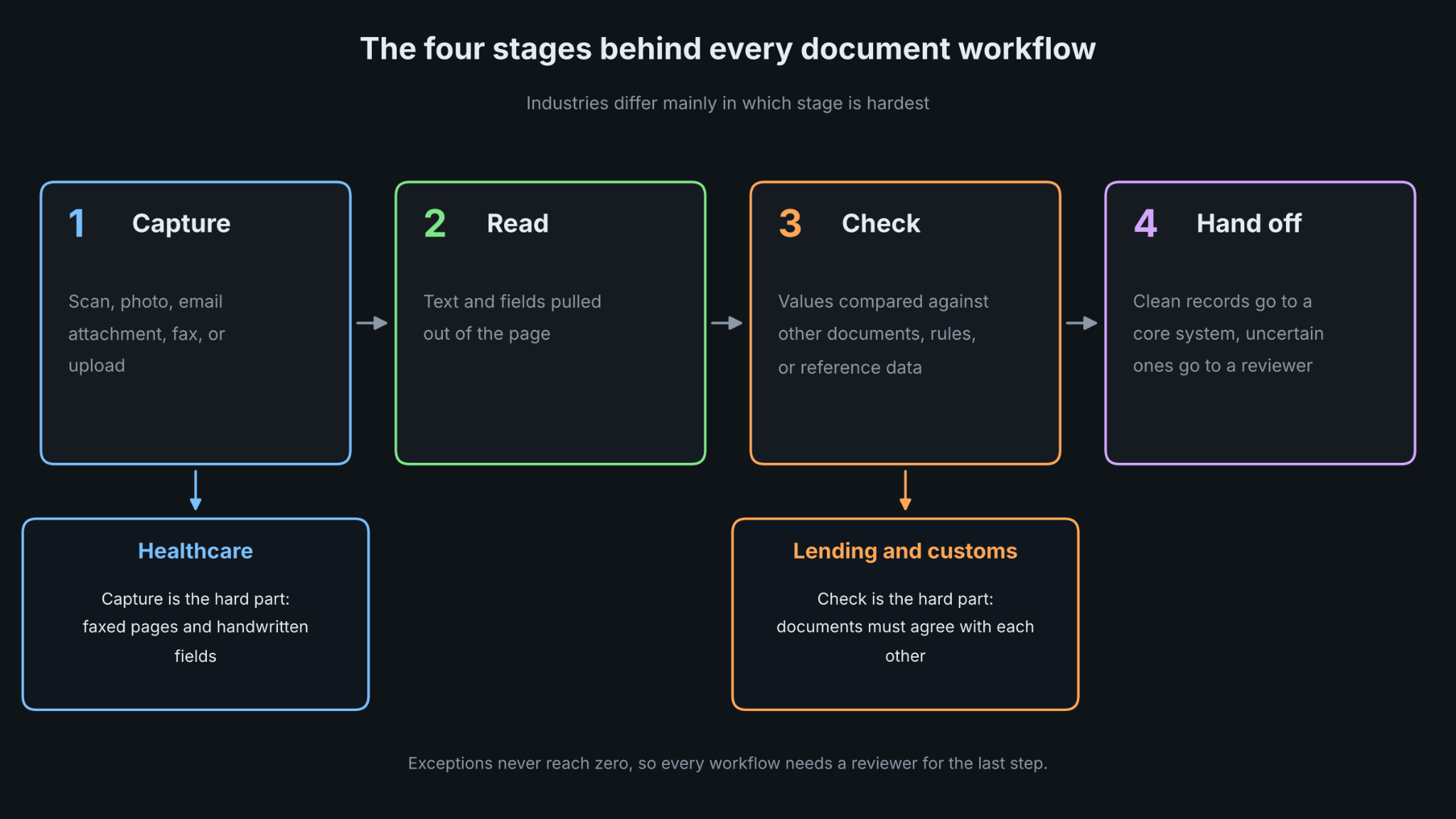
Despite the differences, almost every workflow follows the same four stages:
- Capture: the document arrives as a scan, photo, email attachment, fax, or upload.
- Read: the text and fields are pulled out of the page.
- Check: values are compared against other documents, rules, or reference data.
- Hand off: clean records move into a core system, and uncertain ones go to a reviewer.
The use cases below differ mainly in which stage is hardest. In healthcare, capture is the problem because of faxes and handwriting. In lending, the check stage matters most, because a file is only as good as the agreement between its documents.
Banking and Lending
Customer Onboarding and KYC
In the United States, the Customer Identification Program rule for banks, 31 CFR 1020.220, requires a bank to obtain at least a name, a date of birth for an individual, an address, and an identification number before opening an account. The bank must also verify identity through risk-based procedures within a reasonable period after the account is opened.
The documents behind that process include passports, national IDs, driver's licenses, utility bills, bank statements, and corporate records. Reading the fields is one step, and confirming that the document is genuine and belongs to the applicant is a different one. How banks combine extraction, fraud checks, biometric matching, and screening is covered in DeepRead's guide to how banks automate KYC and customer document verification. Extraction alone does not verify anyone.
Mortgage and Loan Files
A mortgage file is a bundle of documents that must agree with each other. Most lenders collect the borrower's details on the Uniform Residential Loan Application, known as Fannie Mae Form 1003 and Freddie Mac Form 65. Supporting documents typically include recent pay stubs, W-2s from the past two years, and bank statements covering about two months. The underwriter compares the application to every one of those documents, and any mismatch has to be explained.
That comparison is the natural place to automate. Extract income and balances from each document, line them up against the application, and send only the mismatches to a person.
Insurance
Underwriting Submissions
Commercial insurance runs on standardized ACORD forms. The ACORD 125 commercial insurance application is used in the underwriting process for any commercial account submission, and additional forms cover specific lines such as workers' compensation and property. Incomplete or unsigned submissions are often sent back as "not in good order," which slows underwriting and delays binding.
Automation helps most at intake: read each form, check that required fields and signatures are present, and flag the gaps before an underwriter spends time on the file. DeepRead's insurance document processing automation guide covers claims, underwriting, and compliance paperwork together.
Claims Intake
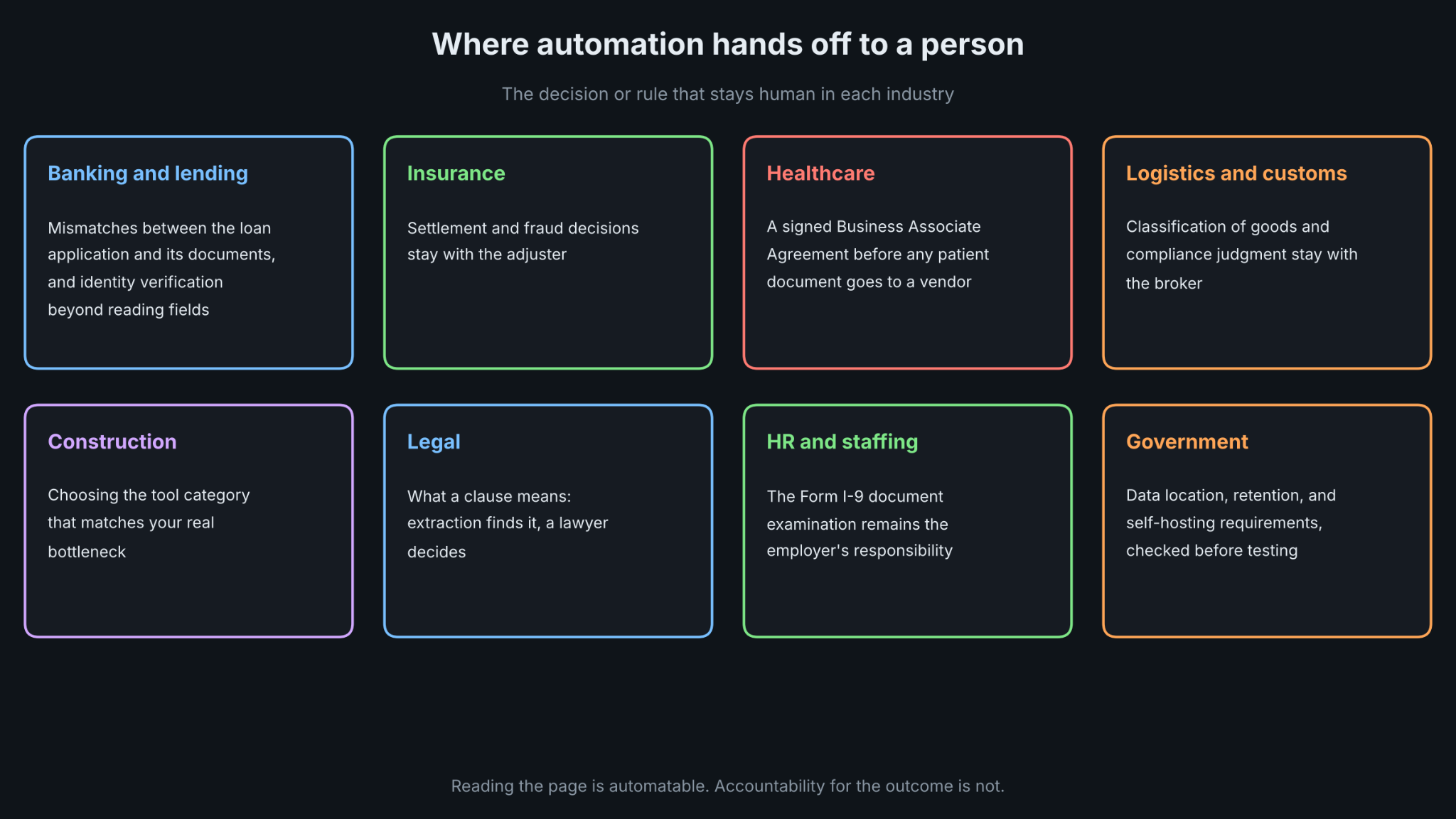
A claim starts with a first notice of loss and then collects police reports, repair estimates, medical bills, photos, and correspondence. These arrive in mixed formats from many senders. A sensible first use case is sorting and reading the incoming package so adjusters begin with structured data, not a pile of attachments. Settlement and fraud decisions stay with the adjuster.
Healthcare
Claims and Billing Forms
The CMS-1500 is the standard paper claim form used by non-institutional providers and suppliers, maintained by the National Uniform Claim Committee. Its electronic equivalent is the 837P. Most Medicare Part B claims must be submitted electronically, so paper forms appear mainly where a waiver or exception applies, along with claims sent to other payers.
Healthcare document handling is hard because of the inputs. Handwritten fields on forms such as the CMS-1500, and faxed pages with low resolution and skew, are difficult for standard OCR tools.
Patient Records, Intake, and Lab Paperwork
Intake forms, insurance cards, referrals, and lab requisitions carry protected health information, so privacy requirements come first. HIPAA binds covered entities such as providers, health plans, and clearinghouses, and it extends to business associates, the vendors that handle patient data for them. The practical consequence is simple: before any patient document goes to a vendor, confirm that the vendor will sign a Business Associate Agreement. DeepRead's guide to HIPAA-compliant document processing lays out the safeguards to look for.
Logistics and Customs
Freight and trade run on a stack of transaction documents. A U.S. import typically involves a commercial invoice, a packing list, and a bill of lading or air waybill. The importer or broker then files an entry summary, CBP Form 7501, through the Automated Commercial Environment, generally within 10 working days after entry, which for most shipments means the date of cargo release.
The recurring failure is inconsistency between documents. Reference numbers that do not match across the purchase order, invoice, and bill of lading, and invoice values that differ from the declared customs value, can cause delays and holds. Automation can read the key fields from each document and compare them before filing, which catches mismatches at the point where they are cheapest to fix. Classification of goods and any compliance judgment stay with the broker.
Construction
Construction documents are large, technical, and constantly revised. Drawings and specifications often conflict, version control is hard when many parties contribute, requests for information and submittals need structured routing, and compliance documents carry regulatory weight.
DeepRead's overview of construction document automation software separates the tools into four categories: document intelligence for AI extraction and cross-checking, document management for storage and version control, document workflow for review and approval routing, and document collaboration for shared markup. Match the category to your actual bottleneck. A team losing time to conflicting drawings needs a different tool from a team losing time to approval routing.
Legal and Professional Services
Contracts are the core document here, and the main use case is extracting key terms and clauses so a reviewer can find them quickly. Deal teams also work through large sets of files during diligence, and DeepRead has a separate post on due diligence platforms with automated document indexing.
Automation here supports review and does not replace it. Extraction can surface the clause and the page it came from, and a lawyer decides what it means.
HR and Staffing
Hiring generates resumes, offer letters, tax forms, and identity paperwork. Form I-9 is the clearest example of where rules limit automation. An employer must complete Section 2 within three business days of the date employment begins, by examining the original documents the employee presents. Employers that participate in E-Verify may use an alternative procedure authorized by DHS to examine documents remotely. Completed forms must be kept for the longer of three years from the date of hire or one year after employment ends.
Extraction can read document numbers and expiration dates into the record and flag a missing signature or an expired document. It does not replace the examination itself, which the rules assign to the employer.
Government and Public Sector
Agencies handle license and permit applications, public records, tax documents, and a steady stream of citizen forms. Vendor guides describe these as strong use cases because the volume is high and the formats repeat, though most of that material comes from vendors and should be read that way.
Procurement and data handling rules can decide the project before accuracy does. Check where documents are processed, how long they are kept, and whether a self-hosted deployment is required, because those answers can rule out an option before any testing begins.
Back-Office Documents That Appear in Every Industry
Some documents cross every sector. Invoices, receipts, expense reports, and identity documents show up in banks, hospitals, contractors, and agencies alike, so a team that solves one of them often reuses the work elsewhere. Accounts payable is the most common starting point because the document type is stable, the volume is measurable, and the cost of an error is easy to count.
How to Pick Your First Use Case
Choose the first workflow with these tests:
- Volume: enough documents each month that the time saved is visible.
- A small set of formats: one or two document types, not twenty.
- A measurable error cost: you can say what a wrong value costs in rework, delay, or risk.
- A reviewer who exists: someone is assigned to the exceptions, because exceptions never reach zero.
- Clear data rules: you know whether the documents contain regulated data and where they are allowed to be processed.
Test on your worst documents, not your best ones. Fax pages, phone photos, and handwritten forms show the real error rate, and a pilot built only on clean samples will overstate it.
Matching an Extraction API to the Right Workflow
Most of the use cases above hinge on one technical step: turning a page into fields that a system can use and a person can sign off on. DeepRead is a developer-first document API for that step. It traces each extracted value back to the page it came from, which helps in the industries above where someone is accountable for the result.
Fit varies by workflow. DeepRead handles extraction only, so the identity verification, biometric matching, and sanctions screening parts of KYC need other components, as the company's own KYC guide notes. It cannot be self-hosted and does not offer a BAA on any plan, so it is a poor match for patient records that require one or for documents that cannot leave your network. Processing defaults to US East; Free and Standard keep documents for up to three years, and Enterprise lists EU and AU data residency, which is worth raising early with government and other regulated buyers.
Pricing starts with a Free plan of 2,000 pages a month, no card needed. Beyond that, Standard runs at $15 and $35 per 1,000 pages by its listed pricing; Enterprise is quoted individually, and nothing is billed for a failed job. There is also a fast deep extract pipeline, priced at $90 per 1,000 pages, that runs about twice as fast as the normal deep extract. DeepRead's published benchmark is run by the vendor and covers eight document types: invoice, medical bill, payslip, statement, insurance document, W2, driver's license, and offer letter. Treat it as a starting point and test your own files.
Conclusion
Document processing applications look different from one industry to the next, but the pattern is steady: capture the page, read the fields, check them against something, and hand the clean ones to a system while a person reviews the rest. Lending leans on cross-document checks, insurance on submission quality, healthcare on privacy and messy inputs, trade on matching references, and HR on rules that keep a human in the loop.
Start with one workflow that has volume, a small set of formats, and a clear cost of error. Test it on the worst documents you have, assign a reviewer for exceptions, and confirm the data rules before choosing a tool. Once that workflow runs, the same approach carries over to the next one.
FAQ
What is document processing?
Document processing is the work of capturing documents, reading their contents, checking the data, and passing it to a system or a person. It covers scans, PDFs, photos, and faxes, and it ranges from basic text recognition to extracting specific fields and routing exceptions for review.
Is document processing the same as OCR?
No. OCR converts an image of text into machine-readable text. Document processing builds on that by identifying what kind of document it is, extracting the fields that matter, validating them, and routing problems to a person.
Which industries benefit most from document processing?
Industries with high document volume, a limited set of document types, and a real cost for errors tend to benefit first. Lending, insurance, healthcare billing, customs and freight, and accounts payable fit that description. The best candidate in any industry is the workflow you can measure.
Can automation replace a legal or compliance step such as the Form I-9 review?
No. Form I-9 requires the employer to examine original documents within three business days of the start date, with a limited alternative procedure for E-Verify participants. Extraction can capture details and flag problems, but the examination itself remains the employer's responsibility.
Can I send patient documents to any document API?
Only if the vendor will sign a Business Associate Agreement and meets your security requirements. HIPAA extends to vendors that handle protected health information for covered entities. DeepRead has no BAA on any plan, so confirm this with any vendor before sending patient documents.
How should I choose the first use case?
Pick one workflow with steady volume, one or two document formats, and an error cost you can measure. Test it on your hardest documents, assign a reviewer for exceptions, and confirm where the data may be processed and stored before you commit.
More articles
Unstructured.io Review: Features, Pricing, and Alternatives
Unstructured.io review: what the open-source library and hosted platform do, current pricing, tested Python code, limits, and four alternatives compared.
Resume OCR: Extracting Candidate Data from Resumes Automatically
How resume OCR reads PDFs and scans, fixes two-column order, and returns candidate fields. Tested Python code, a tool comparison, and US hiring rules.