%20{%20:root%20{%20--deepread-stroke:%20%23E5E7EB;%20}%20}%20.dark%20{%20--deepread-stroke:%20%23E5E7EB;%20}%20%3c/style%3e%3crect%20x='40'%20y='30'%20width='220'%20height='260'%20rx='28'%20ry='28'%20stroke='var(--deepread-stroke)'%20stroke-width='16'%20fill='none'/%3e%3cpath%20d='M180%2030v52c0%2010%208%2018%2018%2018h62'%20stroke='var(--deepread-stroke)'%20stroke-width='16'%20fill='none'/%3e%3cline%20x1='70'%20y1='130'%20x2='200'%20y2='130'%20stroke='var(--deepread-stroke)'%20stroke-width='16'%20stroke-linecap='round'/%3e%3cline%20x1='70'%20y1='165'%20x2='200'%20y2='165'%20stroke='var(--deepread-stroke)'%20stroke-width='16'%20stroke-linecap='round'/%3e%3cline%20x1='70'%20y1='200'%20x2='170'%20y2='200'%20stroke='var(--deepread-stroke)'%20stroke-width='16'%20stroke-linecap='round'/%3e%3c!--%20green%20download%20arrow%20in%20bottom%20right%20corner%20--%3e%3cpath%20d='M210%20202v58'%20stroke='var(--deepread-accent)'%20stroke-width='18'%20stroke-linecap='round'/%3e%3cpath%20d='M195%20245l15%2015%2015-15'%20fill='none'%20stroke='var(--deepread-accent)'%20stroke-width='18'%20stroke-linecap='round'%20stroke-linejoin='round'/%3e%3c/svg%3e)
Secure AI Document Handling 2027
Advanced AI capabilities for secure automated document handling in 2027: use cases by industry, audit trails, retention, governance, and 8 platforms compared.
Advanced AI capabilities for secure automated document handling are no longer limited to reading text faster. Heading into 2027, buyers' questions have shifted to control: where documents go, who or what can see them, whether every AI action is logged, and whether records are deleted when they should be. This guide explains what secure AI document handling involves, the capabilities worth paying for, how document automation is used across industries, which audit trail and retention features to require, how current governance frameworks apply, and how eight platforms compare.
What Secure AI Document Handling Means
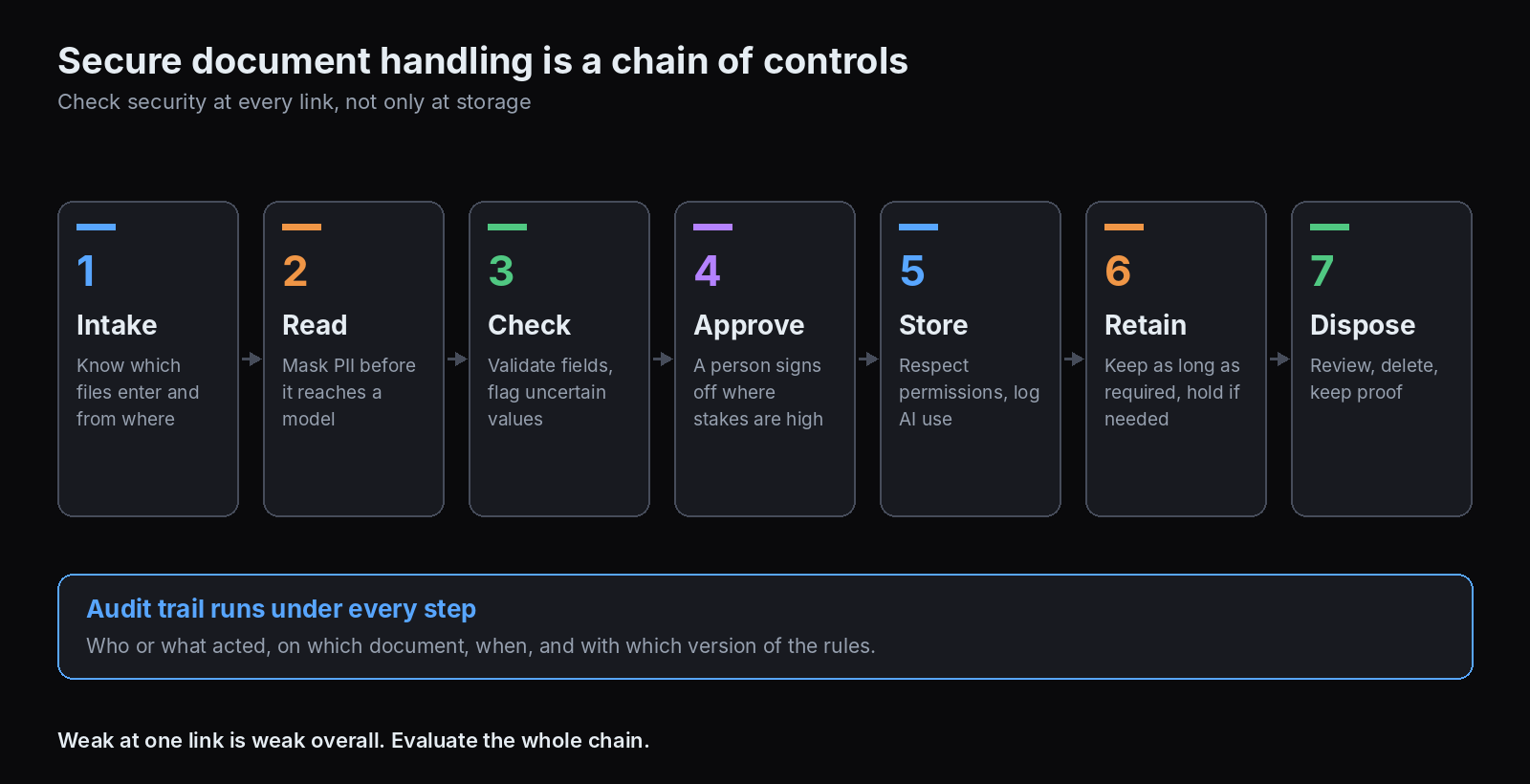
Document handling is a chain: intake, reading, checking, routing, storage, retention, and disposal. Security has to hold at every link, not just at the vault at the end. In practice, that means:
- Controlled intake: knowing which files enter, from where, and in what form.
- Protected processing: limiting what the AI sees, keeping sensitive data out of prompts where it is not needed, and knowing where processing happens.
- Permission-aware access: AI that respects the same access rules as people.
- Traceable decisions: a record of what was extracted, by which system, and who approved it.
- Defensible retention: keeping records as long as required and no longer, with proof of deletion.
A tool can be strong at one link and weak at another, so evaluate the whole chain. DeepRead's review of the most reliable data extraction service shows how to compare tools on your own documents.
Advanced AI Capabilities That Matter for Secure Document Handling
These capabilities separate a modern platform from an OCR add-on. DeepRead's guide to metrics for measuring the ROI of document workflow automation helps put numbers on the gain.
- Classification and splitting. Sorting mixed batches by document type, and separating packets that hold several documents, so each part gets the right rules.
- Schema-based extraction from varied layouts. Returning typed fields from documents the system has not seen before, without a template per supplier.
- Source traceability. Every extracted value linked back to its place in the document. UiPath describes built-in traceability that links each extracted field to its source, and DeepRead returns each field with its page, bounding box, and source text.
- Uncertainty signals and review routing. Flags on values the system is unsure about, so people check only those. DeepRead returns a needs_review flag with a reason and no numeric confidence score.
- Validation rules. Totals that add up, required fields present, duplicates caught, and cross-document checks.
- PII masking and redaction. Removing personal data before it reaches a model or a log. UiPath's AI Trust Layer policies can mask personally identifiable information before requests reach the LLM.
- Permission-aware AI. Box says its AI respects existing permissions, so users reach only files they can already access, and that neither Box nor its model providers train on customer data.
- Logged AI interactions. A record of what was sent to a model and what came back. UiPath's IXP records each extraction in an audit log of LLM inputs and outputs.
- Retention and disposition automation. Rules that keep and delete records on schedule, with review before deletion.
- Human-in-the-loop controls and approvals. Defined hand-offs where a person must approve before an action runs.
Document Processing Automation Use Cases by Industry
The core steps repeat across industries: capture, classify, extract, validate, route, and archive. The document types and rules change.
- Finance and accounts payable: supplier invoices, purchase orders, remittances, bank statements. Ardent Partners' 2026 research, as summarized by its sponsor Medius, puts the average cost of processing an invoice at $9.90 and the average exception rate at 19.9%. Figures differ by report edition, and sponsored summaries should be read as indicative. DeepRead's guide to AI document processing for AP automation covers the payables flow.
- Insurance: claims forms, policies, loss runs, medical records, and underwriting submissions, where one submission can hold many document types. DeepRead's guide to AI document extraction for insurance underwriting covers the intake side.
- Logistics and trade: bills of lading, commercial invoices, packing lists, and customs entries, which arrive in mixed batches from many parties. DeepRead's overview of AI document processing in logistics shows how that paperwork is read at volume.
- Banking and lending: loan and credit application packets checked for completeness and compliance before approval.
- Healthcare: records, intake forms, and claims, where personal health data raises the security bar.
- Legal and compliance: contracts, regulatory filings, and audit evidence.
- Human resources: applications, onboarding forms, and contracts, which hold personal data.
- Government and public sector: permits, applications, and correspondence routed at high volume.
Latest Trends in Intelligent Document Processing and AI Document Automation
- Agentic processing is moving from pilots toward production, with caution. Gartner forecasts that over 40% of agentic AI projects will be canceled by the end of 2027 because of rising costs, unclear business value, or inadequate risk controls, and separately that 40% of enterprise apps will include task-specific AI agents by the end of 2026, up from under 5% in 2025. Treat both as forecasts.
- Generative models are making raw extraction a commodity. Newer pipelines extract from varied layouts without per-template training, which shifts the differentiators to validation, review, governance, and integration.
- Data readiness is the bottleneck. A Harvard Business Review Analytic Services survey sponsored by Hyland, fielded in December 2025 among 325 respondents, found 39% say their unstructured data is somewhat or fully prepared for AI use, against 65% for structured data. Because Hyland sponsored it and the sample is small, read it as indicative.
- Adoption is broad but uneven. An AIIM survey of 600 large US and European enterprises, underwritten by IDP vendors, found 78% are operational with AI, and 61% of IDP processes still include paper. The US Census Bureau found 17% to 20% of US businesses used AI between December 2025 and May 2026, and 37% of firms with 250 or more employees in the period ending 3 May 2026. Later releases may show higher figures.
- Human oversight is being built in, not bolted on. Review queues, approval steps, and audit logs are standard features in current products.
- Market size estimates vary widely. Published estimates of the 2025 IDP market run from about $3.1 billion (PS Market Research) and $3.3 billion (IMARC) up to $10.41 billion (Fortune Business Insights), because firms define the category differently. Do not rely on a single figure.
- Regulation is setting the pace for governance. The EU's AI Act, ISO/IEC 42001, and the NIST AI Risk Management Framework are shaping what buyers ask vendors to show.
Governance and Compliance Frameworks for 2027
- EU AI Act. The Act's staged obligations have been adjusted. The Digital Omnibus on AI, adopted by the European Parliament on 16 June 2026 and reported as approved by the Council by 10 July 2026, moves obligations for stand-alone high-risk systems, such as those used for hiring or credit scoring, to 2 December 2027, and for high-risk systems embedded in regulated products to 2 August 2028. Confirm publication in the Official Journal and the final text. Transparency obligations under Article 50 applied from 2 August 2026, with some marking obligations for existing systems reported as delayed to 2 December 2026. Document extraction is not automatically high-risk. It depends on what the output is used for, so check classification with counsel.
- ISO/IEC 42001. The first certifiable AI management system standard, published in 2023. Certification attests to an organization's governance, not to any model being safe, and it does not by itself establish compliance with a specific law.
- NIST AI Risk Management Framework. A voluntary US framework organized around Govern, Map, Measure, and Manage, with a Generative AI Profile (NIST AI 600-1) published in 2024. It has no certification, and organizations often pair it with ISO/IEC 42001.
- Privacy and sector rules. GDPR, HIPAA, and state privacy laws govern the personal data inside documents, regardless of which AI processes it.
A practical approach is to document each AI use, its data, its owner, its review process, and its logs, then map that record to whichever framework your customers or regulators ask about.
Automating Document Retention Policies
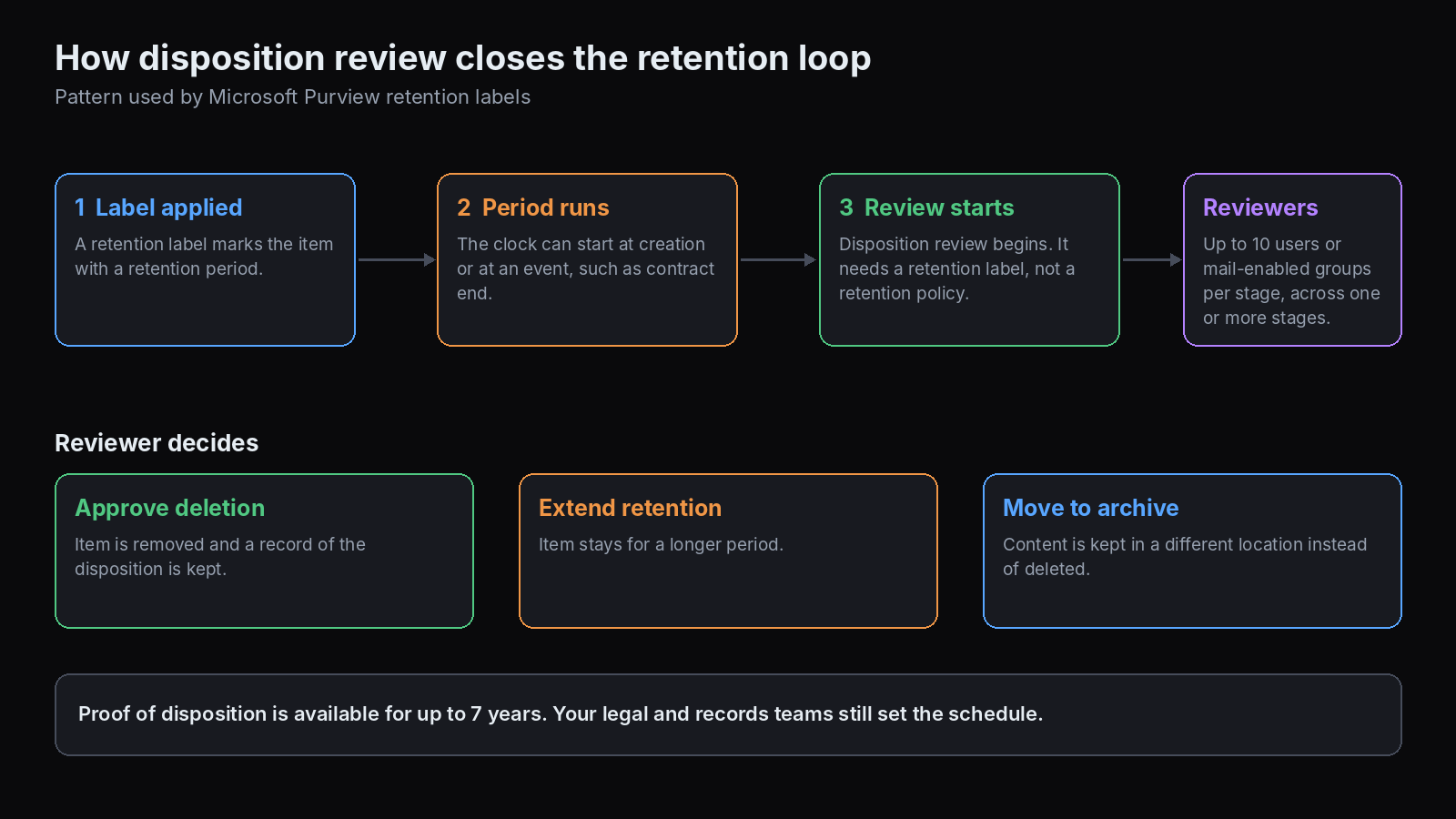
Retention automation keeps required records, removes the rest, and proves it did. Features to look for:
- Policy and label separation. In Microsoft Purview, retention policies apply broadly to locations, while retention labels apply to individual items and can trigger a disposition review at the end of the period. Disposition review is available only with a retention label, not a retention policy.
- Disposition review. Reviewers see items at the end of retention and can approve deletion, extend the period, or move the content to an archive. Purview allows up to 10 reviewers or mail-enabled security groups per stage, supports several stages, and offers optional auto-approval after a set number of days.
- Regulatory records controls. Purview's regulatory record labels cannot have their retention period shortened once saved, only extended.
- Event-based triggers. Retention clocks that start at an event, such as contract termination or project close.
- Legal holds. The ability to suspend deletion for litigation or audit.
- Limits. Purview lists a maximum of 1,000 retention labels per tenant and 10,000 policies per tenant, and changes can take up to seven days to propagate.
- Auditing. Purview requires auditing to be enabled at least a day before the first disposition action for confirmation records.
Retention rules need legal alignment. Software enforces a schedule, but your legal and records teams must set it.
Automating Document Compliance Checks
Compliance checks compare documents against rules: required fields present, signatures complete, terms within policy, identity documents valid, evidence matched to a control.
- Intake and completeness checks: confirm a packet has the required documents before it moves on.
- Contract and policy checks: compare terms to approved language and flag deviations.
- Evidence matching for audits: Wolters Kluwer's TeamMate Document Linker connects documents to specific tests of detail to create a traceable audit trail, and finance tools such as DataSnipper map source documents to outputs.
- Identity and KYC checks: document verification, sanctions screening, and biometric steps in financial services.
- Cross-document validation: Instabase describes AI agents that validate across documents in a packet against multi-step business rules.
Whatever the tool, keep the rule set under human ownership, log each check, and send exceptions to a person.
RPA for Insurance Document Workflows
RPA drives software the way a person does, by clicking and typing, and it suits rule-based steps on systems without APIs. It does not read documents on its own, so insurers pair it with document processing.
- Where RPA fits: moving data between claims, policy, and billing systems, updating records, and running coverage verification and assignment steps.
- Where document AI fits: reading claims forms, medical records, and submissions, and returning structured data with flags.
- Common combination: extraction feeds a bot or workflow that posts the data and routes exceptions.
Automation Anywhere describes its Document Automation as extracting data from claims forms, while RPA aids coverage verification, triage, and claim assignment. UiPath is often named where legacy screens have no API. Check whether the RPA tool, the document AI, or both hold the audit trail, since a gap between them is a common weakness.
How Organizations and Mid-Size Companies Automate Document Workflows
- Pick one document type and one outcome. Start where volume, rules, and cost of error are clear, often invoices or a single intake form.
- Map the current process. Record where documents enter, who touches them, and where they stall.
- Define the fields and checks. Write the schema and the validation rules before choosing a tool.
- Decide what needs a person. Set the exceptions, approvals, and thresholds.
- Choose a tool by fit, not by feature count. A mid-size team usually needs template-free extraction, review tools, integrations with its ERP or accounting system, and audit logs, without an enterprise rollout.
- Run a controlled comparison on your own documents, and measure fields, exceptions, and review time.
- Launch one workflow, log everything, and expand a document type at a time.
- Measure and maintain. Track accuracy, exception rates, cycle time, and cost per document.
Platforms for Secure Document Automation Compared
Pricing and limits come from vendor pages where noted. Several vendors do not publish pricing, and those entries say so.
DeepRead
- What it automates: Reads a document into Markdown with layout blocks and bounding boxes and returns the fields you define as JSON. Deep Extract adds two OCR engines, adjudication where they disagree, and a verification pass on every value.
- Pricing: $15 per 1,000 pages for Extract and $35 per 1,000 pages for Deep Extract. Free covers 2,000 pages a month with no card, Standard has no monthly page limit, and Enterprise is custom. A failed job costs nothing.
- Limits: Free allows 50 pages and 15 MB per document and 10 requests a minute. Standard allows 1,000 pages, 50 MB, and 100 requests a minute, with webhooks. Enterprise adds retention controls, PII redaction, bring-your-own model keys, EU and AU data residency, and SSO. Processing defaults to US East, and Free and Standard retain documents for up to three years. There is no self-hosted option and no BAA on any plan.
- Best for: Teams that want typed fields with source citations and review flags as a component in their own workflow.
- Pros: Each field returns its page, bounding box, and source text, uncertain values come back with a reason, and a review UI is on every plan. It does not return a numeric confidence score.
- Cons: It is an extraction layer and not a workflow or records platform, and it has no self-hosting or BAA.
UiPath IXP
- What it automates: Document classification, extraction, and human validation, including generative extraction for complex unstructured documents, feeding agents and robots downstream.
- Pricing: Not published on the pages reviewed.
- Limits: UiPath's documentation says LLM requests pass through its AI Trust Layer, audit entries remain visible for 60 days and can be exported, and policies can turn off saving inputs and outputs or mask PII.
- Best for: Teams already using UiPath for automation that want document understanding with governance controls.
- Pros: Source traceability for each field, versioning and rollback, a human validation interface, and a logged record of LLM interactions.
- Cons: Pricing is not public, and its strongest value is inside the wider UiPath platform.
Automation Anywhere Document Automation
- What it automates: Extracts data from forms and documents within workflows, alongside RPA for steps such as coverage verification, triage, and claims assignment in insurance.
- Pricing: Not published on the pages reviewed.
- Limits: Not stated on the pages reviewed.
- Best for: Insurers and other teams that want document extraction tied to RPA.
- Pros: Extraction and bots on one platform, with analytics through its CoE Manager.
- Cons: Pricing and technical limits are not public.
Rossum
- What it automates: Document processing for transactional documents such as invoices, with validation against master data and ERPs.
- Pricing: Not published on the pages reviewed. Coupa announced its acquisition of Rossum on 12 May 2026, so confirm how it is sold.
- Limits: Not stated on the pages reviewed.
- Best for: Larger finance teams, especially on Coupa.
- Pros: A detailed audit trail and logs for each document, covering sender communication, extraction, and approvals, according to Rossum.
- Cons: Pricing is not public, and packaging may change after the Coupa acquisition.
Tungsten Automation
- What it automates: Document capture and transformation, plus TotalAgility for intelligent document processing and workflow, with validation rules and database matching.
- Pricing: Not published on the pages reviewed.
- Limits: Not stated on the pages reviewed.
- Best for: Teams that want capture, validation rules, and workflow with an audit trail.
- Pros: Validation rules and database matching, and an audit trail listed by the vendor.
- Cons: Pricing is not public, and records retention is not its focus.
Box AI
- What it automates: AI answers, summaries, and extraction on content stored in Box, including Extract agents that turn contract and form details into structured metadata.
- Pricing: Not reviewed. Box meters AI usage in AI Units.
- Limits: Box says its models come from several providers, that it logs the fact a query was made but does not store the query or response, and that customers can enable or disable Box AI.
- Best for: Organizations whose documents already live in Box and who want permission-aware AI.
- Pros: Respects existing permissions and retention rules, and states that neither Box nor its providers train on customer data without approval.
- Cons: It works on content in Box, so it is less suited to intake from outside systems.
Microsoft Purview
- What it automates: Retention policies, retention labels, records management, and disposition review across Microsoft 365 locations.
- Pricing: Licensing was not reviewed. Check Microsoft's current terms.
- Limits: Up to 1,000 retention labels and 10,000 policies per tenant, up to seven days for label changes to propagate, and disposition review only with retention labels.
- Best for: Microsoft 365 organizations that need retention and disposition inside the tools they already use.
- Pros: Multi-stage disposition review, event-based retention, regulatory record controls, and an audit trail of disposition.
- Cons: It governs content in Microsoft locations and does not extract data from documents.
Laserfiche
- What it automates: Records and content management with lifecycle handling from creation through disposition, plus AI agents for extraction and classification.
- Pricing: Not published on the pages reviewed. A third-party comparison says retention schedules start at the Business tier and AI is metered in AI Units, so confirm with Laserfiche.
- Limits: AI Unit allowances vary by tier, per that comparison.
- Best for: Public sector, education, healthcare, and other audit-heavy organizations with formal records schedules.
- Pros: Records lifecycle management and audit trail reporting listed among its features.
- Cons: Retention rules need careful legal alignment and upfront planning, as review sites note.
Reliable IDP Platforms: How to Judge Reliability
A reliable platform does more than score well on a demo.
- Accuracy on your documents, measured by field and by line item, not a headline percentage.
- Behavior when unsure: flags with reasons, review queues, and no silent errors.
- Traceability: the ability to show where any value came from.
- Stability: consistent results across versions, with release notes and rollback.
- Security evidence: retention, residency, training use, and audit logs you can verify.
- Operational fit: rate limits, failure handling, and support.
Be careful with headline accuracy claims such as "99%", and ask for results on your own documents.
Security Questions to Ask Any Vendor
- Where is data processed and stored, and can you choose a region?
- How long is it retained, and can you shorten it?
- Is it used to train models, by the vendor or its model providers?
- Which model providers see your content, and can you restrict them?
- Can PII be masked or redacted before it reaches a model?
- What is logged about AI interactions, and can you export it?
- Who at the vendor can access content, and under what controls?
- Is there a data processing agreement, and a BAA if you handle health data?
- What certifications and audit reports exist, and what do they cover?
- Can you delete a customer's data on request, with proof?
How to Choose
- You need document reading with source citations as a component: DeepRead, UiPath IXP, or Rossum for invoices.
- You already run an automation platform: UiPath or Automation Anywhere.
- Your content lives in Box or Microsoft 365: Box AI or Microsoft Purview.
- You need formal records schedules: Purview or Laserfiche.
- You need detailed audit trails and records disposition: Laserfiche, or Tungsten Automation for capture with an audit trail.
- You are mid-size with one document type to start: pick the tool that handles it without templates, and add platforms as you expand.
Conclusion
Secure AI document handling is a chain of controls, from intake and extraction through audit and disposal, and the platform you choose should be judged on every link. Heading into 2027, extraction itself is becoming a commodity, so the deciding factors are traceability, review and approval paths, logged AI interactions, retention enforcement, and honest vendor security answers. Start with one document type, test on your own files, keep people in the loop where stakes are high, and map your records to the governance frameworks your customers and regulators ask about.
Frequently Asked Questions
What is secure AI document handling?
It is the automation of capturing, reading, checking, storing, and deleting documents with controls at each step: permissions, logging, human review, and retention rules.
What are the best AI tools for document automation in 2027?
There is no single best tool. As of November 2026, the choice depends on your documents and stack: UiPath IXP or Automation Anywhere for automation platforms, Rossum for invoices, Box AI or Microsoft Purview for content already in those systems, and extraction APIs such as DeepRead as a component. Test candidates on your own documents.
Which AI document automation platforms have audit trail features?
Several describe them. Rossum lists an audit trail and logs for each document, Tungsten Automation lists an audit trail for extraction and validation, UiPath records LLM interactions in an AI Trust Layer audit log, and Laserfiche lists audit trail reporting. Compare what each logs and how long entries are kept.
What is the best software for automating document retention policies?
Microsoft Purview suits Microsoft 365 content, with retention labels and multi-stage disposition review, and Laserfiche suits formal records programs. Whatever the tool, your legal and records teams must set the schedule.
How do mid-size companies automate document processing?
They usually start with one high-volume document type such as invoices, choose template-free extraction with review and integrations, run a controlled test on their own documents, launch one workflow, and expand a document type at a time.
How is RPA used in insurance document workflows?
RPA moves data between claims, policy, and billing systems and runs rule-based steps, while document AI reads claims forms and records. They are often combined, with extraction feeding a bot or workflow.
Do AI document tools need to comply with the EU AI Act?
It depends on how the output is used. Under the Digital Omnibus, obligations for stand-alone high-risk systems apply from 2 December 2027, and document extraction is high-risk only when used for covered purposes such as hiring or credit scoring. Check with counsel.
Does DeepRead offer audit trails and secure handling?
DeepRead returns each field with its page, bounding box, and source text, and flags uncertain values needs_review with a reason. Enterprise adds retention controls, PII redaction, bring-your-own model keys, EU and AU data residency, and SSO. It has no self-hosted option or BAA, and it is an extraction layer and not a records or workflow platform.
More articles
Business Card OCR API
Compare business card OCR API and software options: fields returned, accuracy checks, pricing units, limits, privacy, and how to test on your own cards.

LLM OCR Accuracy Leaderboard
An LLM OCR leaderboard guide: current top scores on OmniDocBench, olmOCR-Bench, OCRBench v2, and the IDP Leaderboard, what each measures, and how to read them.