%20{%20:root%20{%20--deepread-stroke:%20%23E5E7EB;%20}%20}%20.dark%20{%20--deepread-stroke:%20%23E5E7EB;%20}%20%3c/style%3e%3crect%20x='40'%20y='30'%20width='220'%20height='260'%20rx='28'%20ry='28'%20stroke='var(--deepread-stroke)'%20stroke-width='16'%20fill='none'/%3e%3cpath%20d='M180%2030v52c0%2010%208%2018%2018%2018h62'%20stroke='var(--deepread-stroke)'%20stroke-width='16'%20fill='none'/%3e%3cline%20x1='70'%20y1='130'%20x2='200'%20y2='130'%20stroke='var(--deepread-stroke)'%20stroke-width='16'%20stroke-linecap='round'/%3e%3cline%20x1='70'%20y1='165'%20x2='200'%20y2='165'%20stroke='var(--deepread-stroke)'%20stroke-width='16'%20stroke-linecap='round'/%3e%3cline%20x1='70'%20y1='200'%20x2='170'%20y2='200'%20stroke='var(--deepread-stroke)'%20stroke-width='16'%20stroke-linecap='round'/%3e%3c!--%20green%20download%20arrow%20in%20bottom%20right%20corner%20--%3e%3cpath%20d='M210%20202v58'%20stroke='var(--deepread-accent)'%20stroke-width='18'%20stroke-linecap='round'/%3e%3cpath%20d='M195%20245l15%2015%2015-15'%20fill='none'%20stroke='var(--deepread-accent)'%20stroke-width='18'%20stroke-linecap='round'%20stroke-linejoin='round'/%3e%3c/svg%3e)
Invoice Digitization: How to Digitize Invoices, Tools Compared, and What to Check (2026)
Learn how invoice digitization works, from scanning and OCR to validation and archiving, with 9 tools compared on published pricing, limits, and best use.
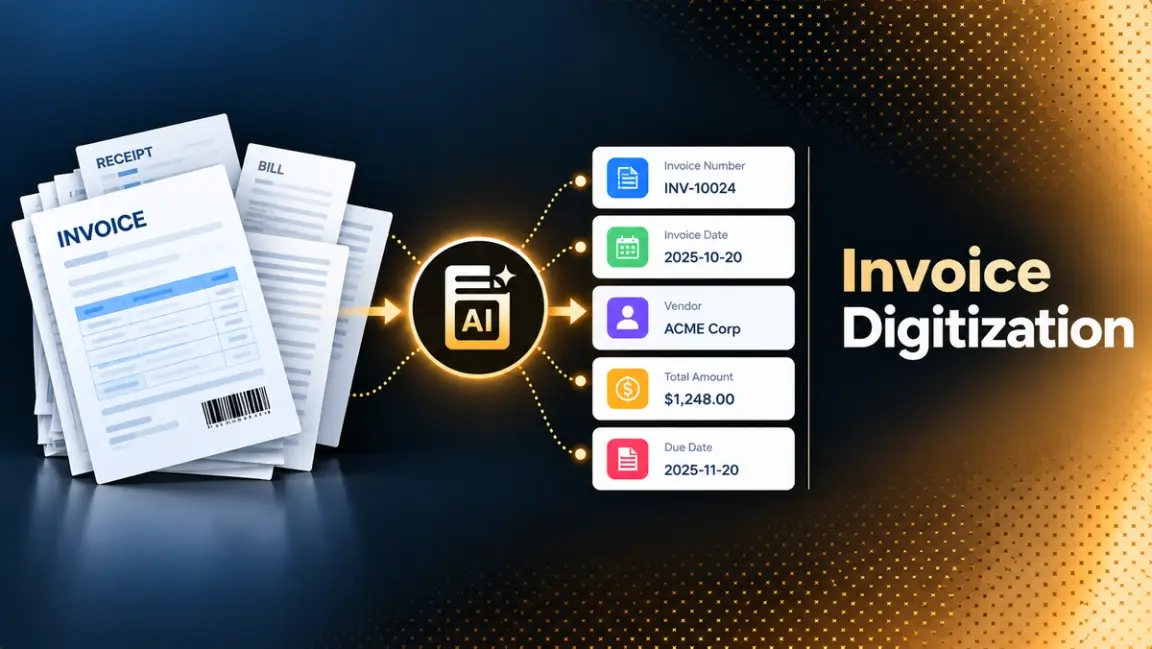
A scanned invoice is still a picture. Someone has to read it, key the vendor, the date, the tax, and the total into a system, and file the original somewhere they can find it during an audit. Invoice digitization removes that reading and keying by turning the invoice into data: labeled fields, line items as rows, and a link back to the original image.
This guide explains how invoice digitization works from capture to archive, how it differs from scanning and from e-invoicing, and what to check on accuracy, record-keeping, and security. It compares nine tools using their own published pricing and limits, and ends with a pilot you can run on your own invoices. The focus is on businesses in the United States and Canada, where most invoices still arrive as paper or PDF. If you also need approvals and payments, DeepRead's guide to AI document processing for AP automation covers that side.
What Invoice Digitization Actually Means
Three terms get mixed up, and the difference matters when you choose a tool.
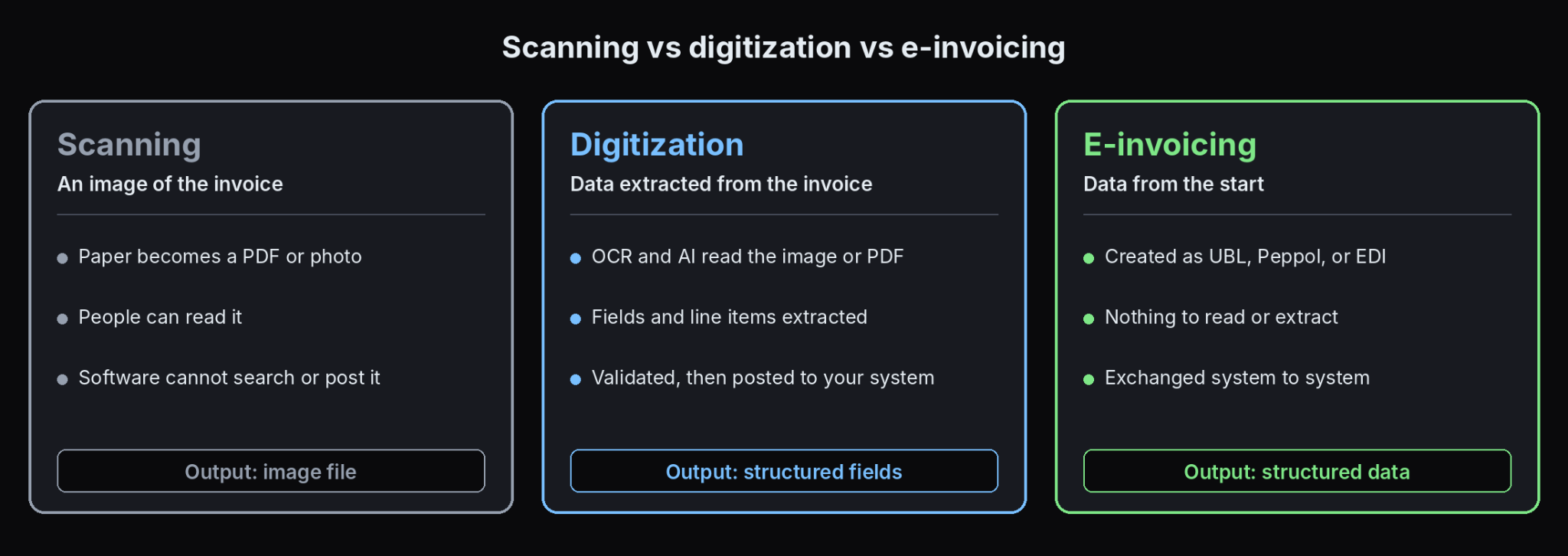
- Scanning creates an image of a paper invoice. The result is a file that people can read, but software cannot search or post.
- Digitization extracts the data from that image or PDF into fields such as vendor, invoice number, dates, line items, tax, and total, so a system can use it.
- E-invoicing is different: the invoice is created as structured data from the start, in a format such as UBL or Peppol, or exchanged through EDI, so there is nothing to extract.
Most businesses deal with all three at once, because suppliers send whatever format they prefer. A practical digitization setup accepts every format and normalizes it into one clean data structure. Many tools now read invoices without per-supplier templates, and DeepRead's roundup of Nanonets alternatives compares several of them.
Why Paper and PDF Invoices Hold Teams Back
- Slow approvals. Invoices wait in inboxes and on desks until someone keys them and routes them.
- Keying errors. Manual entry produces wrong amounts, dates, and vendor names that surface later as payment disputes.
- Poor visibility. Finance cannot see what is owed until an invoice is entered.
- Fraud and duplicate risk. Without searchable data, duplicate invoices and changed bank details are harder to catch.
- Audit friction. Finding one invoice among filing cabinets or shared folders takes time.
DeepRead's guide to document workflow automation shows how invoices can move from intake to export without those delays.
Benefits of Digitizing Invoices
- Less manual entry, because fields arrive already extracted.
- Faster routing, since approvers work from data and not from paper.
- Better control, because duplicate and arithmetic checks can run automatically.
- Easier audits, since each value links to the image it came from.
- Searchable records, by vendor, number, date, or amount.
Benefit figures in vendor marketing, such as "3x faster" or "50% cheaper," are rarely backed by a stated test. Measure your own before and after. These benefits only hold if extraction is accurate, and DeepRead's review of the most reliable data extraction service shows how to judge that.
Digital Invoices vs E-Invoices in North America
Globally, governments are moving toward mandatory e-invoicing. EY's e-invoicing tracker, current to July 29, 2026, reports that business-to-government mandates are the most common, that business-to-business mandates are spreading through phased rollouts between 2026 and 2030, and that timelines are often delayed or adjusted. For both the United States and Canada, the same tracker lists no mandate: e-invoicing is not applicable in the United States and is allowed but not mandatory in Canada.
For North American businesses, this means invoices will keep arriving as PDFs, scans, and photos for the foreseeable future, so extraction remains necessary. If you also trade with suppliers or customers in countries that mandate e-invoicing, you will need to receive structured formats as well. Check the rules for each country you deal with, since they change.
Where Invoices Come From
The source determines how hard digitization will be.
- Paper invoices arrive by mail or at a front desk and need scanning.
- Email attachments are usually PDFs, and many are born-digital with a text layer, which is the easiest case.
- Photos taken on a phone bring skew, shadows, and blur.
- Supplier portals and EDI feeds deliver structured or semi-structured data.
- Scanned PDFs look like documents but contain only images, so they need OCR.
A simple first step is to check whether a PDF has a text layer. If it does, you can read the text directly, which is faster and more accurate, and keep OCR for pages that need it.
The Invoice Digitization Process, Step by Step
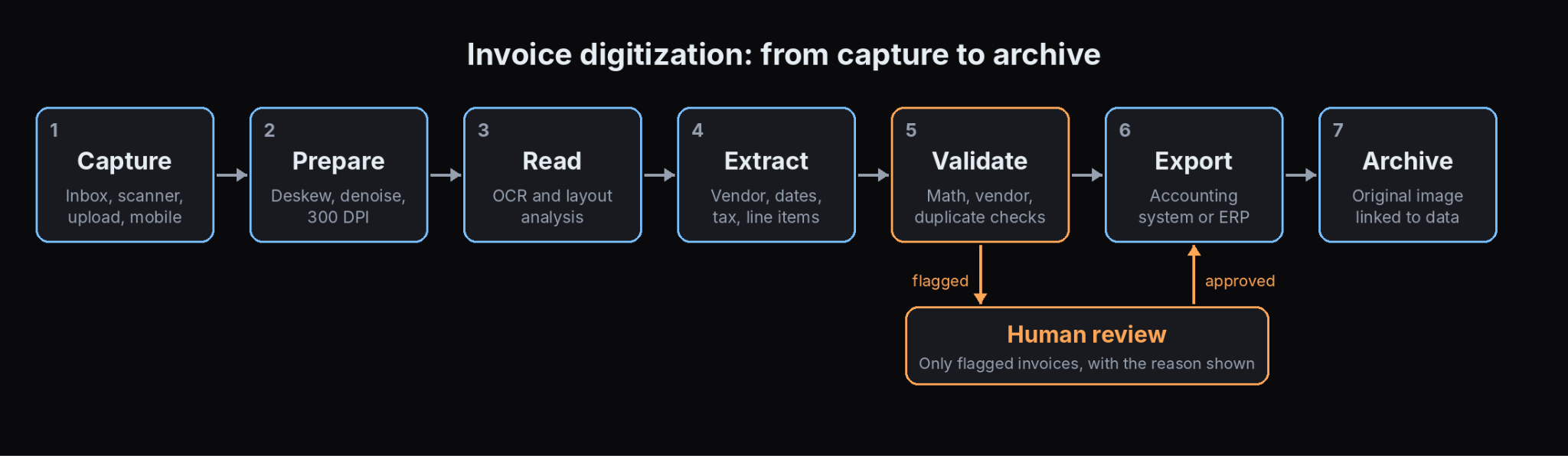
- Capture. Collect invoices in one place: a shared inbox, an upload folder, a scanner, or a mobile app. Fewer entry points mean fewer lost invoices.
- Prepare the image. Straighten skewed pages, remove noise, and make sure resolution is adequate. About 300 DPI is commonly recommended for scanned documents.
- Read the text. OCR converts pixels to text, and layout analysis keeps tables and columns in order.
- Extract the fields. Identify vendor, invoice number, dates, currency, tax, totals, and line items.
- Validate. Check arithmetic, vendor identity, duplicates, and required fields, and flag anything uncertain for review.
- Export. Send structured data to your accounting system, ERP, or spreadsheet.
- Archive. Store the original image with the extracted data so every value can be traced back.
Methods for Digitizing Invoices
Different methods suit different volumes and document mixes.
- Manual keying needs no software and breaks down quickly as volume or supplier variety grows.
- Template-based OCR assigns zones for each supplier's layout. It works when layouts are stable and fails when a supplier changes theirs. Docparser, for example, bills by document credit and sells a service where it builds a custom parser for each layout.
- AI-based extraction reads invoices without templates and adapts to new layouts, which suits mixed supplier bases.
- Cloud extraction APIs return structured fields from a call and leave workflow, review, and storage to you. They bill per page or per document, and DeepRead's breakdown of per-document vs per-page pricing helps you compare quotes.
- AP automation suites combine capture with approvals, matching, and payments.
Scanning Best Practices
Image quality sets the ceiling on accuracy, so a few habits pay off.
- Scan flat, with pages straight and the whole page in frame.
- Use consistent settings, with about 300 DPI and a lossless or lightly compressed format.
- Scan invoices individually or use separator pages so batches split correctly.
- Remove staples and unfold pages before scanning.
- For phone photos, use good light, avoid shadows, and capture the full page.
- Name or index files consistently so they can be found later.
Accuracy and Validation
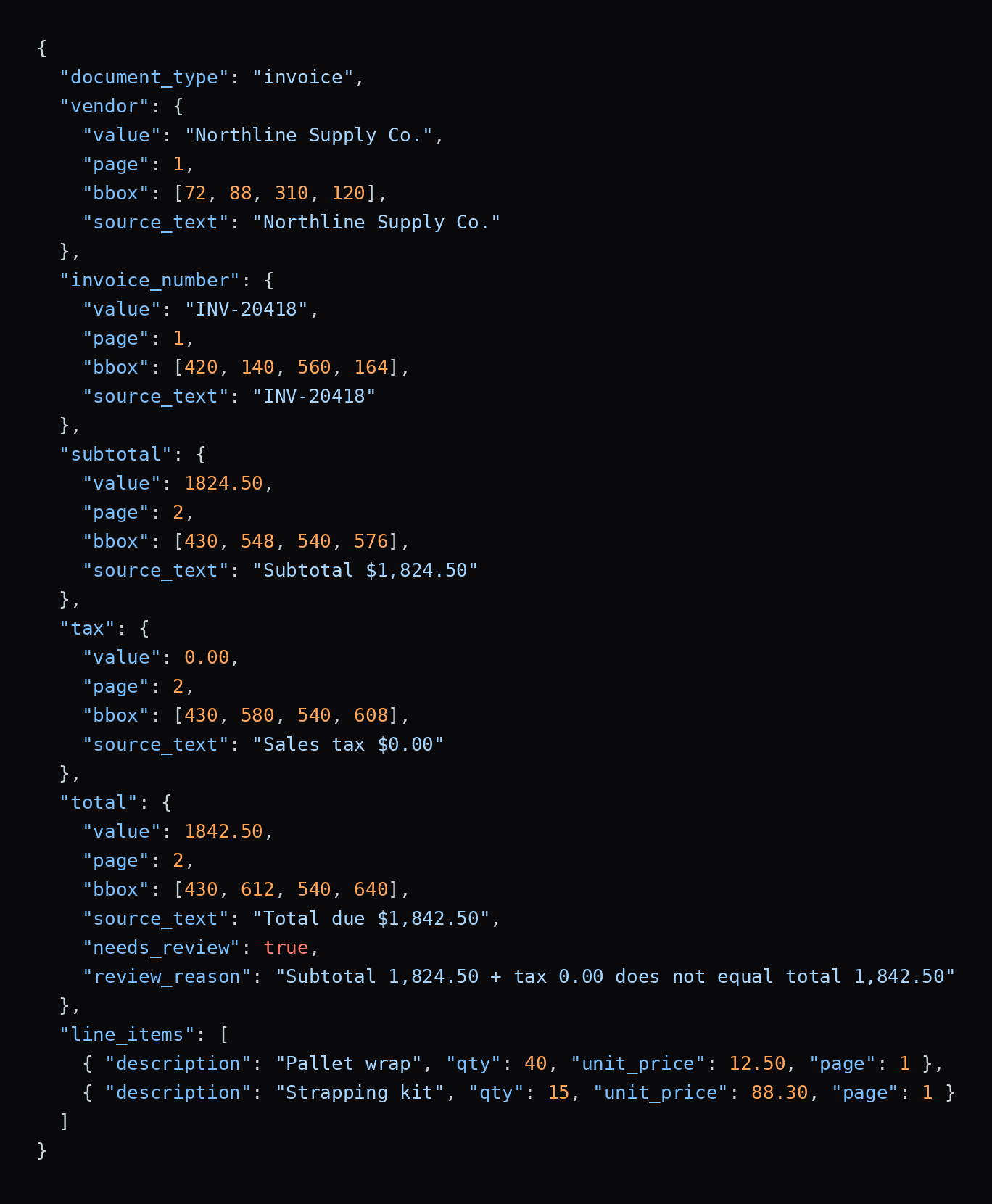
Accuracy needs a precise definition. Header fields such as invoice number and total are easier than line items, and a correct total can hide a wrong row. Score both separately.
- Arithmetic checks: line totals equal quantity times price, lines sum to the subtotal, and subtotal plus tax equals the total.
- Vendor checks: names and tax IDs match your vendor list, and bank details that change get extra review.
- Duplicate checks: the same vendor, invoice number, and amount should not post twice.
- Required-field checks: nothing needed for posting is blank.
- Review routing: uncertain values go to a person with the reason attached.
Treat vendor accuracy claims with care. A figure such as 99% rarely says whether it counts fields or documents, whether line items are included, or whether flagged values count as errors. Lido's own digitization guide, for example, states 99%+ field-level accuracy and 3x faster processing without citing a test. Ask for the method, then run your own sample.
Record-Keeping and Compliance in the United States
Digitizing paper invoices does not remove your duty to keep records. The IRS addresses this in Revenue Procedure 97-22, which covers businesses that keep books and records on electronic storage by imaging paper records. Its requirements, in plain terms:
- Accurate and complete transfer. The system must capture the paper record fully and preserve it.
- Indexing. Records must be identifiable and retrievable, in a way comparable to a reasonable paper filing system, with controls that protect the index from unauthorized change or deletion.
- Retrieval and reproduction. At examination you must be able to retrieve and reproduce records, including hard copies if requested, and give the IRS the equipment and documentation needed to read them.
- Legibility. Records must be legible on screen and in print, meaning every letter and numeral can be identified.
- Quality control. The system needs controls for integrity and accuracy, protection against unauthorized alteration or deletion, and regular evaluations and periodic checks of the stored records.
- Retention. The text sets no single period. Records must be kept as long as their contents may be material to the administration of the tax laws. If you stop maintaining the hardware and software needed to read them, the records are treated as destroyed.
The revenue procedure also allows destroying the paper originals once you meet its conditions, including procedures that keep the system compliant. Because the details vary by situation, and the guidance is old, confirm what applies to your business with a tax professional before shredding anything. Practical retention periods (commonly cited as three years, with longer periods in some cases, and seven years as a conservative policy) come from the IRS and from vendor summaries, so check them for your own circumstances. Canadian businesses should check Canada Revenue Agency rules and any provincial requirements.
What Invoice Digitization Costs
Costs have three parts: tool fees, review time, and implementation.
Doing it by hand has a measurable price. Ardent Partners research, summarized on Payables Place, reported a 2019 average of 8.3 days to process an invoice, with best-in-class AP teams paying $2.18 per invoice and all other teams $12.60. The data is old, so read it as the size of the gap and work out your own cost per invoice.
Published tool prices vary by pricing unit. These figures come from vendor pages and should be confirmed.
- Per page: AWS lists expense analysis at $0.01 per page in its first tier, and DeepRead lists $15 per 1,000 pages for Extract and $35 for Deep Extract.
- Per document: Veryfi lists $0.16 per invoice on its Starter plan, and Google's invoice parser lists $0.10 per count, where a count covers up to 10 pages.
- Per credit or subscription: Docparser starts at $39 a month for 100 document credits, and Lido starts at $29 a month for 100 pages.
Compare on a common basis. Your cost per invoice depends on average invoice length, the share needing human review, and any monthly minimums.
Build, Buy, or Use an API
- Buy a capture tool if you want a working system quickly and your needs are standard.
- Use an extraction API if you have developers and want control over workflow, storage, and review.
- Buy an AP suite if you also need approvals, matching, and payments.
- Build on open-source OCR only if volume is modest, invoices are clean, and you can maintain the pipeline.
Security and Privacy
Invoices contain bank details, tax IDs, and pricing. Ask any vendor where documents are processed and stored, how long they are retained, whether they are used for training, who can access them, and what certifications and audit reports exist. Prefer tools that let you control retention, and keep your own archive as the system of record.
Best Tools for Invoice Digitization (2026)
The tools below span template-based parsers, AI extraction services, cloud APIs, and AP platforms. Pricing comes from each vendor's own pages, and anything not published is marked. Confirm current pricing before you buy.
DeepRead
- What it automates: Turning any invoice into structured data through one API. Extract reads the file into Markdown with layout blocks and bounding boxes and returns the fields you ask for as JSON when you send a schema, so you describe what you need and not where it sits on the page. Deep Extract is for the awkward ones: skewed scans, phone photos, and handwritten annotations. It runs two OCR engines, adjudicates where they disagree, and verifies every value.
- Pricing: $15 per 1,000 pages for Extract and $35 per 1,000 pages for Deep Extract, chosen per request. Free covers 2,000 pages a month without a card, Standard has no monthly page limit, and Enterprise is custom. Credits are reserved when a job starts and charged on completion, so failed jobs cost nothing, and up to $1,000 in migration credits is available.
- Limits: Free allows 50 pages per document, 15 MB per file, and 10 requests a minute. Standard allows 1,000 pages, 50 MB, and 100 requests a minute. Enterprise adds retention controls, PII redaction, bring-your-own model keys, EU and AU data residency, and SSO. Processing and storage default to US East, and Free and Standard retain documents for up to three years by default, so keep your own archive for record-keeping. There is no self-hosted option and no BAA on any plan. It does not include approvals, matching, or payments.
- Best for: Teams that want invoice fields extracted with proof of where each value came from, and that already have, or are building, the rest of the workflow.
- Pros: Every field arrives with its page, bounding box, and source text, which makes archive links and audits simple; review flags come with reasons, and there is a review UI on every plan.
- Cons: It is an extraction layer and not an AP suite, and it cannot be self-hosted.
Docparser
- What it automates: Template-style parsing of invoices and other PDFs, Word files, and images into Excel, CSV, JSON, XML, and Google Sheets.
- Pricing: Starter is $39 a month, or $32.50 a month billed annually, for 100 credits a month, where one credit covers one document of up to 5 pages. Professional is $74 monthly for 250 credits, and Business is $159 monthly for 1,000 credits. Enterprise is by quote. A 14-day trial needs no card.
- Limits: Plans cap the number of parsers at 15, 50, and 500 on Starter, Professional, and Business. Multi-layout parsers are a paid add-on on Starter and Professional ($29.95 monthly or $25 annual) and included from Business. A custom parser built for you costs $149 per layout.
- Best for: Small teams with a steady set of suppliers whose layouts rarely change.
- Pros: Low entry price, published pricing, and simple exports.
- Cons: Each new layout needs setup, which is slow and costly when supplier mix is wide.
Veryfi
- What it automates: An API for invoices, receipts, bank documents, W-2s, and W-9s, with an optional product intelligence add-on that extracts and links line-item details.
- Pricing: Free for up to 100 documents a month. Starter bills $0.16 per invoice with a $500 monthly minimum for fewer than 5,000 documents a month, and Growth is custom with volume discounts. The page describes Starter terms in two ways, so confirm them with sales.
- Limits: Billing is per document, and one transaction covers up to 15 pages. Longer documents need a custom account configuration. Fraud detection and embedded options are add-ons.
- Best for: Developers who want a per-document price and a free tier for testing.
- Pros: Clear per-document pricing across document types, a free tier, and SDKs.
- Cons: The $500 monthly minimum is steep for low volume, and long documents need extra setup.
Lido
- What it automates: AI-based extraction from invoices and other documents without per-supplier templates, aimed at spreadsheet and accounting workflows.
- Pricing: Standard is $29 a month for 100 pages and one user. Scale is $7,000 a year for 42,000 pages and up to 10 users. Enterprise starts at $35,000 a year on the pricing section, though its FAQ says $30,000. 50 free pages are included with no card.
- Limits: Lido does not offer per-page billing. Plans are fixed page allowances, so unused pages and overages matter. Its accuracy claims are its own.
- Best for: Small to mid-sized teams that want template-free extraction on a subscription.
- Pros: No templates, a free trial allowance, and published subscription prices.
- Cons: Fixed page bundles can cost more per page at low volume, and Enterprise pricing is stated inconsistently.
Google Document AI
- What it automates: An invoice parser, Enterprise Document OCR, a Form Parser, and custom extractors on Google Cloud.
- Pricing: The invoice parser is $0.10 per count, where a count covers up to 10 pages. Enterprise Document OCR is $1.50 per 1,000 pages with the first 1,000 free, and Form Parser is $30 per 1,000 pages. The invoice parser has no free allowance listed. Failed requests are not billed.
- Limits: Online processing accepts files up to 40 MB, and most processors allow 15 pages online. Batch processing accepts up to 1 GB per file and 5,000 files per request, and the invoice parser allows up to 200 pages per file in batch.
- Best for: Teams on Google Cloud that want a prebuilt invoice processor.
- Pros: A dedicated invoice parser, tiered public pricing, and no charge for failed requests.
- Cons: You build review, storage, and workflow around it.
Nanonets
- What it automates: Invoice workflows that pick up files from email, PDFs, scans, EDI, and supplier portals, extract and match them, and post them to systems such as SAP and NetSuite, sending low-confidence items to reviewers.
- Pricing: Charged by workflow block run. Starter includes $50 in free credits, then $100 a month for 100 credits. Blocks cost $0.02 for simple operations, $0.10 for standard AI, and $0.30 for complex AI such as extraction. Nanonets estimates a typical invoice workflow at under $2 per document. Growth and Enterprise are quoted.
- Limits: Starter is limited to 3 users. Classification, generative AI blocks, and ERP integrations begin on Growth.
- Best for: Teams that want intake, extraction, and ERP posting configured in one product.
- Pros: Several intake channels, built-in review routing, and published block rates.
- Cons: Cost depends on how many blocks your workflow uses, so work out a per-invoice estimate before comparing.
How to Run a Pilot
- Pick a representative sample. Collect 100 to 200 recent invoices, including scans, photos, and your hardest suppliers.
- Define what you need. List the header fields and whether line items matter.
- Record the right answers. Have someone key the correct values once, with a second person checking.
- Run two or three tools. Use free tiers or trials where possible.
- Score fields and line items separately. Count wrong, missing, and flagged values.
- Measure review load. Track how many invoices reach a person and how long each takes.
- Test the export. Post a few validated invoices to a sandbox of your accounting system.
- Compare the total cost. Include fees, minimums, review time, and setup.
- Decide with thresholds set in advance.
Common Mistakes to Avoid
- Treating scanning as digitization.
- Using template tools for a wide supplier base.
- Skipping validation because extraction looks accurate.
- Not archiving the original image with the data.
- Comparing prices without a common unit.
- Ignoring record-retention rules when changing storage.
- Trusting vendor accuracy numbers without a test.
Conclusion
Invoice digitization pays off when the whole chain works: clean capture, accurate extraction, validation that catches silent errors, and an archive that links every value to its source. Because invoices will keep arriving in mixed formats in North America, choose a tool that handles scans, photos, and PDFs, and test it on your own documents. Compare cost per invoice across the whole workflow, and keep your records in a form your tax adviser is comfortable with.
Frequently Asked Questions
What is invoice digitization?
It is the process of converting paper, PDF, and image invoices into structured data, with fields such as vendor, dates, line items, tax, and totals that accounting and AP systems can use.
How do I digitize invoices?
Capture invoices in one place, prepare the images, read them with OCR, extract the fields, validate them, export the data to your accounting system, and archive the original with a link to the data.
What is the difference between scanning and digitizing invoices?
Scanning creates an image. Digitizing extracts the data from that image so software can search, validate, and post it.
What is the difference between a digital invoice and an e-invoice?
A digital invoice is a PDF, Word file, or image that usually needs extraction. An e-invoice is created and exchanged as structured data, such as UBL, Peppol, or EDI, so no extraction is needed.
Is e-invoicing mandatory in the United States or Canada?
EY's tracker, current to July 29, 2026, lists no e-invoicing mandate for the United States and describes Canada as allowed but not mandatory. Rules differ elsewhere and change, so check each country you trade with.
Can I throw away paper invoices after scanning them?
Rev. Proc. 97-22 allows destroying paper originals once the imaging system meets its conditions, including accurate transfer, indexing, legibility, retrieval, and quality controls. Confirm your setup with a tax professional first.
Can an invoice be digitally signed?
Yes. PDF and e-invoice formats can carry digital signatures, which help show who issued the invoice and that it was not changed. Whether a signature is required depends on the country and the customer.
More articles
AI Automation for Contracts and Compliance Documents: How It Works, Platforms Compared, and How to Choose (2026)
How AI automates contract extraction, search, review, and compliance tracking, with 9 platforms compared on pricing and limits and a pilot plan to test them.
Using LLMs for OCR: Architectures, Prompts, Benchmarks, and Code (2026)
How to use LLMs for OCR: architectures, prompts, tested code, failure modes, benchmarks, and open-source tools compared with traditional OCR for PDFs and scans.