%20{%20:root%20{%20--deepread-stroke:%20%23E5E7EB;%20}%20}%20.dark%20{%20--deepread-stroke:%20%23E5E7EB;%20}%20%3c/style%3e%3crect%20x='40'%20y='30'%20width='220'%20height='260'%20rx='28'%20ry='28'%20stroke='var(--deepread-stroke)'%20stroke-width='16'%20fill='none'/%3e%3cpath%20d='M180%2030v52c0%2010%208%2018%2018%2018h62'%20stroke='var(--deepread-stroke)'%20stroke-width='16'%20fill='none'/%3e%3cline%20x1='70'%20y1='130'%20x2='200'%20y2='130'%20stroke='var(--deepread-stroke)'%20stroke-width='16'%20stroke-linecap='round'/%3e%3cline%20x1='70'%20y1='165'%20x2='200'%20y2='165'%20stroke='var(--deepread-stroke)'%20stroke-width='16'%20stroke-linecap='round'/%3e%3cline%20x1='70'%20y1='200'%20x2='170'%20y2='200'%20stroke='var(--deepread-stroke)'%20stroke-width='16'%20stroke-linecap='round'/%3e%3c!--%20green%20download%20arrow%20in%20bottom%20right%20corner%20--%3e%3cpath%20d='M210%20202v58'%20stroke='var(--deepread-accent)'%20stroke-width='18'%20stroke-linecap='round'/%3e%3cpath%20d='M195%20245l15%2015%2015-15'%20fill='none'%20stroke='var(--deepread-accent)'%20stroke-width='18'%20stroke-linecap='round'%20stroke-linejoin='round'/%3e%3c/svg%3e)
Using LLMs for OCR: Architectures, Prompts, Benchmarks, and Code (2026)
How to use LLMs for OCR: architectures, prompts, tested code, failure modes, benchmarks, and open-source tools compared with traditional OCR for PDFs and scans.
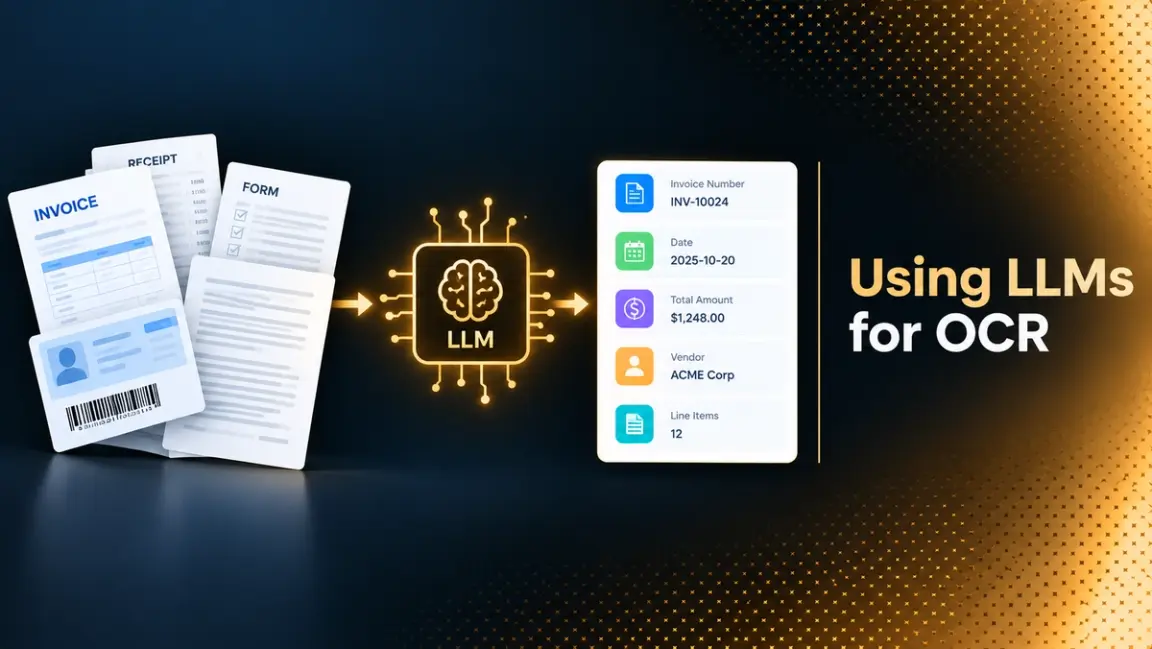
Traditional OCR turns pixels into characters. A large language model does something different: it looks at a page image, reads it the way a multimodal model reads any image, and writes out text, Markdown, or JSON. That shift removes much of the brittle plumbing around classic OCR, such as templates, layout rules, and post-processing. It also introduces a new kind of error, because a language model that cannot read a character will often write a plausible one instead.
This guide is for engineers deciding how far to trust LLMs for OCR. It explains how LLM-based OCR works, where it beats traditional engines and where it does not, how to prompt it, and how to build checks around it. It includes tested Python code, a review of the main benchmarks and what they miss, and a comparison of open-source and hosted tools. If you want the broader product-level comparison first, DeepRead's article on LLMs vs OCR software covers it from the buyer's side.
Three Ways to Use an LLM for OCR
"LLM OCR" covers three different architectures, and mixing them up causes most of the confusion in the SERPs.
1. OCR First, LLM Second (LLM-Aided OCR)
A traditional engine such as Tesseract reads the page and produces raw text. An LLM then receives that text, and sometimes the image too, and fixes errors, restores structure, or extracts fields. The model reasons over text it did not read from pixels, so the OCR engine's mistakes are the ceiling. This approach is cheap and keeps a deterministic first pass, which helps with audits.
2. Vision-Language Model as the OCR Engine
A multimodal model receives the page image directly and transcribes it. This is what people usually mean by "LLM as OCR" or "multimodal LLM OCR". General-purpose models can do it, and so can specialized document models such as olmOCR, DeepSeek-OCR, and PaddleOCR-VL, which are trained specifically to turn pages into text or Markdown. Layout, reading order, and tables are handled by the model rather than by separate stages.
3. Hybrid and Agentic Pipelines
Production systems often combine several parts. They segment the page, send each region to the most suitable model, run validation, and reconcile disagreements between independent reads. LlamaIndex describes this third pattern in its analysis of LLM OCR as the way to make results trustworthy, with traceable output and validation loops around the model. The rest of this guide leans toward this approach, because it is the one that survives contact with real documents.
For the output side of any of these architectures, see DeepRead's explainer on structured data extraction.
LLM vs OCR: Where Each Approach Wins
The honest answer to "OCR vs LLM" is that it depends on the document and the cost of being wrong.
Where Traditional OCR Is Stronger
- Clean, printed, high-volume documents. Engines like Tesseract are fast, cheap, and run on CPUs.
- Determinism. The same input gives the same output, which makes testing and audit simple.
- Per-character confidence. Classic engines report how sure they are about each character, which a language model does not do in a comparable way.
- Data control. They run entirely on your own hardware without sending documents anywhere.
Where LLM-Based Approaches Are Stronger
- Variable layouts. No template per vendor or form type is needed.
- Messy inputs. The OmniDocBench paper found that general vision-language models were more robust than pipeline tools on degraded pages such as fuzzy scans, and generalized better to less common formats such as slides, exam papers, and handwritten notes.
- Understanding, not only reading. A model can decide which number is the invoice total, which is a PO number, and which table row belongs to which heading.
- Fewer moving parts. One model call can replace detection, recognition, layout analysis, and field mapping.
Where LLMs Still Struggle
The same OmniDocBench paper reported that pipeline tools such as MinerU and Marker generally did better on common document types like academic papers and financial reports, and that general models struggled with dense, high-resolution layouts such as newspapers. Accuracy dropped on multi-column and complex layouts across the board.
In short, LLMs earn their cost on hard documents, and traditional engines remain the better default for clean, high-volume text. A hybrid design lets you use each where it is strongest, and the sections on verification below show how.
How AI Improves Data Extraction From Documents in 2026
Several changes have made LLM-based extraction practical over the past two years.
- Specialized document models. Smaller models trained only for document parsing, such as the 7B olmOCR and the 0.9B PaddleOCR-VL, can run on modest hardware and return Markdown with tables and formulas.
- Fewer vision tokens per page. DeepSeek-OCR's paper reports roughly 97% decoding precision at about 10 times compression of visual tokens, which lowers the cost of reading a page, though precision falls to around 60% at about 20 times compression.
- Built-in layout and structure. Modern models return reading order, block types, bounding boxes, and tables as part of one pass. Mistral's OCR 4.1 documentation lists paragraph-level bounding boxes, labeled structural blocks, and a confidence score per block.
- Schema-driven extraction. Instead of training a model per document type, you describe the fields you want and let the model find them.
- Open tooling. Projects such as Docling, marker, and olmOCR make it possible to run pipelines locally.
The gain is real, but the benchmark section below explains why it is easier to overstate than to measure.
Handwriting, Multilingual Text, and Low-Quality Scans
These are the cases that push teams toward LLMs, and also where results vary most.
- Handwriting. Traditional engines have historically struggled with cursive. In AIMultiple's 300-document test, the top handwriting scores were GPT-5 at 95%, olmOCR-2-7B at 94%, and Gemini 2.5 Pro at 93%, with scores across all systems ranging from 46% to 95%.
- Multilingual text. OmniDocBench found that most models scored higher on English than on Chinese pages, and AIMultiple's test used English text only. If you process other languages or scripts, test them directly instead of assuming English results carry over.
- Low-quality scans. The OmniDocBench paper found general vision-language models more robust on fuzzy scans, but this is also where hallucination risk is highest, since the model fills gaps with likely text. Pair these pages with stricter checks and review.
Prompting an LLM for OCR
A good OCR prompt is short and strict. You want transcription, not interpretation.
- Say "transcribe", not "describe" or "summarize". Tell the model to copy text exactly as written.
- Forbid correction. Instruct it not to fix spelling, normalize numbers, or translate.
- Give it an exit. Tell it to write a marker such as [illegible] instead of guessing. This is the single most useful line for reducing silent errors.
- Fix the output format. Ask for Markdown, with tables as Markdown tables, or for JSON against a schema.
- Set temperature to 0. This reduces variation, though it does not guarantee identical output.
- Use the model's own prompt if it has one. Specialized models often expect fixed task prompts. The PaddleOCR-VL vLLM guide lists OCR:, Table Recognition:, Formula Recognition:, and Chart Recognition:, and the GLM-OCR guide uses Text Recognition:.
Three short prompts cover most cases.
- Plain transcription: "Transcribe all text on this page exactly as written. Preserve line breaks. Write [illegible] for anything you cannot read."
- Tables: "Return every table on this page as a Markdown table. Keep every row and column. Do not merge, drop, or reorder rows."
- Fields: "Return JSON with the keys invoice_number, date, and total. Copy values exactly as printed. Use null if a value is missing or unreadable."
Prompt wording reduces errors but does not remove them. Treat the prompt as the first control, not the only one.
Working Code: From PDF to Page Images
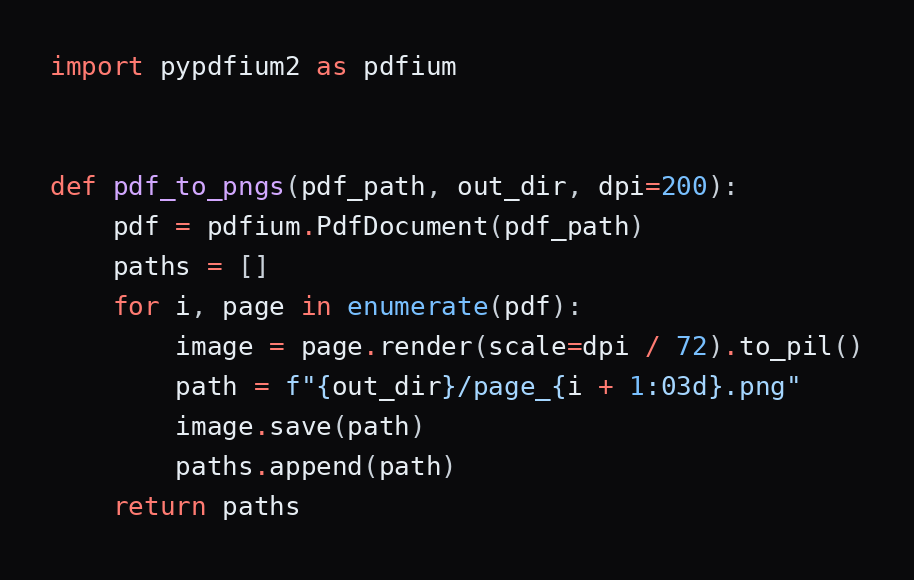
The code in this guide uses pypdfium2, openai, pydantic, pytesseract, and pillow, all installable with pip, plus the Tesseract engine itself, which is a separate system install. The snippets were run with these libraries, with the model call tested against a mock server.
Most LLM OCR pipelines start by rendering each PDF page to an image. Rendering resolution matters, since small print becomes unreadable at low DPI, while very large images raise cost and latency. About 200 DPI is a reasonable starting point to tune.
Working Code: Transcribing a Page With a Vision-Language Model
The snippet below calls any OpenAI-compatible endpoint, such as a local vLLM server hosting an OCR model. It sends the page as a base64 image alongside a strict transcription prompt, with temperature at zero.
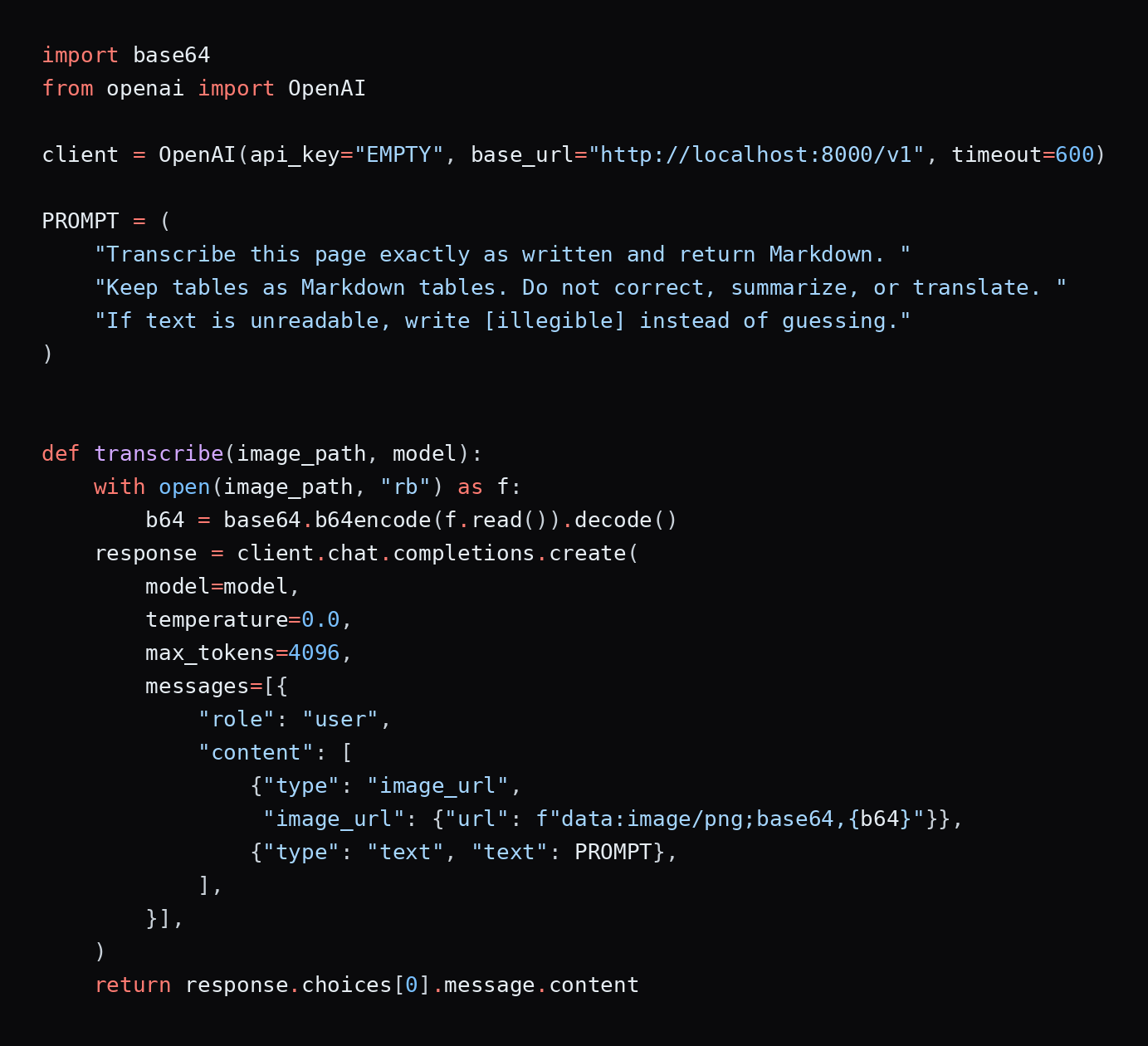
To serve an open model locally with vLLM, the PaddleOCR-VL recipe uses vllm serve PaddlePaddle/PaddleOCR-VL with flags that include --trust-remote-code, and recommends separate virtual environments for vLLM and PaddlePaddle to avoid dependency conflicts. Swap in the prompt the model expects.
Extracting Structured Data From Unstructured Documents
Transcription gives you text. Most applications need fields. You can ask the model for JSON directly, then validate it. This is the pattern behind most "extract structured data from unstructured documents" workflows, and it pairs naturally with the scaling concerns in DeepRead's guide to scaling unstructured document processing.
Define the schema first, so that malformed or incomplete output fails loudly.
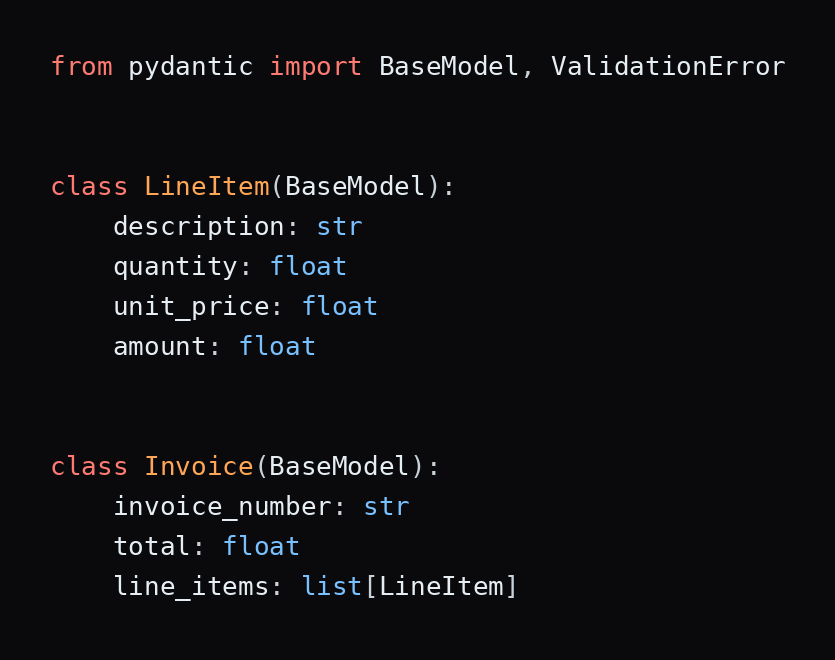
Then add the prompt, a parser that routes invalid output to review, and arithmetic checks. Arithmetic checks matter because they catch errors that look fine to a human reader. If line totals do not equal quantity times price, or the lines do not sum to the total, something was misread.
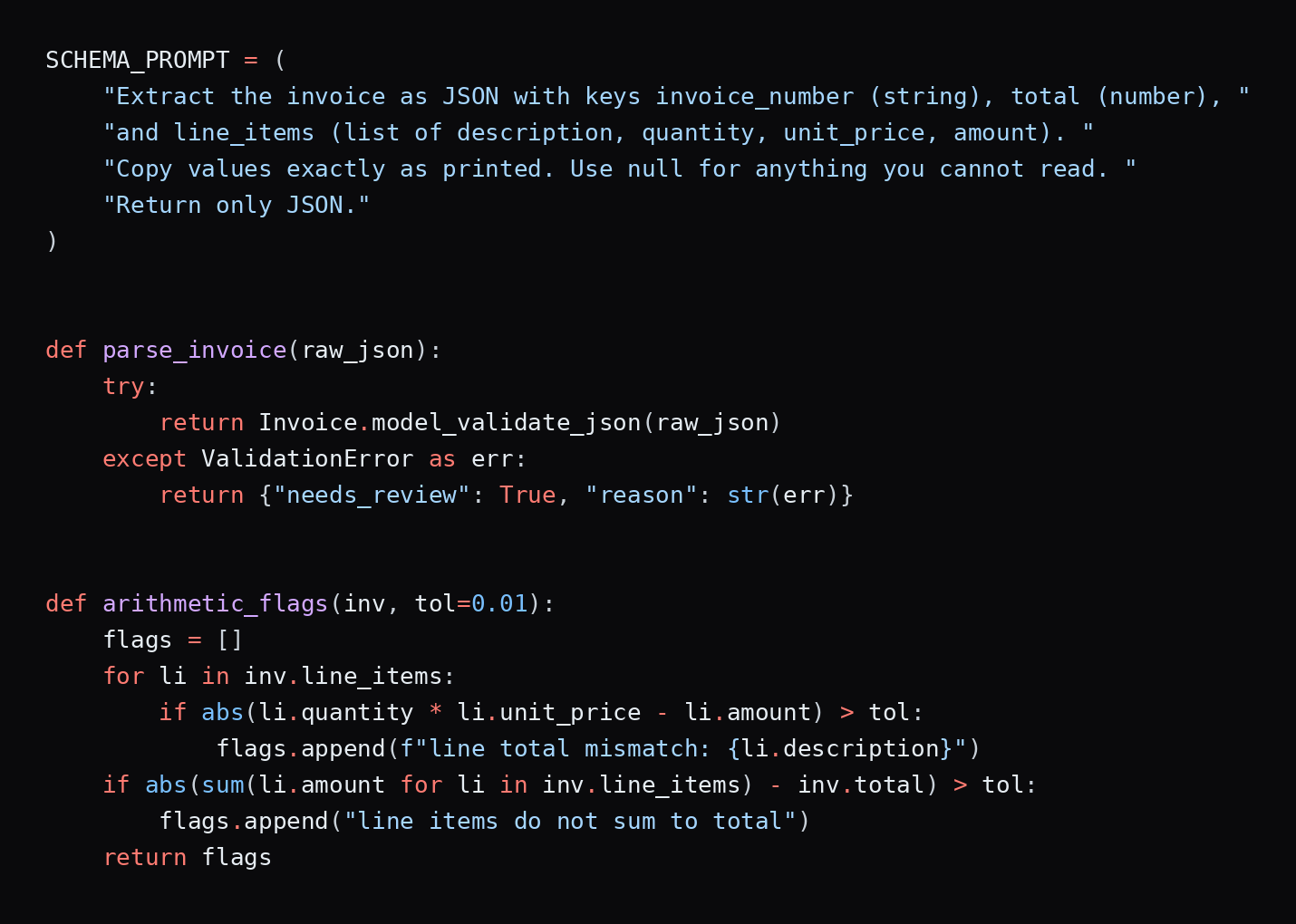
The sample checks pass on a correct invoice and flag one where the total was misread as 287.00 instead of 257.00. Note that the prompt tells the model to return null for anything unreadable, so a missing total fails validation and goes to review instead of being invented.
Failure Modes You Need to Design For
LLM OCR fails differently from classic OCR. Classic engines tend to produce garbled characters that look wrong. LLMs produce fluent output that looks right.
- Silent substitution. A model replaces an unusual value with a more common one. LlamaIndex lists dates drifting to dominant formats and account numbers drifting toward familiar patterns, and says high-entropy fields such as totals, account numbers, and medical codes are most at risk.
- Hallucination on degraded text. A 2025 paper on OCR hallucination in multimodal models found that models such as Qwen2.5-VL and GPT-4o can invent values that the image does not support when text is blurred, occluded, or low in contrast, because they fall back on language priors and often fail to signal uncertainty.
- Omission. A long table returns well formed but shorter than the source, with no marker for the missing rows.
- Repetition loops. Dense or repetitive content can trap a decoder in a repeating cycle.
- Non-determinism. The same page and prompt can produce different transcriptions, even at temperature zero.
- Prompt injection. Text inside a document can be read as an instruction. Treat extracted text as data, never as commands.
- Misleading confidence. Token probabilities reflect how likely the language is, not whether the pixels matched.
Some of the sharper examples, such as decimal shifts and lost currency symbols, come from vendors who sell competing products, so treat their anecdotes as hints about what to test rather than as measured rates.
Verification Patterns That Work
Because errors are silent, the surrounding system carries most of the reliability. These patterns work well together.
Cross-Check Against a Second Reader
Run a traditional OCR pass alongside the LLM and compare. Any number the LLM returned that the classic engine never saw is suspect. The snippet below uses Tesseract through pytesseract and flags unsupported numbers. In a test on a synthetic invoice, it returned nothing for a faithful transcription and flagged both a changed invoice number and a changed total in a corrupted one.
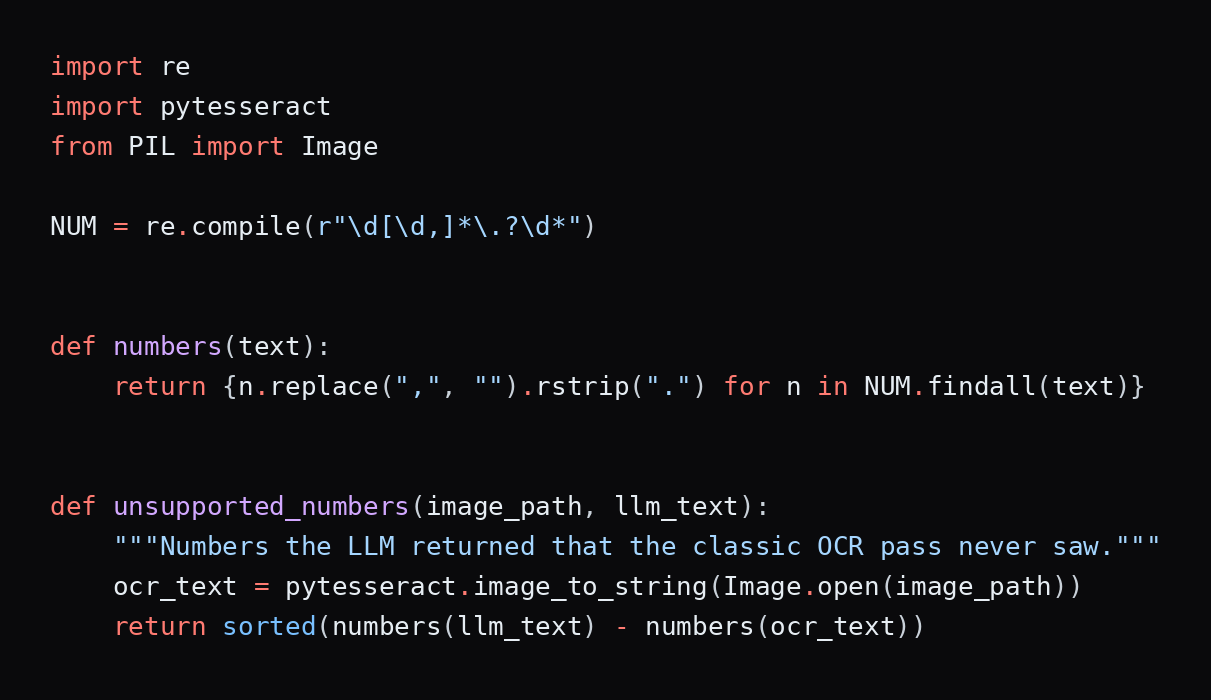
This check is deliberately simple. It will miss errors where both readers agree on a wrong value, and it may flag numbers formatted differently by the two systems, so normalize formats before comparing in production.
Validate Against Business Rules
Check arithmetic, date ranges, tax rates, required fields, and known identifiers. Rules catch plausible-looking nonsense that no OCR confidence score would.
Require Provenance
Prefer output that shows where each value came from, such as page, bounding box, and source text. A reviewer can then confirm a value in seconds and you can audit it later.
Route the Uncertain to People
Define what triggers review: failed validation, disagreement between readers, a missing value, or an [illegible] marker. Then measure how many documents reach a reviewer, which is often a better operational metric than raw accuracy. DeepRead's guide to metrics to measure the ROI of document workflow automation covers which numbers to track.
Sample and Re-Test
Audit a random sample of passed documents each week, and rerun a fixed test set whenever you change models or prompts. Non-determinism and silent model updates make this essential.
LLM OCR Benchmarks: What They Measure and What They Miss
Benchmarks are useful for narrowing candidates and misleading for final decisions. These are the ones you will see most often.
- OmniDocBench (CVPR 2025) evaluates PDF parsing end to end and by task across text, layout, tables, and formulas. The original paper describes 981 pages across nine document types, including academic papers, books, newspapers, handwritten notes, slides, and financial reports. LlamaIndex notes that top models now sit above 94% on it, that it no longer separates the leaders, and that only a small share of its pages are enterprise content.
- OCRBench v2 (NeurIPS 2025) covers 10,000 human-verified question-answer pairs plus a private test set of 1,500 images across 31 scenarios, with harder tasks such as text localization, handwriting, and reasoning. Its authors reported that most large multimodal models they tested scored below 50 out of 100, and attributed this to five weaknesses: uncommon text, fine-grained perception, layout perception, complex element parsing, and logical reasoning.
- olmOCR-Bench uses 7,010 unit tests across 1,402 PDFs and reports a pass rate. The olmOCR project reports 82.4 for its v0.4.0 model and lists other systems scoring higher, and the third-party aggregator Codesota lists infinity-parser2-pro at 87.6% overall as of its May 2026 update. Treat leaderboard positions as moving.
- KIE-HVQA targets OCR hallucination on degraded documents such as ID cards, invoices, and prescriptions, and measures whether a model can tell reliable evidence from unreliable evidence and decline to answer. In the paper that introduced it, a 7B model trained for this reported about a 28% absolute gain over GPT-4o in hallucination-free accuracy.
Four cautions apply to all of them.
- Page-level scores hide field-level failures. Character or edit-distance scores average errors across a page, so a wrong total can disappear into a high score.
- Public benchmarks skew academic. Many of them are papers, books, and slides, not your invoices, claims, or forms.
- Vendors build some benchmarks. LlamaIndex's ParseBench and several vendor comparisons come from companies that sell competing products.
- Leaders change quickly. A ranking from last quarter may not hold.
What an Independent Test of General-Purpose Models Found
AIMultiple tested 300 documents, 100 each of printed text, printed media, and handwriting, against human-written ground truth. It compared API services including Claude Sonnet 4.5, GPT-5, Gemini 2.5 Pro, Amazon Textract, Google Cloud Vision, Azure Document Intelligence, and Mistral OCR 3, plus locally run models including olmOCR-2-7B, PaddleOCR-VL, and DeepSeek-OCR.
- Printed text: Azure Document Intelligence scored 96%, and GPT-5, Gemini 2.5 Pro, Gemini 3 Pro Preview, Google Cloud Vision, and Textract each scored 95%.
- Printed media: the top scores were 85%, shared by Gemini 2.5 Pro, Google Cloud Vision, and Claude Sonnet 4.5, with GPT-5 at 77%.
- Handwriting: GPT-5 led at 95%.
The takeaway is that the gap between frontier LLMs and dedicated OCR services is small on clean printed text and larger on handwriting and messy pages. The test has limits that matter. It scored text similarity with a sentence-embedding model rather than field-level accuracy; it covered English only; it did not test key-value pairing or tables; and each category had just 100 documents. The data also dates from late 2025, so the model lineup has already moved on. Use it to shortlist, not to decide.
Build your own small benchmark: 100 to 200 real documents including the worst ones, field-level ground truth, and separate scoring for tables and line items. Report wrong, missing, and flagged values separately.
LLM OCR on GitHub: Open-Source and Hosted Options Compared
Search results for "llm ocr github" mix model repositories, pipelines, and toolkits. The entries below span classic OCR, document pipelines, open models, and a hosted API and managed service. Licenses and prices were checked on the vendor or project pages where accessible and should be confirmed before you adopt anything.
DeepRead
- What it automates: A managed extraction API built around the verification ideas in this guide. Extract returns the page as Markdown with layout blocks and bounding boxes, and your requested fields as JSON when you provide a schema. Deep Extract targets the pages that trip up single-pass readers, such as scans, photos, and handwriting, by running two OCR engines, adjudicating where they disagree, and verifying every value in a separate pass.
- Pricing: $15 per 1,000 pages for Extract and $35 per 1,000 pages for Deep Extract, selected per request. The Free plan gives 2,000 pages a month with no card, Standard has no monthly cap, and Enterprise is custom. Credits are reserved at job start and charged on completion, so a failed job costs nothing, and up to $1,000 in migration credits is offered for switching from another processor.
- Limits: Free allows 50 pages per document, 15 MB per file, and 10 requests per minute. Standard allows 1,000 pages, 50 MB, and 100 requests a minute. Enterprise goes to 2,000 pages and 500 MB and adds retention controls, PII redaction, bring-your-own model keys, EU and AU data residency, and SSO. Processing and storage default to US East, Free and Standard retain documents for up to three years by default, and there is no self-hosted option and no BAA on any plan.
- Best for: Teams that want the cross-check and review pattern handled for them. Each field returns with its page, bounding box, and source text, and uncertain values arrive flagged with a reason.
- Pros: Field-level citations, review flags with reasons and a review UI on every plan, a verification pass built into Deep Extract, and published per-page pricing.
- Cons: It cannot be self-hosted, it is not a fit where a BAA is required, and it stops at extraction, so approvals and downstream steps are yours.
What DeepRead's benchmark does and does not show. In October 2026, DeepRead published a field-extraction benchmark across 2,614 pages per system, drawn from DocILE (500 documents), Charity (40), and LongExtract (20). Deep Extract averaged 92.0% and Extract 91.1%, against 89.9% for Extend Operator, 87.3% for Reducto Deep Extract, 79.8% for Extend Performance, 79.1% for LandingAI ADE, and 70.5% for Reducto Extract.
On LongExtract, Extend Operator led with 99.6 against 97.8 for Deep Extract. Read it as a signal about field extraction on business documents, not as proof for your workload. DeepRead ran the test itself; its scoring accepts an exact match, a match after normalization, or a reviewer model judging a difference immaterial, and the data contains no identity, insurance, or logistics documents. It is also a different kind of benchmark from the page-level ones above, since it scores fields and not full-page transcription.
Tesseract
- What it automates: Classic OCR that reads text from images and runs on your own hardware. It is the usual first-pass reader in LLM-aided pipelines.
- Pricing: Free and open source, with no per-page fees. You pay for compute.
- Limits: It returns text and positions but does not decide which text is an invoice total or reconstruct tables as rows, and accuracy depends heavily on image quality. Confirm current capabilities in the project's documentation before relying on this summary.
- Best for: A cheap, deterministic baseline and a second reader for cross-checking LLM output.
- Pros: Fast, runs on a CPU, deterministic, and keeps documents on your machine.
- Cons: Layout, tables, and field extraction are your responsibility, and messy scans need preprocessing.
Docling
- What it automates: Document parsing into a unified representation, covering layout, reading order, tables, code, and formulas across PDF, DOCX, PPTX, XLSX, HTML, images, and more, with export to Markdown, HTML, and lossless JSON.
- Pricing: MIT licensed and free, though individual models may carry their own licenses.
- Limits: It requires Python 3.10 or later, and OCR for scans relies on a backend you choose, such as EasyOCR, RapidOCR, or Tesseract. Its optional VLM pipeline supports models such as GraniteDocling.
- Best for: Local, air-gapped pipelines that need structured parsing before an LLM step.
- Pros: Broad format support, framework integrations including LangChain and LlamaIndex, an API server, and local execution for sensitive data.
- Cons: Output quality depends on which OCR or VLM pipeline you enable, and you build your own validation.
marker
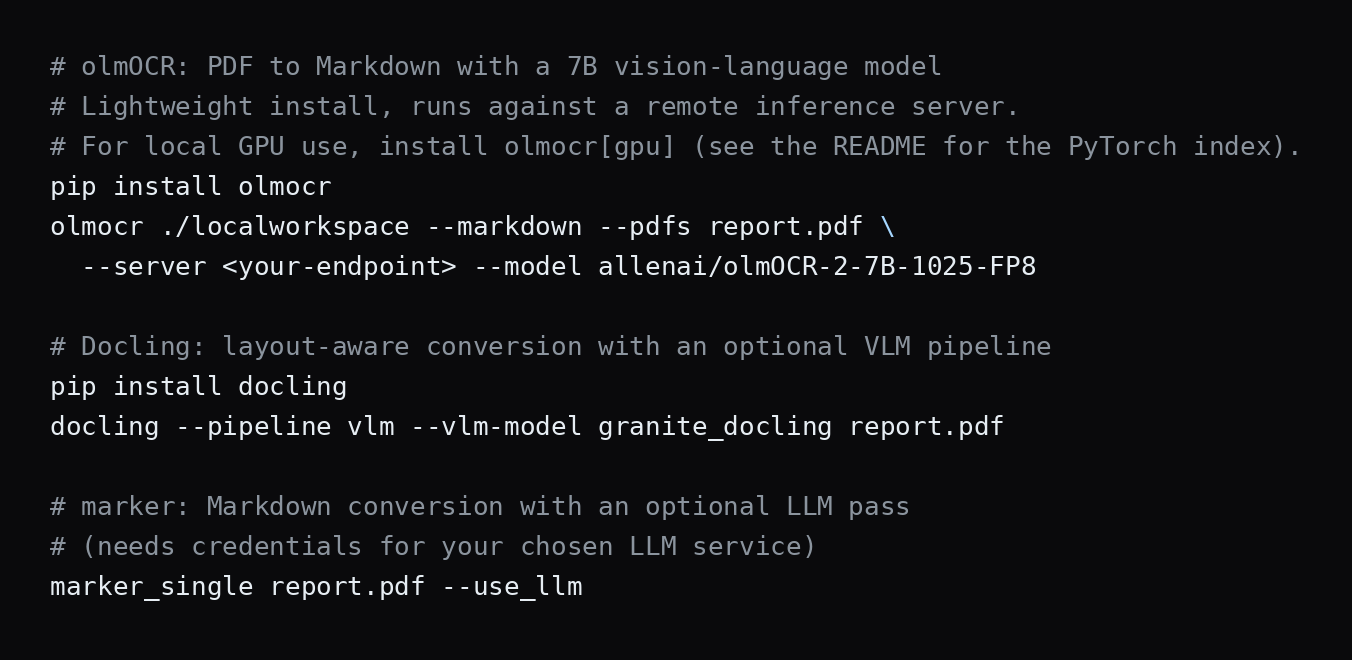
- What it automates: Conversion of PDFs, images, and office files to Markdown, JSON, or HTML, with an optional --use_llm mode that calls a hosted or local LLM for harder cases such as merging tables across pages and extracting form values.
- Pricing: The code is Apache 2.0, but the model weights use a modified Open RAIL-M license that is free for research, personal use, and startups under $5 million in funding or revenue. Larger commercial use needs a paid plan from Datalab.
- Limits: Hybrid mode needs credentials for a supported service such as Gemini, Claude, an OpenAI-compatible endpoint, or Ollama. The maintainers' benchmark figures, such as 76.0% overall for balanced mode on olmocr-bench, are self-reported, and throughput was measured on a single NVIDIA B200.
- Best for: Teams that want a ready-made PDF-to-Markdown tool with an optional LLM correction pass.
- Pros: Several output formats, a flexible LLM backend, and a fast mode for CPU-only use.
- Cons: The weight license restricts larger commercial use, and the LLM mode brings the failure modes covered above.
olmOCR
- What it automates: PDF and image to clean text or Markdown using a 7B vision-language model from the Allen Institute for AI, including tables, equations, and handwriting, with headers and footers removed.
- Pricing: Apache 2.0 and free. The project says conversion costs under $200 per million pages, and local use needs a recent NVIDIA GPU with at least 12 GB of VRAM and about 30 GB of free disk space.
- Limits: Its own benchmark places v0.4.0 at 82.4, below some other listed systems, so it is not top-ranked. Remote inference removes the GPU requirement but adds a provider cost.
- Best for: Teams that want an open VLM for large-scale PDF conversion on their own GPUs.
- Pros: Open weights, a simple CLI, and a published cost estimate.
- Cons: It is a transcription tool, so schema extraction, validation, and review are yours to build, and GPU operations take effort.
DeepSeek-OCR
- What it automates: Page reading through optical compression, where a vision encoder of roughly 380 million parameters shrinks the page into few vision tokens and a 3B mixture-of-experts decoder, with about 570 million parameters active per step, writes the text.
- Pricing: Open model, so cost is your GPU time. The paper claims over 200,000 pages a day on a single A100-40G for generating training data. Check the repository for the license.
- Limits: The paper reports about 97% precision at roughly 10 times compression and about 60% at roughly 20 times, and notes that precision falls on longer documents.
- Best for: High-volume text conversion where token efficiency matters and a GPU is available.
- Pros: Very low vision-token counts, with the paper reporting better OmniDocBench results than GOT-OCR2.0 at 100 tokens against 256.
- Cons: Research-oriented, so expect more integration work, and the compression trade-off needs testing on your own pages.
PaddleOCR-VL
- What it automates: Document parsing with a compact 0.9B model that pairs a dynamic-resolution visual encoder with the ERNIE-4.5-0.3B language model, using task prompts for text, tables, formulas, and charts.
- Pricing: Open model, so cost is your compute. Check the model card for the license.
- Limits: The vLLM guide asks for a recent or nightly vLLM, disables prefix caching, and recommends separate environments for vLLM and PaddlePaddle. The offline pipeline adds a separate layout model.
- Best for: Teams that want a small, fast document model they can serve through an OpenAI-compatible API.
- Pros: Small footprint, fixed task prompts for predictable behavior, and vLLM serving.
- Cons: Dependency management is fiddly, and it covers parsing rather than business validation.
Mistral OCR
- What it automates: A hosted OCR API that returns text, paragraph-level bounding boxes, labeled structural blocks, and a confidence score for each block, with structured annotations and a batch endpoint.
- Pricing: Mistral lists OCR 4.1 at $4 per 1,000 pages, or $5 per 1,000 annotated pages, and OCR 3 at $2 per 1,000 pages.
- Limits: The pages reviewed did not state file size, page limits, or data retention, so confirm those in the OCR overview and legal pages. It is a hosted API, so documents leave your environment unless you arrange another deployment with the vendor.
- Best for: Developers who want a low-cost hosted reader with layout and block-level confidence.
- Pros: Published per-page pricing, bounding boxes, and confidence per block.
- Cons: Field extraction, validation, and review remain your work, and the pages reviewed did not describe a self-hosted option.
Cost and Latency
The cost of LLM OCR depends on image size, page density, and the model, so compare published per-page prices and measure your own.
- Classic OCR APIs: AWS lists text detection at $0.0015 per page and table analysis at $0.015, and Google lists Enterprise Document OCR at $1.50 per 1,000 pages after a free first 1,000.
- Document-specific hosted models: Mistral lists OCR 4.1 at $4 per 1,000 pages, or $0.004 per page.
- Self-hosted open models: the olmOCR project says conversion costs under $200 per million pages, which is under $0.0002 per page, on suitable GPUs.
- General-purpose LLM APIs: pricing is usually per token, and dense, high-resolution pages cost the most. Check the provider's current rate card and run a sample to find your cost per page.
Latency differs too. LlamaIndex notes that LLM OCR runs in seconds rather than milliseconds per page, which is fine for batch work and matters for interactive uses. Classic engines on a CPU are much faster. Also count review time, because a cheaper reader that sends more pages to people can cost more overall.
Data Privacy and Compliance
Sending documents to a hosted model means sending them to a third party. Before you do, confirm where documents are processed, how long they are retained, whether they are used for training, and whether you need a business associate agreement or regional residency. Self-hosted models and local toolkits such as Docling keep everything in your environment, at the cost of running the infrastructure. Hosted services differ widely on these terms, so get answers in writing.
Choosing Self-Hosted, API, or Managed
- Self-hosted open models (olmOCR, DeepSeek-OCR, PaddleOCR-VL) give control and low marginal cost. You take on GPU operations, scaling, monitoring, and everything after transcription.
- Hosted OCR APIs (such as Mistral OCR) reduce operations and charge per page. Documents leave your environment, and extraction and validation remain yours.
- Managed extraction services (such as DeepRead) return structured fields with flags and citations, so the checks above are built in, at the price of less control and vendor limits.
- Toolkits (Docling, marker) sit in between, giving you a local pipeline with optional model steps.
Compare total cost, not per-page price: usage fees, GPU or API cost, review time, and engineering effort. If extraction is one step in a larger flow, DeepRead's overview of intelligent document workflow automation shows how to connect it.
PDF-Specific Considerations
PDF OCR with an LLM has its own details.
- Check for a text layer first. Born-digital PDFs already contain text. Extracting it directly is faster, cheaper, and exact. Marker's documentation reports a large drop in overall score with OCR disabled, which shows how much of a typical benchmark set needs OCR.
- Render at a sensible resolution. Too low loses small print. Too high raises cost and latency.
- Know how your provider handles PDFs. Several hosted APIs accept PDFs directly and convert pages internally, so check each provider's documentation for page limits, how pages are processed, and token cost before choosing between sending a PDF and sending page images.
- Process page by page, then reassemble. Long documents exceed context and quality limits, and one bad page should not sink the whole file.
- Handle tables that span pages. Single-page reading cuts them in two. Reconcile headers and merge rows after extraction, or use a tool with a merge step.
- Mind page and size limits. Services differ widely, so check the limits for your longest files.
- Keep the original. Store the source PDF and page images next to the output so any value can be traced.
How to Run an LLM OCR Pilot
- Pick one document type that causes real manual work.
- Collect 100 to 200 real documents, including scans, photos, and awkward layouts.
- Write field-level ground truth once, with a second person checking.
- Run a classic OCR baseline and one or two LLM approaches on the same set.
- Score fields and tables separately, counting wrong, missing, and flagged values.
- Add the cross-check and validation steps and measure what they catch.
- Measure review load and cost per page, including GPU or API fees and review time.
- Rerun after a week to check consistency, then set pass thresholds before you decide.
Conclusion
LLMs have made OCR more capable on difficult documents and easier to build, and they have also made errors harder to see. The reliable way to use them is as one reader among several: transcribe with a model, cross-check against an independent reader, validate against rules, keep provenance, and send the uncertain to people. Choose the architecture by document type and cost of error, test on your own pages, and rerun the test whenever the model changes.
Frequently Asked Questions
Can an LLM replace OCR?
For many hard documents, it can do the reading, but it should not be trusted alone for high-stakes values. Pair it with an independent check, validation rules, and review for uncertain fields.
What is the difference between OCR and an LLM for text extraction?
Traditional OCR converts pixels to characters, usually with per-character confidence. An LLM reads the page as an image and writes out text or structured data, which lets it understand layout and context, but it can generate plausible values that are not on the page.
What is LLM-aided OCR?
It is a pipeline where a traditional OCR engine reads the page first and an LLM then corrects errors, restores structure, or extracts fields from the text.
Which LLM is best for OCR?
It depends on your documents. Specialized models such as olmOCR, DeepSeek-OCR, and PaddleOCR-VL are built for document parsing, and general multimodal models also work. Rankings on benchmarks change often, so test candidates on your own sample.
What is the best prompt for LLM OCR?
Ask the model to transcribe exactly as written, forbid correction and translation, require a fixed output format, and tell it to write [illegible] when text cannot be read. Use temperature 0, and use the model's own task prompt if it defines one.
How accurate is LLM OCR?
It varies by model and document. Public benchmarks such as OmniDocBench show strong results for top models, but page-level scores can hide wrong values in key fields, so measure field-level accuracy on your own documents.
Do LLMs hallucinate when doing OCR?
Yes. Research on OCR hallucination found that models can invent values for degraded text instead of flagging uncertainty, and practitioners report silent substitution of unusual values with common ones.
Is LLM OCR more expensive than traditional OCR?
Usually per page, yes, though prices vary widely. Mistral lists $4 per 1,000 pages for OCR 4.1, olmOCR's project claims under $200 per million pages on your own GPUs, and classic engines such as Tesseract cost only compute. Include review and engineering time in the comparison.
More articles
AI Automation for Contracts and Compliance Documents: How It Works, Platforms Compared, and How to Choose (2026)
How AI automates contract extraction, search, review, and compliance tracking, with 9 platforms compared on pricing and limits and a pilot plan to test them.
Invoice Digitization: How to Digitize Invoices, Tools Compared, and What to Check (2026)
Learn how invoice digitization works, from scanning and OCR to validation and archiving, with 9 tools compared on published pricing, limits, and best use.