%20{%20:root%20{%20--deepread-stroke:%20%23E5E7EB;%20}%20}%20.dark%20{%20--deepread-stroke:%20%23E5E7EB;%20}%20%3c/style%3e%3crect%20x='40'%20y='30'%20width='220'%20height='260'%20rx='28'%20ry='28'%20stroke='var(--deepread-stroke)'%20stroke-width='16'%20fill='none'/%3e%3cpath%20d='M180%2030v52c0%2010%208%2018%2018%2018h62'%20stroke='var(--deepread-stroke)'%20stroke-width='16'%20fill='none'/%3e%3cline%20x1='70'%20y1='130'%20x2='200'%20y2='130'%20stroke='var(--deepread-stroke)'%20stroke-width='16'%20stroke-linecap='round'/%3e%3cline%20x1='70'%20y1='165'%20x2='200'%20y2='165'%20stroke='var(--deepread-stroke)'%20stroke-width='16'%20stroke-linecap='round'/%3e%3cline%20x1='70'%20y1='200'%20x2='170'%20y2='200'%20stroke='var(--deepread-stroke)'%20stroke-width='16'%20stroke-linecap='round'/%3e%3c!--%20green%20download%20arrow%20in%20bottom%20right%20corner%20--%3e%3cpath%20d='M210%20202v58'%20stroke='var(--deepread-accent)'%20stroke-width='18'%20stroke-linecap='round'/%3e%3cpath%20d='M195%20245l15%2015%2015-15'%20fill='none'%20stroke='var(--deepread-accent)'%20stroke-width='18'%20stroke-linecap='round'%20stroke-linejoin='round'/%3e%3c/svg%3e)
Document Processing Automation Examples: How RPA and AI Work Together
See common document processing automation examples that pair RPA with AI, plus how to prioritize projects, tackle government and education, and measure ROI.
Most teams that start with document automation begin with a bot. A robot logs in, opens an email, downloads an attachment, and types values into a form. That works until the attachment is a scanned PDF, a photo, or a layout the bot has never seen. At that point, the bot needs something that can read, and that is where AI enters.
This guide is a set of examples, not a product comparison. It shows what each technology does in common document workflows, how to pick the right project first, and how to measure whether it paid off. It is written for operations leads, finance teams, and developers in the US and North America. The mission of automated document processing, stated simply, is to turn documents people have to read into data systems can act on, while keeping a person in the loop for the cases a machine should not decide alone.
What RPA and AI Each Do in Document Processing
What RPA Contributes
Robotic process automation follows rules. It clicks, copies, pastes, logs in, and moves structured data between applications. It suits repetitive, rule-based work and has little tolerance for variation, which is why it struggles when the input is an unstructured PDF, email, or image. Typical RPA jobs in a document flow include watching a mailbox, saving attachments, updating a record, and filling in a form. For that last job, this guide to automating PDF form filling compares tools and explains common fixes such as fields that appear blank.
What AI and Intelligent Document Processing Contribute
Intelligent document processing, often shortened to IDP, uses OCR and machine learning to read a document, decide what type it is, extract the fields and tables, and check them against rules. Vendor guides describe it as sorting each file, extracting data, cross-checking it and sending only the exceptions to a person. AI is the part that copes with layouts that vary from one sender to the next.
The Handoff Between Them
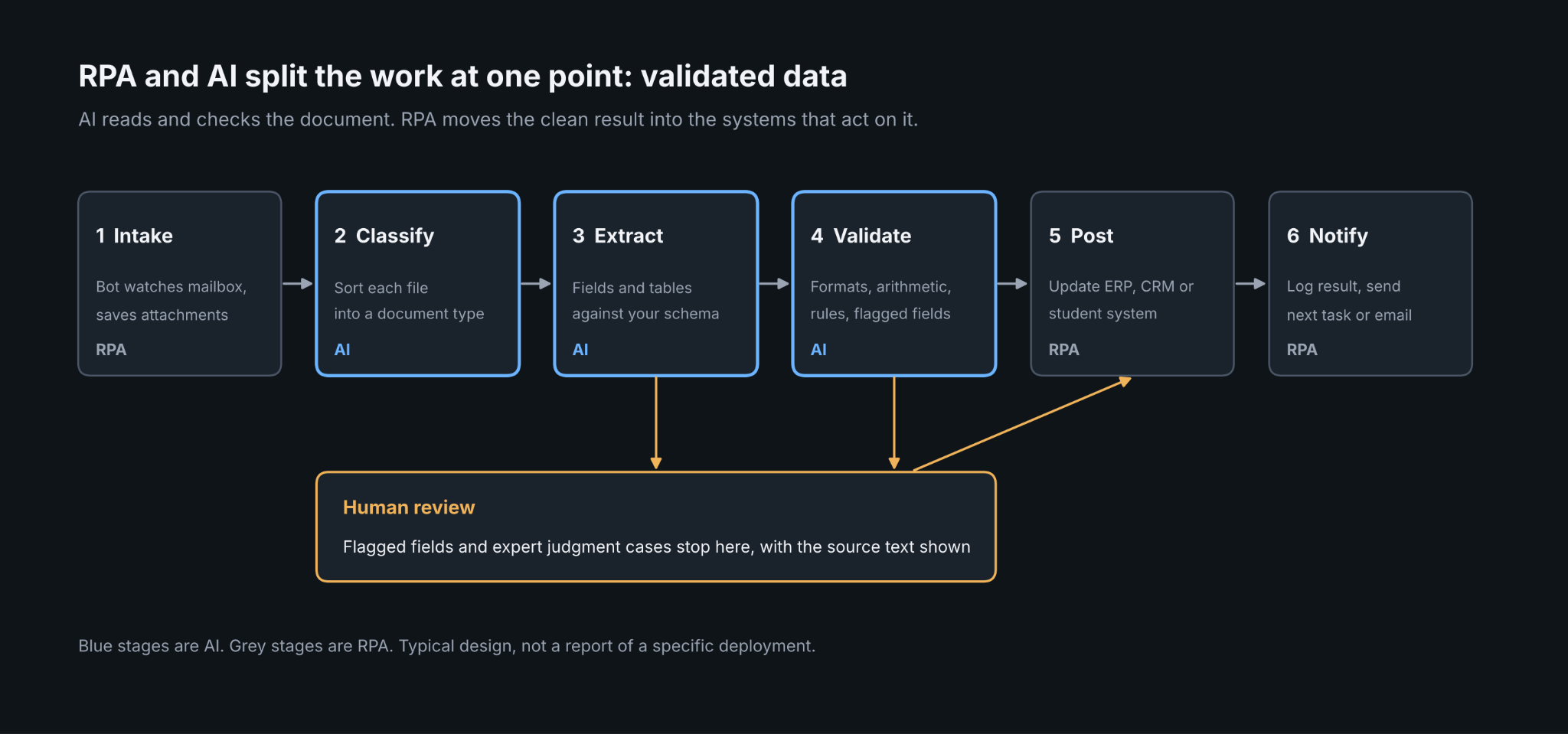
The two fit together at one point: validated, structured data. IBM describes IDP output as structured data that has already been validated and can feed transactions, which lets an RPA bot scale across an organization. In practice, the AI step produces fields and flags the uncertain ones, and the bot posts the clean records and routes the flagged ones to a reviewer. Misrouting and misfiling are errors too, not only typos, and this piece on how AI reduces document handling errors covers content-based classification, rule-driven routing, and sending uncertain cases to a person.
Common Document Processing Automation Examples
The RPA and AI splits below are typical designs for each workflow, not reports of specific deployments.
Accounts Payable and Invoices
Invoices are the most cited example. The AI step captures supplier, dates, totals, and line items. The RPA step matches the invoice to a purchase order, routes it for approval, and posts it to the ERP. Exceptions such as a missing PO or a mismatched total go to AP staff.
Lending, Banking and Onboarding
Lenders process bank statements, payslips, and tax forms, and onboarding teams process IDs and proof of address. The AI step extracts and checks fields such as income and account holder name. The RPA step updates the loan origination or customer system and triggers the next task, such as ordering a credit check.
Insurance Claims and Intake
Claim files mix forms, photos, reports, and correspondence. AI classifies the pieces and pulls out claim and policy details. RPA creates the claim record, checks policy status in the core system, and assigns the file. Complex or disputed claims stay with an adjuster.
Healthcare Records and Prior Authorization
Healthcare paperwork arrives as faxes, scans, and claims. Note that "documentation automation" in healthcare covers two different technologies, as this guide to ambient scribes versus document processing explains: tools that draft notes during visits, and tools that extract data from existing records. Document extraction suits the second, with RPA entering the data into the record system and checking eligibility.
Logistics and Freight Paperwork
Bills of lading, proof of delivery notes, customs declarations, and carrier invoices are classic high-volume documents. AI reads carrier paperwork that differs by sender. RPA updates the transport system and matches freight invoices to loads. For brokers deciding between a full transportation management system and standalone OCR, this overview of freight broker software with OCR automation advises testing any tool on your own carrier paperwork first.
Legal and Contract Work
Contracts and intake forms are a growing example. AI extracts parties, dates, and clauses, and RPA files the result in the contract management system and starts the review workflow. Legal tools span drafting, contract lifecycle management, review, and intake extraction, as laid out in this guide to AI-powered legal document automation. Judgment calls on risk stay with lawyers.
HR and Employee Onboarding
Resumes, ID documents, tax forms, and payslips flow through HR. AI extracts the fields, and RPA creates the employee record and sends the checklist. Employee data is sensitive, so access controls and retention rules matter as much as accuracy.
How to Automate Unstructured Document Processing
Unstructured documents have no fixed layout: emails, scanned letters, free-form reports, photographs. A workable sequence looks like this:
- Ingest from one place. Route email, uploads, and scans to a single intake so nothing bypasses the workflow.
- Clean and classify. Straighten and de-noise images, then sort each file into a document type.
- Extract against a defined schema. Decide the fields you need and their types before choosing a tool.
- Validate. Check formats, arithmetic, and values against your own records.
- Route exceptions to a person. Show the reviewer the source text and where it sits on the page.
- Hand clean data to the bot or API. Post records to the downstream system and log what happened.
- Feed corrections back. Use reviewer fixes to improve rules and models.
Start with one document type and one downstream system, and expand once exceptions are understood.
Which Sectors Use RPA and Document Automation Most
Banking, financial services, and insurance lead most published breakdowns of RPA spending. Grand View Research, as cited by an IT services firm, reports BFSI with a 28.89% revenue share, and Precedence Research, as relayed by a market statistics site, places it at 36.52% for 2025. Those are market research estimates for RPA revenue, not for document processing specifically, and the two sources differ by method.
Beyond financial services, aggregator reports list manufacturing and supply chain, healthcare, telecom, retail, and the public sector, with healthcare often called the fastest-growing segment. These come from commercial market research summaries rather than a primary survey, so treat the ordering as directional. In practice, adoption follows document volume: where there are many invoices, claims, applications, or forms, the case for automation is strongest.
Government: The Hardest Processes to Automate
Government work combines high document volume with constraints that make some processes hard to automate well:
- Unstructured inputs. Vendor white papers from Tungsten Automation and Hyperscience note that RPA alone cannot process the PDFs, emails, images, and hard-copy documents agencies receive, so it needs document intelligence alongside it.
- Expert judgment. FCW's 2019 coverage of a government roundtable raised the question of how to automate documents that need a subject-matter expert to match a workflow against federal regulations. Cases that depend on legal interpretation are poor candidates for full automation.
- Poor underlying data. An executive quoted in Nextgov's account of that roundtable described a spreadsheet-based process that looked straightforward until the team examined the data, and the answer was to automate what worked and have people fix what automation could not.
- Process choice. Participants stressed deciding what should not be automated, since not every process is a good fit.
In each case, a human review step before a consequential decision is the common safeguard.
Education: How to Automate Document Processing
Schools and universities process admissions forms, transcripts, financial aid paperwork, HR records and accreditation files. Transcripts are the standard example because formats differ by institution and country. A typical flow:
- Ingest transcripts from email, PDF, electronic exchange or scanned mail.
- Classify the document and the issuing institution.
- Extract courses, grades, and credits into a defined schema.
- Validate against rules such as minimum GPA or program requirements.
- Have a registrar or admissions reviewer confirm flagged fields.
- Use RPA to update the student information system and notify the applicant.
One vendor reports that admissions teams spend 20 minutes or more per transcript on manual entry, which is a vendor-reported figure and worth replacing with your own measurement. Student records are also covered by privacy rules such as FERPA, so access control and retention belong in the design from the start.
Best Practices for Prioritizing Document Automation Projects
Use the same short list of criteria to rank candidates:
- Volume. More documents mean more return from the same setup effort.
- Rule clarity. Processes with clear decision rules automate more cleanly than those that depend on judgment.
- Document variability. Many layouts raise extraction difficulty, so test on a real sample.
- Cost of errors. Documents tied to payments, compliance or benefits need stronger validation and review.
- Integration readiness. If the destination system has an API or a stable screen, a bot or integration is straightforward.
- Measurable baseline. Choose processes where you can count volume, time and errors today.
Then sequence work: pick one high-volume, rule-clear process first, prove the measurement, and move to harder ones such as free-form correspondence. Sub-processes are often better targets than whole end-to-end processes.
How to Measure ROI on AI Document Processing Automation
Start With a Baseline
You cannot measure ROI without a baseline. Before launch, record monthly document volume, minutes per document, error and rework rate, backlog age and fully loaded labor cost. Published ROI figures are mostly vendor-authored and often conflict, so use them as a sanity check and rely on your own before-and-after data.
Metrics to Track
- Cost per document, including labor, rework, software, and exception handling, not labor alone.
- Straight-through rate, the share of documents that need no human touch. It matters, but one vendor measurement guide argues it can mislead when read alone, so pair it with accuracy, cycle time, and risk measures.
- Cycle time from receipt to completed action.
- Error and exception rate.
- Throughput per person, which captures capacity gains.
A Simple Formula
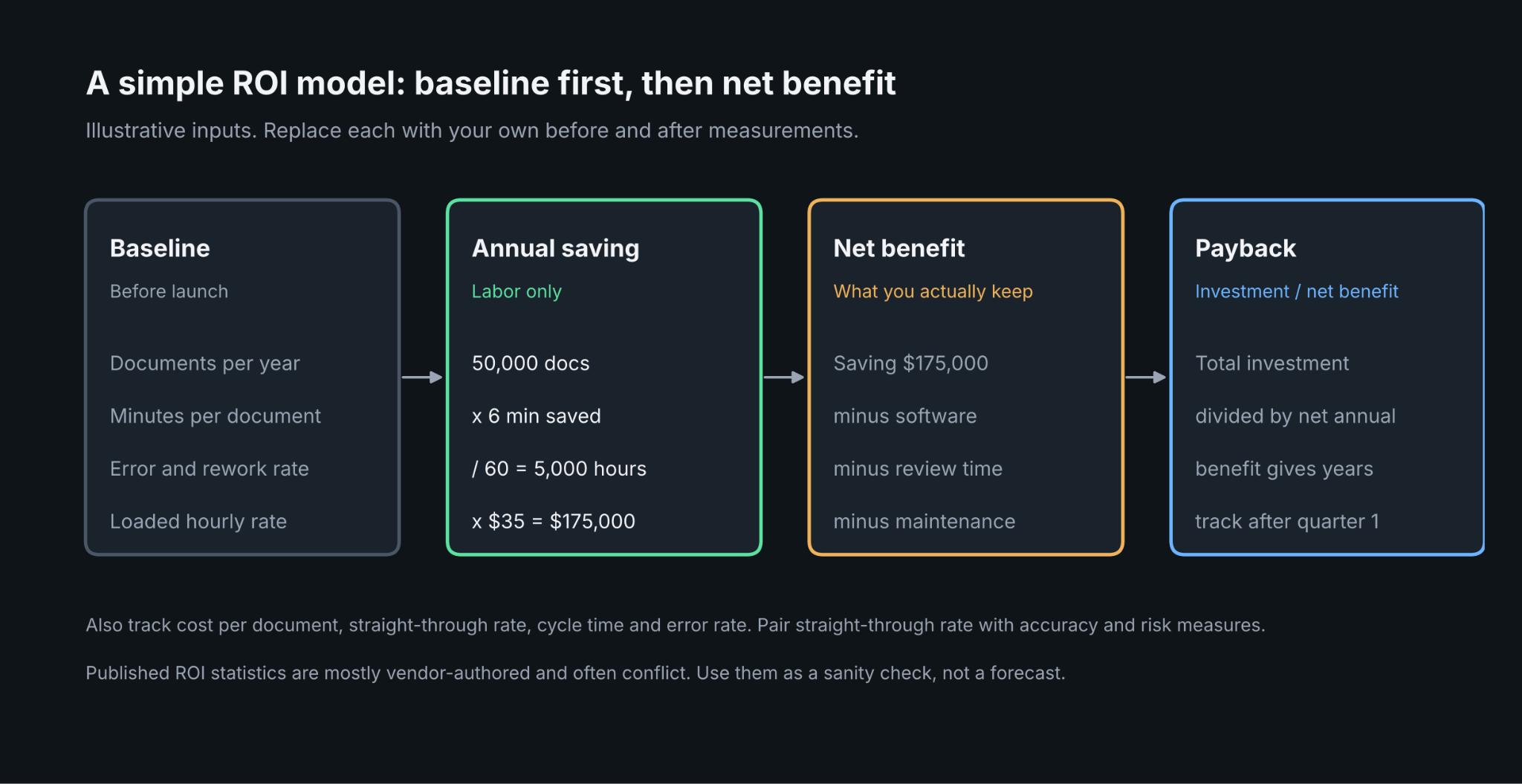
Annual labor savings equals documents per year, times minutes saved per document, divided by 60, times the loaded hourly rate. For example, 50,000 documents saving 6 minutes each at $35 an hour comes to 5,000 hours and $175,000 a year. Those inputs are illustrative. Subtract software, implementation, review time, and maintenance to get net return, and divide the total investment by the net annual benefit to estimate payback.
ROI of Automating AP Document Workflows
Accounts payable has the most published benchmarks. Ardent Partners' 2026 research, as summarized by sponsor Medius, reports an average cost of $9.90 per invoice against $2.67 for best-in-class teams, and exception rates of 19.9% and 11.8%. At 50,000 invoices a year, the $7.23 difference per invoice would be $361,500, which shows the size of the gap but not what your team will capture. Other sources report different Ardent and APQC figures, so compare against your own baseline.
Realistic Payback
Vendors publish short paybacks. One IDP vendor says payback typically lands in 12 to 18 months when straight-through rates reach 80% or more. A Deloitte 2025 AI survey, as relayed by a market statistics site, reports that, across AI projects in general and not document processing alone, most organizations saw satisfactory ROI on a typical use case within two to four years, and only 6% within a year. These figures differ in scope and are secondary or vendor-published, so plan for a range and revisit after the first quarter of real data.
Where an Extraction API Meets the Bot
When a team builds the reading step into its own workflow, the extraction layer needs to return data a bot or service can act on, and a clear signal for what a person should check. DeepRead is a developer-first OCR and document AI API built for that role. It is one component, not an RPA platform: your bot or integration still performs the downstream steps.
What matters for an RPA or workflow handoff:
- Each extracted field comes back with its page, a bounding box, and the source text, so a reviewer can verify a value against the original.
- Fields that need a person are marked needs_review with a review_reason, which gives a bot a clear branch to route to review. DeepRead does not return numeric confidence scores. A review interface for flagged fields is on every plan.
- A failed job costs nothing, and processing defaults to US East.
- Jobs are ID-based, so a bot submits a document and polls. Webhooks are available on Standard and Enterprise plans, and the Free plan refuses a webhook URL.
- Free includes 2,000 pages a month with no card. Standard is priced at $15 and $35 per 1,000 pages. Enterprise is custom and lists EU and AU data residency.
- A bot that is waiting on a result can use the deep extract fast pipeline instead, which costs $90 per 1,000 pages and returns in about half the time of standard deep extract.
- Free and Standard plans retain documents for up to three years. There is no self-hosted option and no BAA on any plan.
To test the fit, run your own documents through the free tier and see how flagged fields look in the review interface. Check here.
Conclusion
RPA and AI do different jobs, and document processing works best when each does its own. AI reads, classifies, and validates, and RPA or an integration moves the clean result into the systems that act on it. Start with a high-volume, rule-clear process such as invoices, build a baseline before you change anything, and keep a person in the loop for expert judgment cases, which is the hardest part of government and regulated work. Measure cost per document, straight-through rate, cycle time, and errors; treat published ROI statistics as a sanity check and plan for payback measured in months to years, depending on scope.
FAQ
What are common document processing automation examples with RPA and AI?
Invoice processing in accounts payable, bank statement and income document handling in lending, KYC onboarding, insurance claims intake, healthcare records and prior authorization, logistics paperwork, contract review and HR onboarding. In each, AI reads and validates the document, and RPA enters the result in the target system.
How do you automate unstructured document processing?
Ingest documents in one place, classify them, extract fields against a defined schema, validate the values, send uncertain fields to a reviewer, and hand clean data to the downstream system. Start with one document type and expand.
What is the difference between RPA and intelligent document processing?
RPA follows rules to move structured data and perform repetitive actions. IDP reads unstructured documents and extracts and validates their data. They are complementary, with IDP feeding validated data to RPA.
Which sectors use RPA and document automation the most?
Banking, financial services and insurance lead most RPA market breakdowns, with manufacturing, healthcare, telecom and retail following. The exact shares vary by source, so treat them as directional.
What are the hardest processes to automate in government?
Processes that depend on expert interpretation of regulations, inputs that are unstructured or paper-based, and workflows built on poor-quality data. Human review before consequential decisions is the common safeguard.
How do you automate document processing for education?
Automate intake, classification, extraction, and validation for admissions forms, transcripts, and financial aid documents; have staff review flagged fields and update the student information system with RPA. Build FERPA-aware access and retention controls into the design.
How do you measure ROI on AI document processing automation?
Record a baseline of volume, time per document, errors, and cost before launch. After launch, track cost per document, straight-through rate, cycle time, and error rate, then compare net benefit with total investment to estimate payback.
What should you automate first?
Pick a high-volume process with clear rules, a measurable baseline, and a stable downstream system. Invoices are a common first project. Leave judgment-heavy processes until the measurement is proven.
More articles

Unstructured.io Review: Features, Pricing, and Alternatives
Unstructured.io review: what the open-source library and hosted platform do, current pricing, tested Python code, limits, and four alternatives compared.

Resume OCR: Extracting Candidate Data from Resumes Automatically
How resume OCR reads PDFs and scans, fixes two-column order, and returns candidate fields. Tested Python code, a tool comparison, and US hiring rules.