%20{%20:root%20{%20--deepread-stroke:%20%23E5E7EB;%20}%20}%20.dark%20{%20--deepread-stroke:%20%23E5E7EB;%20}%20%3c/style%3e%3crect%20x='40'%20y='30'%20width='220'%20height='260'%20rx='28'%20ry='28'%20stroke='var(--deepread-stroke)'%20stroke-width='16'%20fill='none'/%3e%3cpath%20d='M180%2030v52c0%2010%208%2018%2018%2018h62'%20stroke='var(--deepread-stroke)'%20stroke-width='16'%20fill='none'/%3e%3cline%20x1='70'%20y1='130'%20x2='200'%20y2='130'%20stroke='var(--deepread-stroke)'%20stroke-width='16'%20stroke-linecap='round'/%3e%3cline%20x1='70'%20y1='165'%20x2='200'%20y2='165'%20stroke='var(--deepread-stroke)'%20stroke-width='16'%20stroke-linecap='round'/%3e%3cline%20x1='70'%20y1='200'%20x2='170'%20y2='200'%20stroke='var(--deepread-stroke)'%20stroke-width='16'%20stroke-linecap='round'/%3e%3c!--%20green%20download%20arrow%20in%20bottom%20right%20corner%20--%3e%3cpath%20d='M210%20202v58'%20stroke='var(--deepread-accent)'%20stroke-width='18'%20stroke-linecap='round'/%3e%3cpath%20d='M195%20245l15%2015%2015-15'%20fill='none'%20stroke='var(--deepread-accent)'%20stroke-width='18'%20stroke-linecap='round'%20stroke-linejoin='round'/%3e%3c/svg%3e)
Document Processing Platforms and APIs With Validated JSON Output and Custom Workflows
Compare document processing platforms and APIs with validated JSON output, user-defined schemas and custom workflows
A document API earns its place when its output goes straight into another system without a person retyping it. That depends on the shape and the quality of the JSON. A response that breaks a parser stops a pipeline. A response with a missing field or a string where a number belongs stops it later and is harder to trace. A response that is well formed but wrong can pay the wrong invoice.
Document processing platforms and APIs with validated JSON output, user-defined schemas and custom workflows address all three problems. They let you describe the fields you want, return them in a predictable structure, check them against rules and send uncertain values to a reviewer. That last step matters more when AI agents act on extracted values, a risk discussed in guardrails for autonomous AI agents, which treats review of uncertain extracted data as one control.
This guide separates three meanings of "validated," explains what to test in a schema, shows where custom workflows fit around the API and covers ABBYY Vantage in more detail because its validation tooling is unusually deep. It then compares seven platforms and sets out where DeepRead fits.
What Validated JSON Output Means
Vendors use "validated" loosely. A useful buying checklist treats it as three separate guarantees, because a tool can offer one without the others.
Valid JSON, Schema-Valid JSON and Correct JSON
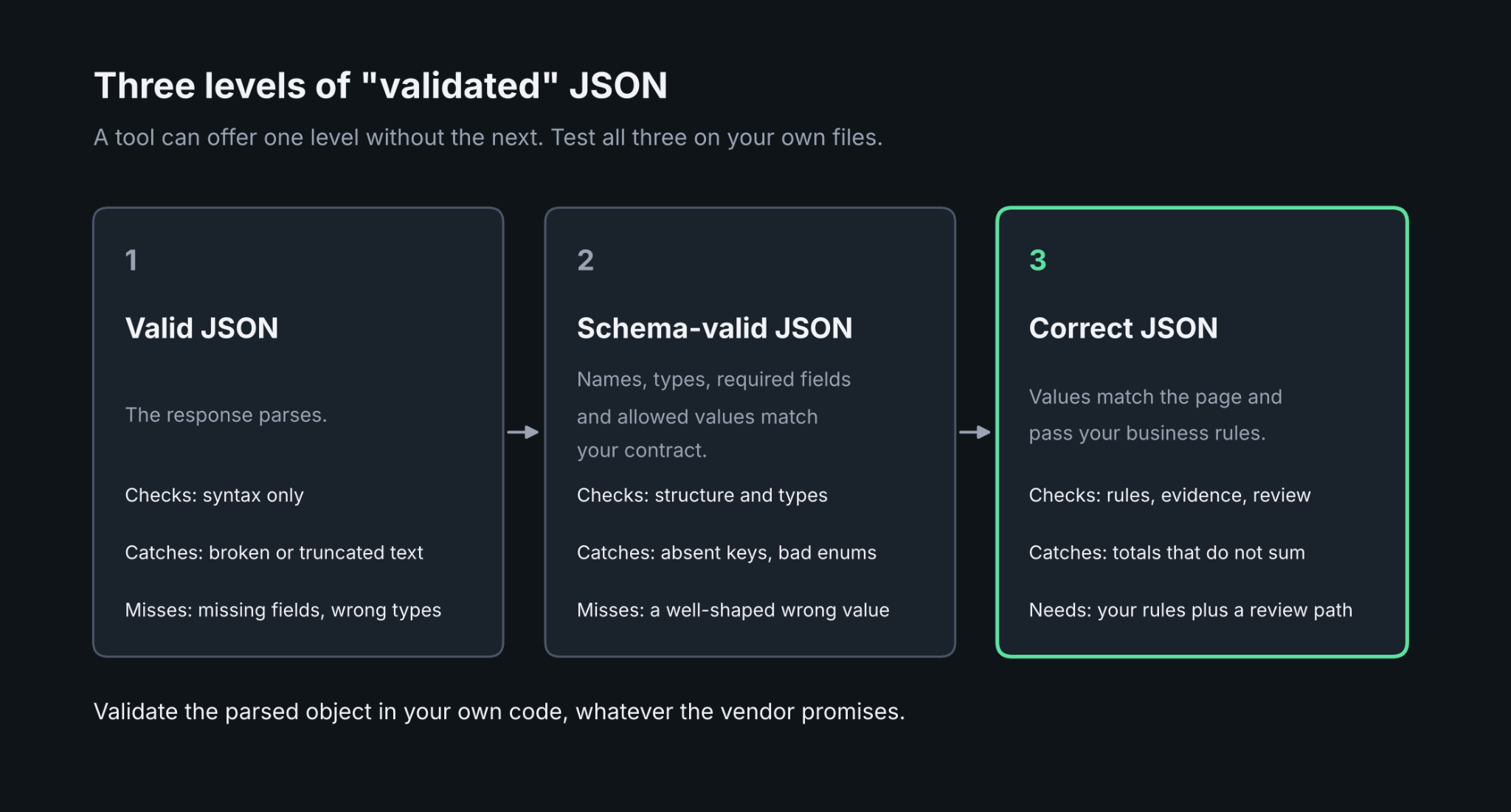
Valid JSON parses. Schema-valid JSON has the fields, types, and allowed values your contract names. Correct JSON has values that match what is on the page. Language-model APIs show the difference clearly. Strict structured output modes constrain a model to a supplied schema, so a required key cannot go missing and an enum value cannot fall outside the allowed set. They do not make the values true. A response can be perfectly shaped and still wrong, and a refusal or a response cut off at a length limit can return successfully without being schema-valid.
The practical rule is to validate the parsed object in your own code, whatever the vendor promises. Check required fields, types, formats, and ranges on every response, and treat a failure as a retry or a review item, not an exception to ignore.
Business-Rule Validation
Correctness comes from rules that know your business. Typical examples are line items that sum to the invoice total, a date that falls inside a billing period, a tax identifier that matches a known format, and a vendor that exists in your master list. Some platforms run these rules inside the extraction step. Others return the data and leave the rules to your code. Neither is wrong, but you should know which one you are buying, because it decides where rule changes get made and who can make them.
Teams building their own validation layer can also read receipt OCR pipeline architecture for a related pipeline design.
Evidence and Review Signals
A value without evidence is hard to verify. Look for each field to carry its source: the page, the position, and the text it was read from. Many APIs add a confidence score, which lets you set a threshold below which a value goes to a person. Some return a review flag with a reason instead. Either works if the share of flagged fields stays small enough for reviewers to clear and if the signal is tied to the individual field, not the whole document.
User-Defined Schemas: What to Test
APIs for custom document processing with user-defined schemas let you decide the output shape instead of accepting a fixed model. That flexibility is the reason to choose them over a prebuilt invoice or receipt parser, and it is also where products differ most.
Field Types, Nesting and Allowed Values
A good schema language covers more than flat strings. Microsoft describes a schema for Azure Content Understanding as an output contract that holds field names, types, required properties, nested objects, and allowed values. Use that as a checklist. Test that you can define a typed date, a number, an enum, an array of line items, and a nullable field for values that may be absent. Then run documents where a value is missing and confirm the API returns null or an empty value, not a guess.
Real projects often need nested structures. A bundled statement such as a multi-service utility bill holds several services with their own lines and units, a case covered in an API for utility bill and multi-service statement processing.
Schema-First Versus Fixed-Model APIs
Some APIs are schema-first. You send a schema and a file and get back data shaped like the schema. Extend, Reducto and LlamaExtract work this way, and so do the custom extractors in Google Document AI and Azure Content Understanding. Others return a general document structure and expect you to map it. Amazon Textract returns a list of Block objects with confidence and geometry, and its Queries feature lets you ask for named fields with an alias, but you still build the mapping to your own schema in code.
Neither approach is better. Schema-first APIs cut mapping code and make the contract explicit. Block-level APIs give finer control over layout and cost less per page. Choose by who will maintain the mapping.
Schema Versioning and Typed Models
Schemas change. A new field is added, a name is corrected, a type is tightened. Check whether the platform versions its extraction configuration, so that a change can be tested before it reaches production and rolled back if it fails. LlamaExtract lets you pin a configuration version, and Extend documents versioned processors. Developers who define schemas as typed models in code will also want an SDK that accepts them. For a comparison of extraction options on one concrete document type, see receipt data extraction SDK.
Custom Workflows Around the API
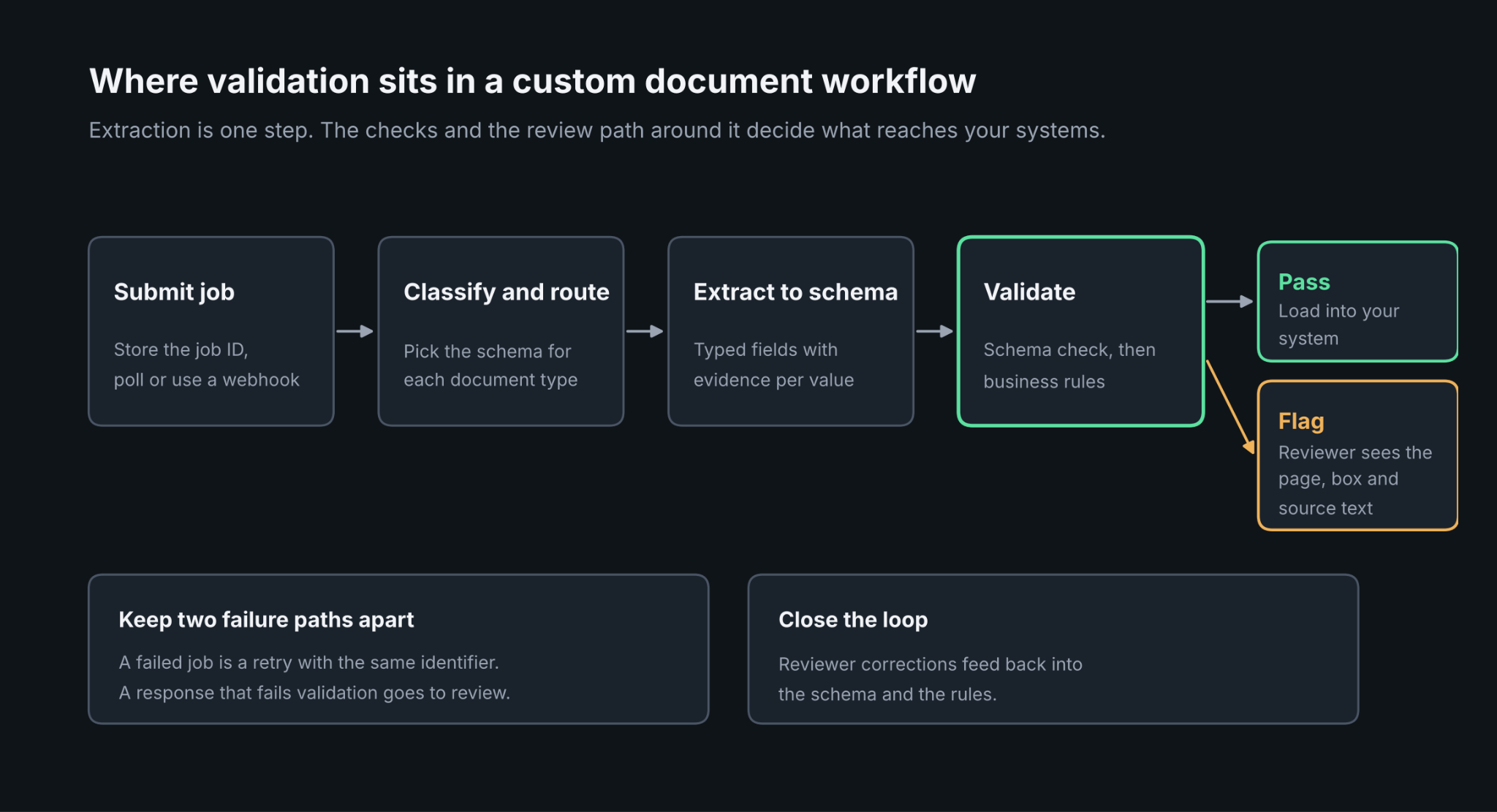
Extraction is one step in a workflow. The surrounding steps decide whether the output is usable: splitting a stack into documents, classifying each one, choosing the right schema, validating, routing exceptions and delivering the result.
Classification and routing come first when a stream mixes document types. A contract inbox is a common case, where an NDA, a renewal and an amendment each need different fields. Related reading is available in AI automation for contracts. Some platforms handle this inside the product. Azure Content Understanding offers composed analyzers that classify a document's segments and send each to the right extractor and schema. ABBYY Vantage uses process skills with decision points. Google Document AI sells a separate classifier and splitter. With a plain extraction API, you build this layer yourself.
Design the integration around three practical points.
- Asynchronous jobs. Large files and batches run as jobs. Submit, store the job ID, poll or receive a webhook and fetch the result. ABBYY's documentation suggests polling transaction status every 5 to 10 seconds with exponential backoff on transient errors.
- Retries that are safe to repeat. Give each submission a stable identifier so a retry cannot create a duplicate record downstream.
- A review path. Decide where flagged values go, who clears them and how corrections flow back to the schema or the rules.
ABBYY AI Document Processing Capabilities
ABBYY Vantage is the clearest example of a platform where validation and workflow design are first-class features. Its AI document processing capabilities are organized around skills, and the API is the way to run them from your own systems.
Skills: Pre-Trained, Designed and Advanced
A skill is a reusable unit that classifies documents, extracts data or runs a full process. The Skill Catalog holds pre-trained skills for common types such as invoices, receipts and tax forms, and you can derive a new skill from one and adjust it. Skill Designer is a browser tool for defining fields, setting business rules and assembling processing workflows, and ABBYY recommends it for most custom skills. Advanced Designer is a desktop application for complex extraction logic, including custom activities, extraction rules, FlexiLayouts and prompt-based extraction with a language model.
Business Rules and Data Catalogs
Validation lives inside the skill. A reseller listing describes business rules that check sums and date formats before data is exported, and the REST API can load reference data into data catalogs that the skill uses for lookups during processing. Partner documentation describes more advanced checks, including two-way and three-way matching and field consistency checks. When a rule fails, the document can go to a person for review before the data leaves the platform. For teams that want validation maintained by analysts and not by developers, this is the main reason to consider ABBYY.
Process Skills and Custom Activities
Process skills combine classification and document skills with business logic into a multi-step flow. They can include decision points that send documents down different paths, and a JavaScript-based custom activity can extend the platform. A custom activity can also call a third-party REST service during processing, which lets a workflow enrich or check data against an outside system before review.
The API and JSON Output
The Vantage Processing API lets you create transactions with a specific skill, upload and manage files, track status, and retrieve results. Authentication uses OAuth 2.0 with three flows, and regional endpoints exist for the US, EU, and AU. Results come back as JSON, with hierarchical data and confidence scores, or as XML for systems that need it. A separate Reporting API returns throughput, processing time, extraction accuracy, and field-level data, which supports the quality tracking that high-volume teams need.
The trade-offs are setup and pricing. You must request a tenant from ABBYY before creating API clients; pricing is not published, and reviewers on G2 describe initial setup and training as time-consuming, with the low-code designer feeling constraining for complex needs.
Seven Platforms Compared
The platforms are grouped by what they are, not ranked. Prices are published list rates or figures from third-party trackers, and they change often, so confirm current rates with each vendor before budgeting.
Enterprise IDP Platforms
ABBYY Vantage
- What it automates: Classification and extraction through pre-trained and custom skills, with business-rule validation, data-catalog lookups, process skills and human review. Output is JSON or XML through a REST API.
- Pricing: No public list price. Subscriptions are sold by volume of page transactions, and a UK government marketplace listing shows sample annual tiers where the cost per transaction falls as volume rises.
- Limits: A tenant must be requested from ABBYY before API access. Skills are designed by an administrator or skill designer, and a skill user can only run existing skills.
- Best for: Enterprises that want analysts to own validation rules and routing and need regional endpoints in the US, EU, and AU.
- Pros: Deep rule and lookup tooling, process skills with decision points, a Reporting API with accuracy and confidence analytics, and a large catalog of pre-trained skills.
- Cons: Opaque pricing, a heavier setup than an API-first tool, and a designer that reviewers find constraining for complex cases.
Cloud Provider APIs
Google Document AI
- What it automates: OCR, layout parsing, form parsing, classification and splitting, and a Custom Extractor where you define a schema of entities with data types such as checkbox, table, and signature. Fields can be extracted from the text or derived by inference.
- Pricing: Per page. The Custom Extractor and Form Parser are $30 per 1,000 pages, dropping to $20 above 1 million pages a month. The custom classifier and splitter are $5 per 1,000 pages, dropping to $3. Each deployed custom processor version adds $0.05 an hour for hosting.
- Limits: Derived fields are generated page by page, so values that need information from across pages are not fully supported. Derived fields carry no text or page anchor.
- Best for: Google Cloud teams that want classification, splitting, and schema-based extraction from one provider.
- Pros: A confidence score between 0 and 1 on each entity, Document JSON output with text and page anchors on extracted fields, and a foundation model that usually needs fewer training documents.
- Cons: Several processors must be chained for a full pipeline, and hosting charges apply to deployed custom processors.
Azure AI Document Intelligence and Content Understanding
- What it automates: Schema-first field extraction, classification and generation, with prebuilt analyzers for invoices, tax forms and identity documents and composed analyzers that classify and route segments. Azure AI Document Intelligence remains available for read, layout, prebuilt, and custom extraction models.
- Pricing: Usage-based. Cost combines content extraction, contextualization tokens, and the language model's input and output tokens, so Microsoft points buyers to its pricing calculator. Document Intelligence rates are reported at $1.50 per 1,000 pages for Read, $10 for prebuilt models, and about $30 for custom extraction.
- Limits: A multi-meter bill makes cost harder to predict than a flat per-page rate, and the schema is configured as an analyzer you create first.
- Best for: Microsoft-centered teams that want a schema as the output contract, with grounding and confidence on every field.
- Pros: Source grounding with span, page and coordinates, confidence scores for review thresholds and routing between extractors.
- Cons: Two related products with different billing models, and the accuracy benchmark Microsoft has published is vendor-run.
Amazon Textract
- What it automates: Text, forms, tables, queries, signatures, and layout extraction. Output is a JSON list of Block objects, each with a confidence value and geometry. Queries return named answers with an alias.
- Pricing: Per page. In US West (Oregon), Queries and Tables are $15 per 1,000 pages and Forms are $50. Detect text is $1.50, and text, forms, and tables have lower rates above 1 million pages a month.
- Limits: It does not return data shaped to a schema you supply, so you map blocks to your own structure. Queries allow up to 15 per page on synchronous calls and 30 on asynchronous ones. Amazon A2I human review is in maintenance mode and not open to new customers, so an AnalyzeDocument request with HumanLoopConfig fails for them.
- Best for: AWS teams that want low-level building blocks and are comfortable owning the mapping and review layers.
- Pros: Confidence and location on every block, volume discounts and tight links to S3 and Lambda.
- Cons: More code to reach a validated, schema-shaped output, and no built-in review path for new accounts.
Schema-First Extraction APIs
Extend
- What it automates: Extraction against a JSON Schema, plus parsing, classification, splitting and editing. Results return as an output value shaped like your schema and a metadata block with per-field confidence and citations that include page and polygon. It can also infer a schema from a sample document.
- Pricing: Credit-based. A Starter plan includes 10,000 free credits, and each API consumes a base number of credits per page, with lower per-credit rates on higher plans.
- Limits: Cost depends on which operations and processing modes you run, so estimate on a real sample. Zero data retention is listed on plans, but confirm which tier includes it.
- Best for: Product teams that want schema extraction with evaluation tooling, versioned processors and workflow routing around it.
- Pros: A clear separation of value and metadata, Studio and evals for schema iteration and human review support.
- Cons: The comparison that ranks Extend first was published on Extend's own site, so treat it as vendor-reported and run your own test.
Reducto
- What it automates: Parsing, schema-based extraction with optional citations, classification and splitting. Citations can include source text, page location, bounding box and confidence.
- Pricing: Per page. Standard list rates are $10 per 1,000 pages for Parse, $20 for Extract with parsing included and $40 for Deep Extract. Growth adds volume discounts, zero data retention, a BAA and EU and AU data residency endpoints.
- Limits: VPC and on-premises deployment sit on the Enterprise tier. The free usage on Standard is described with two different figures on the pricing page, so confirm it before you budget.
- Best for: Teams that need citations on every value and a path to private deployment.
- Pros: Source-grounded output, published per-page pricing and deployment options up to on-premises.
- Cons: Higher per-page rates for Deep Extract and enterprise-only deployment options.
LlamaExtract
- What it automates: Schema-based extraction from documents, configurable per document, per page or per table row, with a choice of extraction tiers and optional source citations. Schemas can be generated from typed models in code.
- Pricing: Billed in credits per page, with the rate set by extraction tier, parsing mode, and region. Check the current credit price on the vendor's pricing page, since published figures have changed during 2026.
- Limits: Its documentation and examples are built around the LlamaIndex and LlamaCloud ecosystem. The documentation reviewed for this guide does not describe a built-in review queue.
- Best for: Developers who already build on LlamaIndex and want to go from parsed content to typed fields quickly.
- Pros: An explicit extraction target, version pinning, and a free tier for prototypes.
- Cons: Credit-based cost is harder to forecast than a flat per-page rate, and no built-in review queue is documented.
DeepRead's Field Evidence and Review Flags
DeepRead is a developer-first OCR and document AI API, and its output design is the reason to consider it when validation matters. Alongside each value, it returns evidence about where the value came from.
For every extracted field, the response includes the page, bounding box, and source text. That gives your validation code something to test beyond the value itself, such as whether the source text really contains the number you were handed, and it tells a reviewer exactly where to look.
Fields the system is unsure about are marked needs_review with a review_reason, and the review interface for flagged fields is included on every plan. Treat the flag as one input to your own checks, not a replacement for them. Types, formats, and business rules still need to be validated in your code on every response.
Integration follows the asynchronous pattern described earlier. You submit a job, keep its job ID, and poll for the result. Webhooks are available on Standard and Enterprise, and the Free plan returns a 402 error when a webhook_url is supplied. A failed job costs nothing. Keep that case separate from a response that fails your own validation, and send each down its own path.
Pricing is per page. Free includes 2,000 pages a month with no card; Standard is $15 and $35 per 1,000 pages, and Enterprise is custom. Free includes 2,000 pages a month with no card; Standard is $15 and $35 per 1,000 pages, and Enterprise is custom. If review turnaround is the bottleneck in your pilot, the fast deep extract pipeline costs $90 per 1,000 pages and runs about twice as fast as normal deep extract. Processing defaults to US East; Free and Standard retain documents for up to three years, and Enterprise lists EU and AU data residency. There is no self-hosted option and no BAA on any plan, so workloads that need either should look elsewhere.
Running a Pilot
A pilot on your own documents shows more than any comparison. Build a small golden set of real files with correct answers, then run each shortlisted API through the same checks.
- Schema validity. Validate every response against your JSON Schema and count failures, including empty, truncated, and refused responses.
- Field accuracy. Compare each value to the golden answer and report the error rate per field, since one weak field can hide behind a good average.
- Rule failures. Run your business rules and count how many responses fail them, and how many of those the API had already flagged.
- Review load. Measure the share of fields or documents flagged for review and how long clearing them takes.
- Failure behavior. Send corrupt, blank, and oversized files and confirm the API fails cleanly and does not bill for the failure, where that is documented.
- Cost on your documents. Price the same sample on each vendor's own billing unit, whether page, document, credit, or token.
Conclusion
The right platform depends on who owns validation. If analysts need to maintain rules and routing, ABBYY Vantage is built for that. If your team lives in one cloud, the native extractors in Google Document AI and Azure Content Understanding keep data and billing in one place. If you want the lightest path to schema-shaped JSON with citations, the schema-first APIs from Extend, Reducto and LlamaExtract let you send a schema and get typed data back; DeepRead adds field-level evidence and review flags; and Textract suits teams that prefer building blocks.
Whichever you choose, validate the response yourself. Check the schema, apply business rules, route uncertain fields to a person, and keep the evidence for every value. That layer, more than the extraction model, decides whether JSON from a document can be trusted.
FAQ
What does validated JSON output mean for document processing?
It can mean three things: the output parses as JSON, it matches your schema in names, types and required fields, or the values are correct against the document and your business rules. A platform may guarantee the first two without the third, so test all three on your own files.
Can an API guarantee that extracted values are correct?
No. Schema enforcement guarantees structure, not truth, and a well-shaped response can still hold a wrong value. Use confidence scores or review flags, business-rule checks and human review for high-impact fields, and track error rates per field against a golden set.
How do user-defined schemas work in document processing APIs?
You describe the fields you want, with names, types, nesting and allowed values, and the API returns data in that shape. Schema-first services such as Extend, Reducto, LlamaExtract, Google Document AI's Custom Extractor and Azure Content Understanding work this way, while Textract returns general blocks you map yourself.
What are ABBYY's AI document processing capabilities?
ABBYY Vantage offers pre-trained and custom skills for classification and extraction, business rules and data-catalog lookups for validation, process skills with decision points and custom activities, human review and a REST API that returns JSON or XML. A Reporting API provides accuracy and throughput analytics.
Do I need a custom workflow, or is an extraction API enough?
An API is enough when documents are one type and your own code handles routing and review. A workflow layer becomes worth having when streams mix document types, when different schemas apply to each and when exceptions need a defined path. Some platforms include that layer, and others leave it to you.
How should I handle asynchronous jobs and retries?
Submit the file, store the job ID and poll or use a webhook where one exists. Poll at sensible intervals with exponential backoff on transient errors, and give each submission a stable identifier so a retry never creates a duplicate downstream record.
More articles
Unstructured.io Review: Features, Pricing, and Alternatives
Unstructured.io review: what the open-source library and hosted platform do, current pricing, tested Python code, limits, and four alternatives compared.

Resume OCR: Extracting Candidate Data from Resumes Automatically
How resume OCR reads PDFs and scans, fixes two-column order, and returns candidate fields. Tested Python code, a tool comparison, and US hiring rules.