%20{%20:root%20{%20--deepread-stroke:%20%23E5E7EB;%20}%20}%20.dark%20{%20--deepread-stroke:%20%23E5E7EB;%20}%20%3c/style%3e%3crect%20x='40'%20y='30'%20width='220'%20height='260'%20rx='28'%20ry='28'%20stroke='var(--deepread-stroke)'%20stroke-width='16'%20fill='none'/%3e%3cpath%20d='M180%2030v52c0%2010%208%2018%2018%2018h62'%20stroke='var(--deepread-stroke)'%20stroke-width='16'%20fill='none'/%3e%3cline%20x1='70'%20y1='130'%20x2='200'%20y2='130'%20stroke='var(--deepread-stroke)'%20stroke-width='16'%20stroke-linecap='round'/%3e%3cline%20x1='70'%20y1='165'%20x2='200'%20y2='165'%20stroke='var(--deepread-stroke)'%20stroke-width='16'%20stroke-linecap='round'/%3e%3cline%20x1='70'%20y1='200'%20x2='170'%20y2='200'%20stroke='var(--deepread-stroke)'%20stroke-width='16'%20stroke-linecap='round'/%3e%3c!--%20green%20download%20arrow%20in%20bottom%20right%20corner%20--%3e%3cpath%20d='M210%20202v58'%20stroke='var(--deepread-accent)'%20stroke-width='18'%20stroke-linecap='round'/%3e%3cpath%20d='M195%20245l15%2015%2015-15'%20fill='none'%20stroke='var(--deepread-accent)'%20stroke-width='18'%20stroke-linecap='round'%20stroke-linejoin='round'/%3e%3c/svg%3e)
Receipt OCR Pipeline Architecture
See a receipt OCR pipeline diagram and how each stage works, with Python and Tesseract code, open-source engines, GitHub datasets, and local LLM options.
Introduction
A receipt looks simple until you try to read one with software. Fonts are small, paper is crumpled, layouts change from one store to the next, and the data you need, such as the merchant, date, line items, tax, and total, is scattered across a long narrow strip. A receipt OCR pipeline is the sequence of steps that turns that image into data your systems can use. It matters most for expense reports, bookkeeping, and the receipt side of AI document processing for accounts payable.
This guide covers what receipt OCR means, why receipts are hard, a receipt OCR pipeline diagram with each stage explained, Python code that runs the whole flow with Tesseract, the open-source engines worth comparing, how NLP and machine learning fit in, receipt OCR projects on GitHub, and how local LLMs change the architecture. Figures and tool details are as of November 2026. Details from third-party tutorials and project pages are reported as those sources describe them, and none of the benchmarks cited here replace a test on your own receipts.
What Receipt OCR Means
OCR stands for optical character recognition, the technology that converts text in an image into machine-readable characters. Receipt OCR applies it to receipts, usually to digitize receipt data in a structured form that can feed an ERP, an accounting system, or a database. Typical uses are expense claims, bookkeeping and tax records, accounts payable, and retail or inventory analytics. Reading characters is only the first half. A receipt is not useful as a block of text, so a working system also decides which text is the merchant, which is the date, which lines are items, and which number is the total.
That second half is the difference between plain OCR and receipt data extraction. OCR produces a flat sequence of characters with no sense of what they mean, and the quality differences between systems mostly show up in the stages after recognition. If you want the extraction side explained on its own, DeepRead's guide to structured data extraction covers how fields are defined and returned as typed output.
What Data Receipt OCR Extracts
A working receipt pipeline usually returns these fields, where the receipt provides them:
- Merchant details: name, and sometimes address or a tax identifier.
- Transaction details: date, time, currency, and a receipt number, which is useful for duplicate detection.
- Line items: description, quantity, unit price, and line amount.
- Totals: subtotal, tax, discounts, tips, and the final total.
Field availability varies by receipt type. A grocery receipt has many line items, while a card slip may show only a total and a merchant, and handwritten tips often need separate handling.
Why Receipts Are Harder Than Other Documents
Receipts combine several problems that most clean documents do not have:
- No standard layout. Every merchant, point-of-sale system, and country formats receipts differently, so fixed templates do not scale.
- Thermal paper degradation. Printed text fades with heat, light, and time, and OCR cannot recover what is no longer on the paper.
- Handwriting. Tips, corrections, and signatures are often the most financially relevant marks and the hardest to read.
- Camera artifacts. Photos of crumpled or folded paper add perspective distortion, uneven lighting, and blur.
- Dense formatting. Compact lines with few labels give the engine less context for separating fields.
- Mixed languages and formats. Date styles, currencies, and scripts vary by country.
These problems explain why a preprocessing step that works on a flatbed-scanned page can fail on a receipt photographed on a car seat. They also explain why pipelines that must handle real volume, as in scaling unstructured document processing, spend most of their effort on input quality and validation instead of the OCR engine itself.
Receipt OCR Pipeline Diagram
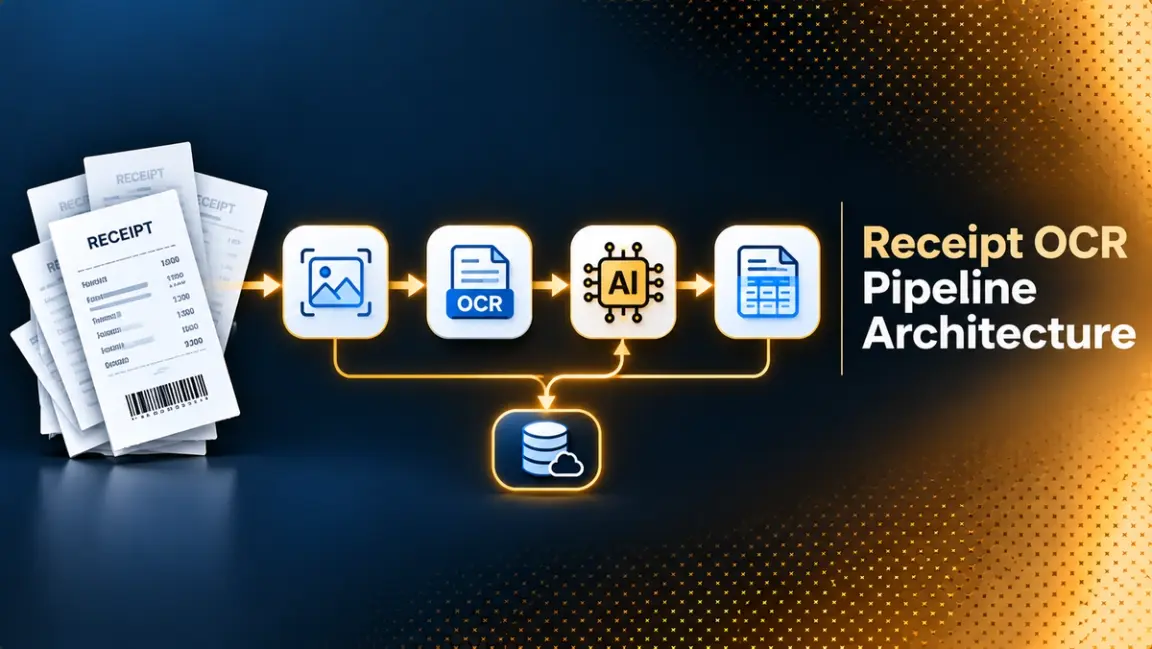
Most tutorials and production write-ups describe the same backbone: preprocessing, OCR, information extraction, and output. Splitting those into smaller steps gives seven stages, shown below. Vendor write-ups order the middle stages differently: some run layout analysis before text detection, and others rebuild layout after recognition, as this diagram does. Some pipelines also merge stages, for example by detecting and recognizing text in one model or by extracting fields with a single LLM call, but the same jobs still have to happen somewhere.
Receipt OCR pipeline diagram showing seven stages from capture to validated JSON
Stage 1 and 2: Capture and Preprocessing
Capture is how the receipt arrives: a phone photo, a scan, or a PDF page. A good pipeline checks input early and asks for a retake when the image is too blurry or the receipt edges cannot be found, instead of passing bad input downstream.
Preprocessing prepares the image for OCR. Typical steps are:
- Receipt detection and cropping. Find the receipt in the frame and remove background clutter. One common approach finds the four corners with OpenCV and applies a perspective transform to get a top-down view.
- Rescaling. Tesseract's documentation says it works best on images of at least 300 DPI.
- Grayscale conversion and noise removal. Reduce color and random variation that confuse recognition.
- Binarization. Convert to black and white. Tesseract binarizes internally, but the result can be poor when the background is uneven, so a separate adaptive threshold often helps.
- Deskewing. Rotate so text lines are horizontal, because heavy skew hurts line segmentation.
- Borders. Tesseract's guidance is to keep a small margin of around 10 pixels, because text touching the image edge can trigger an empty-page result.
Tesseract 4 and later expect dark text on a light background, so inverted images should be flipped.
Stage 3 and 4: Text Detection and Recognition
OCR involves two steps: finding where the text is, and reading it. Detection returns boxes for words or lines. Recognition reads each box into characters. Tesseract does both inside one engine, using classic layout analysis to find text and an LSTM neural network to read it. Libraries such as docTR and PaddleOCR expose the two steps as separate models, so you can swap or tune each one.
The output of these stages should keep both the text and the box coordinates. Positions are what make the next stage possible. If you throw them away and keep only a string, you lose the information needed to rebuild lines and tell the total apart from an item price.
Stage 5: Layout and Line Grouping
A receipt is read in lines: a description on the left and a price on the right. OCR engines can split one line into several boxes, merge two lines, or detect the same text twice with a small shift, so a good pipeline post-processes the output to rebuild the layout. In practice that means sorting boxes by vertical position, grouping those that share a baseline, and ordering each group left to right.
This stage matters more than it looks. A team that tested a local OCR and LLM pipeline on about 100 receipts reported that formatting consistency and preserved line grouping mattered more than raw character accuracy, and that many failures originated in OCR structure, not in the model.
Stage 6: Field Extraction
Extraction maps lines to named fields. There are three main approaches:
- Rules and regular expressions. Split text into lines, match prices and dates with patterns, and look for keywords such as total. This is cheap and transparent, but the rules have to be rewritten for new layouts.
- Machine learning models. Token classification models read the text along with box positions and label each word as merchant, date, total, and so on. Object detection models can recognize fields directly from the image.
- LLMs. A language model, given the OCR text or the image, returns the fields as JSON. This handles layout variation well but needs guardrails, covered in the local LLM section below.
Many production systems combine them: rules for dates and amounts, a model for ambiguous fields, and validation to catch mistakes.
Stage 7: Validation and Review
Validation is the stage most tutorials skip and the one that decides whether the pipeline is trustworthy. Receipts have built-in arithmetic you can check: line items should add up to the subtotal, and subtotal plus tax should equal the total. If they do not, something was misread or misextracted.
Good validation also checks required fields, date formats, currency, and duplicates, and routes anything that fails to a person. Treat a failed check as a flag with a reason, not as a silent correction. DeepRead's review of the most reliable data extraction service explains how to measure accuracy at the field level on your own documents, which is the right way to judge this stage.
Output
The final output is structured data, usually JSON, with merchant, date, currency, line items, tax, and total, plus any review flags. From there, it flows into your ledger, expense tool, or database. If receipts are one input among many in your finance workflow, DeepRead's overview of intelligent document workflow automation shows where this output slots in.
Python Receipt OCR With Tesseract
Tesseract is the default starting point for Python receipt OCR: a free engine, installed as a system binary, with the pytesseract wrapper and OpenCV for image work. Install Tesseract with your package manager, then install the Python packages:
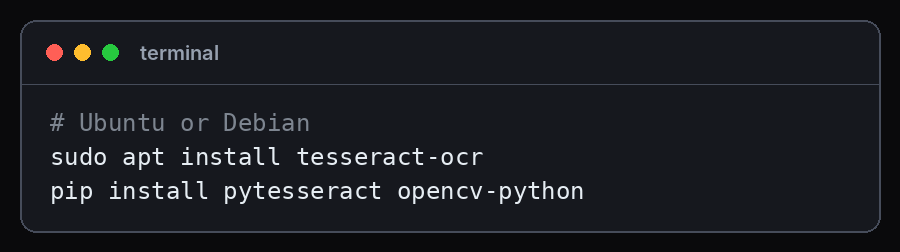
The script below covers preprocessing, recognition, parsing, and validation in about 50 lines. It was run against a synthetic receipt image to confirm it works. Real receipts need more tuning.
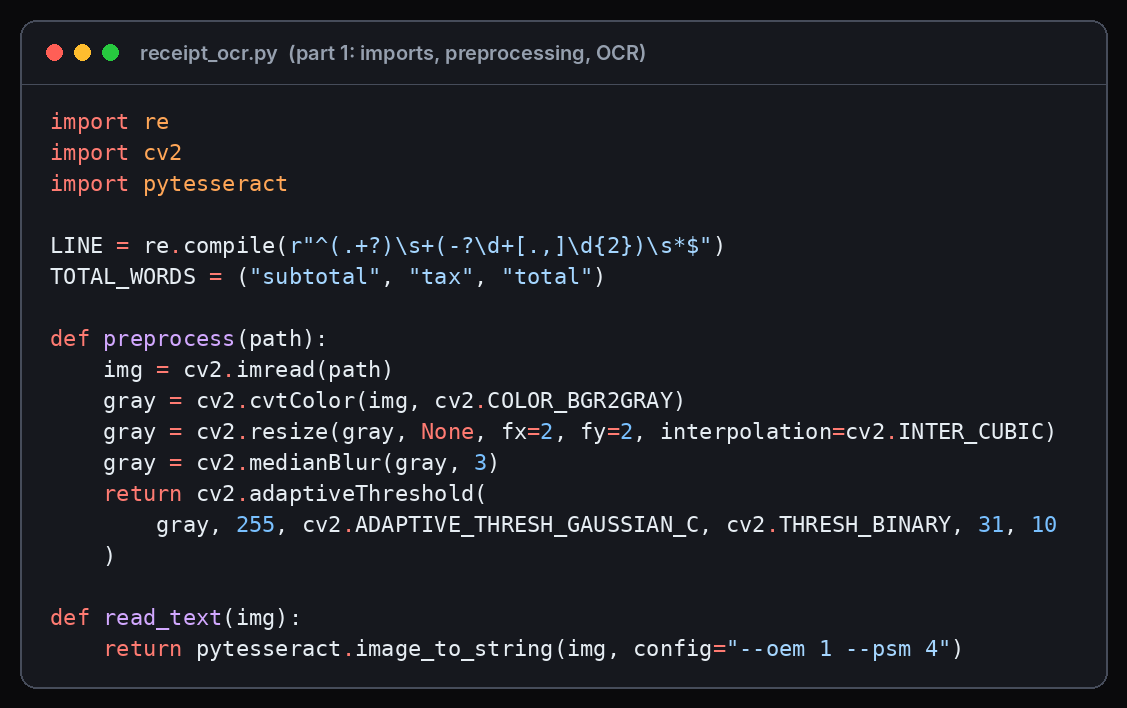
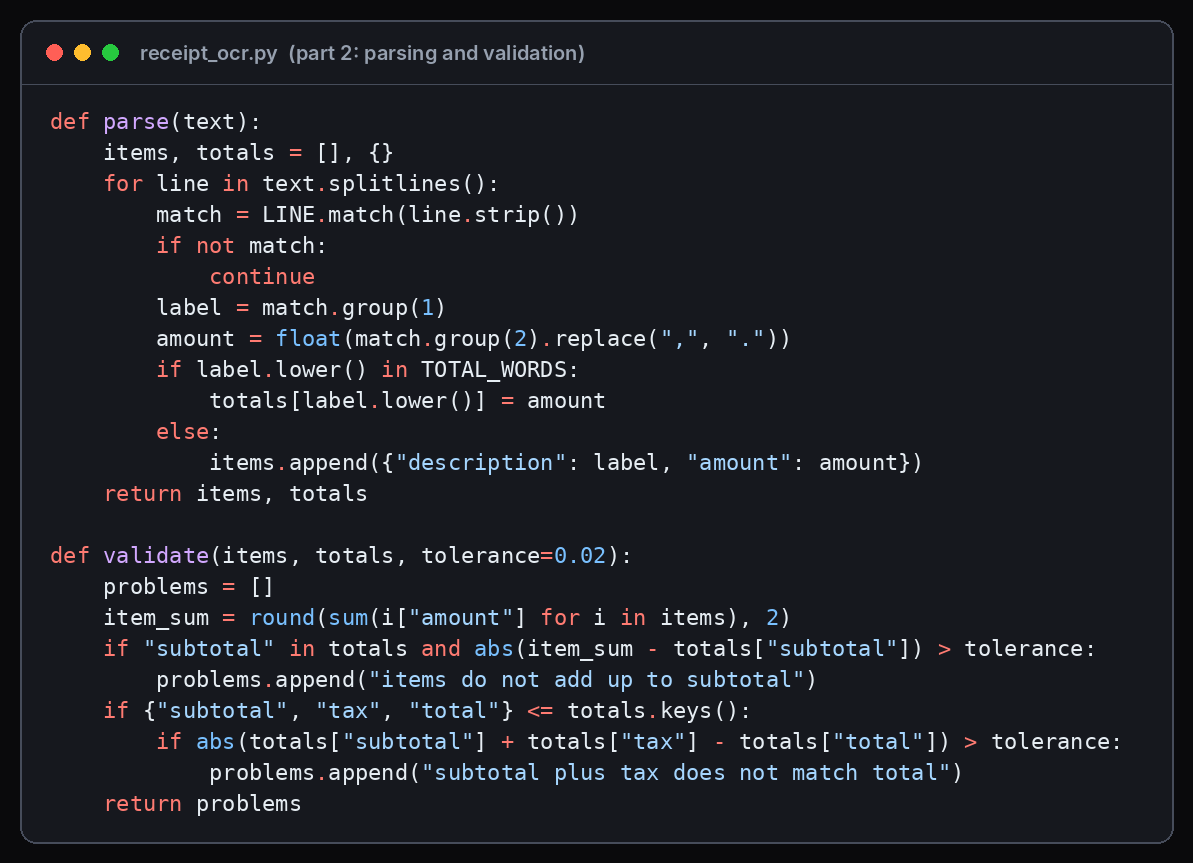
On the test receipt, the script returned three items, a subtotal of 10.34, tax of 0.83, and a total of 11.17, and the validation list came back empty. It also read "1kg" as "lkg", a typical OCR confusion between the digit one and a lowercase L. That mistake did not affect any total, so the arithmetic check would not catch it, which is a reminder that validation covers numbers better than descriptions.
Tesseract Options That Matter for Receipts
Three settings do most of the work when using Tesseract on receipts:
- Page segmentation mode (--psm). The default, mode 3, assumes a full page and often struggles with the long narrow shape of a receipt. Mode 4 assumes a single column of text of variable sizes, which is why tutorials such as PyImageSearch's receipt scanner use it to read line by line. Mode 6 assumes a single uniform block, mode 7 a single line, and mode 11 sparse text. Try 4 and 6 on your own samples and compare.
- Engine mode (--oem). Mode 1 uses the LSTM neural engine only and is the usual choice with current language data. Mode 0 is the legacy engine and needs traineddata that includes it.
- Language (-l). Tesseract supports more than 100 languages out of the box. Install the language pack for your receipts and pass the code, for example, -l eng+deu for mixed English and German.
You can also ask for word-level data with pytesseract's image_to_data function, which returns each word with its box and a confidence value. That is the input you need for line grouping when the default text output merges lines.
Open-Source OCR Engines for Receipts
Tesseract is not the only choice. These four are the engines most receipt tutorials and benchmarks compare.
Tesseract
- What it automates: Text detection and recognition in one engine, with an LSTM recognizer since version 4. Version 5 is the current stable line.
- Pricing: Free and open source under the Apache 2.0 license.
- Limits: Needs preprocessing on photos, and its layout analysis is rule-based, so complex or skewed layouts can fail.
- Best for: Clean printed receipts, CPU-only deployment, small dependencies, and a predictable baseline.
- Pros: Small install, no GPU, more than 100 languages, and a large body of tutorials.
- Cons: Output on phone photos is often noisy and may merge lines, and it returns no field-level understanding.
docTR
- What it automates: A two-stage deep learning OCR, with a detection model that localizes words and a recognition model that reads them. You choose the architecture for each stage.
- Pricing: Free and open source under the Apache 2.0 license.
- Limits: Heavier install than Tesseract, and it returns text and boxes, not receipt fields.
- Best for: Teams that want deep learning detection and recognition with control over each model.
- Pros: Separable stages and a Python-first API.
- Cons: Needs more compute, and you still build extraction and validation yourself.
PaddleOCR
- What it automates: Text detection, recognition, and layout analysis, with additional document pipelines for tables and structure.
- Pricing: Free and open source under the Apache 2.0 license.
- Limits: A larger Python stack with model weights downloaded on first use.
- Best for: Receipts and invoices where accuracy matters more than the smallest install, including multilingual and rotated text.
- Pros: A wide toolkit that includes layout and table models, and many languages.
- Cons: More moving parts than Tesseract, and a steeper setup for a first prototype.
EasyOCR
- What it automates: A single readtext call that runs a CRAFT detector and a text recognizer on PyTorch and returns boxes, text, and confidence scores.
- Pricing: Free and open source. Check the license for your use.
- Limits: Returns boxes and text only, so line grouping and field extraction are left to you.
- Best for: A quick Python baseline and proofs of concept.
- Pros: Very short code, more than 80 languages, GPU support on compatible hardware, and boxes and confidence scores returned together.
- Cons: In first-party 2026 benchmarks on receipt datasets, it scored below PaddleOCR and docTR on text accuracy, so test it on your own receipts.
A comparison article from a vendor that runs its own benchmarks on the SROIE and CORD receipt sets reported different rankings across engines for text accuracy, speed, and downstream field extraction. Because those are first-party tests, treat them as a reason to run your own comparison, not as a verdict.
OCR, NLP, and Machine Learning in Receipt Pipelines
OCR on its own ends at text. Natural language processing and machine learning handle everything after: deciding what the text means. The authors of CORD, a receipt dataset built for this purpose, put it plainly: OCR is inevitably linked to NLP because its final output is text. They built the dataset to support post-OCR parsing, where a model parses recognized text, including its errors, into receipt structure.
Three model families show up in receipt work:
- OCR plus token classification. An OCR engine supplies words and boxes, and a layout-aware model such as LayoutLM labels each word. LayoutLM was proposed to model text and layout together, and its authors reported receipt understanding among its target tasks. It relies on an external OCR engine such as Tesseract.
- OCR-free models. Donut reads the image and outputs structured text directly, with no separate OCR step. Its repository reports a 93.9 score on CORD document parsing for the model fine-tuned on that data.
- Post-OCR correction. Research on downstream NLP tasks such as named entity recognition shows that OCR errors degrade results, and NLP-based correction of OCR output is an active approach. For receipts, the equivalent is validating and repairing values after recognition.
- Rule-based extraction with ML cleanup. Simple, fast, and often good enough for a single known merchant or format.
The practical choice depends on data. Token classification and OCR-free models need labeled receipts for training or fine-tuning, which is why public datasets matter, covered next.
Local LLM OCR for Receipts
A local LLM keeps receipt images and extracted data on your own machine, which matters for privacy and cost control. There are two architectures.
OCR first, then a local text LLM. A pipeline from Iunera tested Tesseract OCR followed by small Qwen models, from 0.8 billion to 3 billion parameters, running through llama.cpp on CPU only, with cleaning and validation layers after the model. On about 100 receipts, the author reported average runtimes of roughly 2 to 3 seconds for Tesseract alone, rising to about 12 to 18 seconds with the 3-billion-parameter model. The author described the results as practical observations and not scientific benchmarks, and gave no accuracy figures.
A local vision-language model reads the image. Models such as Qwen2.5-VL can run through Ollama, for example with the qwen2.5vl:7b tag, and handle OCR and extraction in a single step. One open-source receipt processor that runs local vision models through Ollama reports that qwen2.5vl:7b scored 86.3% combined accuracy on 10 labeled receipts, and it was not the default model. A sample that small shows the approach works, not how well it will work on your data. Roboflow recommends at least a T4 class GPU for deploying a fine-tuned Qwen2.5-VL model.
Two other designs appear in open-source projects. In the first, an LLM corrects Tesseract output: the llm_aided_ocr project uses local or API models for error correction, chunking, and formatting of scanned pages. In the second, a layout model finds boxes and a local vision model transcribes the page, then an alignment step binds the transcribed lines back to the boxes, as the local-llm-pdf-ocr project does with Surya. These are general document tools, not receipt-specific, but the patterns carry over.
The same lessons appear across these designs:
- Smaller was often steadier. In the CPU test, larger models tended to hallucinate more fields and drift in structure, and the smaller ones were more predictable when paired with deterministic validation.
- Prompting alone was not enough. The author could not get reliable JSON from prompts alone, so cleaning and validation did the real work.
- Constrain the output. The receipt processor above asks its vision model for JSON at temperature 0. Fixing the output format and removing randomness reduces malformed results.
- Validate arithmetic. Check that items minus discounts match the total, and flag drift instead of trusting the model.
A local LLM replaces stages 3 to 6 of the pipeline with one component. It does not replace stage 7.
Receipt OCR on GitHub: Datasets and Projects
Searches for receipt OCR on GitHub mostly surface a small set of datasets and repositories. These are worth knowing:
- CORD (clovaai/cord). A consolidated receipt dataset for post-OCR parsing. The v2 release has 1,000 receipts split 800 for training, 100 for validation, and 100 for testing, licensed CC BY 4.0. The receipts come from Indonesian shops and restaurants, so performance on other languages is not guaranteed.
- SROIE. The dataset from the ICDAR 2019 competition on scanned receipt OCR and key information extraction. It remains a common benchmark for receipt understanding.
- Donut (clovaai/donut). The OCR-free document understanding transformer, with fine-tuned checkpoints for CORD.
- docTR (mindee/doctr). The two-stage OCR library described above.
- receipt-ocr (bhimrazy). An MIT-licensed project with two modules: structured extraction through LLM providers including OpenAI, Gemini, and Groq, and raw text extraction through Tesseract. The structured module sends images to those providers, so it is not a local-only pipeline by default.
Before reusing any repository, check its license, its last commit date, and whether its examples match your receipts. Starter projects usually cover the happy path, and the gap to production is validation, review, and handling bad images.
Using an API Instead of Building the Pipeline
Building every stage yourself gives control but also gives you the maintenance. A hosted extraction API takes over stages 2 to 6. DeepRead is one such option: it reads a document into Markdown with layout blocks and bounding boxes and returns the fields you define as JSON, with each field linked to its page and source text, and it flags uncertain values with a reason instead of returning a numeric confidence score.
The Free plan covers 2,000 pages a month with no card, accepts PDF, PNG, and JPEG files up to 15 MB, and includes the review interface for flagged fields. Paid usage is $15 per 1,000 pages for Extract and $35 for Deep Extract, which runs two OCR engines, adjudicates disagreements, verifies every value, and rotates pages automatically. That is enough to test it on a batch of your own receipts. You would still keep your own arithmetic checks and approval rules around it.
Conclusion
A receipt OCR pipeline is more than an OCR engine. Reliable systems clean the image, detect and read text, rebuild lines from box positions, extract fields, and check the arithmetic before anything reaches a ledger. Tesseract with OpenCV is a fast way to build and understand the pipeline; deep learning engines such as docTR and PaddleOCR handle harder images, and local LLMs and vision models can replace the middle stages when privacy matters. Whichever route you take, test on your own receipts, measure field-level accuracy, and keep a person in the loop for anything that fails validation.
Frequently Asked Questions
What does OCR receipt mean?
OCR receipt refers to using optical character recognition to read a receipt image and turn it into machine-readable text, and usually into structured data such as merchant, date, line items, tax, and total.
What is a receipt OCR pipeline?
It is the sequence of steps that converts a receipt image into structured data: capture, preprocessing, text detection, text recognition, line grouping, field extraction, and validation.
Can Tesseract read receipts?
Yes. Tesseract can read printed receipts, but it usually needs preprocessing such as cropping, deskewing, and thresholding, and the right page segmentation mode. Many tutorials use mode 4 or mode 6 for receipts. It returns text and not receipt fields, so you add parsing and validation.
How do I do receipt OCR in Python?
Install Tesseract and the pytesseract and OpenCV packages, preprocess the image, call image_to_string with a page segmentation mode suited to receipts, parse the text with rules or a model, and validate the totals.
Which OCR engine is best for receipts?
It depends on your images and constraints. Tesseract suits clean receipts and small deployments. docTR, PaddleOCR, and EasyOCR are deep learning alternatives. Run a small comparison on your own receipts and measure field-level accuracy.
Can a local LLM do OCR on receipts?
Yes, in two ways: an OCR engine feeds text to a local LLM, or a local vision-language model such as Qwen2.5-VL reads the image directly. Both need validation, because models can hallucinate fields or return malformed JSON.
More articles
Business Card OCR API
Compare business card OCR API and software options: fields returned, accuracy checks, pricing units, limits, privacy, and how to test on your own cards.
LLM OCR Accuracy Leaderboard
An LLM OCR leaderboard guide: current top scores on OmniDocBench, olmOCR-Bench, OCRBench v2, and the IDP Leaderboard, what each measures, and how to read them.