%20{%20:root%20{%20--deepread-stroke:%20%23E5E7EB;%20}%20}%20.dark%20{%20--deepread-stroke:%20%23E5E7EB;%20}%20%3c/style%3e%3crect%20x='40'%20y='30'%20width='220'%20height='260'%20rx='28'%20ry='28'%20stroke='var(--deepread-stroke)'%20stroke-width='16'%20fill='none'/%3e%3cpath%20d='M180%2030v52c0%2010%208%2018%2018%2018h62'%20stroke='var(--deepread-stroke)'%20stroke-width='16'%20fill='none'/%3e%3cline%20x1='70'%20y1='130'%20x2='200'%20y2='130'%20stroke='var(--deepread-stroke)'%20stroke-width='16'%20stroke-linecap='round'/%3e%3cline%20x1='70'%20y1='165'%20x2='200'%20y2='165'%20stroke='var(--deepread-stroke)'%20stroke-width='16'%20stroke-linecap='round'/%3e%3cline%20x1='70'%20y1='200'%20x2='170'%20y2='200'%20stroke='var(--deepread-stroke)'%20stroke-width='16'%20stroke-linecap='round'/%3e%3c!--%20green%20download%20arrow%20in%20bottom%20right%20corner%20--%3e%3cpath%20d='M210%20202v58'%20stroke='var(--deepread-accent)'%20stroke-width='18'%20stroke-linecap='round'/%3e%3cpath%20d='M195%20245l15%2015%2015-15'%20fill='none'%20stroke='var(--deepread-accent)'%20stroke-width='18'%20stroke-linecap='round'%20stroke-linejoin='round'/%3e%3c/svg%3e)
Content Moderation API with PII Detection
How a content moderation API with PII detection works, which compliance rules apply, and how eight options compare on categories, pricing, limits, and privacy.
Two kinds of risk arrive in the same text box. One is harmful content: hate, harassment, threats, sexual material, self-harm. The other is personal data: a phone number in a chat message, a card number in a support ticket, a patient name in an uploaded note. A content moderation API with PII detection checks for both, so a platform or an AI application can decide what to publish, what to mask, and what to send to a person. This guide explains how the two checks differ, what compliance expects of you, how to build the pipeline, and how eight options compare. Prices and limits come from vendor pages and should be confirmed before you buy, and nothing here is legal advice.
What a Moderation API With PII Detection Does
Most products cover one job well and the other less well, so it helps to name them separately.
- Content moderation classifies content against harm categories and returns scores or severity levels. You choose the threshold and the action.
- PII detection finds personal data, such as names, emails, phone numbers, addresses, and ID or card numbers, and returns the type and location so you can mask or remove it.
- Both together mean one call, or one pipeline, that returns harm scores and PII findings for the same input, so a single policy decides the outcome.
The distinction matters because the leading general-purpose moderation endpoints do not treat PII as a harm category. OpenAI's moderation endpoint, for example, lists 13 categories, such as harassment, hate, illicit content, self-harm, sexual content, and violence, and none of them is personal data. If you need PII handling, you usually pair a moderation endpoint with a PII service, or choose a platform that includes both.
Moderation, PII Detection, and DLP Compared
- Moderation asks whether content is harmful to people. It protects users and your platform.
- PII detection asks whether content contains personal data. It protects the individuals the data belongs to.
- Data loss prevention asks whether sensitive data is leaving a boundary it should not cross. Google's Sensitive Data Protection, for example, inspects and de-identifies data across storage and content, which is broader than a chat filter.
A single message can trip all three. A user posting a neighbor's address in a threatening comment is harassment, PII, and a possible legal report at once.
What Counts as PII, and Which Rules Apply
There is no single definition, so the label set must follow your legal exposure.
- GDPR. Personal data is any information relating to an identified or identifiable natural person, directly or indirectly. Special categories, such as health data, face stricter rules under Article 9. Pseudonymized data can still be personal data.
- HIPAA. Health information tied to an individual is protected, and the Privacy Rule recognizes two de-identification routes: removing 18 listed identifiers with no actual knowledge that what remains could identify someone (Safe Harbor), or an expert determination that re-identification risk is very small.
- COPPA. In the United States, the FTC's rule covers personal information collected online from children under 13, for services directed at children or with actual knowledge of under-13 users.
- State privacy laws. US states define personal information differently, so check the ones where your users live.
- Child sexual abuse material. OpenAI tells developers not to send known or suspected CSAM to its Moderation API and points to separate guidance for preventing, detecting, responding to, and reporting it. Treat this as its own process with legal advice, not as another moderation category.
- Digital Services Act. In the EU, hosting providers must give affected users a clear statement of reasons when they remove or restrict content, and platforms must offer a way to report illegal content and to contest decisions.
The practical result is a label set that matches your rules. A healthcare app needs a way to catch medical record numbers, a kids' platform needs contact details and location, and a marketplace needs off-platform payment and contact information.
How the Pipeline Works
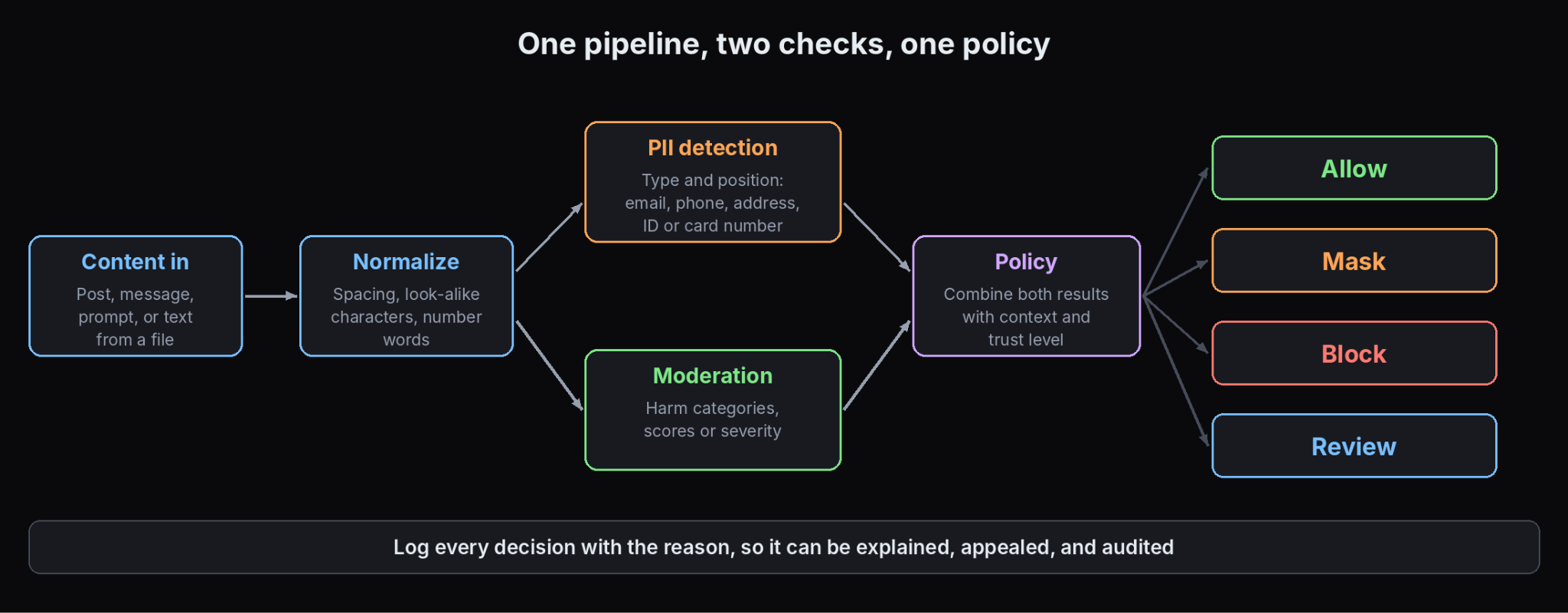
- Receive the content, whether a post, a chat message, a prompt, a model response, or text extracted from a file.
- Normalize it, so tricks such as spacing, look-alike characters, or numbers spelled out do not hide a phone number.
- Run PII detection, returning each entity's type and position.
- Run moderation, returning category scores or severities.
- Apply policy. Combine both results with context, such as a user's trust level or the room's audience.
- Act: allow, mask, block, hold for review, or escalate.
- Log the decision with enough detail to explain it later.
For AI applications the same checks run twice, once on the user's prompt and once on the model's answer, so personal data does not leak out and harmful output does not reach the user.
Use Cases by Platform Type
- Dating and social apps: users share contact details to move conversations off the platform, and scammers use hidden contact information to move victims away, according to one moderation vendor's description of its customers.
- Gaming and chat: players trade handles and phone numbers in chat, and many players are children, which brings COPPA into scope.
- Marketplaces: buyers and sellers move deals off-platform to avoid fees, often by posting emails, phone numbers, or payment details.
- Customer support and AI assistants: people paste card numbers, IDs, and health details into tickets and prompts, so masking before storage or before a model call matters.
- Healthcare and education: records and student data bring HIPAA and children's privacy rules into the design.
- Publishing and comments: spam, scam links, and phishing sit alongside abuse.
Choosing Actions: Block, Mask, Redact, or Review
- Block when the content should never be accepted, such as a card number in a public comment.
- Mask when the rest of the content is useful, replacing a value with its type, for example {EMAIL}.
- Redact permanently when the data must not be stored at all.
- Hold for review when the system is unsure or the stakes are high.
- Allow and log when the item is low risk.
Match the action to the surface. A public post, a private message, a support ticket, and an internal log each carry different risk. DeepRead's guide to document workflow automation shows how a review step fits into an automated flow without stopping everything.
When the PII Sits Inside Files
Moderation and PII detection are built for text. A lot of risk arrives as PDFs, scans, photos of documents, and spreadsheets, where the text has to be read out first. That is an extraction step, and the quality of the text decides the quality of everything after it. DeepRead's guide to structured data extraction explains how documents become reliable fields and text.
DeepRead is an example of a service for that step. It reads a file into Markdown with layout blocks and bounding boxes, so the extracted text can be passed to a moderation or PII service, and each result keeps its page and location. Its Enterprise plan adds PII redaction and retention controls. It is a document extraction API and not a moderation product, so it does not score content for harm, and it has no BAA, no self-hosted option, and processing defaults to US East. Free and Standard retain documents for up to three years, so check that against your data rules.
Moderation and PII Detection Options Compared
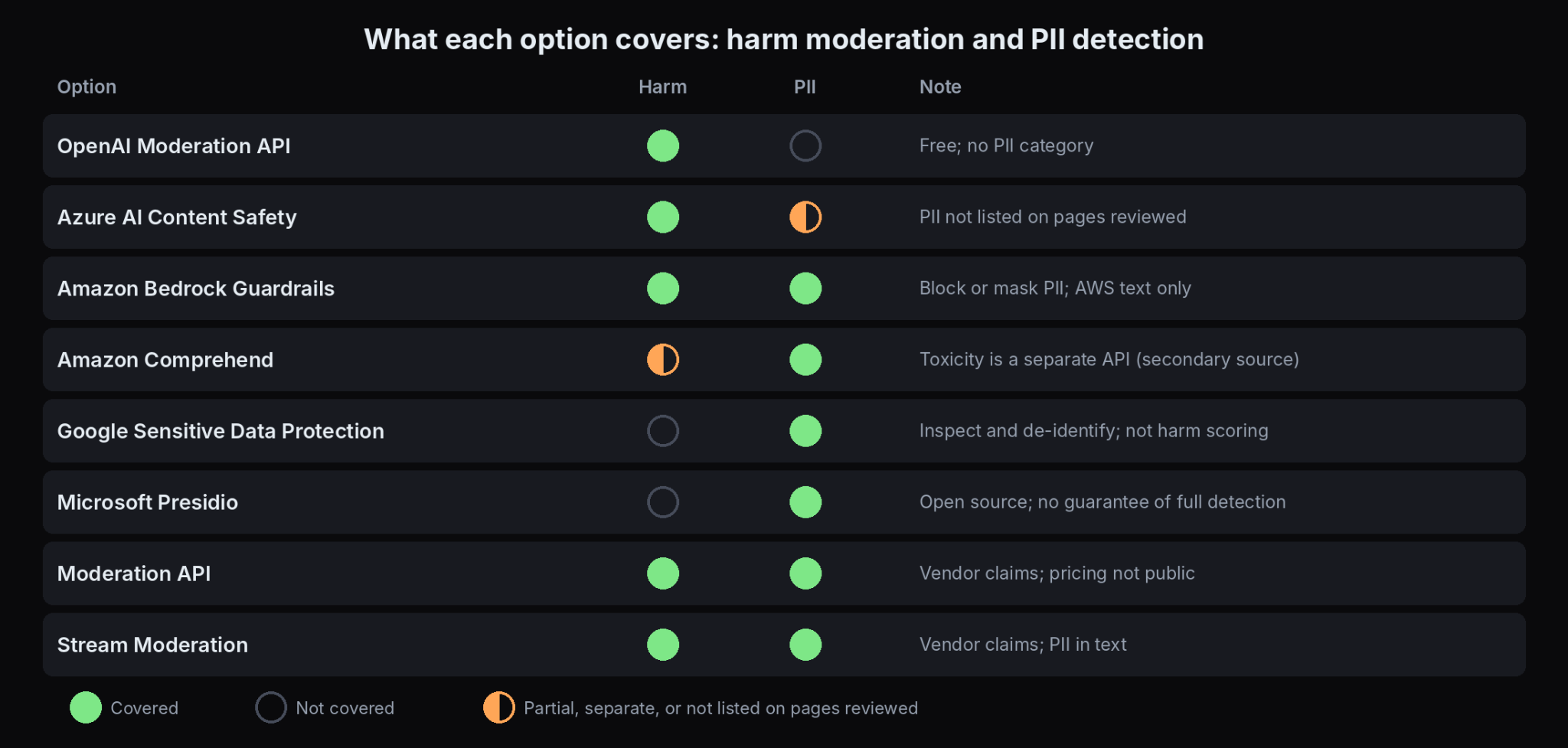
Pricing and limits come from vendor pages where noted. Several products bill in different units, so compare them on your own volumes.
OpenAI Moderation API
- What it automates: Classifies text and images for potentially harmful content using the omni-moderation-latest model, returning a flag, per-category booleans, and scores from 0 to 1.
- Pricing: Free to use.
- Limits: Thirteen categories in all. Seven are text only, including harassment, hate, illicit content, and sexual/minors, and six cover text and images, including self-harm, sexual, and violence. Image files can be up to 20 MB, and audio is not classified. The page does not state supported languages or rate limits.
- Best for: Teams that want a free baseline harm check, especially if they already use OpenAI.
- Pros: No cost, scores per category, and image support for six categories.
- Cons: None of its categories covers PII, and the categories are fixed, so you add a PII service and your own rules.
Azure AI Content Safety
- What it automates: Classifies text, images, and multimodal content for hate, sexual content, violence, and self-harm, with Prompt Shields, protected material detection, and groundedness detection for AI applications, plus custom blocklists.
- Pricing: Billed per 1,000 text records and per 1,000 images, where one record is up to 1,000 characters. The free tier lists 5,000 text records and 5,000 images a month. A third-party summary puts the Standard rate at $0.38 per 1,000 text records and $0.75 per 1,000 images, but Microsoft's own page showed placeholders when I checked, so confirm current rates.
- Limits: Text is limited to 10,000 characters per request, and severity is scored at 0, 2, 4, and 6. Microsoft recommends starting at severity 4 for new projects. The API returns classification only, so enforcement is yours.
- Best for: Teams on Azure that want severity scores and an AI-safety toolset.
- Pros: Severity levels, blocklists, a studio for testing, and clear data handling statements.
- Cons: The pages reviewed do not list PII detection among its features. Its predecessor, Azure Content Moderator, did check for possible PII, and Microsoft retires it on March 15, 2027, so plan a separate PII step.
Amazon Bedrock Guardrails
- What it automates: Configurable policies for generative AI: content filters for text and images, denied topics, word filters, and sensitive information filters that detect PII and either block or mask it, with custom regex patterns.
- Pricing: Content filters and denied topics are $0.15 per 1,000 text units, per AWS's 2024 announcement. Sensitive information filters are priced lower, with one third-party summary listing $0.10 per 1,000 units, and regex filters and word filters are free. A text unit is up to 1,000 characters, and charges apply to the prompt and the response. Regional prices vary.
- Limits: The sensitive information filter evaluates text only, and in tool-use workloads some fields are not evaluated. It is designed for use with Bedrock models.
- Best for: Teams building AI applications on AWS that want harm and PII controls in one policy.
- Pros: Both checks in one service, block or mask modes, and custom patterns at no charge.
- Cons: It is oriented to model inputs and outputs, so it is less direct for moderating a social feed.
Amazon Comprehend PII detection
- What it automates: Detects PII entities in text and returns each entity's type, a confidence score, and its position. AWS's service card describes a fixed set of 22 universal and 14 country-specific entity types.
- Pricing: Billed per 100-character unit with a 300-character minimum per request. Third-party summaries put DetectPiiEntities at $0.0001 per unit and a cheaper ContainsPiiEntities check at $0.000002 per unit.
- Limits: PII detection supports English and Spanish only, and text input can be up to 100 KB. The service card says it does not support text from databases, native PDFs, or other languages.
- Best for: AWS-native teams with English or Spanish text who need entity positions to mask.
- Pros: Entity types, scores, and offsets, and a low-cost screening call.
- Cons: Narrow language coverage, and its PII feature does not score harm. Third-party sources describe a separate toxicity detection API in Comprehend, so confirm its current scope in AWS’s documentation.
Google Sensitive Data Protection
- What it automates: Inspects and de-identifies sensitive data in text, images, and storage using built-in and custom detectors, with methods to inspect content, de-identify it, and redact images.
- Pricing: Content inspection is free up to 1 GB a month, then $3.00 per GB, falling to $2.00 per GB over 1 TB. Content transformation is $2.00 per GB over the first free gigabyte. Requests bill at least 1 KB.
- Limits: Content sent directly to the API has size and findings limits, such as a maximum of 3,000 findings per request, and larger files should go through Cloud Storage jobs. Third-party sources cite more than 200 built-in detectors.
- Best for: Teams on Google Cloud that need PII inspection and de-identification across data stores as well as messages.
- Pros: Mature de-identification options, image redaction, and custom detectors.
- Cons: It does not score content for harm, and it is built for data protection more than community moderation.
Microsoft Presidio
- What it automates: An open-source SDK for detecting and anonymizing PII in text and images, using named entity recognition, regular expressions, rule-based logic, and checksums, with options to connect external models.
- Pricing: Free to use, and most sources describe an MIT license. Confirm the license in the repository before you embed it. You pay for hosting and engineering.
- Limits: Its documentation says automated detection cannot guarantee that all sensitive information is found, so add other protections. It states a trade-off between false positives and false negatives, and some recognizers, such as a driver's license number, can match any nine digits.
- Best for: Teams that need self-hosted PII detection with custom entity types and full control.
- Pros: Customizable recognizers, adjustable thresholds, image redaction, and no per-call fee.
- Cons: You tune, host, and maintain it, and it does not moderate harmful content.
Moderation API
- What it automates: A moderation platform for text, images, video, and audio with custom rules in plain language, a PII model with optional masking, and a review dashboard.
- Pricing: Not published on the pages I reviewed.
- Limits: The vendor lists support for 120+ languages. It states GDPR, CCPA, and DSA compliance and offers a signed data processing agreement, which are vendor statements to verify.
- Best for: Teams that want moderation and PII in one developer-focused product with review tools.
- Pros: Both checks in one service, custom rules, and a DPA.
- Cons: Pricing and accuracy figures are not public, and the compliance claims are the vendor's own.
Stream Moderation
- What it automates: Moderation for text, images, video, audio, and livestreams, covering harm categories plus scams, spam, and PII in text, with a review agent and COPPA and CSAM flagging.
- Pricing: Not published on the pages I reviewed.
- Limits: The vendor says 35+ harm categories in 50+ languages.
- Best for: Chat and community products that already use or want Stream's tooling.
- Pros: Several media types and compliance-oriented features in one product.
- Cons: The accuracy figure on its page, 98%, is the vendor's own, and pricing is not public.
API, LLM Prompt, or Human Reviewers
- Human reviewers only handle nuance and context well, but they do not scale; they are exposed to harmful content and personal data, and quality varies between people.
- Prompting a general LLM is flexible and can follow a custom-written policy, but it costs per call, can return different answers on the same input, and sends content to another provider, so test consistency and check the data terms.
- A moderation or PII API returns fast, consistent scores and types you can threshold, though categories are often fixed and edge cases still need people.
Most teams combine them: an API for the first pass, an LLM or custom rules for platform-specific policy, and people for the hard cases.
Compliance Checklist for Vendors
- Where is data processed and stored, and can you pick a region?
- How long is it retained, and can you shorten it?
- Is it used to train models, and can you opt out?
- Is there a data processing agreement, and a BAA if you handle PHI?
- Who at the vendor can see content, and under what controls?
- What certifications and audit reports exist?
- What happens to your logs and the vendor's logs?
- Can you delete a user's data on request?
Microsoft, for instance, states that Azure AI Content Safety does not store prompts or completions for content filtering, does not use them to train its filtering models without customer consent, and keeps data in the region you choose. Compare that kind of statement across every vendor you consider.
How to Choose
Compare options on these criteria first:
- Category coverage: the harm types and PII types it detects.
- Language support: the languages your users write in.
- Latency: whether it fits a real-time path.
- Customization: fixed categories or your own rules.
- Pricing model: the billing unit and cost at your volume.
- Compliance: data region, retention, training use, and contracts.
Then match the use case:
- Free baseline for harm only: OpenAI's endpoint, plus a PII service.
- AI application on a major cloud: Bedrock Guardrails on AWS, or Azure AI Content Safety with a PII step on Azure.
- PII across data and messages on Google Cloud: Sensitive Data Protection.
- Self-hosted PII with custom entities: Presidio.
- Both checks in one product for a platform: Moderation API or Stream, after testing accuracy.
- Documents and scans: an extraction step first, then text-level checks.
How to Test Accuracy
Missing a phone number and flagging a harmless message are different errors, so measure them separately.
- False negatives for PII: the personal data that slips through. This is usually the costlier error.
- False positives: harmless text flagged, such as nine digits that are not an ID.
- Per-type results: an overall score can hide a type that fails, such as addresses or national IDs.
- Obfuscation: numbers spelled out, spaced-out phone numbers, disguised emails, and Unicode look-alike characters in bios and chat, which are the tricks moderation vendors describe users trying.
- Languages you actually receive, since support varies, such as Comprehend's English and Spanish limit.
- Context: the same string can be an ID or a harmless number.
DeepRead's review of the most reliable data extraction service describes a small pilot method that adapts to moderation tests. Vendor accuracy figures are rarely tied to a stated test set, so run your own.
Pricing Units: Records, Text Units, Characters, and Gigabytes
The same message costs different amounts depending on the unit.
- Azure: per text record of up to 1,000 characters, so a 7,500-character input counts as eight records.
- Bedrock Guardrails: per text unit of up to 1,000 characters, and charged on both prompt and response.
- Comprehend: per 100-character unit with a 300-character minimum.
- Google: per gigabyte inspected, with a 1 KB minimum per request.
- OpenAI: free.
At one million single-message requests of up to 1,000 characters, the list rates above work out roughly as follows. These use the third-party rates where noted, so treat them as an illustration.
- Azure AI Content Safety: about $380 at $0.38 per 1,000 text records.
- Bedrock Guardrails: about $250 per direction for content filters plus PII, and double that if you check both prompt and response.
- Comprehend PII detection: about $300 for DetectPiiEntities at the 3-unit minimum, or about $6 for the cheaper ContainsPiiEntities screen.
- Google Sensitive Data Protection: inside the free first gigabyte at roughly 1 KB per request.
- OpenAI moderation: free.
Short chat messages and long documents price very differently across these. DeepRead's breakdown of per-document vs per-page pricing explains how the billing unit changes the total, and the same logic applies here.
Conclusion
A content moderation API with PII detection is really two controls working together, one for harm and one for personal data, with a policy that decides the action and a human path for hard cases. Several leading moderation endpoints do not cover PII, so check what each option actually detects, in which languages, and at what cost per unit. Test on your own content, log decisions carefully, and confirm the compliance terms with your legal team before launch.
Frequently Asked Questions
What is a content moderation API with PII detection?
It is a service, or a combination of services, that checks content for harmful material and for personal data in one pipeline, so you can block, mask, or review each item.
Does the OpenAI Moderation API detect PII?
No. Its 13 categories cover harms such as harassment, hate, illicit content, self-harm, sexual content, and violence, and none is personal data. Pair it with a PII service if you need that check.
What is the best PII detection API?
It depends on your cloud, languages, and entity types. Amazon Comprehend supports English and Spanish, Google Sensitive Data Protection suits Google Cloud and data stores, Bedrock Guardrails combines PII with content filters, and Presidio is a self-hosted open-source option. Test each on your own data.
Can PII detection guarantee compliance?
No. Presidio's own documentation says there is no guarantee that automated detection finds all sensitive information, and compliance also depends on retention, access, consent, and contracts.
Are moderation APIs GDPR compliant?
It depends on the vendor and how you configure it. Look for a data processing agreement, the processing region, retention, and whether content is used for training. Microsoft, for example, states that Content Safety does not store prompts or completions for filtering, and Moderation API says it offers a DPA.
Can I use more than one moderation API at once?
Yes. Many teams pair a free harm classifier with a dedicated PII service, or run a second check on items the first one scores near the threshold.
How much does moderation cost at one million messages?
At list rates for messages under 1,000 characters, roughly $380 at Azure using a third-party rate, about $250 per direction at Bedrock Guardrails, about $300 for Comprehend PII detection, and nothing for OpenAI's endpoint. Your cost depends on message length and how many checks you run.
Can I moderate PDFs and scanned documents?
Moderation and PII services work on text, so a file needs an extraction step first. DeepRead reads files into text with page locations, and its Enterprise plan adds PII redaction, but it is not a moderation product.
More articles

Business Card OCR API
Compare business card OCR API and software options: fields returned, accuracy checks, pricing units, limits, privacy, and how to test on your own cards.

LLM OCR Accuracy Leaderboard
An LLM OCR leaderboard guide: current top scores on OmniDocBench, olmOCR-Bench, OCRBench v2, and the IDP Leaderboard, what each measures, and how to read them.