%20{%20:root%20{%20--deepread-stroke:%20%23E5E7EB;%20}%20}%20.dark%20{%20--deepread-stroke:%20%23E5E7EB;%20}%20%3c/style%3e%3crect%20x='40'%20y='30'%20width='220'%20height='260'%20rx='28'%20ry='28'%20stroke='var(--deepread-stroke)'%20stroke-width='16'%20fill='none'/%3e%3cpath%20d='M180%2030v52c0%2010%208%2018%2018%2018h62'%20stroke='var(--deepread-stroke)'%20stroke-width='16'%20fill='none'/%3e%3cline%20x1='70'%20y1='130'%20x2='200'%20y2='130'%20stroke='var(--deepread-stroke)'%20stroke-width='16'%20stroke-linecap='round'/%3e%3cline%20x1='70'%20y1='165'%20x2='200'%20y2='165'%20stroke='var(--deepread-stroke)'%20stroke-width='16'%20stroke-linecap='round'/%3e%3cline%20x1='70'%20y1='200'%20x2='170'%20y2='200'%20stroke='var(--deepread-stroke)'%20stroke-width='16'%20stroke-linecap='round'/%3e%3c!--%20green%20download%20arrow%20in%20bottom%20right%20corner%20--%3e%3cpath%20d='M210%20202v58'%20stroke='var(--deepread-accent)'%20stroke-width='18'%20stroke-linecap='round'/%3e%3cpath%20d='M195%20245l15%2015%2015-15'%20fill='none'%20stroke='var(--deepread-accent)'%20stroke-width='18'%20stroke-linecap='round'%20stroke-linejoin='round'/%3e%3c/svg%3e)
10 Leading Document Processing Automation Platforms for Businesses (2026)
Comparing leading document processing automation for businesses - RPA suites, extraction APIs, and managed services, with verified pricing.
"Document processing automation" gets sold as one category but is really three different purchases: RPA platforms that added document understanding as a module, extraction-focused platforms and APIs built for the capture layer specifically, and managed BPO services that process documents as outsourced labor rather than software you run. This profiles leading options across all three, with pricing verified from official sources — several of these platforms simply don't publish pricing, and it's worth knowing that plainly rather than being handed a guessed number.
Who This Is For
Business and operations leaders scoping a document automation initiative, IT and procurement teams sizing real total cost of ownership, and teams comparing across categories without a clear sense of which one actually fits their situation.
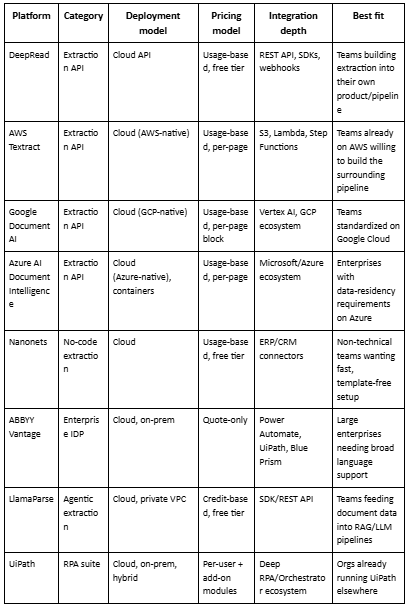
Platforms at a Glance
Extraction-Focused Platforms and APIs
These specialize in the capture layer itself, built for teams integrating document processing into their own product or pipeline rather than adopting an end-to-end suite.
1. DeepRead
DeepRead is a schema-driven document extraction API — invoices, medical bills, bank statements, and similar documents come back as structured JSON with a per-field confidence score, using multi-model consensus rather than a single model's output, and without needing retraining for every new document format.
- Strengths: The one platform on this list with a fully public, checkable accuracy methodology, the same documents run through DeepRead and three named competitors, compared against a manually verified ground truth, published on a dedicated benchmark page rather than asserted in a slide. Async processing and webhook delivery are standard, not an add-on. Uncertain fields are flagged needs_review rather than returned silently wrong.
- Best use case: Teams building document processing directly into their own product, pipeline, or internal tool, especially where verifiable accuracy on a specific document type (invoices, financial statements) matters more than a full workflow suite.
- Pricing: Free — 2,000 documents/month, no credit card required. Confirm current paid-tier structure directly.
2. AWS Textract
Amazon's document extraction service, with a dedicated AnalyzeExpense operation for invoices and receipts alongside broader text, form, and table extraction.
- Strengths: Deep native integration for teams already on AWS (S3, Lambda, Step Functions); genuinely usage-based pricing with no minimum commitment; a real free tier for basic text extraction.
- Best use case: Engineering teams already running AWS infrastructure who want document extraction as one more managed service in that ecosystem, and who have the capacity to build the surrounding validation and workflow logic themselves.
- Pricing (confirmed on aws.amazon.com/textract/pricing): $1.50 per 1,000 pages for plain text extraction, $10 per 1,000 pages for AnalyzeExpense (invoices/receipts), up to $50 per 1,000 pages for forms. 90-day free tier covers 1,000 pages of basic text extraction only.
3. Google Document AI
Google Cloud's document processing suite, including a pretrained Invoice Parser with the option to fine-tune custom parsers for non-standard formats.
- Strengths: Strong multi-language support; fine-tuning available for teams with non-standard document formats; tight integration with the rest of Google Cloud/Vertex AI for teams already in that ecosystem.
- Best use case: Teams standardized on Google Cloud wanting a prebuilt starting point for common document types, with the option to customize further as needed.
- Pricing (confirmed on cloud.google.com/document-ai/pricing): $0.10 per 10-page block for the prebuilt Invoice Parser (effectively $10 per 1,000 pages), billing rounds up to the next 10-page block regardless of actual document length.
4. Azure AI Document Intelligence
Microsoft's document extraction service, including a prebuilt Invoice model and container-based deployment options for data-residency requirements.
- Strengths: A capable prebuilt model requiring no training to start; strong enterprise compliance and SLA options for organizations already inside Microsoft's ecosystem; container deployment supports data-residency-sensitive use cases.
- Best use case: Enterprises already standardized on Microsoft/Azure, particularly where data-residency or compliance requirements make Microsoft's enterprise agreements a natural fit.
- Pricing (confirmed on azure.microsoft.com/pricing/details/document-intelligence): Free for the first 500 pages/month on the F0 tier (which only returns the first 2 pages of any single request); $10 per 1,000 pages on the standard tier for prebuilt models including Invoice.
5. Nanonets
No-code AI-driven extraction covering invoices, receipts, purchase orders, and more, with models that improve from user corrections over time.
- Strengths: Fast, template-free setup with no coding required; broad ERP/CRM integration ecosystem; positive reviewer consensus on ease of use for common, standard document formats.
- Best use case: Non-technical teams wanting a fast, self-serve setup across a range of document types without engineering involvement.
- Pricing: A free starter tier is offered with usage-based pricing above it; specific per-run rates vary across Nanonets' own published materials and third-party sources enough that a single confirmed figure isn't reliable here — get current numbers directly from Nanonets rather than a third-party estimate.
6. ABBYY Vantage
A cloud-native IDP platform with 150+ pre-trained "skills" including invoices, purchase orders, and identity documents, built on ABBYY's long-standing OCR technology.
- Strengths: Broad, mature language support (200+ languages); human-in-the-loop verification built into the platform, not bolted on; strong integration with major automation platforms including Power Automate and UiPath.
- Best use case: Large enterprises with complex document variety and existing budget for a mature, full-featured platform, particularly where multi-language support is a hard requirement.
- Pricing: ABBYY does not publish pricing for Vantage. Cost is driven by processing volume, which pre-trained skills are licensed, and deployment model (cloud vs. on-premise) — confirm directly rather than relying on secondhand contract estimates.
7. LlamaParse
A newer, agentic parsing platform using vision-language models to handle complex layouts, nested tables, and multimodal content, aimed primarily at teams feeding document data into RAG pipelines and LLM applications.
- Strengths: Genuinely strong at complex, non-standard layouts that trip up template-based extraction; output optimized for LLM consumption (markdown, semantic structure) rather than just database fields; a real free tier for testing.
- Best use case: Developers building RAG pipelines or LLM applications on complex documents, where semantic understanding of layout matters more than rigid schema-field extraction.
- Pricing (confirmed on llamaindex.ai/pricing and developers.llamaindex.ai): 7,000 free pages/week on the free tier; Starter at $50/month; Pro at $500/month. Standard parsing runs roughly $0.003/page, but "Agentic" modes for higher accuracy run 3–15x that rate
RPA-Native Automation Suites
These started as robotic process automation platforms and added document understanding as a module inside a broader automation product.
8. UiPath (Document Understanding)
Document classification and extraction inside UiPath's broader agentic automation platform, built to route extracted data directly into existing automated workflows.
- Strengths: Deep integration with the rest of the UiPath ecosystem (Orchestrator, Excel, Salesforce) if you're already running UiPath elsewhere; recently named a Leader in Forrester's Wave for Document Mining and Analytics Platforms; genuinely useful free Basic tier for individual learning.
- Best use case: Organizations already invested in UiPath for other automation who want document processing to plug directly into existing bots and workflows, rather than a standalone extraction tool.
- Pricing: Basic starts at $25/month, but document classification and extraction specifically require Standard or Enterprise, both quote-only via direct sales, confirmed on UiPath's own pricing page.
9. Automation Anywhere (Document Automation)
RPA platform with document processing as part of its broader "Agentic Process Automation" framework, handling structured, semi-structured, and unstructured documents including handwriting.
- Strengths: A genuine free Community Edition for small-scale learning and prototyping; handles a wide variety of documents including barcodes and handwriting; recognized as a Gartner Magic Quadrant Leader for RPA for eight consecutive years.
- Best use case: Enterprises wanting document processing embedded inside a broader RPA program rather than integrated separately, especially where document automation is one piece of a larger workflow automation initiative.
- Pricing: Automation Anywhere does not publish pricing. Cost is driven by bot licenses (attended vs. unattended), user seats, and add-on modules including document processing specifically; confirm current cost structure directly with sales rather than relying on a third-party estimate.
10. Tungsten Automation (TotalAgility, formerly Kofax)
An established platform combining document capture, workflow, and case management, positioned around end-to-end "content-intensive customer journeys" like onboarding and claims processing.
- Strengths: Broad, single-platform scope covering capture, workflow, and process orchestration together; named a Leader in Gartner's inaugural IDP Magic Quadrant; strong presence in regulated industries like banking and insurance.
- Best use case: Large, established enterprises, particularly regulated ones, wanting one platform covering document capture through full case management, rather than assembling separate tools.
- Pricing: Not publicly listed. Pricing is structured around participant users, annual IDP page volume, and digital worker count simultaneously — confirm current cost directly, since it scales across multiple dimensions rather than a single per-seat or per-page number.
Common Challenges Across Document Processing Automation
Every category on this list runs into some version of the same problems once deployed, worth knowing these upfront rather than discovering them mid-rollout.
- The pilot-to-production accuracy gap. A platform that performs well on a clean, curated demo set often underperforms on the messier, real document mix production actually sees — inconsistent vendor formats, low-quality scans, handwriting. This shows up across all three categories, not just extraction APIs; RPA suites and managed services aren't immune to it either.
- Unbudgeted add-on costs. Several platforms here price document processing as a separate module on top of a base license (UiPath, Automation Anywhere), which means an initial quote can significantly understate real cost once document processing is actually switched on. Confirm what's included versus metered separately before signing.
- Exception handling with no clear owner. Almost every platform routes low-confidence or failed extractions to a human review queue, but that queue frequently launches without a named owner or allocated time, which quietly recreates the manual bottleneck the automation was supposed to remove.
- Integration effort that isn't visible in the pricing page. RPA suites and enterprise IDP platforms in particular can require significant configuration or professional services to actually connect to your specific ERP, document formats, and approval logic — a gap that shows up as implementation cost, not license cost.
- Vendor lock-in versus flexibility trade-offs. Cloud-native extraction APIs (Textract, Google Document AI, Azure) tie you to that provider's ecosystem; RPA suites tie you to their orchestration layer; managed services tie you to a service relationship. None of these are inherently wrong, but the trade-off is easy to underweight during evaluation and expensive to reverse afterward.
- Accuracy claims that aren't independently checkable. This is the one worth repeating from the evaluation section above: most platforms in this category state accuracy without a public methodology behind it. A number without a disclosed dataset and method is a marketing claim, not a verified fact; treat it that way regardless of which platform is making it.
What to Evaluate Before Choosing a Category or Platform
The category you land in matters more than the specific vendor within it — get this right first:
- Where does document processing sit in your broader workflow? If it's one piece of an automation program you're already running, an RPA suite avoids adding a second system. If it's the core capability you're building around, a dedicated extraction API gives more control without suite overhead.
- Do you have engineering capacity to build the surrounding pipeline? Extraction APIs (Textract, Google Document AI, Azure) hand you accurate extraction but expect you to build validation, workflow, and routing yourself. No-code platforms (Nanonets, RPA suites) bundle more of that in, at the cost of flexibility.
- What's your actual document variety? Broad language and format coverage (ABBYY, Tungsten) matters more for genuinely diverse document types; narrow, high-accuracy extraction (DeepRead, purpose-built APIs) matters more when you're optimizing one specific document type at volume.
- Internal capacity vs. outsourcing. If you don't want to own document processing operationally at all — no software to manage, no team to train — a managed service like Conduent trades control for zero internal overhead.
- Is the accuracy claim independently checkable? Most platforms in this category assert accuracy without a public methodology. Ask what document set any number was measured against, and whether you can verify it yourself before it factors into the decision.
Conclusion
The right category here depends on what you're actually trying to solve. If document processing is one piece of a broader automation program you're already running, an RPA suite like UiPath or Automation Anywhere makes sense despite the enterprise pricing gap between entry tier and production. If you're building document processing into your own product or pipeline, an extraction-focused API — DeepRead, Textract, Google Document AI, Azure, or LlamaParse depending on your cloud and use case- is the more direct fit. If you'd rather not run any of this internally at all, a managed service like Conduent removes the operational burden entirely, at the cost of direct control. None of these are wrong choices in the abstract; they're solving different problems that all happen to get called "document processing automation."
FAQ
What's the difference between an RPA-native platform and an extraction-focused API for document processing?
RPA platforms (UiPath, Automation Anywhere, Tungsten Automation) bundle document understanding as one module inside a broader workflow automation suite. Extraction-focused APIs (DeepRead, Textract, Google Document AI) specialize in the capture layer itself, built to integrate into a product or pipeline you control rather than a fixed platform.
Why do some of these platforms not publish pricing at all?
Enterprise platforms like Automation Anywhere, Tungsten Automation, and ABBYY Vantage price based on multiple variable factors — user seats, processing volume, deployment model, add-on modules — that don't reduce cleanly to a single number, so they're sold through direct sales conversations rather than a published price list.
Is a managed service like Conduent cheaper than software?
Not necessarily — it depends on volume and internal capacity. A managed service removes the need for internal infrastructure and staffing, but you're paying for that labor and management on an ongoing basis rather than owning the tooling. The right comparison depends on whether your organization has the capacity to operate a platform internally.
Which platform is best for a team building document processing into their own product?
An extraction-focused API rather than a full RPA suite or managed service — DeepRead, AWS Textract, Google Document AI, or LlamaParse depending on cloud ecosystem and whether the downstream use is structured data (database/ERP) or LLM/RAG pipelines.
Why does DeepRead lead the Extraction-Focused Platforms section instead of appearing at the very top of the whole list?
Because it belongs to that category functionally — it's an extraction API, not an RPA suite or a managed service, so placing it there is a classification choice, not a ranking demotion. Within its category, it leads because it's the only platform on this list with a fully public, independently checkable accuracy benchmark rather than an asserted number.
More articles
Structured Data Extraction: A Technical Guide
How to extract structured data from documents using an AI API, the architecture, grounding, and named tools compared.
Key Features of AI Document Workflow Automation
AI document workflow automation features, governance, prioritization framework, and real examples with measurable benefits for 2026.