%20{%20:root%20{%20--deepread-stroke:%20%23E5E7EB;%20}%20}%20.dark%20{%20--deepread-stroke:%20%23E5E7EB;%20}%20%3c/style%3e%3crect%20x='40'%20y='30'%20width='220'%20height='260'%20rx='28'%20ry='28'%20stroke='var(--deepread-stroke)'%20stroke-width='16'%20fill='none'/%3e%3cpath%20d='M180%2030v52c0%2010%208%2018%2018%2018h62'%20stroke='var(--deepread-stroke)'%20stroke-width='16'%20fill='none'/%3e%3cline%20x1='70'%20y1='130'%20x2='200'%20y2='130'%20stroke='var(--deepread-stroke)'%20stroke-width='16'%20stroke-linecap='round'/%3e%3cline%20x1='70'%20y1='165'%20x2='200'%20y2='165'%20stroke='var(--deepread-stroke)'%20stroke-width='16'%20stroke-linecap='round'/%3e%3cline%20x1='70'%20y1='200'%20x2='170'%20y2='200'%20stroke='var(--deepread-stroke)'%20stroke-width='16'%20stroke-linecap='round'/%3e%3c!--%20green%20download%20arrow%20in%20bottom%20right%20corner%20--%3e%3cpath%20d='M210%20202v58'%20stroke='var(--deepread-accent)'%20stroke-width='18'%20stroke-linecap='round'/%3e%3cpath%20d='M195%20245l15%2015%2015-15'%20fill='none'%20stroke='var(--deepread-accent)'%20stroke-width='18'%20stroke-linecap='round'%20stroke-linejoin='round'/%3e%3c/svg%3e)
Document Scanning OCR for Expense Tracking: How the Pipeline Actually Works
How document scanning and OCR actually automate expense tracking, the pipeline, IRS compliance, fraud detection, and a DIY build option.
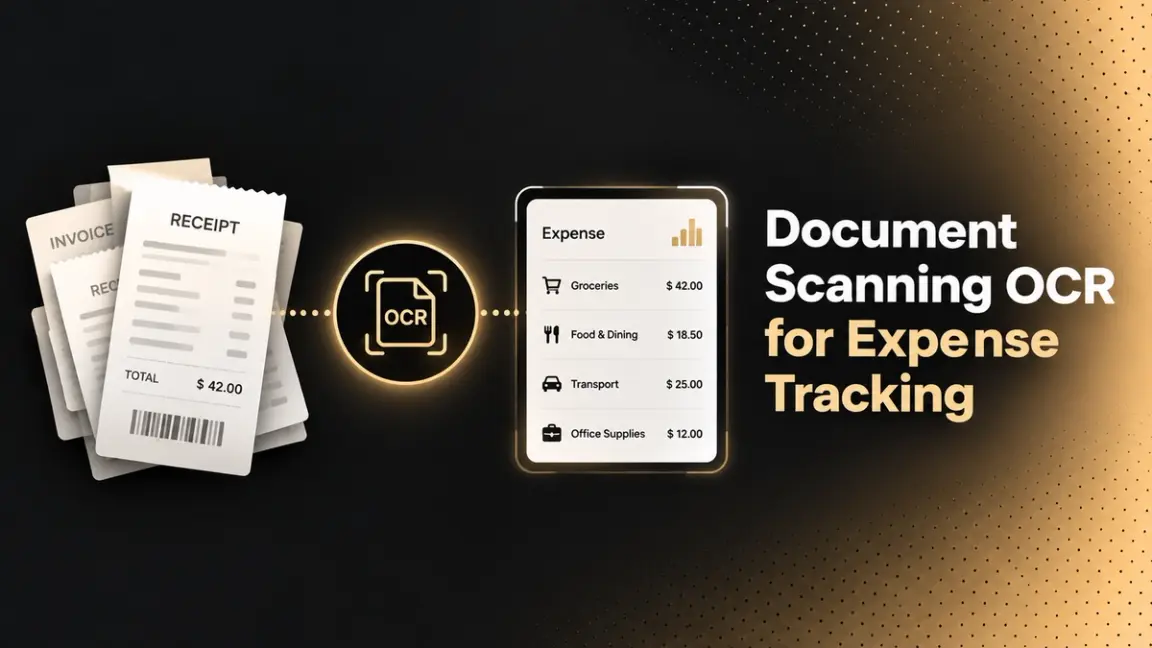
Automated expense tracking isn't one feature — it's a pipeline of distinct steps, each doing a specific job, whether you're using a commercial app or building your own. This is a guide to how that pipeline actually works: scanning, OCR extraction, merchant recognition and categorization, IRS and policy compliance checks, fraud and duplicate detection, and syncing into an expense report or accounting system.
Who This Is For
- Finance and ops teams wanting to understand what's actually happening at each step of an automated expense pipeline before evaluating specific tools.
- Small business owners and freelancers needing to understand IRS documentation requirements well enough to know whether an automated tool actually satisfies them.
- Developers and IT teams considering building a custom expense-scanning workflow rather than adopting a commercial app.
- Anyone managing travel or international expenses, where multi-receipt grouping and currency handling add real complexity beyond a single domestic receipt.
The Pipeline, Step by Step
- Capture — a receipt is scanned, photographed, or uploaded, in whatever format and quality it happens to be in.
- OCR extraction — text is pulled from the image or scan: merchant name, date, line items, tax, and total.
- Merchant recognition and categorization — the system identifies the merchant and, combined with purchase details, automatically assigns a spend category without a person manually selecting one.
- Compliance and policy checking — the categorized expense is checked against IRS documentation requirements and company spend policy, covered in detail below.
- Fraud and duplicate detection — the receipt is checked for signs of tampering, duplication, or mismatch against other records, also covered below.
- Storage and sync — the digitized receipt becomes part of a searchable, audit-ready record, and structured data syncs into an expense report, accounting software, or payroll system.
Steps 3 through 5 are where the real automation value sits; OCR alone only gets you from paper to text; categorization, compliance checking, and fraud detection are what actually remove manual review from the process.
How Merchant Recognition and Categorization Actually Works
The system recognizes a merchant from the extracted name and, combined with analysis of purchase details, assigns an appropriate category automatically — a coffee shop receipt gets categorized as meals, an airline receipt as travel, without a person choosing from a dropdown each time. The same recognition step can flag a purchase as potentially tax-deductible based on merchant type and spend pattern. This mechanism improves with volume and repetition — a system that's seen a specific merchant before categorizes it more reliably the next time.
IRS Documentation Requirements OCR Systems Need to Satisfy
Worth being specific about this, since "automated and compliant" gets asserted often without explaining what compliance actually requires:
- Receipts must capture vendor name, transaction date, amount, and a description of the expense — the core fields the IRS requires, which is exactly what OCR extraction is built to pull automatically rather than requiring manual entry.
- Mileage logs have a stricter requirement: date, destination, purpose, total miles, and odometer readings, and critically, the IRS requires these records be made contemporaneously — at or near the time of travel, not reconstructed later from memory. An automated mileage tracker using GPS detection satisfies this in a way a monthly manual log genuinely can't.
- The standard mileage rate changes annually — software needs to update this automatically to maintain compliance rather than relying on a stale, hardcoded rate.
- Hotel and travel receipts need itemization — room rate, taxes, and additional services separated out, with personal charges clearly distinguished from business ones, since a lump-sum hotel total doesn't satisfy documentation requirements on its own.
- A credit card statement alone doesn't replace a receipt — it shows date, vendor, and amount, but not the itemized detail or business purpose a receipt or expense description provides, which is why automated systems still capture the receipt image itself rather than relying on card-feed data alone.
- Monthly reconciliation catches gaps early — comparing captured receipts against bank and card statements on a regular cadence surfaces missing documentation before it becomes a year-end scramble, something automated matching can flag proactively rather than requiring a manual monthly audit.
Fraud Detection and Duplicate Prevention
This is worth its own section, since automated systems now handle fraud detection that goes meaningfully beyond simple amount-checking:
- Duplicate fingerprinting — identifying the exact same receipt image submitted more than once, whether across different dates or by different employees, catching a specific and real fraud pattern rather than relying on someone noticing a repeated filename.
- Data mismatch detection — flagging when a receipt's extracted date or location conflicts with the corresponding corporate card transaction feed, a discrepancy that's hard to catch manually but straightforward for an automated system cross-referencing two data sources.
- Synthetic document detection — a genuinely current concern worth naming directly: AI-generated fake receipts, created using online receipt generators that produce convincing, "pixel-perfect" forgeries, are a real and growing fraud vector. Systems built to flag this specifically are addressing a threat that didn't meaningfully exist a few years ago and that basic OCR extraction alone has no way to catch.
Handling Multi-Receipt and International Travel Expenses
A single business trip generates a genuinely harder document problem than a single domestic receipt:
- Trip-grouping — a hotel stay alone can generate multiple separate receipts (room charge, incidentals, resort fees), and systems built for this intelligently group related charges by travel dates rather than treating each as an unrelated submission, which is specifically what prevents duplicate-looking submissions from being flagged incorrectly or processed twice.
- Multi-currency and multi-language OCR — extraction needs to correctly read and convert receipts in the currency and language they were actually issued in, not just the reporting currency, with currency conversion methods matching company policy consistently.
- Automatic GL coding by department, project, or entity — relevant specifically for organizations reimbursing international travel across multiple subsidiaries, where the coding logic needs to route correctly regardless of which currency or country a receipt originated in.
Build vs. Buy: A DIY Option Most Guides Skip
Most comparisons jump straight to commercial apps, but there's a genuine build option worth naming directly: constructing a custom OCR-to-expense pipeline yourself using a workflow automation tool like Power Automate paired with an OCR connector. The pattern is straightforward — a cloud flow triggers when a receipt file is created or uploaded, an OCR action extracts the data, and the output feeds into whatever downstream system you've configured it to write to.
This isn't the right choice for everyone — it requires someone comfortable building and maintaining a workflow automation, and it won't have the polished categorization, fraud detection, or mobile capture experience a dedicated commercial app ships with out of the box, including the IRS-compliance and fraud-detection mechanisms covered above, which you'd need to build yourself rather than get by default. But it's a real, viable option for teams with existing workflow automation infrastructure wanting a lightweight pipeline for a specific internal use case a commercial app doesn't cover well.
Common Challenges
- Employees forgetting to submit receipts, addressed by automated reminders and push notifications tied to card transactions rather than relying on someone remembering weeks later.
- Faded, lost, or illegible receipts, a genuine documentation gap that automated capture at the point of purchase (rather than batched later) meaningfully reduces.
- Personal and business expenses mixed on one receipt or one card transaction, requiring clear separation that automated systems need to support explicitly, not just extract totals.
- Treating card-feed data as a substitute for the receipt itself, when the two serve different compliance purposes and neither fully replaces the other.
- Assuming basic OCR alone handles fraud and duplication, when these require the specific mechanisms covered above (fingerprinting, mismatch detection, synthetic document flagging), not just accurate text extraction.
What to Evaluate
- Whether categorization is genuinely automatic or just extraction with a manual category step still required.
- Whether mileage tracking is contemporaneous (GPS-based, real-time) rather than relying on manual monthly logs that don't satisfy IRS timing requirements.
- Fraud and duplicate detection depth — ask specifically whether the system checks for data mismatches against card feeds and synthetic/AI-generated receipts, not just repeated file uploads.
- Multi-currency and trip-grouping support, if travel or international expenses are a real part of your volume.
- Downstream sync reliability — whether extracted, categorized, compliance-checked data lands cleanly in your actual expense report or accounting system.
- If building your own pipeline: realistic maintenance capacity, and whether you're prepared to build compliance and fraud-detection logic yourself rather than getting it by default.
Conclusion
Automated expense tracking is a pipeline, not a single feature — capture, OCR extraction, merchant recognition and categorization, IRS and policy compliance checking, fraud and duplicate detection, and sync into a downstream system. The compliance layer specifically deserves more attention than it usually gets: IRS documentation requirements are specific and non-negotiable (contemporaneous mileage logs, itemized receipts, vendor and description fields), and fraud detection now has to account for genuinely new threats like AI-generated synthetic receipts.
Whether you adopt a commercial platform or build a lightweight pipeline yourself, these are the mechanisms worth testing directly rather than assuming from marketing language alone.
FAQ
Is automated expense tracking just OCR applied to receipts?
No, OCR is one step. The full pipeline includes merchant recognition, automatic categorization, IRS and policy compliance checking, fraud and duplicate detection, and syncing into a downstream system.
What does the IRS actually require for expense documentation?
Receipts need vendor name, transaction date, amount, and a description. Mileage logs need date, destination, purpose, total miles, and odometer readings, recorded contemporaneously — at or near the time of travel, not reconstructed later. A credit card statement alone doesn't satisfy either requirement on its own.
Can AI-generated fake receipts fool automated expense systems?
It's a real, current concern — "synthetic documentation" from online receipt generators can produce convincing forgeries that basic OCR extraction alone won't catch. More sophisticated systems specifically flag this pattern alongside duplicate fingerprinting and data-mismatch checks against card transaction feeds.
How do automated systems handle a hotel stay that generates multiple receipts?
Trip-grouping features intelligently associate related charges (room, incidentals, resort fees) by travel dates, rather than treating each as a separate, unrelated submission, this is specifically what prevents legitimate multi-receipt trips from being flagged as duplicates.
Can I build my own receipt-scanning expense pipeline instead of buying an app?
Yes, pairing a workflow automation tool like Power Automate with an OCR connector is a genuine option. It requires more setup and won't include fraud detection, compliance checking, or trip-grouping by default the way a commercial app does, but it's viable for teams with the right use case and infrastructure.
More articles
Document Workflow Automation at Mid-Sized Companies: Agencies, Platforms, and What Actually Changes by Size
How document workflow automation actually works for companies with 250–1,000 employees, including how implementation agencies operate.
Per-Document vs Per-Page Pricing in AI Extraction Services (2026)
Per-document vs per-page pricing for AI extraction: Google Document AI 2026 invoice and form parser rates, per-document vendors, and cost-by-length math.