%20{%20:root%20{%20--deepread-stroke:%20%23E5E7EB;%20}%20}%20.dark%20{%20--deepread-stroke:%20%23E5E7EB;%20}%20%3c/style%3e%3crect%20x='40'%20y='30'%20width='220'%20height='260'%20rx='28'%20ry='28'%20stroke='var(--deepread-stroke)'%20stroke-width='16'%20fill='none'/%3e%3cpath%20d='M180%2030v52c0%2010%208%2018%2018%2018h62'%20stroke='var(--deepread-stroke)'%20stroke-width='16'%20fill='none'/%3e%3cline%20x1='70'%20y1='130'%20x2='200'%20y2='130'%20stroke='var(--deepread-stroke)'%20stroke-width='16'%20stroke-linecap='round'/%3e%3cline%20x1='70'%20y1='165'%20x2='200'%20y2='165'%20stroke='var(--deepread-stroke)'%20stroke-width='16'%20stroke-linecap='round'/%3e%3cline%20x1='70'%20y1='200'%20x2='170'%20y2='200'%20stroke='var(--deepread-stroke)'%20stroke-width='16'%20stroke-linecap='round'/%3e%3c!--%20green%20download%20arrow%20in%20bottom%20right%20corner%20--%3e%3cpath%20d='M210%20202v58'%20stroke='var(--deepread-accent)'%20stroke-width='18'%20stroke-linecap='round'/%3e%3cpath%20d='M195%20245l15%2015%2015-15'%20fill='none'%20stroke='var(--deepread-accent)'%20stroke-width='18'%20stroke-linecap='round'%20stroke-linejoin='round'/%3e%3c/svg%3e)
OCR Software Overview: How It Works, the Different Types, and What to Look For
Discover how OCR software works, explore different OCR types, key features, benefits, and what to consider when choosing the right solution.
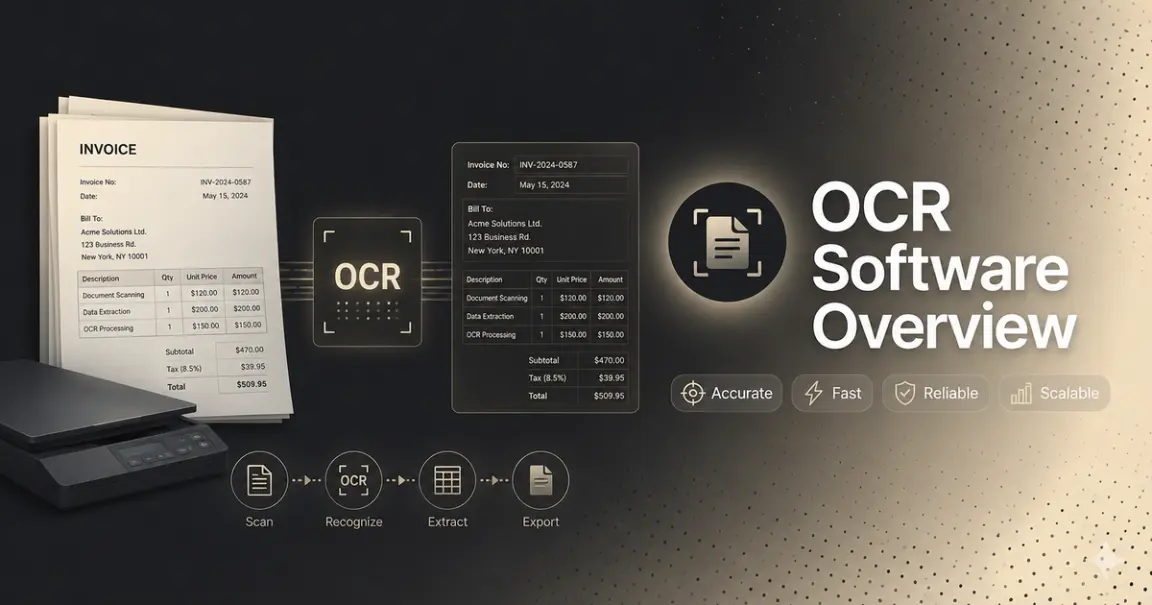
Every OCR tool claims to "read" documents. Few explain what that actually means, or why two OCR products can process the same invoice and produce wildly different results — and even fewer tell you that the right OCR software depends heavily on who you are and what you're trying to fix.
Manual document processing is what compresses margins in freight, BFSI, healthcare, insurance, and real estate — not because these industries lack smart people, but because someone is still keying in data that a machine could extract in seconds. This is a breakdown of what OCR software is, how it works, the categories it now falls into, and what to check before you pick one — organized around the actual reasons people go looking for it.
Who Actually Searches for OCR Software (and Why)
Before the mechanics, it's worth being specific about who ends up here, because "best OCR software" means something different depending on the answer:
- Freight and logistics teams processing bills of lading, proof of delivery, and carrier invoices by hand, usually at a volume where manual entry is now the bottleneck rather than the workaround.
- Developers who've already tried an OCR API — Textract, Nanonets, or something built in-house — and hit an accuracy ceiling or spent weeks building workarounds instead of shipping.
- Ops and IT leads at high-volume enterprises (BFSI, healthcare, insurance, real estate) evaluating platforms like Rossum or UiPath, where the tool itself is capable but the implementation timeline and budget aren't.
- Compliance and privacy teams doing PII detection and redaction manually today, with no audit trail, because most OCR tools don't treat compliance as a first-class feature.
- AI/ML and product teams who need OCR output to slot directly into an existing pipeline — async processing, webhooks, schema-driven JSON — not a UI to click through.
If you recognize yourself in one of these, skip ahead to "Types of OCR Software" and "What to Check Before Choosing." If you want the full picture first, keep reading.
What Is OCR Software?
Optical Character Recognition (OCR) software converts images of text — scanned pages, photographed documents, image-only PDFs — into machine-readable, searchable, or structured data. Instead of a person retyping a scanned invoice or bill of lading, OCR software identifies the characters in the image and turns them into text a computer can process.
That's the narrow definition. The practical one, for anyone evaluating OCR software in 2026, is broader: modern OCR software doesn't just extract text — it extracts structure. It tells you not only what a document says, but what each piece of text means: this is an invoice number, this is a total, this is a shipper's signature block. That distinction is the difference between "we digitized our documents" and "we eliminated manual data entry", and it's the second one that actually moves cost and headcount.
How OCR Software Works
Most OCR pipelines, regardless of vendor, run through the same four stages:
- Image acquisition — the document page is captured or scanned and converted into a format the engine can analyze, typically reduced to light and dark regions.
- Preprocessing — the image is cleaned up: deskewing pages scanned at an angle, removing background noise, stripping out lines and boxes that aren't part of the actual text.
- Character/text recognition — the engine identifies dark regions as characters, groups characters into words, and words into lines and sentences.
- Post-processing — contextual and language models correct likely errors, especially for irregular fonts or handwriting, before the final output is returned.
The more capable tools go a step beyond core OCR: they don't just return plain text; they return structured, schema-mapped JSON — field names, values, tables, and confidence scores, ready to drop into a database or downstream workflow without a human re-keying anything. This structured layer — classification, field mapping, schema output — sits on top of OCR rather than being another OCR stage itself. For a developer, this is the entire ballgame: plain text means you're still writing parsing logic; structured output means you're not.
Three Generations of OCR Software
Rules-based / traditional OCR relies heavily on pattern-matching and fixed rules. It's fast and low-cost, but can struggle with handwriting, unusual fonts, and layouts it wasn't tuned for. Tesseract is the best-known open-source engine — though modern versions (v4+) now use neural network models, so it's no longer purely rules-based.
ML-based OCR layers machine learning on top of pattern matching, so the engine improves with exposure to varied layouts and fonts, and handles moderate handwriting and messier scans more reliably.
AI/LLM-native structured extraction — the current generation. Instead of just reading characters, these systems understand document layout and semantics, and output structured data directly — field names, tables, hierarchies, often without requiring a template or a model retrained per document type, though this varies by system and configuration. This is also where the developer pain point usually lives: tools that demand per-document-type training can break when a new invoice format or carrier layout shows up, which means someone's re-training a model instead of shipping.
Types of OCR Software (by Deployment)
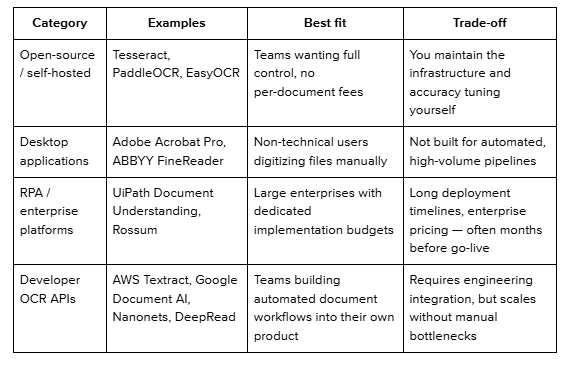
Two things worth naming directly:
- If you're an ops or IT lead evaluating Rossum or UiPath, the trade-off is rarely capability — it's timeline and cost. Enterprise RPA platforms are built for teams that can absorb a long implementation cycle; a developer OCR API with a free tier lets you validate accuracy on your own documents in days, not quarters.
- If you're a developer, the deployment type isn't really a choice; you're in API territory by default. What matters more at that point is whether the API handles batch volume asynchronously (so large document runs don't block or time out your application) and whether it returns schema-driven output you don't have to re-parse every time a layout changes.
What Actually Drives OCR Accuracy
"Accuracy" gets thrown around as a single number, but it's really a function of several things:
- Image quality: Clean, high-resolution scans are easy; blurry, tilted, or low-light images (common in freight and field-collected documents) are not.
- Handwriting and non-standard formats: Most OCR tools were built and tuned for printed text; handwritten fields and unconventional layouts are where accuracy commonly drops.
- Layout retention: Whether the engine preserves tables, columns, and field relationships, rather than returning a flat wall of text.
- Confidence handling: Whether uncertain extractions are flagged for a human to check, or silently returned as-is. This is the detail that separates tools in production from tools that look good in a demo: a system that fails silently on a low-confidence field is worse than one that flags it, even if their raw accuracy scores look identical on paper. For any team running documents at volume, freight invoices, insurance claims — this is often the actual determinant of whether OCR software reduces ops load or just moves the error somewhere less visible.
- Batch and scale handling: Whether the system can process large document batches asynchronously, without timing out or blocking the rest of your application. This matters specifically for AI/ML and product teams wiring OCR into an existing pipeline, where a blocking call on a 500-document batch isn't a minor inconvenience — it's a broken workflow.
The honest way to evaluate any accuracy claim, including a vendor's own: ask what document set it was measured against, whether the methodology is public, and whether you can verify it yourself. DeepRead publishes its full benchmark methodology, dataset breakdown, and results, including per-document-type accuracy, as one example of what a checkable claim looks like, rather than a number in a marketing slide.
Compliance and PII: Often the Part That's Still Manual
For compliance and privacy teams, OCR software solves half the problem and creates the other half. Extracting structured data from a bank statement or medical bill also means that PII is now sitting in your system, and most OCR tools stop at extraction, leaving detection and redaction as a separate manual step.
What to look for if this is your primary use case:
- Automated PII detection built into the extraction step, not bolted on afterward
- Redaction that's automated and consistent, not manually applied per document
- A workflow you can point to in an audit, rather than "we handle this case by case"
If PII handling is still a manual review step in your process today, that's usually the clearest sign the OCR tool you're evaluating wasn't built with compliance as a first-class requirement.
Where OCR Software Gets Used
- Freight and logistics — bills of lading, proof of delivery, carrier invoices
- Banking and financial services — bank statements, loan documents, account-opening forms
- Healthcare — medical bills, insurance claims, patient forms
- Insurance — claims processing, policy documents
- Real estate — leases, title documents, closing paperwork
The common thread across all five: high document volume, non-standard layouts, and a direct, measurable cost to manual re-keying. That's why OCR adoption concentrates here rather than spreading evenly across every business type, the ROI is easiest to prove where the manual alternative is most visibly expensive.
What to Check Before Choosing OCR Software
- Independently verifiable accuracy — not a marketing number, but a benchmark you can check against real documents and competing tools, with a published methodology behind it.
- Compliance and PII handling — especially for regulated data like medical bills, bank statements, or ID documents.
- Human-in-the-loop fallback — does uncertain output get flagged, or does it fail silently?
- Integration path — REST APIs, SDKs, and webhooks if you're building this into a product; async support if you're processing documents in batches; a GUI only if you're not technical. Check the provider's own documentation for the specifics rather than relying on a sales page.
- Deployment speed — can you be live in days, or is this a quarter-long enterprise rollout?
- Pricing and trial access — can you test the tool against your own documents before committing, or is pricing gated behind a sales call?
Conclusion
There's no single "best" OCR software — there's the right OCR software for what's actually costing you time or money. A freight team drowning in BOLs needs volume and speed more than a fancy UI. A developer who's already hit an accuracy wall needs an API that returns clean, schema-driven JSON without demanding a model retrain every time a layout shifts.
A compliance team needs automated PII detection and redaction built in, not bolted on. And an enterprise stuck evaluating Rossum or UiPath usually isn't questioning capability; it's questioning whether they can afford the timeline.
The through-line across all of it: accuracy claims are only as useful as the methodology behind them. Whatever you choose, test it against the messiest, most representative document you actually process — not a clean sample PDF — and ask for a public benchmark, not just a headline number, before you commit budget or engineering time to it.
FAQ
Is OCR the same as AI?
Not inherently. Traditional OCR was originally pattern matching rather than AI, though most modern engines — including open-source ones like recent Tesseract versions — now use neural network models. "OCR" itself just refers to the task of extracting text from images, regardless of the underlying method.
What's the difference between OCR, ICR, and IDP?
OCR reads printed text. ICR (Intelligent Character Recognition) extends that to handwriting. IDP (Intelligent Document Processing) is the broader category; it includes OCR/ICR as one step, plus classification, structured data extraction, and workflow automation on top.
How is an OCR API different from a platform like Rossum or UiPath?
Capability-wise, they can overlap. The practical difference is deployment: RPA/enterprise platforms are usually built around a longer implementation process and enterprise contracts, while a developer OCR API is built to integrate directly into your existing product or workflow — often testable within days on a free tier rather than requiring a sales cycle first. See a provider's API documentation directly to compare integration effort.
Can OCR software handle PII detection and redaction automatically?
Some can, most can't. Basic OCR tools extract data and stop there, leaving PII detection and redaction as a manual downstream step. If audit-ready compliance matters to you, this needs to be a specific evaluation criterion, not an assumption.
Is there free OCR software?
Yes, both open-source engines (Tesseract, PaddleOCR) and free tiers from commercial OCR APIs, though free tiers usually cap monthly document volume. Check current terms on the provider's pricing page, since these change.
How accurate is OCR software, really?
It depends heavily on document type and tool, and it's worth asking for a specific, verifiable answer rather than a general one. DeepRead's published benchmark, for example, measures accuracy across eight document types — invoices, medical bills, payslips, bank statements, insurance forms, W-2s, driver's licenses, and offer letters — against a fixed ground-truth dataset, with results and methodology public at deepread.tech/benchmarks. Whichever tool you're evaluating, ask the same question: what was this measured against, and can you check it yourself?
More articles
Structured Data Extraction: A Technical Guide
How to extract structured data from documents using an AI API, the architecture, grounding, and named tools compared.
Key Features of AI Document Workflow Automation
AI document workflow automation features, governance, prioritization framework, and real examples with measurable benefits for 2026.