%20{%20:root%20{%20--deepread-stroke:%20%23E5E7EB;%20}%20}%20.dark%20{%20--deepread-stroke:%20%23E5E7EB;%20}%20%3c/style%3e%3crect%20x='40'%20y='30'%20width='220'%20height='260'%20rx='28'%20ry='28'%20stroke='var(--deepread-stroke)'%20stroke-width='16'%20fill='none'/%3e%3cpath%20d='M180%2030v52c0%2010%208%2018%2018%2018h62'%20stroke='var(--deepread-stroke)'%20stroke-width='16'%20fill='none'/%3e%3cline%20x1='70'%20y1='130'%20x2='200'%20y2='130'%20stroke='var(--deepread-stroke)'%20stroke-width='16'%20stroke-linecap='round'/%3e%3cline%20x1='70'%20y1='165'%20x2='200'%20y2='165'%20stroke='var(--deepread-stroke)'%20stroke-width='16'%20stroke-linecap='round'/%3e%3cline%20x1='70'%20y1='200'%20x2='170'%20y2='200'%20stroke='var(--deepread-stroke)'%20stroke-width='16'%20stroke-linecap='round'/%3e%3c!--%20green%20download%20arrow%20in%20bottom%20right%20corner%20--%3e%3cpath%20d='M210%20202v58'%20stroke='var(--deepread-accent)'%20stroke-width='18'%20stroke-linecap='round'/%3e%3cpath%20d='M195%20245l15%2015%2015-15'%20fill='none'%20stroke='var(--deepread-accent)'%20stroke-width='18'%20stroke-linecap='round'%20stroke-linejoin='round'/%3e%3c/svg%3e)
10 Best Invoice Automation Software Platforms (2026)
The best invoice automation software for both sides of the cycle - paying vendors (AP) and getting paid (AR), with verified pros, cons, and pricing.
"Invoice automation software" covers two distinct jobs that happen to share a document type: paying vendors (accounts payable) and getting paid by customers (accounts receivable). This ranks the leading platforms on both sides, with real advantages and limitations for each, not just a features list.
One correction worth flagging up front: an earlier pass at this list included Sage Business Cloud Accounting as an AR option. That product was retired in the US on December 31, 2024, with support ending January 31, 2025 — it's still live in other countries, but not in the US. Sage Intacct is the current live Sage product for this market and is listed below instead.
Who This Is For
- Finance leaders and controllers managing both sides of the invoice cycle, trying to figure out whether one platform can genuinely do both well.
- Small business owners for whom "invoice automation" usually means the AR side — sending invoices and getting paid faster.
- Ops and AP teams who know they need the payables side specifically and want a clear, verified shortlist.
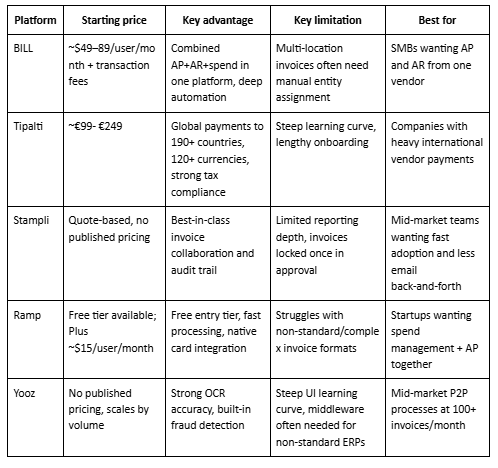
AP Platforms at a Glance
AR Platforms at a Glance
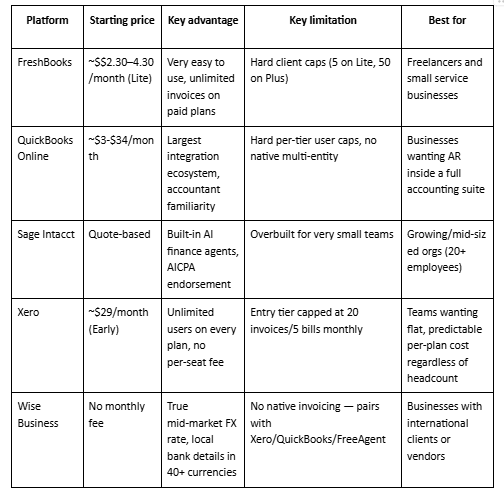
Pricing shifts frequently across this category — treat the figures above as directional and confirm current rates directly before budgeting.
Best AP-Side Invoice Automation Software
1. BILL
Combines AP and AR in one platform, with electronic invoice receipt, automated data extraction, customizable approval workflows, and multi-method payment processing (ACH, wire, check).
- Advantages: Deep automation and approval-workflow configurability; genuinely combines AP, AR, spend, and expense management in one place rather than requiring separate tools; API access available; an accountant program lets firms standardize pricing and workflow across many clients.
- Limitations: Multi-location businesses often need to manually assign invoices to specific entities, since BILL wasn't built primarily for multi-location routing; multi-entity features are gated to Corporate and Enterprise tiers. AP-only businesses may end up paying for AR features they don't use at higher tiers.
- Pricing: Essentials tier reported around $49/user/month, Team around $59/user/month, Corporate around $79–89/user/month, plus per-transaction fees (roughly $0.59 ACH, $1.99 check), figures vary by source, and BILL updates pricing periodically, so confirm current rates directly.
2. Tipalti
AI-powered global payables platform supporting payments across 190+ countries in 120+ currencies, with automated tax compliance (VAT, tax forms), supplier onboarding, and fraud/risk controls.
- Advantages: Genuinely global reach with multi-currency and cross-border tax handling built in, not bolted on; automated supplier onboarding cuts a meaningful chunk of manual data entry; partners with major financial institutions (Citi, Wells Fargo, J.P. Morgan, Visa) for payment execution; strong ERP integration with NetSuite, QuickBooks, and Xero.
- Limitations: A steep learning curve and lengthy onboarding are consistently reported across reviews, along with limited reporting depth for teams needing detailed financial analysis. Not built for straightforward, purely domestic bill pay — the complexity pays off mainly once global payments or multi-entity operations are already a real requirement.
- Pricing: Reports vary from roughly €99/month at the low end up to €249/month for full global-payment deployments — pricing is modular and transaction-driven, so a quote based on your specific product mix, entity count, and volume is the only reliable number.
3. Stampli
Centers on collaborative, invoice-level communication, comments, tagging, and audit history directly on each invoice, with AI-assisted GL coding that improves from historical corrections.
- Advantages: Genuinely strong ease-of-use and fast adoption relative to competitors; invoice-level collaboration removes a lot of the email/Slack back-and-forth that slows down approvals elsewhere; AI coding assistant improves with use; supports procurement and AP card capabilities beyond basic bill pay.
- Limitations: Reporting and data extraction are repeatedly cited as limited compared to what finance teams need for advanced analysis. Invoices can't be modified once they enter the approval process or are complete, which can create friction when corrections are needed mid-workflow.
- Pricing: No published self-serve pricing; quote-based, positioned toward mid-market complexity rather than very small businesses.
4. Ramp
AP automation bundled with corporate cards and spend management; markets 99% accurate OCR and invoice processing roughly 2.4x faster than legacy AP software, with ACH, card, check, and international wire payment options syncing to ERPs like NetSuite, QuickBooks, and Sage Intacct.
- Advantages: A genuinely free Bill Pay tier lowers the barrier to entry meaningfully compared to per-user-priced competitors; fast, user-friendly onboarding with minimal training required; native corporate card integration gives spend visibility most standalone AP tools don't offer.
- Limitations: Built card-first, with AP as an extension rather than the core product — multi-location businesses often need location-specific email intake and manual approver routing, and some users report recurring sync issues with QuickBooks and NetSuite. AI processing can struggle with non-standard or complex multi-page invoice formats, and multi-currency batch processing has reported constraints.
- Pricing: A genuinely free Bill Pay tier exists, with a Plus tier reported around $15/user/month and enterprise pricing negotiated separately; per-transaction fees apply (around $0.59 ACH, $1.99 check, $10–20 for expedited payments).
5. Yooz
AI- and OCR-driven invoice capture, matching, and workflow automation aimed at mid-market procure-to-pay processes, with built-in fraud detection (including duplicate-payment alerts) and audit trail features.
- Advantages: Genuinely strong OCR/AI data capture accuracy according to reviewer consensus; easy integration with major accounting systems like QuickBooks; real-time invoice and payment tracking; built-in fraud detection and strong e-invoicing compliance (notably Factur-X in France); proven scale (7,000+ customers, 300M+ invoices processed).
- Limitations: A not-especially-intuitive interface creates a real learning curve for new users, and integration with non-standard ERP or accounting systems can require extra middleware. Reporting and analytics are considered limited relative to competitors like Tipalti.
- Pricing: No published pricing; subscription-based with tiers that scale by document volume and selected features, best suited to companies processing roughly 100+ invoices a month.
Best AR-Side Invoice Automation Software
6. FreshBooks
Invoicing and light accounting built specifically for small business owners and their clients — unlimited invoices and estimates, automated late-payment reminders and fees (on higher tiers), recurring billing, and mobile expense/mileage tracking.
- Advantages: Genuinely easy to use even without an accounting background; unlimited invoices and estimates on every paid plan regardless of client count; unlimited user accounts (at a per-user add-on fee); consistently praised, responsive customer support.
- Limitations: The defining constraint is a hard cap on billable clients per plan — 5 clients on Lite, 50 on Plus — regardless of invoice volume; most growing businesses outgrow Lite within months. Reporting is genuinely basic compared to QuickBooks or Xero, and PayPal integration has reportedly been removed in some configurations.
- Pricing: Lite plan reported in the $2.30/month range depending on promotion and billing cycle (annual vs. monthly), Plus around $4.30/month, Premium and Select scaling higher — FreshBooks runs frequent promotional pricing, so treat any specific figure as a snapshot.
7. QuickBooks (Online)
The long-standing US SMB accounting standard, with AR features (invoicing, online payment acceptance, automated reminders via Bill Pay add-ons) built into a broader accounting suite rather than sold standalone.
- Advantages: The deepest third-party integration ecosystem in this category (750+ apps); near-universal familiarity among US accountants and bookkeepers, which simplifies handoff; free accountant login included on every plan; robust reporting and role-based access on higher tiers.
- Limitations: Hard user caps per tier (1 user on Solopreneur/Simple Start up to 25 on Advanced) block growth without upgrading — there's no way to simply add a seat. No native multi-entity support; each company requires its own separate subscription, which Xero and some alternatives handle more flexibly.
- Pricing: Five tiers as of 2026 — Simple Start around $3/month, Essentials around $8/month, Plus around $14/month, Advanced around $34/month — QuickBooks has raised prices multiple times in 2026, so confirm current figures directly.
8. Sage Intacct
Cloud-based financial management built for growing and mid-sized organizations (typically 20+ employees), with built-in AI finance agents (a Finance Intelligence assistant for report Q&A, a Close agent that tracks month-end tasks and flags issues) and AICPA endorsement.
- Advantages: Purpose-built AI agents genuinely reduce manual close and reporting work rather than being a bolted-on chatbot; strong multi-entity and complex-organization support that SMB-tier tools lack; AICPA endorsement carries real weight with accounting firms and auditors.
- Limitations: Not built for very small businesses or solo operators — the 20+ employee positioning means it's meaningfully more than most freelancers or small AR-only teams need. As with most quote-based platforms, total cost isn't transparent without a sales conversation.
- Pricing: Quote-based; positioned above SMB-tier tools like FreshBooks or QuickBooks Essentials, reflecting its mid-market target.
9. Xero
Cloud accounting is widely used as a QuickBooks alternative, especially outside the US, with automated invoice reminders, multi-currency invoicing, and strong accountant/bookkeeper collaboration tools.
- Advantages: Unlimited users on every plan with no per-seat fee — a real cost advantage over QuickBooks for teams with many occasional approvers; strong bank reconciliation and bank-feed automation; an interface reviewers consistently describe as more approachable for non-accountants.
- Limitations: The entry-tier Early plan's 20-invoice/5-bill cap is genuinely restrictive; most active small businesses upgrade to Growing within a few months. No direct phone support (email/chat only), and multi-state US tax complexity is less comprehensively handled than QuickBooks.
- Pricing: Three US tiers — Early around $29/month (capped at 20 invoices and 5 bills monthly), Growing around $50–75/month (unlimited invoices and bills), Established around $90/month — all plans include unlimited users at no extra per-seat cost.
10. Wise Business
Not a full invoicing platform, a multi-currency payment and collection account (local bank details in 40+ currencies, batch payments to 1,000+ recipients, an open API) that integrates with existing invoicing software rather than replacing it.
- Advantages: A genuinely transparent mid-market exchange rate with no hidden markup, unlike traditional bank FX; local bank details mean international clients can pay like a domestic transfer, avoiding wire fees on their end; no monthly account fee; a capable API for teams wanting to automate payout workflows directly.
- Limitations: No native invoicing — you raise invoices in your accounting software (Xero, QuickBooks, or FreeAgent) and route payment through Wise. It's not a bank: no loans, no overdrafts, no cheques, and funds are safeguarded rather than covered by deposit protection schemes like the FSCS.
- Pricing: No monthly account fee; transparent per-transaction and conversion fees at the mid-market exchange rate. Inbound international wire fees can add up meaningfully at volume; one detailed review calculated roughly $61/month in inbound fees alone for a business receiving ten international wires monthly.
Full-Cycle Platforms: The Real Trade-off
BILL is the clearest example of a platform genuinely attempting both AP and AR in one product, appealing for consolidation — one vendor, one login, one integration to maintain. The honest trade-off: a platform built to do both directions reasonably well is rarely the strongest option on either side individually compared to a specialist. If AP complexity is high (multi-entity, heavy PO matching, compliance-driven), a dedicated AP platform is usually the stronger choice. If AR is genuinely light and AP is the priority, or vice versa, a full-cycle tool can be the simpler, lower-overhead option.
How to Evaluate Either Side
- Separate the two evaluations mentally before comparing vendors — a platform strong on AP capture accuracy isn't necessarily strong on AR collection speed.
- Verify pricing and feature limits directly before committing — as the entries above show, published pricing shifts often, and third-party summaries can lag actual changes.
- Confirm accounting/ERP sync is automatic, not a manual export-import step dressed up as "integration."
- For AP specifically, verify extraction accuracy on your actual invoice mix — this is the layer everything else in AP automation depends on. DeepRead's benchmarks page shows what a checkable version of that claim looks like.
- For AR specifically, check how fast collected payments actually reconcile — a fast invoicing UI doesn't matter much if payment matching still requires manual review.
Conclusion
There's no single "best invoice automation software" because it's really two separate rankings: best for paying vendors, best for getting paid by customers. Every platform above has genuine strengths and genuine, specific limitations that only show up once you're past the marketing page. None of these limitations disqualify a platform; they just mean the right fit depends on which trade-off you can actually live with, and the tables above are meant to make that trade-off visible at a glance before you go deeper on any one option.
FAQ
Is invoice automation software the same as AP automation?
Not exactly; AP automation is one half of invoice automation, specifically handling invoices coming into the business. Invoice automation as a broader category also includes accounts receivable: sending invoices and collecting payment from customers.
Is Sage still a good option for invoice automation in the US?
Sage Business Cloud Accounting, the product most often recommended in older AR comparisons, was retired in the US at the end of 2024. Sage Intacct is the current live Sage product for this market, though it's positioned for mid-sized organizations (20+ employees) rather than small businesses or freelancers.
Which AP platform has the fewest hidden limitations for multi-location businesses?
None of the five covered here were purpose-built for multi-location or multi-entity operations specifically — BILL, Ramp, and Stampli all report some form of manual workaround needed for location-specific routing. If multi-location complexity is your primary requirement, that's worth weighing heavily before choosing any of these as a default.
Which AR platform is best for international businesses?
Xero and Wise Business both handle multi-currency well for different reasons — Xero as a full AR platform with multi-currency invoicing built in, Wise Business as a payment collection layer with local bank details in 40+ currencies to pair with whatever invoicing tool you're already using.
Where can I find a deeper comparison of AP automation platforms specifically?
A dedicated comparison covering AP-specific platforms — BILL, Tipalti, Stampli, Ramp, Yooz, and others — by segment, compliance criteria, and named-vendor positioning, goes into more depth than the AP entries in this list.
More articles
Structured Data Extraction: A Technical Guide
How to extract structured data from documents using an AI API, the architecture, grounding, and named tools compared.
Key Features of AI Document Workflow Automation
AI document workflow automation features, governance, prioritization framework, and real examples with measurable benefits for 2026.