%20{%20:root%20{%20--deepread-stroke:%20%23E5E7EB;%20}%20}%20.dark%20{%20--deepread-stroke:%20%23E5E7EB;%20}%20%3c/style%3e%3crect%20x='40'%20y='30'%20width='220'%20height='260'%20rx='28'%20ry='28'%20stroke='var(--deepread-stroke)'%20stroke-width='16'%20fill='none'/%3e%3cpath%20d='M180%2030v52c0%2010%208%2018%2018%2018h62'%20stroke='var(--deepread-stroke)'%20stroke-width='16'%20fill='none'/%3e%3cline%20x1='70'%20y1='130'%20x2='200'%20y2='130'%20stroke='var(--deepread-stroke)'%20stroke-width='16'%20stroke-linecap='round'/%3e%3cline%20x1='70'%20y1='165'%20x2='200'%20y2='165'%20stroke='var(--deepread-stroke)'%20stroke-width='16'%20stroke-linecap='round'/%3e%3cline%20x1='70'%20y1='200'%20x2='170'%20y2='200'%20stroke='var(--deepread-stroke)'%20stroke-width='16'%20stroke-linecap='round'/%3e%3c!--%20green%20download%20arrow%20in%20bottom%20right%20corner%20--%3e%3cpath%20d='M210%20202v58'%20stroke='var(--deepread-accent)'%20stroke-width='18'%20stroke-linecap='round'/%3e%3cpath%20d='M195%20245l15%2015%2015-15'%20fill='none'%20stroke='var(--deepread-accent)'%20stroke-width='18'%20stroke-linecap='round'%20stroke-linejoin='round'/%3e%3c/svg%3e)
How Automation Reduces Data Entry Errors in Document Processing
How automation actually reduces data entry errors in document processing — root causes, specific mechanisms, and how to measure results.
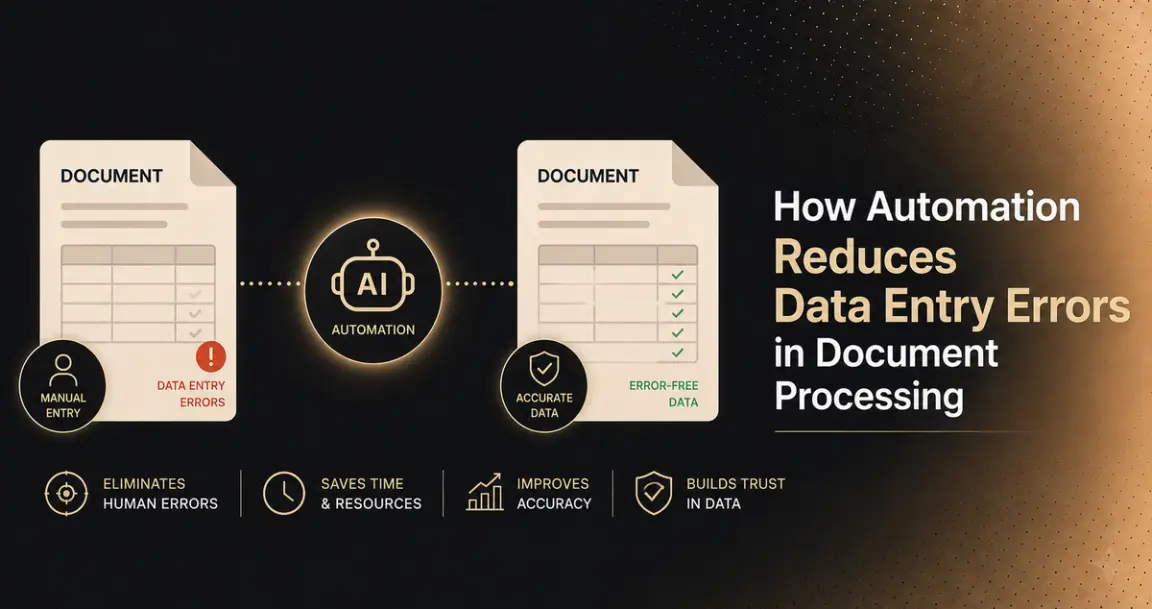
Manual data entry doesn't fail randomly — it fails in predictable, specific ways: a transposed digit, a field left blank, the wrong code applied, a date formatted inconsistently between two systems. Human error rates in manual data entry typically range from 1–5%, and each of these errors has a specific, identifiable cause, addressed by a specific mechanism in automated document processing — not by "AI" as a general fix.
This is a guide to what actually causes manual entry errors, the technology behind how automation addresses each cause specifically, where this shows up across industries, what errors actually cost beyond the mistake itself, and how to measure whether automation genuinely worked after implementation.
Who This Is For
- Operations and finance leaders trying to understand why manual data entry keeps producing errors, and what specifically automation fixes versus what it doesn't.
- Teams evaluating whether automation is worth the investment, wanting to understand the real cost of errors, not just processing speed.
- Implementation teams needing a framework for measuring whether automation actually reduced errors after go-live, not just assuming it did.
What Actually Causes Manual Data Entry Errors
Worth naming the specific, recurring error types rather than treating "human error" as one undifferentiated category:
- Transposed numbers — digits swapped during manual retyping, a specific, mechanical mistake distinct from a judgment error.
- Missing or blank fields — a required value skipped, often under time pressure or during high-volume batches.
- Misapplied codes — the wrong category, GL code, or classification applied, usually from inconsistent judgment rather than carelessness.
- Inconsistent formatting — dates, currencies, and phone numbers entered in different formats across records, causing downstream matching and merging failures.
- Fatigue-driven degradation — accuracy dropping over the course of a shift or a large batch, a genuine, physiological root cause distinct from carelessness or lack of training.
Each of these has a different underlying cause, which is exactly why automation addresses them through different specific mechanisms, not one blanket fix.
The Specific Mechanisms Automation Uses to Address Each
- Validation rules at the point of entry — mandatory fields can't be left blank, only valid formats are accepted, directly addressing missing fields and formatting inconsistency at the source rather than catching them downstream.
- Consistent, rule-based standardization — dates, currencies, and codes are normalized into one format automatically, removing the inconsistency that causes matching and merging errors between systems.
- No fatigue curve. Automated processing doesn't degrade over the course of a batch the way manual entry does — the 500th document in a batch is processed with the same mechanism as the first, addressing the fatigue-driven error pattern specifically.
- Pattern recognition for context-dependent judgment calls. Systems trained on prior data can recognize that a given value likely belongs in a specific category based on context, addressing misapplied codes and classification errors more consistently than manual judgment under time pressure.
- Confidence-threshold escalation. Rather than treating every field as equally certain, values below a confidence threshold get flagged for human review while high-confidence values proceed automatically — this is what prevents automation from simply replacing human errors with silent automated ones. Claims meeting predefined confidence thresholds can be processed automatically, while anomalies are escalated for human review specifically, striking a deliberate balance between efficiency and oversight rather than choosing one or the other universally.
- Handling document formats manual entry treats inconsistently. Modern automated systems process scanned paper, PDFs, digital forms, and even handwritten documents through the same pipeline, removing the variability that comes from different people handling different formats differently by hand.
The Technology Layers Behind Automated Extraction
The mechanisms above run on a stack of distinct technologies, each handling a different part of the problem — worth understanding separately, since a platform can be strong at one layer and weak at another.
- OCR and computer vision form the foundation — OCR reads printed and handwritten text, including complex layouts like tables and multi-column forms, while computer vision adds the spatial layer on top: recognizing document structure, identifying tables and forms, and understanding how different pieces of information relate to each other on the page. OCR alone only returns text; it takes computer vision to understand what that text actually represents structurally.
- Natural language processing adds comprehension. Once text and structure are extracted, NLP interprets meaning — resolving ambiguity, understanding business terminology, and identifying relationships between concepts. Processing a contract, for instance, means not just reading the words but recognizing which clauses represent obligations, which represent dates and deadlines, and how they relate.
- Intelligent document processing (IDP) combines OCR, NLP, and generative AI into one layer that reads, classifies, and interprets documents in a way closer to human understanding, at far greater speed. In practice, this is what lets a system capture an invoice, extract supplier, amount, and due date, classify the document type, and cross-check it against existing records — all as one coordinated step rather than separate manual tasks.
- An orchestration layer ties the pieces together — deciding what happens next based on what was extracted, routing documents by type, and adapting the approach depending on document characteristics and business rules, rather than applying one fixed process to every document regardless of what it actually contains.
The mechanisms in the previous section — validation rules, confidence-threshold escalation, consistent formatting — are implemented through this stack, not separately from it. A platform weak at the computer vision layer, for instance, will struggle with table-heavy documents no matter how good its validation rules are downstream.
Where This Shows Up Across Industries
The same underlying mechanism applies everywhere, but the specific error consequences differ by context:
- Invoice and accounts payable processing — supplier names, amounts, and due dates retyped from scanned PDFs and emails, with duplicate and fraud checks layered on top of extraction.
- Customer onboarding and KYC documentation — passports, IDs, utility bills, and financial statements arriving in multiple formats, where manual review at regulated institutions has been reported to take up to several months per customer review at scale.
- Insurance claims processing — a mix of handwritten forms, medical records, photos, and repair estimates, where automated triage and confidence-threshold escalation directly affect both processing speed and fraud detection.
- Healthcare records — patient intake forms, lab results, and physician notes, where a data entry mistake carries meaningfully higher stakes than in most other document categories.
- Legal document review and contracts — clause extraction and risk identification from lengthy agreements, where manual review of a single contract has been reported to take several hours.
- Supply chain documentation — bills of lading, purchase orders, and customs paperwork, where a missing or inconsistent field can cause real delays at ports or distribution centers, not just an internal correction.
- Real estate and property management — lease agreements, tenant applications, and property records, where manual lease abstraction alone has been reported to take multiple hours per document.
What Errors Actually Cost, Beyond the Mistake Itself
The cost of a data entry error is rarely just the error — it's the chain of consequences that follows: finding the error, redoing the affected work, and in some cases compensating for it. An accounting firm that makes an error in a cash flow statement doesn't just fix the number — it spends staff hours locating the error, repeats the calculations it affected, and may need to discount or refund the client, directly impacting the bottom line beyond the original mistake. This compounding cost — detection, rework, and downstream consequence — is why error reduction, not just speed, is often the larger part of automation's real financial case.
Real Examples
HVVG Medical Group, a healthcare provider running 24 facilities across Germany, processed every invoice manually before implementing automated document processing — a slow process prone to human error. After automating capture, indexing, and routing, the organization reported meaningfully reduced processing times, faster approvals, and fewer errors, while staff previously doing repetitive manual entry shifted to higher-value work.
Centerline Business Services, a Memphis-based accounting, finance, and consulting firm, previously spent hours manually handling diligence files running thousands of pages, with earlier automation tools struggling against the mix of charts, tables, and varied formats those documents contained. After adopting a platform better suited to complex financial document structures, the company reported a 35% productivity increase within the first month, with manual data entry tasks nearly eliminated and staff redirected toward analysis and client advisory work — a different document type and use case than HVVG's, but the same underlying pattern: fewer errors and staff redeployed to work automation can't do.
Automation Changes Where Staff Spend Time, Not Whether They're Needed
Worth stating directly, since it's a common misconception: in most organizations, automation doesn't eliminate the need for staff involved in data entry — it changes what they spend their time on. Instead of manually keying data, teams shift toward analysis, vendor or customer relationships, exception handling, and process improvement — work that benefits from human judgment, rather than work that exists only because extraction wasn't automated.
This isn't just an efficiency argument. A 2024 Grant Thornton survey found roughly half of employees reporting burnout, with repetitive, manual work as a named contributing factor, and separate research found most workers would gladly redirect automation-freed time toward more meaningful work. Staff redeployment isn't only about output per hour; it's a genuine factor in retention and job satisfaction that a pure cost-savings calculation misses.
How to Measure Whether Automation Actually Reduced Errors
Measuring this properly means tracking specific metrics against your own pre-automation baseline, not assuming success from the fact that automation was implemented. IBM's own AI ROI guidance makes the same point this framework is built around: organizations using rigorous, structured measurement see better outcomes and higher stakeholder confidence in results, not just faster processing.
- Error rate and error type, tracked separately before and after — a reduction in total errors matters less than confirming which specific error types (transposition, missing fields, misapplied codes) actually declined.
- Rework requirements — how often does a processed document still need manual correction after automated processing, and has that rate genuinely dropped?
- Accuracy on complex documents specifically, not just simple ones — a reasonable target commonly cited in this category is accuracy in the 95%+ range on complex documents specifically, since simple documents were rarely where manual entry struggled in the first place.
- Straight-through processing rate — what percentage of documents move through with zero manual touches, a direct measure of how much of the error-prone manual step has actually been removed.
- Avoided error costs, not just labor savings — the rework, discounting, and compliance costs errors used to generate are a real part of ROI that a pure "hours saved" calculation misses.
- Staff time reallocation, tracked concretely — confirming freed-up time is actually being spent on higher-value work, not just assumed.
The discipline worth applying: measure these against your own numbers before and after, at intervals rather than once at launch, since accuracy and adoption both tend to improve as a system encounters more of your actual document variety over time.
Where Confidence Scoring Fits
The mechanism doing the most work in preventing automation from simply trading manual errors for silent automated ones is confidence-based escalation — flagging uncertain extractions for review rather than either guessing silently or requiring every document to be manually checked.
Beyond flagging uncertain values, the strongest implementations also provide traceability — linking each extracted value directly back to its location in the source document, so a reviewer can verify a flagged field in seconds rather than re-reading the whole document to find it. This is what makes confidence scoring actually usable at volume: a flag alone tells you something's uncertain, but traceability tells you where to look.
DeepRead's extraction API implements the confidence-scoring half of this directly: every extracted field returns a per-field confidence score, with uncertain values flagged needs_review rather than returned as if they were certain — a practical, checkable version of the same mechanism this article describes conceptually. This is worth confirming with any automation platform you evaluate, not assuming: ask specifically whether uncertain extractions are flagged for review, or silently returned alongside confident ones without distinction, and whether source-document traceability is available for verification.
Conclusion
Automation reduces data entry errors by addressing specific, identifiable root causes — inconsistent formatting, fatigue-driven degradation, missing validation, context-dependent judgment calls- through a specific technology stack (OCR and computer vision, NLP, IDP, orchestration), not through a general "AI is better" effect.
The real financial case rests as much on avoided error costs and reduced staff burnout as on processing speed, and the honest way to confirm it worked is measuring error rate, rework requirements, and straight-through processing against your own pre-automation baseline, not assuming success from implementation alone. Confidence-based escalation with source-document traceability is the mechanism that keeps automation from simply trading visible manual errors for invisible automated ones, and it's worth confirming directly in any platform you evaluate.
FAQ
What specific types of errors does automation actually reduce?
Transposed numbers, missing or blank fields, misapplied codes, and inconsistent formatting between systems — each caused by a different root cause (fatigue, inconsistent judgment, no built-in validation) and addressed by a different specific mechanism in automated processing.
What technologies actually make up an automated data extraction system?
OCR and computer vision handle text and layout recognition, NLP adds contextual understanding, intelligent document processing (IDP) combines these with generative AI to classify and interpret documents, and an orchestration layer routes documents and decides next steps based on what was extracted.
Does automation eliminate data entry jobs, or just reduce errors?
In most organizations, automation changes where staff spend time rather than eliminating the need for them, shifting effort from manual keying toward analysis, exception handling, and relationship work that benefits from human judgment. This also has a measurable effect on burnout, given how much manual, repetitive work has been linked to it.
How much does a data entry error actually cost?
Beyond the mistake itself: the time to locate the error, the rework to correct affected calculations or records, and in some cases a discount or refund to compensate an affected client — a compounding cost that often exceeds the value of the original error alone.
How do I know if automation actually reduced errors after implementation?
Track error rate and error type, rework requirements, accuracy specifically on complex documents, and straight-through processing rate — all measured against your own pre-automation baseline, at intervals rather than once at launch.
What prevents automation from just replacing visible manual errors with invisible automated ones?
Confidence-based escalation combined with source-document traceability — flagging uncertain extractions for human review, and linking each value back to exactly where it came from in the source document, rather than returning every value with equal apparent certainty.
More articles

Metrics to Measure the ROI of Document Workflow Automation (2026)
The metrics that measure document workflow automation ROI: baselines, formulas, cost per document, STP rate, payback, and how to read the statistics.

API for Utility Bill and Multi-Service Statement Processing (2026)
How document processing APIs handle utility bills and multi-service statements: how the market splits, schema design, validation, and named options.