%20{%20:root%20{%20--deepread-stroke:%20%23E5E7EB;%20}%20}%20.dark%20{%20--deepread-stroke:%20%23E5E7EB;%20}%20%3c/style%3e%3crect%20x='40'%20y='30'%20width='220'%20height='260'%20rx='28'%20ry='28'%20stroke='var(--deepread-stroke)'%20stroke-width='16'%20fill='none'/%3e%3cpath%20d='M180%2030v52c0%2010%208%2018%2018%2018h62'%20stroke='var(--deepread-stroke)'%20stroke-width='16'%20fill='none'/%3e%3cline%20x1='70'%20y1='130'%20x2='200'%20y2='130'%20stroke='var(--deepread-stroke)'%20stroke-width='16'%20stroke-linecap='round'/%3e%3cline%20x1='70'%20y1='165'%20x2='200'%20y2='165'%20stroke='var(--deepread-stroke)'%20stroke-width='16'%20stroke-linecap='round'/%3e%3cline%20x1='70'%20y1='200'%20x2='170'%20y2='200'%20stroke='var(--deepread-stroke)'%20stroke-width='16'%20stroke-linecap='round'/%3e%3c!--%20green%20download%20arrow%20in%20bottom%20right%20corner%20--%3e%3cpath%20d='M210%20202v58'%20stroke='var(--deepread-accent)'%20stroke-width='18'%20stroke-linecap='round'/%3e%3cpath%20d='M195%20245l15%2015%2015-15'%20fill='none'%20stroke='var(--deepread-accent)'%20stroke-width='18'%20stroke-linecap='round'%20stroke-linejoin='round'/%3e%3c/svg%3e)
AI-Powered AP Automation Tools Comparison: A Buyer's Guide
A practical comparison of AI-powered AP automation platforms - what separates real AI from OCR-with-branding, and how to evaluate one for your team
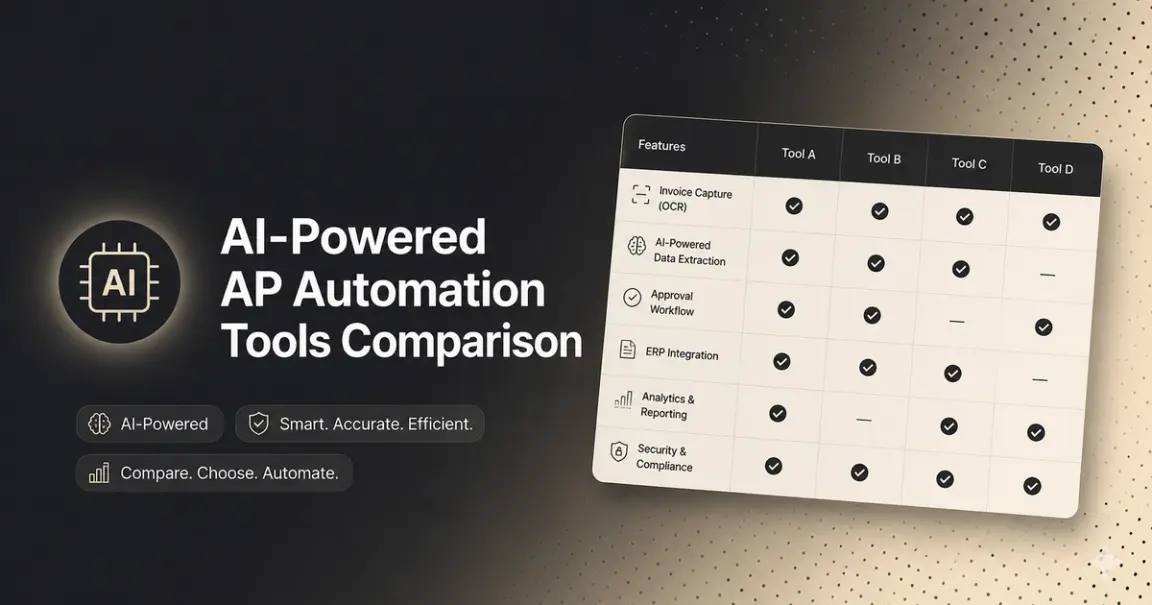
AI-Powered AP Automation Tools Comparison: A Buyer's Guide
Almost every AP automation vendor now calls itself "AI-powered." That word has stopped being a differentiator and started being a checkbox, which means the label tells you almost nothing about whether a platform will actually cut your manual invoice work, or just add a nicer interface on top of it.
This is a comparison of the AP automation landscape by category and vendor, what "AI-powered" actually needs to mean to matter, how compliance factors in, and how to evaluate a platform, or decide not to buy one at all, based on what's underneath the marketing.
Who This Comparison Is For
- Finance and ops leaders evaluating a switch from manual or semi-manual AP to an automated platform, trying to figure out which category of tool fits their invoice volume and complexity.
- IT and procurement teams at enterprises comparing platforms like Coupa, Basware, or SAP Ariba, where the real constraint is implementation timeline and ERP depth, not raw capability.
- Compliance and privacy officers at regulated businesses (BFSI, healthcare, insurance) who need automated AP that's also audit-ready, not just fast.
- Engineering and product teams deciding whether to buy an off-the-shelf AP platform or build a custom AP workflow on top of a document extraction API, because none of the existing platforms fit an unusual invoice format or internal system.
What "AI-Powered" Is Supposed to Mean
The pitch across the category is consistent: AI-powered tools should process complex, unstructured, or handwritten invoices with higher accuracy and fewer exceptions than traditional OCR, and without seamless integration, teams may still need manual data entry. That's the promise. It's worth naming directly: some platforms in this space run automation that's primarily ERP-centric rather than document-intelligent, or are primarily rules-based with limited AI-driven learning, even while marketed as AI-powered. In other words, "AI-powered" and "AI-driven extraction that actually reduces manual review" are not always the same product.
The honest version of the pitch, and the one worth evaluating a vendor against: does this tool reduce exceptions on your invoice mix, or does it just move the manual work from data entry to exception review?
The AP Automation Landscape, by Segment
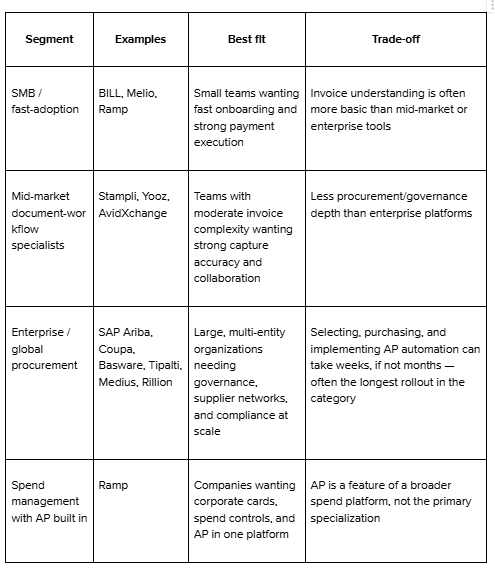
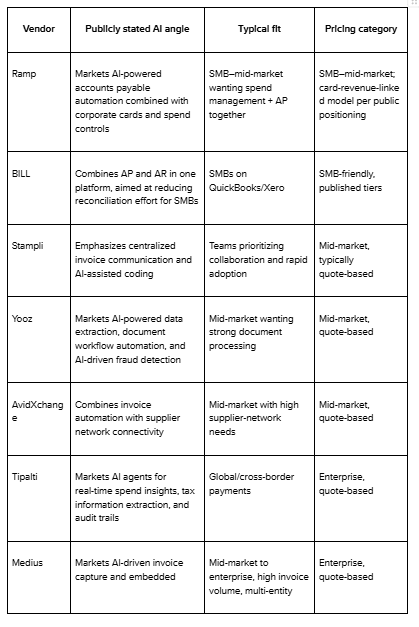
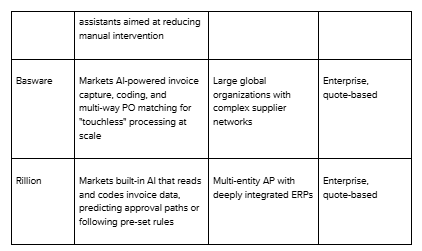
Named Vendor Snapshot
A quick reference on where specific tools tend to position themselves publicly. A note on how to read this table: the descriptions below reflect each vendor's own public marketing language, not an independent benchmark, no third-party test measures these platforms against each other on a common dataset the way OCR extraction engines can be. Pricing signals are general market categories (SMB-friendly vs. enterprise/quote-based), not confirmed current rates. Treat this as a starting shortlist and verify pricing, features, and current positioning directly with each vendor before deciding.
Compliance and Security: What Regulated Buyers Should Screen For
If you're evaluating AP automation at a BFSI, healthcare, or insurance company, "AI-powered" isn't the filter that matters most, auditability is. Beyond the standard feature comparison, screen specifically for:
- Audit-ready records by default — can the platform produce a clean, timestamped record on demand, or does that require manual reconstruction after the fact?
- PII and sensitive-data handling — invoices, especially in healthcare and insurance, often carry sensitive vendor or patient-adjacent data. Ask explicitly how the platform detects and handles this, not just how it extracts totals and line items.
- Fraud and anomaly detection depth — whether flagging is rule-based (fixed thresholds) or adaptive (learns from vendor payment history and behavior).
- Compliance certifications — SOC 2, ISO 27001, and GDPR support are standard asks for regulated buyers and should be confirmed directly with the vendor, not assumed from an "AI-powered" or "enterprise-grade" label.
- Data residency and access controls, particularly for multi-entity or cross-border operations.
If a vendor can't answer these directly and quickly, that's itself informative.
The Part That Actually Determines ROI: The Document Layer
Every platform in this category promises faster approvals, fewer errors, and audit-ready records. What actually delivers on that promise is upstream of the workflow UI, it's whether the system correctly reads and codes the invoice in the first place.
Advanced platforms differentiate themselves by tracking payment history and applying intelligence, prioritizing invoices with early payment discounts, applying stricter validation to new vendors, and automatically notifying suppliers when invoices are rejected for specific reasons, but none of that intelligence matters if the invoice wasn't captured accurately to begin with. Vendors use a variety of formats, so a platform's ability to reliably extract data from scanned, handwritten, or complex invoices with minimal manual correction is the real accuracy test, not a demo on a clean sample invoice.
The single most useful filter when comparing "AI-powered" AP tools: ask what percentage of invoices get processed touchless, on your actual document mix, not the vendor's cherry-picked demo set, and what happens to the rest. A platform with a high exception rate has just relocated your manual work, not removed it.
A note on accuracy claims generally: extraction accuracy is measurable and independently verifiable — it's possible to run the same set of documents through multiple engines and compare results directly. DeepRead publishes exactly this kind of benchmark, measured against Nanonets, Reducto, and Landing AI on identical document sets, with the methodology public. That comparison covers document-extraction engines specifically, not full AP platforms like the ones in the table above. Extraction accuracy and AP workflow capability are different things to evaluate, and it's worth asking any vendor, extraction-focused or full-platform, whether their accuracy claims are similarly checkable.
How to Actually Evaluate a Tool in a Trial or Demo
A feature checklist only gets you so far; most vendors will check every box on paper. What separates a useful evaluation from a wasted one:
- Bring your own messiest documents — not a clean sample invoice, but the scanned, handwritten, or oddly-formatted ones that actually cause problems today.
- Ask for the exception rate on that batch, not the headline accuracy number. A tool that's 95% accurate but silently mishandles the remaining 5% is riskier than one that's 92% accurate but flags every uncertain field for review.
- Time the approval-routing setup yourself — don't take the vendor's word on "easy configuration." Have your own team try to set up one real approval chain during the demo.
- Ask specifically what the AI does at each step — capture, coding, fraud detection, supplier communication, since "AI-powered" is often true of only one stage of the pipeline, not the whole thing.
- Confirm compliance answers in writing, not verbally in a sales call.
- Ask if any accuracy or performance claim is independently checkable — a published methodology and dataset, not just a number on a slide.
Signs You've Outgrown Your Current AP Tool
Not everyone reading this is starting from zero. Common signals it's time to re-evaluate:
- Your exception queue is growing faster than your invoice volume, meaning the tool isn't adapting to new formats or vendors
- You're manually re-keying data that the tool was supposed to capture automatically
- Approval routing has become a workaround-built-on-workaround rather than a clean configuration
- You've outgrown a single-entity setup and need multi-entity or multi-currency support the current tool doesn't handle well
- Compliance or audit prep still requires manual reconstruction of records the tool was supposed to make automatic
Evaluation Checklist
- Capture accuracy on your real invoice mix — scanned, handwritten, multi-format, not a clean PDF sample
- Touchless processing rate, not just "AI-powered" as a label
- ERP and integration depth — native connectors vs. limited or manual sync
- Approval workflow flexibility — multi-level routing, thresholds, and conditions that match your actual process
- Fraud and duplicate detection — rules-based or genuinely adaptive
- Implementation timeline — weeks vs. months
- Multi-entity and compliance support — critical across regions or business units
- Audit readiness — clean record on demand, or manual reconstruction?
Build vs. Buy: When an Off-the-Shelf Platform Isn't the Answer
Every platform above is built for a fairly standard invoice-to-payment workflow. If your AP process is genuinely standard, an off-the-shelf platform is almost always the faster, cheaper path. Don't build what you can buy.
But this category has a real gap: teams whose documents don't fit the standard invoice mold — freight carrier invoices with inconsistent layouts, multi-entity operations with non-standard vendor formats, or finance and product teams whose ERP or internal tooling doesn't have a clean native connector to any of the platforms above. For these teams, the AP platform itself usually isn't the constraint — the document-capture layer underneath it is.
This is where engineering and AI/ML product teams sometimes route around the platform entirely and build a custom AP workflow on top of a document extraction API — feeding structured, schema-driven invoice data directly into their own approval and ERP logic instead of adapting their documents to fit a vendor's template. This approach depends on the extraction layer handling two things a standard platform often doesn't expose: asynchronous processing for large invoice batches that shouldn't block the rest of the pipeline, and webhook-driven delivery so extracted data lands in the team's existing systems automatically rather than through a polling loop or manual export.
DeepRead is built specifically for this layer — schema-driven structured extraction, async processing for large batches, webhook delivery, and human-review routing (needs_review) for invoices the model isn't confident about, rather than letting uncertain fields fail silently. It's more engineering effort upfront than buying a platform, but it removes the ceiling that comes with a vendor's built-in extraction limits.
Conclusion
"AI-powered" has become table stakes marketing language in AP automation, not a meaningful differentiator; nearly every vendor in this comparison uses it, and the platforms underneath range from genuinely adaptive extraction to basic OCR with a workflow UI attached. The segment breakdown and named vendor snapshot are reasonable starting filters, but the decision that actually determines ROI is narrower: how accurately does this tool capture your real invoice mix, and what happens to the invoices it can't process cleanly? And, if you're a regulated buyer, can it prove that in an audit?
If your documents are standard, buy a platform and prioritize the one with proven capture accuracy, a compliance profile that fits your industry, and the shortest realistic implementation timeline for your size. If your documents aren't standard — non-standard formats, freight or logistics-heavy invoicing, custom ERP requirements- the more durable fix is often building your own workflow on top of a reliable, async-capable document extraction layer, rather than forcing your invoices into a platform template they don't fit. If that's the path you're on, the integration itself is usually a smaller lift than people expect, worth a look before ruling it out on effort alone.
FAQ
What does "AI-powered" actually mean in AP automation software?
It should mean the system learns and adapts to varied invoice formats rather than relying on fixed templates. In practice, it often just means AI is used somewhere in the pipeline — sometimes only for fraud flagging or coding suggestions, with basic OCR still doing the heavy lifting underneath. Always ask specifically what the AI is doing, not just whether it exists.
How long does AP automation implementation actually take?
It varies by segment. SMB-focused tools can onboard in days to weeks. Enterprise procurement platforms with deep ERP integration and multi-entity requirements can take months. This is usually the deciding factor for enterprise buyers more than raw feature comparison.
Is a higher-priced enterprise AP platform always more accurate than a mid-market one?
Not necessarily. Enterprise platforms are usually differentiated by governance, compliance, and scale — not always by raw document-capture accuracy. A mid-market, document-workflow-focused platform can outperform an enterprise suite specifically on invoice extraction accuracy, even with less procurement governance depth.
What compliance certifications should I ask AP automation vendors about?
SOC 2, ISO 27001, and GDPR support are the standard baseline for regulated industries. Ask how PII is detected and handled specifically within invoice data, not just how the platform handles payments security generally.
When does it make sense to build custom AP automation instead of buying a platform?
When your invoice formats, approval logic, or ERP setup don't fit any existing platform's template well — common in freight, logistics, and multi-entity operations with non-standard vendor documents. In that case, an accurate, async-capable document extraction API as the foundation, like DeepRead with custom workflow logic built on top, often outperforms forcing your process into an off-the-shelf tool.
What's the single best predictor of ROI from an AP automation tool?
Touchless processing rate on your actual invoice mix — the percentage of invoices captured and coded correctly with no manual intervention. Everything else (workflow speed, fraud detection, reporting) compounds on top of that number; it doesn't compensate for a low one.
More articles
Structured Data Extraction: A Technical Guide
How to extract structured data from documents using an AI API, the architecture, grounding, and named tools compared.
Key Features of AI Document Workflow Automation
AI document workflow automation features, governance, prioritization framework, and real examples with measurable benefits for 2026.